When mail sent to your domain does not arrive, the message has either reached the server and been put somewhere you are not looking, or it never reached the server at all. Webmail tells you which, in a minute. This guide works through the incoming-mail checks for mailboxes included with Domain India hosting, in the order that finds the cause fastest.
Open webmail and look in the Inbox and Spam folders. If the mail is there, fix your mail app (IMAP on port 993 is the safe choice). If it is not, check the mailbox quota, the domain's MX record, cPanel's Email Routing, forwarders and filters, and whether the hosting account is suspended. Ask the sender for any bounce: its error code usually names the cause. Still stuck? Send support the addresses, the time and the bounce.
This page covers mail that does not arrive. For every other email symptom, including the settings for each control panel, start with Email troubleshooting. If you use Domain India Business Email rather than hosting mailboxes, its settings are different: see Business Email vs the email included with your hosting.
1. Check webmail first
Webmail shows what is really on the server, so it splits the problem in two.
| Hosting | Webmail address |
|---|---|
| cPanel | yourdomain.com/webmail, webmail.yourdomain.com or yourdomain.com:2096 |
| DirectAdmin | yourdomain.com/webmail or yourdomain.com/roundcube |
| Webuzo | yourdomain.com/webmail |
Sign in with the full email address and the mailbox password. Full steps are in How to log in to webmail.
- The message is in webmail but not in your app: go to section 2.
- The message is not in webmail at all: go to section 3.
2. Mail is on the server, but not in your app
Your mail app is the problem, not delivery. Check:
- The incoming settings. Server
mail.yourdomain.com, IMAP on port 993 or POP3 on 995, SSL/TLS, your full email address as the username and the mailbox password. In cPanel, Email › Email Accounts › Connect Devices shows the exact server name for your account. - POP3 on another device. POP3 usually downloads messages and removes them from the server, so a phone or old computer using POP3 can take mail before your other devices see it. Use IMAP everywhere.
- A stale password. An app with an old password stops fetching mail quietly. Update it on every device; repeated failed logins can also get your IP address blocked by the server firewall (see I can't reach my server: have I been blocked?).
3. Look in Spam and anything that files mail for you
Before assuming mail never arrived, check everything that can move it:
- The Spam or Junk folder in webmail. If genuine mail lands there, mark it as not spam and adjust the spam settings in your panel; see The SpamAssassin spam box.
- Forwarders. In cPanel, Email › Forwarders lists any forwarder on the address. A forwarder can send mail elsewhere without keeping a copy.
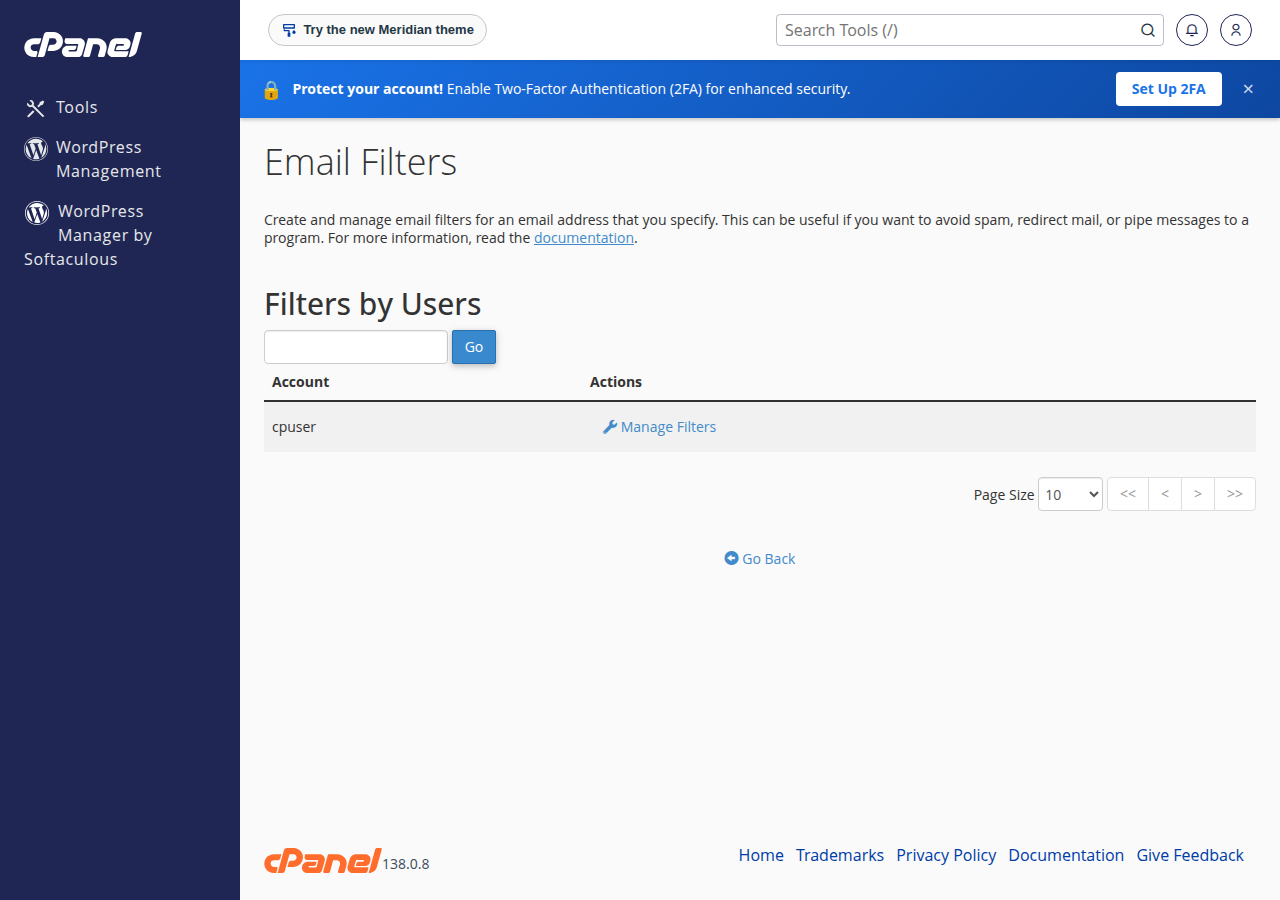
- Filters. In cPanel, Email › Email Filters lists rules for each address. Look for rules that discard mail or move it to a folder.
- The default (catch-all) address. In cPanel, Email › Default Address decides what happens to mail for addresses that do not exist. If a sender mistypes your address, this setting decides whether it bounces or reaches you.
- BoxTrapper, if you turned it on in cPanel. It holds mail from unknown senders until they reply to a verification message.
4. Check the mailbox quota
A full mailbox refuses new mail, and the sender gets a bounce such as "mailbox full" or "over quota".
- Check usage.In cPanel, open Email › Email Accounts and look at the storage used by the address.
- Free space.In webmail, sort by size, delete large old messages and empty Trash and Spam, which count towards the quota.
- Raise the quota if needed.Click Manage next to the address and change its storage. Mailboxes share your hosting plan's disk space, so a full hosting account stops mail too.
More detail is in Managing your email accounts.
5. Check the MX record and where your DNS is managed
The MX record tells the world which server receives mail for your domain. If it points somewhere else, mail goes there.
dig MX yourdomain.com +shortOr use any online MX lookup tool. Common findings:
| What you see | What it means | What to do |
|---|---|---|
| MX points to your hosting server | Correct for hosting mailboxes | Carry on with section 6 |
| MX points to Google, Microsoft or another provider | Mail goes to that provider, not your hosting | Use that provider's mailboxes, or change MX back |
| No MX record | Senders cannot find your mail server | Add the MX record where your DNS is managed |
| Different answers from different tools | A recent DNS change is still spreading | Wait; changes can take up to 24 to 48 hours |
Change MX records wherever your domain's DNS is managed: in your hosting control panel if the domain uses your hosting nameservers, or at your DNS provider if it does not. How to change your domain DNS settings explains how to tell which applies.
6. Check Email Routing in cPanel
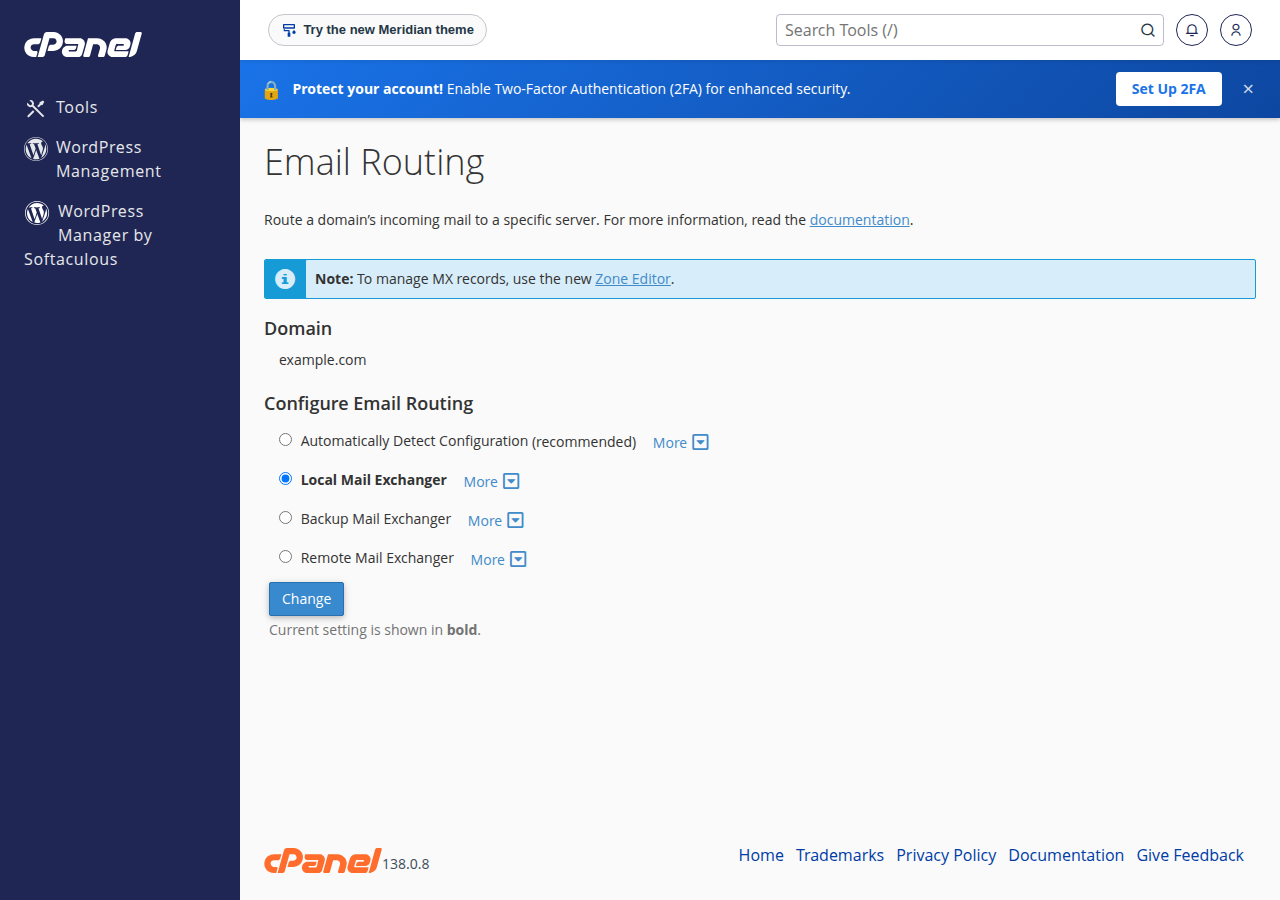
cPanel has a per-domain setting, Email › Email Routing, that decides whether mail for the domain is delivered to mailboxes on this server.
- Local Mail Exchanger: mail is delivered to your cPanel mailboxes. Use this when your MX points to your hosting.
- Remote Mail Exchanger: mail is sent to another provider. Use this only when your MX points elsewhere, such as Google Workspace.
If it says Remote while your MX points to your hosting, messages sent from your own website or from other accounts on the same server never reach your cPanel mailboxes. Set it to Local or Automatically Detect Configuration.
7. Check the hosting account
If the hosting account is suspended, for example because a renewal invoice is unpaid, mail stops in both directions. Check the service under Services and any open invoices in your client area. Renewals are never charged to a card automatically: the service renews when its renewal invoice is paid.
8. Ask the sender for the bounce
If one sender's mail does not arrive, ask them whether they received a "delivery failed" message. Its code and wording usually name the cause:
| Code in the bounce | Usual meaning | What to do |
|---|---|---|
| 550 5.1.1 | The address does not exist on the server | Check the spelling, or create the address or a default address |
| 552 5.2.2 or 452 4.2.2 | Your mailbox is full | Free space or raise the quota (section 4) |
| 554 5.7.1 or 550 5.7.1 | Refused by a policy, such as a spam or blocklist check | Send the full bounce to support |
| 4xx codes | A temporary problem; the sender's server will retry | Wait, then check again |
Understanding email bouncebacks decodes the common messages. As a quick test, send yourself a message from a Gmail or Outlook.com address: if nothing arrives from anyone, look at MX and the account; if only one sender fails, the cause is probably on their side or in a filter.
9. Send the full bounce to support
On shared hosting you cannot read the server's mail logs, and you do not need to: support checks them for your address. The most useful thing you can send is the evidence the sender already has. Ask them to forward the complete bounce message, not a screenshot of the first line, and, if a message arrived somewhere else or late, its full headers (in Gmail, Show original; in Outlook, View message source or Message details).
Live chat runs 24/7, and tickets get a first response within 15 minutes; a fix can take longer depending on the problem. There is no phone support. Include:
- your email address and the sender's address;
- roughly when the missing message was sent;
- the full bounce message, with its headers if you have them;
- what you have already checked.
10. Where Domain India products fit
Every cPanel, DirectAdmin and Webuzo hosting plan includes email accounts at your domain, managed in the same panel as your website. Compare plans on the cPanel hosting and DirectAdmin hosting pages.
If you want email that runs separately from your website, Business Email is priced per mailbox and starts with one, with webmail at https://mail.yourdomain.com:8443/. Domain India list prices exclude 18% GST.
Frequently asked questions
I am not getting emails. What should I check first?
Send yourself a test from an outside address such as Gmail. If it doesn't arrive, check that the mailbox isn't full, that your domain's MX record still points to your hosting, and that no forwarder or filter moves the mail. Then work through the checks in this guide, or open a ticket with the address and the time of a missing message.
Why am I not receiving emails on my domain?
The usual causes are a full mailbox, an MX record pointing to another server, a forwarder or filter moving the mail, mail filed as spam, cPanel Email Routing set to Remote, or a suspended hosting account. Check webmail first: if the mail is there, the problem is your mail app.
The email is in webmail but not in Outlook or on my phone. Why?
The mail reached the server, so the app is the problem. Check the incoming server, port, SSL/TLS setting and password. If any device uses POP3, it may download and remove messages before your other devices see them; use IMAP on port 993 everywhere.
How do I check my domain's MX record?
Run dig MX yourdomain.com +short in a terminal, or use an online MX lookup tool. For hosting mailboxes, the MX must point to your hosting server. Change it wherever your domain's DNS is managed.
Can a full mailbox stop incoming email?
Yes. When a mailbox reaches its quota, the server refuses new messages and the sender receives a bounce. Delete old mail, empty Trash and Spam, or raise the quota. Mailboxes share the hosting plan's disk space.
What does Email Routing do in cPanel?
It decides whether the server delivers mail for your domain to local cPanel mailboxes or sends it to another provider. Use Local when your MX points to your hosting and Remote only when your email is hosted elsewhere, such as Google Workspace.
Can I see the mail server logs myself?
No. On shared hosting the mail logs are not available to account holders. Open a ticket with your address, the sender's address, the time and the full bounce message with its headers, and support will check the logs for you.
Ready to find your missing mail? Start with webmail in section 1, and keep Email troubleshooting handy for other symptoms. If mail still is not arriving, open a ticket in the client area or use the public ticket form, and follow it on Track ticket.
Tell us your email address, the sender's address, when the message was sent and the full bounce with its headers, and we will check the mail logs.
Open a support ticket