To set up an addon domain in cPanel, open Domains, click Create A New Domain, type the domain, untick Share document root and click Submit. The addon domain becomes a separate website in the same hosting account, with its own folder, its own email addresses and free SSL once its DNS points to your hosting.
This page is the quick version. For the complete walk-through, see How to add an addon domain in cPanel: a step-by-step guide. For how addon domains differ from aliases and subdomains, see What is the difference between parked, addon and subdomains.
Current cPanel has no separate Addon Domains icon. Go to Domains › Domains › Create A New Domain, enter the domain without www, untick Share document root, keep or edit the suggested folder and click Submit. Then point the domain at your hosting with the values on the Point a domain to this hosting card in the client area. Each addon domain counts towards your plan's website limit.
1. Check your plan first
An addon domain is a second website, so your plan must allow more than one. In the Domain India catalogue of 19 September 2026, cPanel Starter hosts 1 website, Growth 5 and Business 25. On a one-website plan, upgrade before you add the domain.
All addon domains share the plan's storage, email account and database limits with your main site.
- 50 GB NVMe SSD Storage
- 100 GB Monthly Bandwidth
- 5 Websites
- 50 Email Accounts
Prices on the cards exclude 18% GST.
2. Add the domain in cPanel
- Open cPanel.In the client area, open your hosting and click the cPanel button on your domain's row. Other routes are in How to log in to cPanel.
- Open Domains.In the Domains section, click Domains, then Create A New Domain.
- Type the domain,for example
secondbusiness.com, withoutwwworhttps://. - Untick Share document root.This is what makes it a separate website. Left ticked, the domain would show your main site instead.
- Check the folder.cPanel suggests a folder named after the domain. Accept it, but don't put it inside another site's folder.
- Click Submit.The domain now appears in the list on the Domains page.
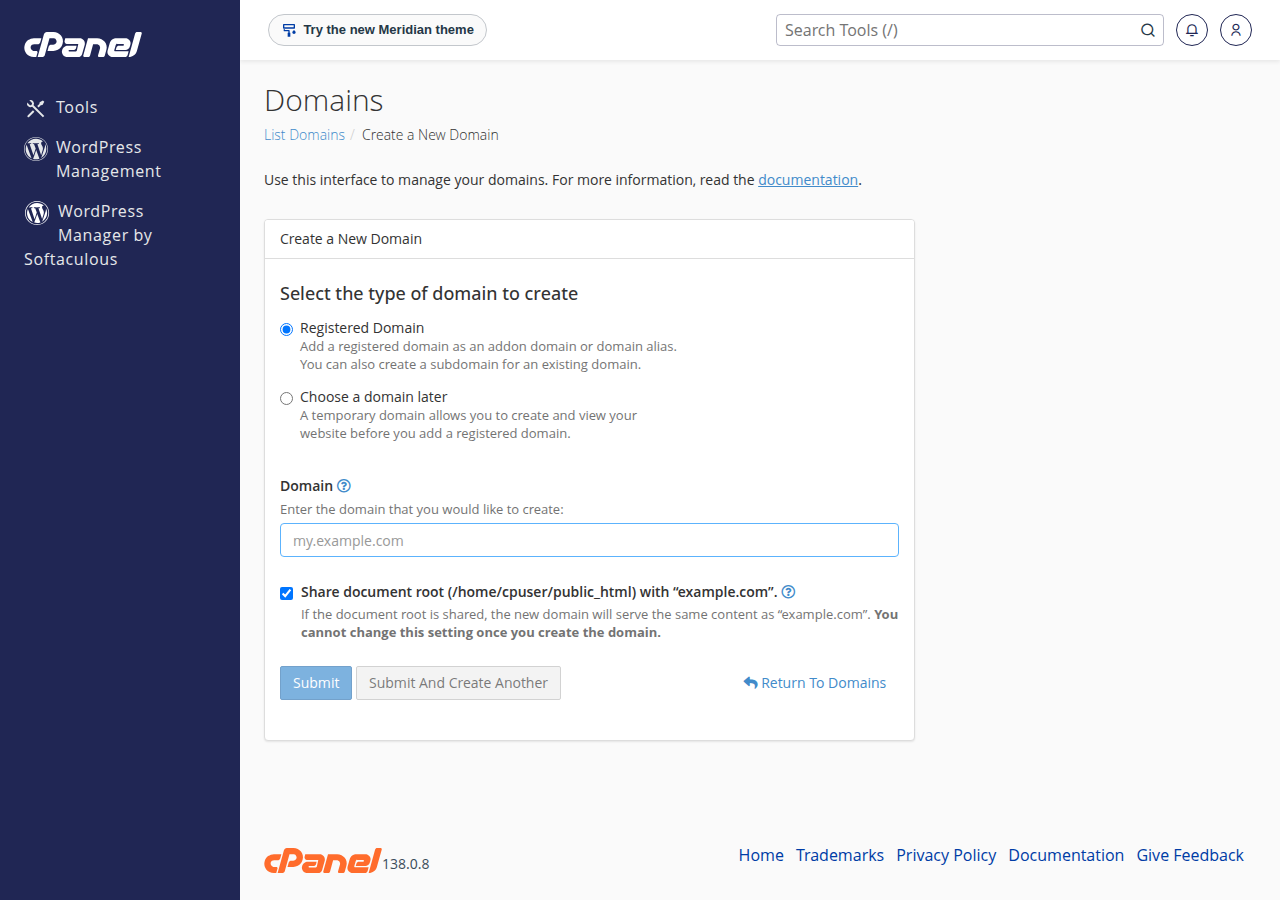
If cPanel says "A DNS entry for the domain already exists", see fixing the DNS entry already exists error.
3. Point the domain and build the site
Adding the domain in cPanel only prepares the server. Visitors see the new site once the domain's DNS points to your hosting. Open your hosting service in the client area and use the Point a domain to this hosting card: either set the domain's nameservers to the ones shown, or add A records for @ and www with the server IP shown. Copy the values from your own card; step-by-step help is in How do I change my nameservers.
Then:
- Install WordPress into the new folder with Softaculous or WP Toolkit, or upload your own files with the File Manager or FTP.
- Create email addresses such as
[email protected]in cPanel's Email section. - Let SSL arrive. AutoSSL issues a free Let's Encrypt certificate once the domain points to the server. See AutoSSL in cPanel.
Removing the domain on the Domains page does not delete its folder. Download or delete the files yourself, and remove the domain's email accounts first if you no longer need them.
Using DirectAdmin? See adding an addon domain in DirectAdmin.
Frequently asked questions
Where is Addon Domains in the new cPanel?
Current cPanel has no separate Addon Domains icon. Open Domains, click Create A New Domain, enter the domain and untick Share document root. That creates an addon domain with its own folder.
How many addon domains can I add on Domain India cPanel hosting?
Each addon domain counts as a website. In Domain India's catalogue of 19 September 2026, cPanel Starter hosts 1 website, Growth 5 and Business 25, including your main domain.
Why does my addon domain show the wrong site or not open?
Usually the domain does not point to your hosting yet. Set its nameservers, or A records for @ and www, using the values on the Point a domain to this hosting card in the client area, then allow a few hours for DNS to update.
Does an addon domain get free SSL?
Yes. AutoSSL issues a free Let's Encrypt certificate for the addon domain once its DNS points to your hosting server.
Can an addon domain have its own email addresses?
Yes. Create them in cPanel's Email section. They count towards your plan's email account limit.
Ready to add your second website? Open your hosting and click the cPanel button. Need the domain first? Register it here. Need room for more sites? Compare cPanel hosting plans.
Growth and Business plans host several websites in one account, each with its own folder, email and free SSL.
See cPanel hosting plans