"Web FTP" used to mean typing an ftp:// address into your web browser and managing your website's files from there. That no longer works: the major browsers removed FTP support in 2021. This guide explains what to use instead on Domain India hosting, which is your control panel's File Manager for quick jobs in the browser and a proper FTP client for bigger ones.
You can no longer open FTP in Chrome, Edge or Firefox; all three removed it in 2021. The browser-based way to manage your files today is the File Manager in your control panel (cPanel, DirectAdmin, Webuzo or Plesk), which you can open from the Domain India client area with no extra password. For large uploads, use an FTP client such as FileZilla with explicit FTP over TLS on port 21. Do not type your hosting password into third-party "online FTP" websites.
1. What "web FTP" means today
FTP (File Transfer Protocol) is the classic way to copy files between your computer and your hosting account. "Web FTP" has meant two things: typing ftp://username:[email protected]/ into a browser or Windows File Explorer, or using a third-party website that connects to your server for you. The first is gone from browsers and was never safe; the second sends your password to a stranger. What you want is the File Manager already built into your control panel, which runs in the browser over an encrypted HTTPS connection.
2. Browsers no longer support ftp:// addresses
Google Chrome turned off FTP in version 88 and deleted the code in version 95, both in 2021. Microsoft Edge is built on the same engine and followed. Firefox turned FTP off in version 88 and removed it in version 90, also in 2021. Type an ftp:// address into any of them now and the browser either does nothing, offers to open another program, or shows an error.
| Method | Works in 2026? | Encrypted? | Our advice |
|---|---|---|---|
| ftp:// in Chrome, Edge or Firefox | No, support was removed in 2021 | No | Do not rely on it |
| ftp:// in Windows File Explorer | On some Windows versions | No, plain FTP only | Avoid: password sent unencrypted |
| Control panel File Manager | Yes | Yes, over HTTPS | Best for quick jobs in the browser |
| FTP client with TLS, such as FileZilla | Yes | Yes, with explicit FTP over TLS | Best for large sites and regular updates |
| Third-party online FTP website | Often | Only between you and them | Do not use with your hosting password |
3. Why the old address-bar method was a bad idea
Even where Windows File Explorer still opens an ftp:// address, we recommend against it:
- Your password travels in plain text. File Explorer speaks plain FTP only, with no TLS encryption, so anyone on the same network path can read your username and password.
- The password sits in the address. A URL such as
ftp://user:[email protected]/can be saved in history, shown on screen to anyone nearby, or pasted into a chat by mistake. - Extra FTP accounts break it. FTP accounts you create in cPanel or DirectAdmin usually have usernames like
[email protected]. A second@in the address confuses the parser, so these accounts often fail.
Change it. For your main hosting account, reset the control panel password from the client area (Hosting › My hosting › Manage › Access, then Reset password). For an extra FTP account, change its password in your control panel's FTP accounts page. Then clear the address from your browser or File Explorer history.
4. The modern way: your control panel's File Manager
Every Domain India shared hosting plan includes a control panel, and every one of those panels has a File Manager. It lets you upload, download, edit, rename, move, zip, unzip and delete files, and change permissions, all from a browser tab, with no software to install. The connection is HTTPS, so your files and login are encrypted.
- Sign in to the client area.Go to your hosting list, which is Hosting › My hosting in the left menu.
- Open your control panel.Click the panel button on your domain's row, for example cPanel or DirectAdmin. A new tab opens, already signed in. On Webuzo, log in at
https://yourdomain.com:2003instead. If nothing happens, allow pop-ups for domainindia.com and click again. - Open File Manager.In cPanel it is in the Files section. In DirectAdmin it is under System Info & Files › File Manager; in Webuzo, type "file" in the search box at the top of the panel. In Plesk on Windows hosting, open Files.
- Go to your website folder.Your main website normally lives in public_html. On DirectAdmin it is
domains/yourdomain.com/public_html.
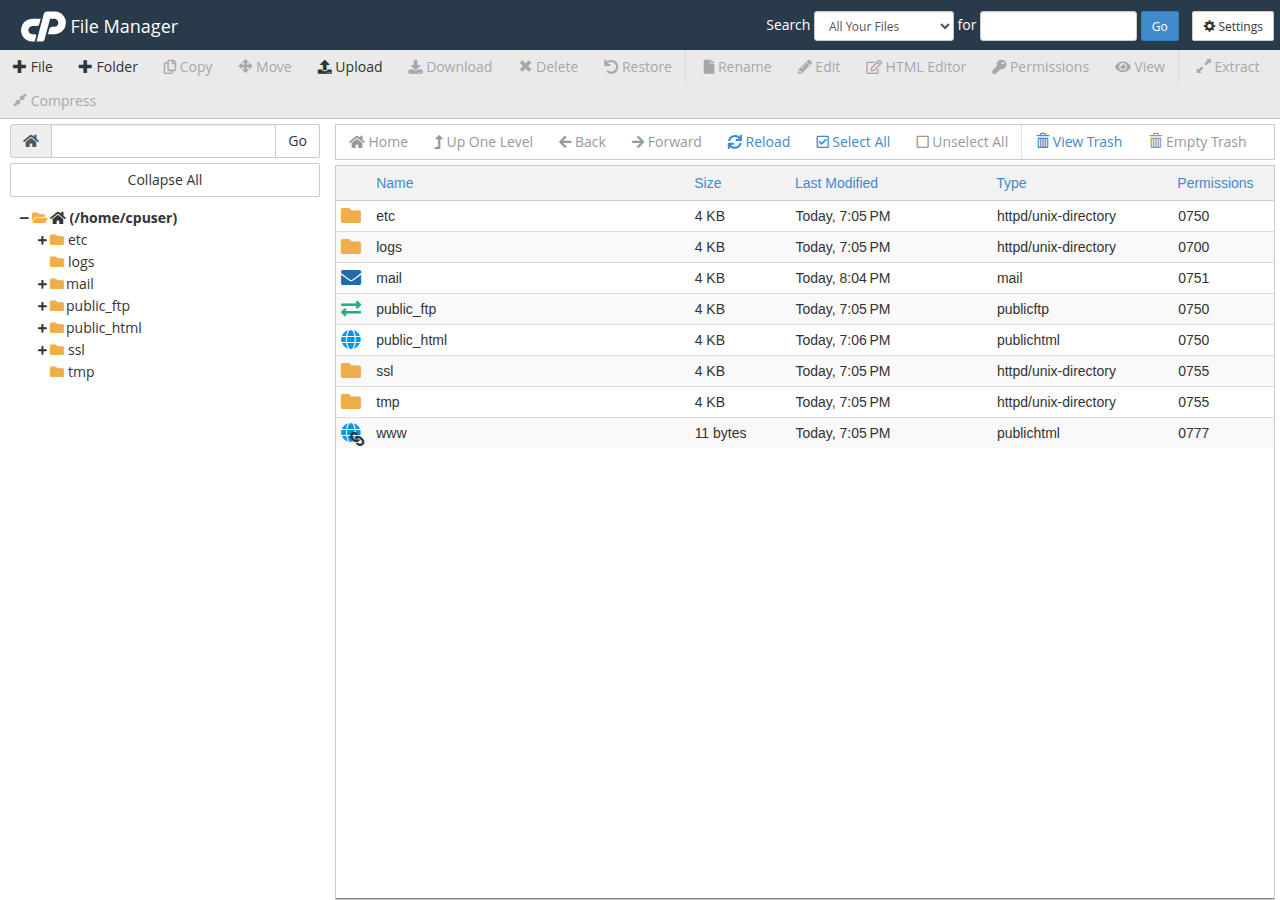
From there, use the toolbar or right-click menu. The full walkthrough, including hidden files such as .htaccess, permissions, the trash and zip uploads, is in How to use the File Manager in cPanel, DirectAdmin and Webuzo. DirectAdmin users can also read Using the File Manager in DirectAdmin.
Zip the site on your computer, upload the single zip file in File Manager, then use Extract on the server. One zip is far faster and more reliable than hundreds of separate uploads. Delete the zip afterwards so nobody can download your whole site.
5. Don't give your FTP password to third-party "web FTP" sites
Searching for "web FTP" turns up websites offering to connect to your server from their page. They work by taking your hostname, username and password and logging in from their server. That means:
- They hold your password. Whoever runs the site, or anyone who breaks into it, can log in to your hosting later and upload malware, delete files or copy your database settings. For your main account, that is usually your control panel password as well.
- The hop to your server may not be encrypted. Your browser's connection to their site may be HTTPS, but you cannot see whether their server uses TLS when it connects to yours.
Your control panel's File Manager does the same job without handing your password to anyone. If you have used such a site, change the password as described in section 3.
6. When you need more: a proper FTP client
File Manager is ideal for a few files, a quick edit or one zip. For hundreds of files, a large site, regular updates or transfers you may need to resume, use a desktop FTP client. FileZilla is free for Windows, macOS and Linux; WinSCP (Windows) and Cyberduck (macOS and Windows) also work.
Always choose an encrypted connection:
| Setting | FTP with TLS (recommended) | SFTP |
|---|---|---|
| Host | Your domain, or the server hostname or IP before your domain points to us | Your domain or server hostname |
| Port | 21 | 22 |
| Protocol in FileZilla | FTP, with "Require explicit FTP over TLS" | SFTP - SSH File Transfer Protocol |
| Username | Your control panel username, or an FTP account you created | Your control panel username |
| Password | The password for that username | Your control panel password, or an SSH key |
Your username, server IP and panel URL are on the Access tab of your hosting account in the client area, and in the email titled "Your Hosting Account is Ready". SFTP works only if SSH is enabled for your account, and Windows (Plesk) hosting has no SSH, so use FTP with TLS there.
Step-by-step setup for FileZilla and other clients is in How to download and access files using SSL/TLS encryption in FTP clients. For every upload setting in one place, including the database, read What settings do I need to upload my website?. Port details for each panel are in Domain India hosting port numbers.
7. Which tool should you use?
If nothing connects at all, and your website and webmail also stop loading from the same connection, the server firewall may have blocked your IP address after failed logins. Try from mobile data to confirm, then read I can't reach my server: have I been blocked?.
8. File Manager and FTP on Domain India hosting
Every Domain India shared hosting plan comes with a control panel that includes File Manager, and FTP accounts you can create yourself. cPanel, DirectAdmin and Webuzo plans also list SSH access and Git, so you can move up to SFTP or Git when you need to.
- 25 GB NVMe SSD Storage
- 50 GB Monthly Bandwidth
- 1 Website
- 10 Email Accounts
- 10 GB NVMe SSD Storage
- 50 GB Monthly Bandwidth
- 1 Website
- 5 Email Accounts
Card prices are Domain India list prices on 19 September 2026, excluding 18% GST. Compare every plan on cPanel hosting, DirectAdmin hosting and Webuzo hosting.
Frequently asked questions
Can I still use FTP in my web browser?
No. Google Chrome and Microsoft Edge removed FTP support in 2021, and Firefox removed it the same year. Use the File Manager in your hosting control panel to manage files in the browser, or an FTP client such as FileZilla for larger transfers.
What is the browser-based alternative to FTP?
Your control panel's File Manager. In cPanel it is in the Files section; DirectAdmin and Webuzo have File Manager on the dashboard; Plesk has Files. It works over an encrypted HTTPS connection and needs no software.
How do I open File Manager without a password?
Sign in to the Domain India client area, open Services, then My Hosting, and click the control panel button on your domain's row. The panel opens already signed in, and File Manager is inside it.
Is it safe to use an online FTP website?
We advise against it. Those sites log in to your hosting from their own server using the password you give them, so they, or anyone who compromises them, can access your files later. Use your control panel's File Manager instead.
What FTP settings should I use?
Use your domain or server hostname as the host, port 21, and explicit FTP over TLS, with your control panel username and password or an FTP account you created. If SSH is enabled for your account, SFTP on port 22 also works.
Why does my extra FTP account not work in an ftp:// address?
Extra FTP account usernames usually contain an @ sign, such as [email protected], and a second @ in the address breaks it. Enter the full username in an FTP client such as FileZilla instead.
Ready to manage your files? Open your hosting list and click your panel's button, then follow How to use the File Manager. For big uploads, set up an encrypted FTP client with the FTP over TLS guide. Stuck? Open a support ticket with your domain and the exact error; support is 24/7 on live chat, and tickets get a first response within 15 minutes.
Click your control panel's button on your domain's row, then open File Manager. No FTP program and no extra password needed.
Open My Hosting