Setting up an email account at your own domain takes about a minute in your hosting control panel: create the address, set a password and a quota, then read the mail in webmail or add it to a mail app. This page gives the short version for cPanel, DirectAdmin and Webuzo hosting, plus the settings for Outlook, Thunderbird and phones.
In your control panel, open Email Accounts, click Create, enter the part before the @, a strong password and a storage quota, and save. The address works at once. Read it at https://yourdomain.com/webmail, or add it to a mail app with IMAP on port 993 and SMTP on port 465 (both SSL/TLS), using your full email address as the username. Mail only arrives once your domain's MX record points to the server that holds the mailbox.
Every panel's steps, plan limits, quotas, MX/SPF/DKIM and common problems are in How to create email accounts for your domain. This page covers email included with hosting. Business Email is a separate product with its own webmail at https://mail.yourdomain.com:8443/; see Business Email vs the email included with your hosting.
1. Create the email account
- Open your control panel.Sign in to the client area, open your hosting services and click the panel button on your hosting row.
- Open Email Accounts.In cPanel it is Email › Email Accounts; in DirectAdmin, E-mail Manager › E-mail Accounts; in Webuzo, Email › Email Account.
- Click Create.Type the username, such as
info,salesor a person's name, and pick the domain if you have more than one. - Set a strong password.Use a long, unique password or the panel's generator, and copy it somewhere safe.
- Set the storage quota.Give each mailbox a sensible limit rather than Unlimited, because all mailboxes share your plan's disk space with your website.
- Save.The address is ready to use straight away.
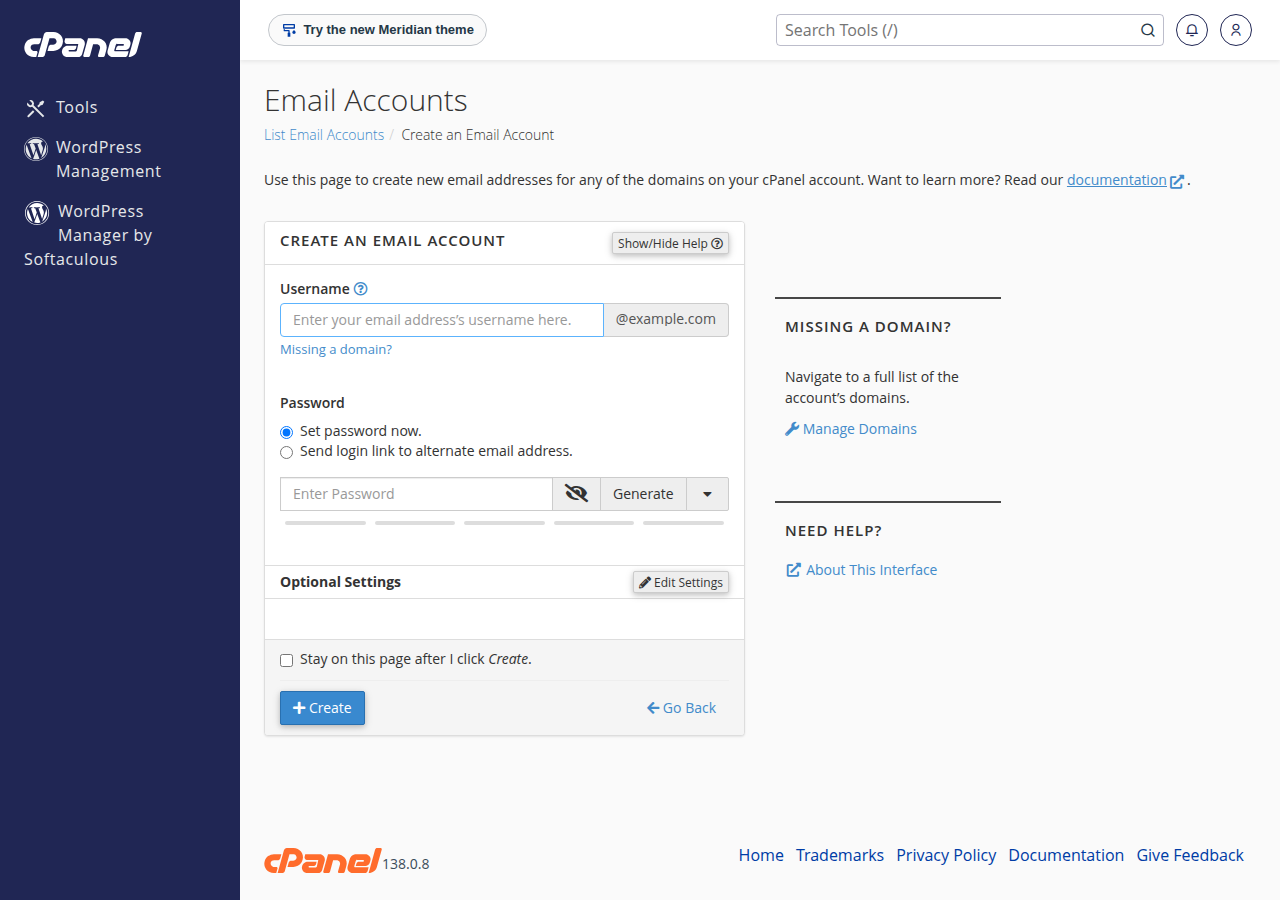
Panel-specific walk-throughs: cPanel, DirectAdmin and Webuzo.
2. Read your mail in webmail
Sign in with the full email address and its password.
| Panel | Webmail address |
|---|---|
| cPanel | https://yourdomain.com/webmail, https://webmail.yourdomain.com or https://yourdomain.com:2096 |
| DirectAdmin | https://yourdomain.com/webmail or https://yourdomain.com/roundcube |
| Webuzo | https://yourdomain.com/webmail |
webmail.yourdomain.com works only on cPanel. The full guide is how to log in to webmail.
3. Settings for Outlook, Thunderbird and phones
| Setting | Value |
|---|---|
| Username | Your full email address, for example [email protected] |
| Incoming server | mail.yourdomain.com |
| IMAP (recommended) | Port 993, SSL/TLS |
| POP3 | Port 995, SSL/TLS |
| Outgoing (SMTP) server | mail.yourdomain.com, with authentication switched on |
| SMTP port | 465 with SSL/TLS, or 587 with STARTTLS |
Choose IMAP so the same mail appears on every device, and avoid the unencrypted ports 143 and 110. If your app warns about the certificate for mail.yourdomain.com, use the server name your panel shows (in cPanel, under Connect Devices). On Windows (Plesk) hosting port 587 is closed, so use 465.
4. Make sure mail is delivered
- MX: mail goes to whichever server your domain's MX record points to. If it still points to an old provider, a new mailbox receives nothing. The simplest setup is to point your domain at your hosting nameservers; see how do I change my nameservers.
- SPF and DKIM: these stop your mail landing in spam. In cPanel, Email › Email Deliverability checks both and offers to fix them; DKIM is on by default for new cPanel accounts. See understanding SPF, DKIM and DMARC.
- Sending limits: each cPanel account can send 200 messages per hour, and each DirectAdmin account 1,000 per day (200 per mailbox by default). Use a dedicated delivery service for newsletters.
When someone leaves, change the password or set up forwarding first. Delete the mailbox only after anything important has been saved.
Frequently asked questions
How do I set up an email account on my Domain India hosting?
Log in to your control panel from the client area, open Email Accounts, click Create, enter the part before the @, a strong password and a storage quota, and save. The address works immediately.
What are the incoming and outgoing server settings?
Use mail.yourdomain.com for both, with IMAP on port 993 (SSL/TLS) or POP3 on port 995 (SSL/TLS), and SMTP on port 465 (SSL/TLS) or 587 (STARTTLS). The username is your full email address, and SMTP authentication must be on. Windows (Plesk) hosting has no port 587, so use 465 there.
Which webmail can I use?
On cPanel use yourdomain.com/webmail, webmail.yourdomain.com or yourdomain.com:2096. On DirectAdmin use yourdomain.com/webmail or /roundcube. On Webuzo use yourdomain.com/webmail. Sign in with the full email address.
I created the account but no mail arrives. Why?
Your domain's MX record must point to the server that holds the mailbox. If it still points to another provider, mail goes there. Check the MX record first, then check that the mailbox is not over its quota.
How many emails can I send per hour?
Each Domain India cPanel hosting account can send 200 messages per hour, and each DirectAdmin account 1,000 messages per day (200 per mailbox by default). Everyday business mail stays well inside these limits.
Ready to create your first address? Open your hosting services and click your panel button, read the full email setup guide, or open a support ticket if something does not work.
- Priced per mailbox - start with one
- Email at your own domain ([email protected])
- Add and remove mailboxes yourself
- Webmail with calendar, contacts and tasks
Prices on the cards exclude 18% GST.
Need email without hosting, or email kept separate from your website? Business Email is priced per mailbox, starting from one.
See Business Email