An email forwarder passes every message that arrives at one address on to another address, such as [email protected] to a colleague or an old address to a new one. On Domain India hosting you set forwarders up in your control panel, and they work as soon as you save them. This page gives the quick steps for each panel and the two things that catch people out: whether a copy is kept, and forwarding to Gmail.
For every option, deleting forwarders and why forwarded mail sometimes goes missing, see how to create and delete an email forwarder. This page is the short version.
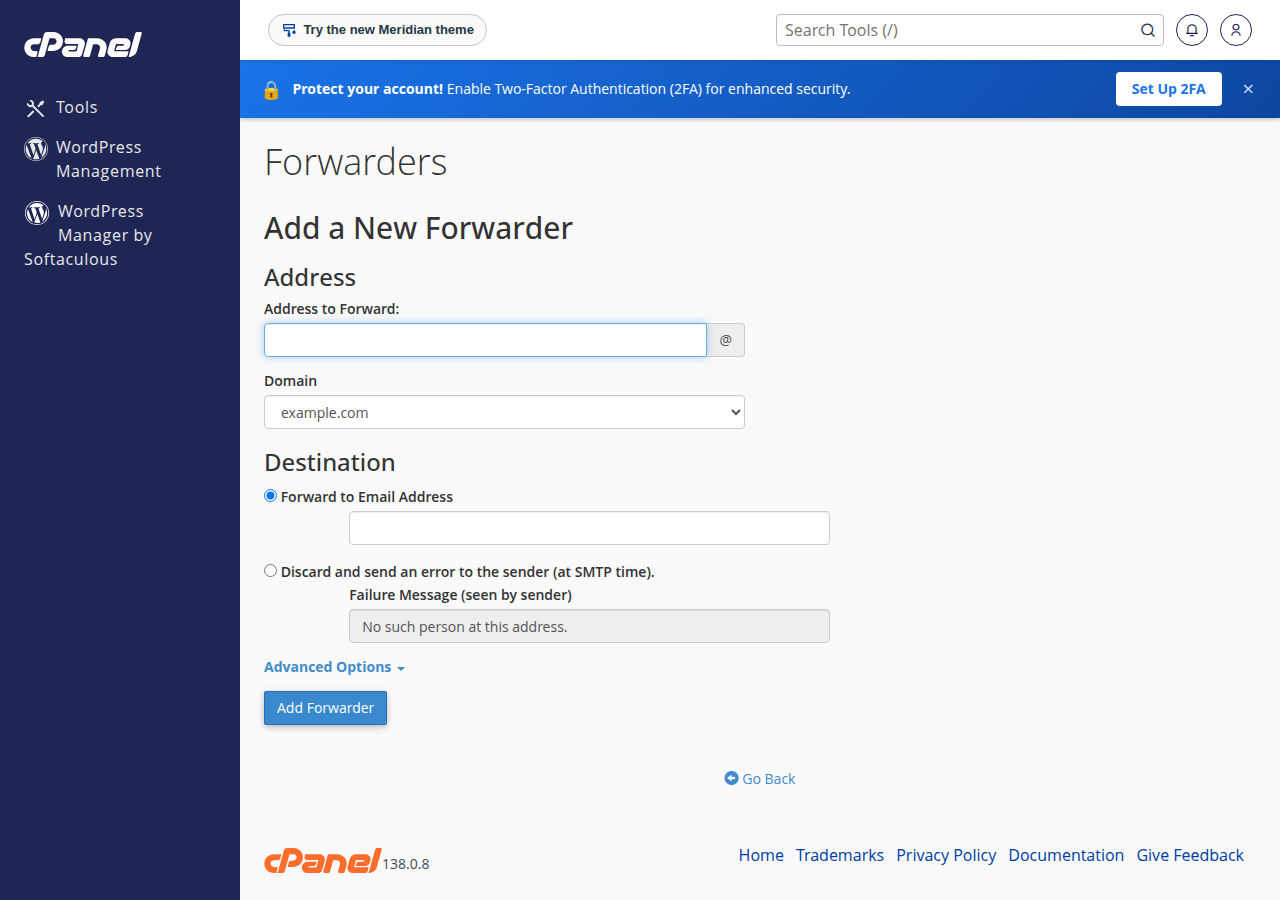
In cPanel, open Email › Forwarders, click Add Forwarder, enter the address, keep Forward to Email Address, type the destination and click Add Forwarder. If the address also has a mailbox, a copy stays there too; if it has no mailbox, mail is only forwarded. To forward to several people, add one forwarder per destination. Keep the catch-all (Default Address) off unless someone reads it daily.
This page covers the email included with cPanel, DirectAdmin, Webuzo and Windows (Plesk) hosting. Business Email is a separate product with its own webmail at https://mail.yourdomain.com:8443/; see Business Email vs the email included with your hosting.
1. Add a forwarder in cPanel
- Log in to cPanelfrom your hosting service in the client area; see how to log in to cPanel.
- Open Forwardersin the Email section and click Add Forwarder.
- Enter the address to forward.Type the part before the
@and pick the domain. - Choose the destination.Keep Forward to Email Address and type the full address that should receive the mail. It can be on your domain or outside, such as Gmail.
- Click Add Forwarder.It appears in the list and works straight away.
cPanel has no edit button: to change a destination, delete the forwarder and add a new one. To retire an address cleanly, use Discard and send an error to the sender, so senders get a bounce with the message you write.
2. Is a copy kept on the server?
It depends on whether the address also has a mailbox.
| Set-up | What happens to each message |
|---|---|
| Address with a mailbox and a forwarder | Stored in the mailbox and a copy is forwarded |
| Address with only a forwarder (no mailbox) | Forwarded only; nothing is stored on the server |
| Several forwarders on one address | Each destination gets its own copy |
If you keep a mailbox nobody reads, it fills up. When it reaches its quota, new mail bounces and forwarding stops with it. For an address that only passes mail on, create the forwarder without a mailbox. See managing email quotas.
3. DirectAdmin, Webuzo and Windows (Plesk)
The idea is the same on every panel: an address, a destination, and a list where you remove entries.
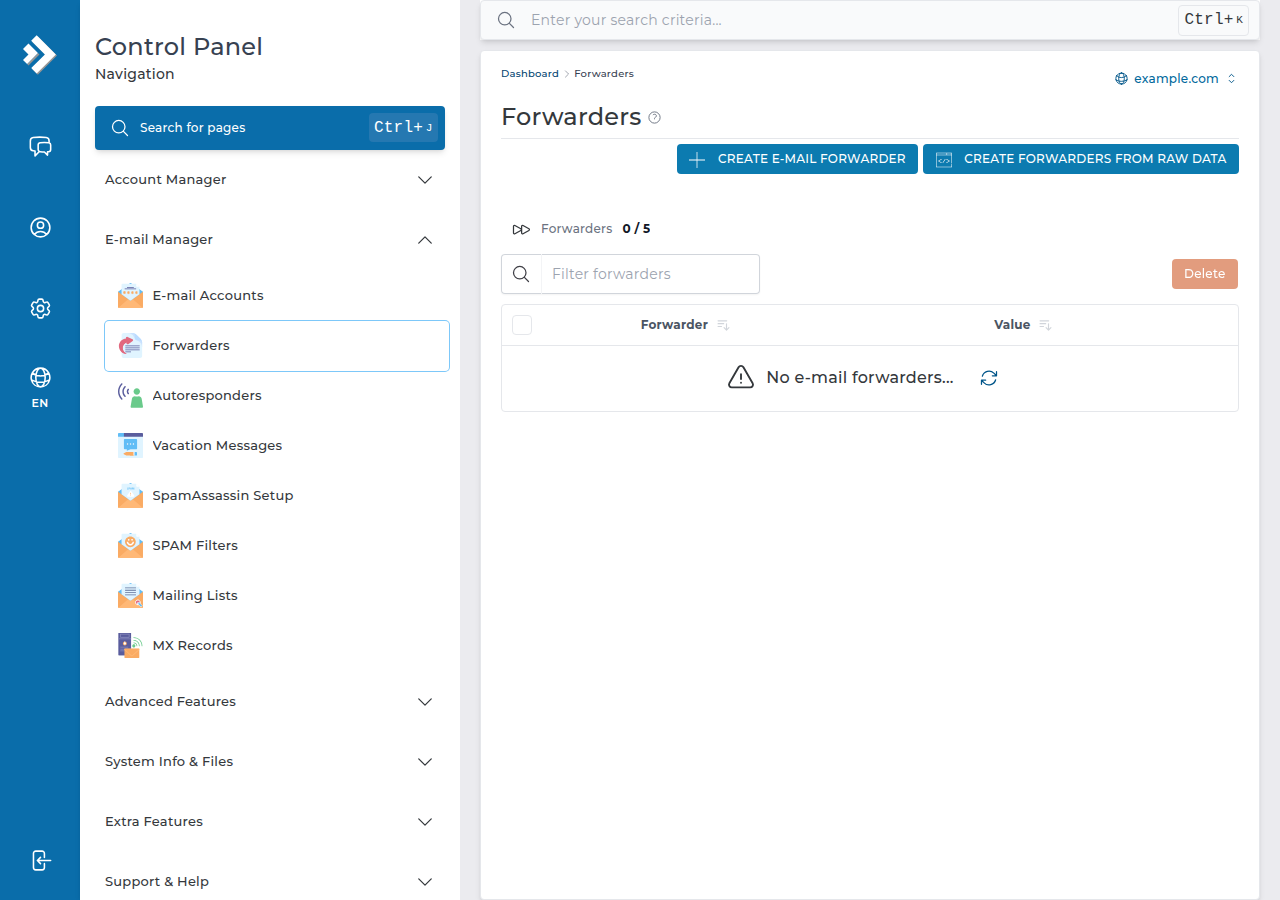
- DirectAdmin: open E-mail Manager › Forwarders. An address with both a mailbox and a forwarder keeps a copy. Full steps: email forwarders in DirectAdmin.
- Windows (Plesk): see email forwarding in Plesk.
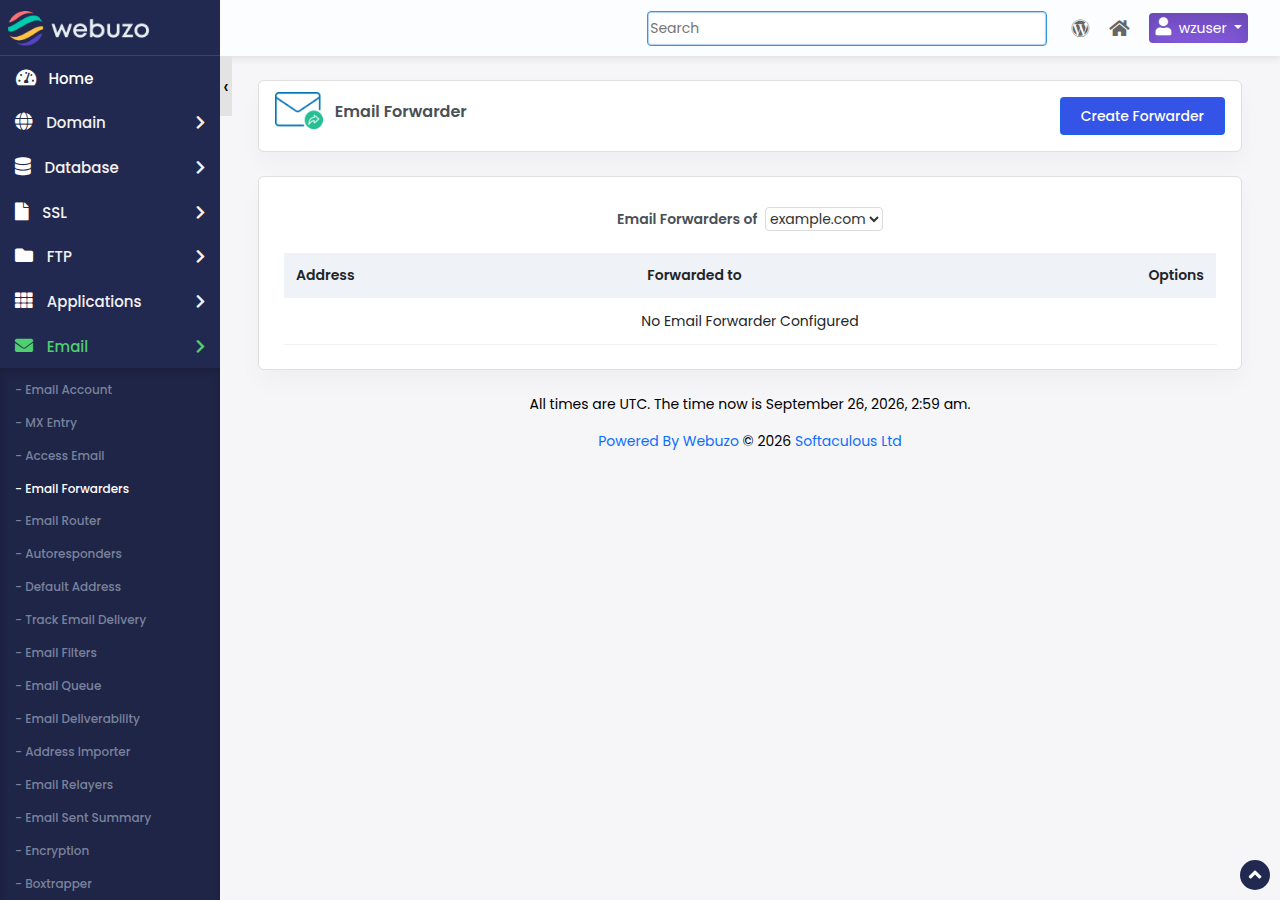
- Webuzo: open Email › Email Forwarders and click Create Forwarder.
4. Forwarding to Gmail, Outlook.com or Yahoo
Forwarded mail reaches Gmail from our server, not from the original sender, so it can fail the sender's SPF check. If the sender also signed the message with DKIM, it usually still passes; if not, Gmail may put it in spam or refuse it.
- On our cPanel servers, SRS (Sender Rewriting Scheme) is off, so forwarded mail keeps the original sender address and depends on DKIM.
- On our DirectAdmin server, SRS is configured, so forwarded mail is checked against your domain's SPF.
A forwarder copies everything, including the spam an address receives. If an address gets a lot of junk, do not forward it to Gmail. Add the mailbox to the Gmail app on your phone over IMAP instead: nothing is forwarded, and the mail stays on your server.
When you test, send from an outside address that is not the Gmail account you forward to; Gmail hides copies of messages you sent yourself.
5. Catch-all: mail to addresses that do not exist
A catch-all collects mail sent to any address at your domain that has no mailbox or forwarder. In cPanel it is called the Default Address (Email › Default Address); current Domain India DirectAdmin plans have no catch-all and refuse mail to unknown addresses (some older plans show E-mail Manager › Catch-All E-mail). It catches typos, but it also collects spam sent to invented addresses.
On our cPanel servers, most domains' default address delivers unknown-address mail to the account's main mailbox, so check yours. The safer setting is to discard it with an error message, so senders know to correct the address. Details: email aliases and catch-all addresses.
6. Email on Domain India hosting
Every Domain India shared hosting plan includes email accounts on your own domain, with forwarders, the default address and webmail managed in the same panel as your website. Compare cPanel hosting and DirectAdmin hosting. If you would rather keep email separate from your website, Business Email is priced per mailbox; the card shows the Domain India list price, excluding 18% GST.
- Priced per mailbox - start with one
- Email at your own domain ([email protected])
- Add and remove mailboxes yourself
- Webmail with calendar, contacts and tasks
How do I forward email in cPanel?
Open Email, then Forwarders, click Add Forwarder, enter the address and domain, keep Forward to Email Address, type the destination address and click Add Forwarder. It works straight away.
Does a forwarder keep a copy of the email?
Only if the same address also has a mailbox. Then the message is stored there and a copy is forwarded. An address with only a forwarder stores nothing on the server.
Can I forward one address to several people?
Yes. Add a separate forwarder for each destination address. Each destination receives its own copy.
Why is forwarded mail not arriving in Gmail?
Forwarded mail can fail the original sender's SPF check at Gmail, especially on cPanel where SRS is off, and forwarded spam makes Gmail stricter. Check the Gmail spam folder, or add the mailbox to the Gmail app over IMAP instead of forwarding.
How do I change where a forwarder sends mail in cPanel?
cPanel has no edit option. Delete the forwarder and add a new one with the new destination.
Should I set up a catch-all address?
Usually not. A catch-all collects spam sent to invented addresses. Create forwarders or aliases for the addresses customers use, and set the default address to discard unknown mail with an error message.
Ready to set it up? Log in to your control panel from your hosting services, or read the full forwarder guide first. If forwarded mail keeps going missing, open a support ticket with the sender, the time and the destination address.
Mailboxes, forwarders and webmail are included with every Domain India shared hosting plan.
See hosting plans