You create email addresses on your own domain, such as [email protected], from the Email Accounts page in your Webuzo panel. It takes about a minute per address. Mail only reaches the new mailbox once your domain's MX record points to your Webuzo hosting.
Creating email accounts on every panel (cPanel, DirectAdmin and Webuzo), choosing quotas, and setting up MX, SPF and DKIM are covered in how do I create email accounts on my domain. This page is the short Webuzo version.
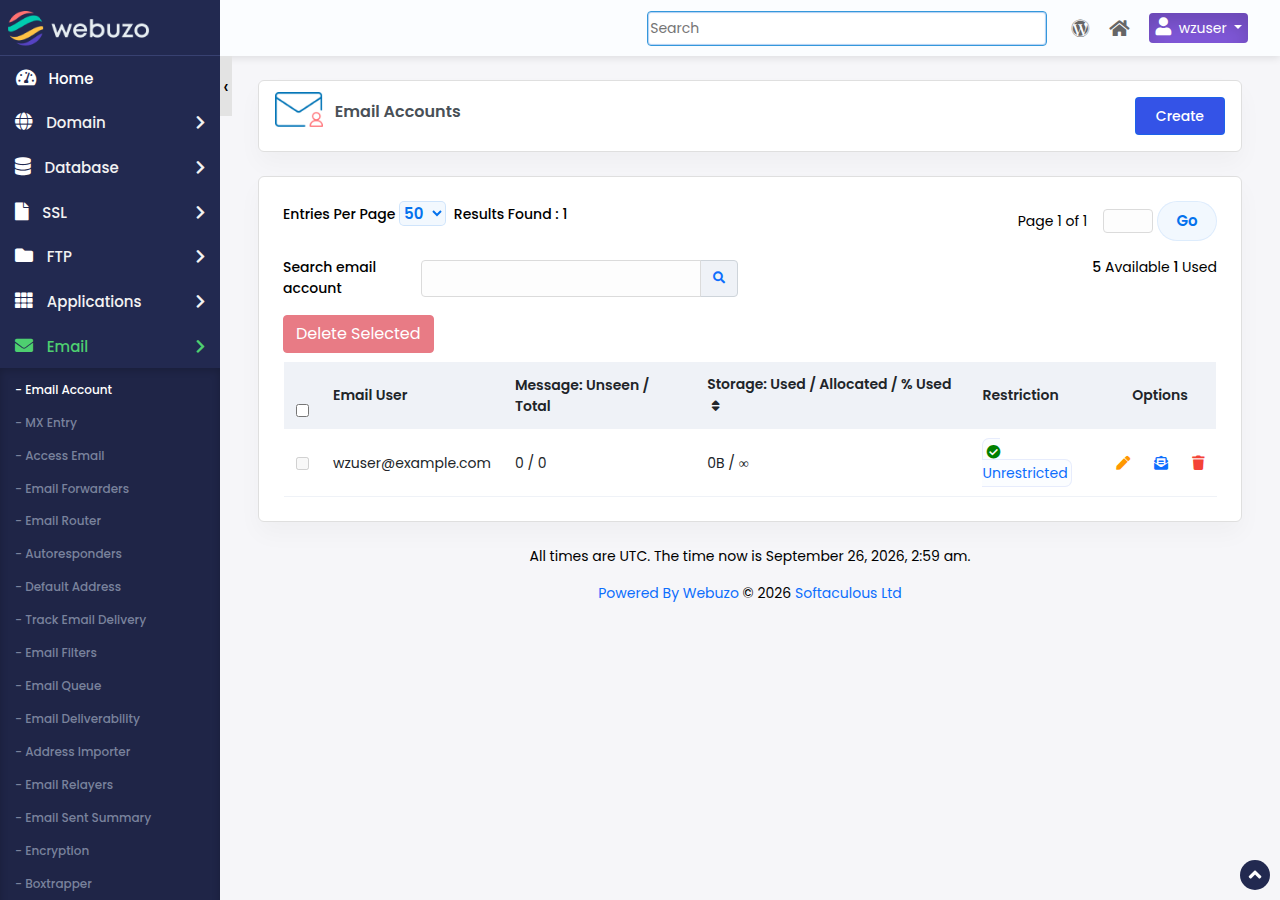
Open your Webuzo panel from the client area, go to Email › Email Account, click Create, enter the part before the @, choose the domain, set a strong password and a mailbox quota, and click Create. Read your mail at https://yourdomain.com/webmail, signing in with the full email address. Webuzo Starter includes 5 email accounts, Developer 25 and Agency 100.
1. Before you start
- Log in to Webuzo. Go to
https://yourdomain.com:2003; see logging in to the Webuzo panel. If your panel password does not work, ask support. - Point the domain at your hosting. Your domain must use your hosting nameservers, or its MX record must point to your Webuzo server, before mail arrives. See how do I change my nameservers.
- Plan your addresses. If one person reads both sales@ and info@, create one mailbox and forward the other address to it, so you stay within your plan's count.
2. Create the email account
- Open Email Accounts.In Webuzo, go to Email and then Email Account.
- Add an account.Click Create.
- Fill in the details.Enter the part before the @, choose the domain, set a strong password and set the mailbox quota.
- Create the account.Click Create.
The same page lets you change a password, adjust the quota or delete an account. Every mailbox shares your plan's disk space with your website, so set a sensible quota per mailbox rather than Unlimited.
Deleting an email account permanently removes all the mail in it. Domain India backs up your email every night, and support can restore mail from those backups if you open a ticket saying which mailbox and which date. It is still good practice to keep your own copy of important mail, for example by using IMAP in a desktop mail app and exporting it.
3. Read and send your mail
- Webmail: go to
https://yourdomain.com/webmailand sign in with the full email address and its password. On Webuzo,webmail.yourdomain.comdoes not exist, so use the/webmailaddress. See how to log in to webmail. - Mail apps (Outlook, phone, Thunderbird): use IMAP on port 993 with SSL/TLS to receive, and SMTP on port 465 with SSL/TLS or 587 with STARTTLS to send, with the full email address as the username and SMTP authentication switched on. Use the server name shown in your Webuzo panel's email settings, and see configuring email clients with Webuzo for app-by-app steps.
IMAP keeps your mail in sync on every device. POP3 (port 995) downloads it to one device and is best avoided if you read mail in more than one place.
4. Make sure your mail is trusted
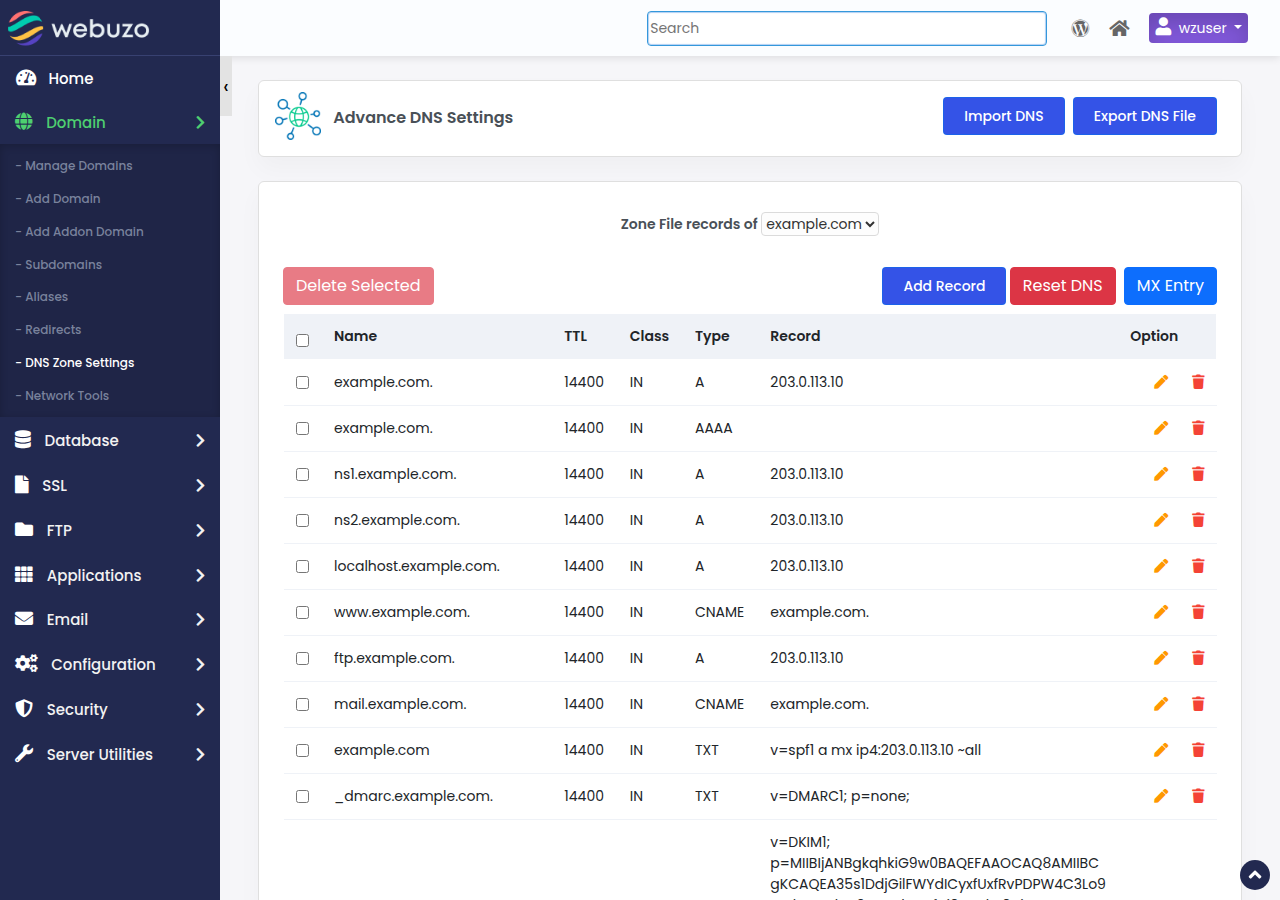
Once the domain points to your Webuzo hosting, check the SPF and DKIM records under Domain › DNS Zone Settings. New Webuzo zones already contain a _dmarc TXT record (v=DMARC1; p=none;), so edit that one rather than adding a second. Without them, your messages are more likely to land in spam. See understanding SPF, DKIM and DMARC.
How do I create an email account in Webuzo?
Open your Webuzo panel from the Domain India client area, go to Email, Email Account, click Create, enter the address, choose the domain, set a password and a quota, and click Create.
How many email accounts does my Webuzo plan include?
Webuzo Starter includes 5 email accounts, Webuzo Developer 25 and Webuzo Agency 100.
What is the webmail address for Webuzo email?
https://yourdomain.com/webmail. Sign in with the full email address and its password. The webmail.yourdomain.com address is not available on Webuzo hosting.
Why is no mail arriving in my new Webuzo mailbox?
Check that your domain's MX record points to your Webuzo hosting, usually by using the hosting nameservers, and that the mailbox is not over its quota. DNS changes can take a few hours to take effect.
Are my Webuzo emails backed up?
Yes. Domain India backs up your Webuzo account, including email, every night to a separate backup server. To restore mail, open a support ticket saying which mailbox and which date. Keeping your own copy of important mail is still good practice.
Ready to set up your mailboxes? Open your hosting from your hosting services, read the full email accounts guide, or open a support ticket if Webuzo will not open.
Tell us your domain and the address you want to create, and we will help you get it working.
Ask support