Creating an email address in DirectAdmin takes about a minute: open the email accounts page, enter the part before the @, set a password and a quota, and save. The address works straight away, and you can read it in webmail or add it to Outlook or your phone.
cPanel, Webuzo and Business Email steps, plan limits, DNS records (MX, SPF, DKIM) and a full troubleshooting section are in How to create email accounts for your domain. This page covers the DirectAdmin steps only.
In DirectAdmin, open E-mail Manager › E-mail Accounts, click CREATE ACCOUNT, enter the username, a strong password and a quota in MB, and click CREATE ACCOUNT on the form. Webmail is at https://yourdomain.com/webmail. In mail apps, use your full email address as the username.
1. Create the email account
- Open DirectAdminfrom your hosting services in the client area.
- Open the email accounts page.Go to E-mail Manager › E-mail Accounts.
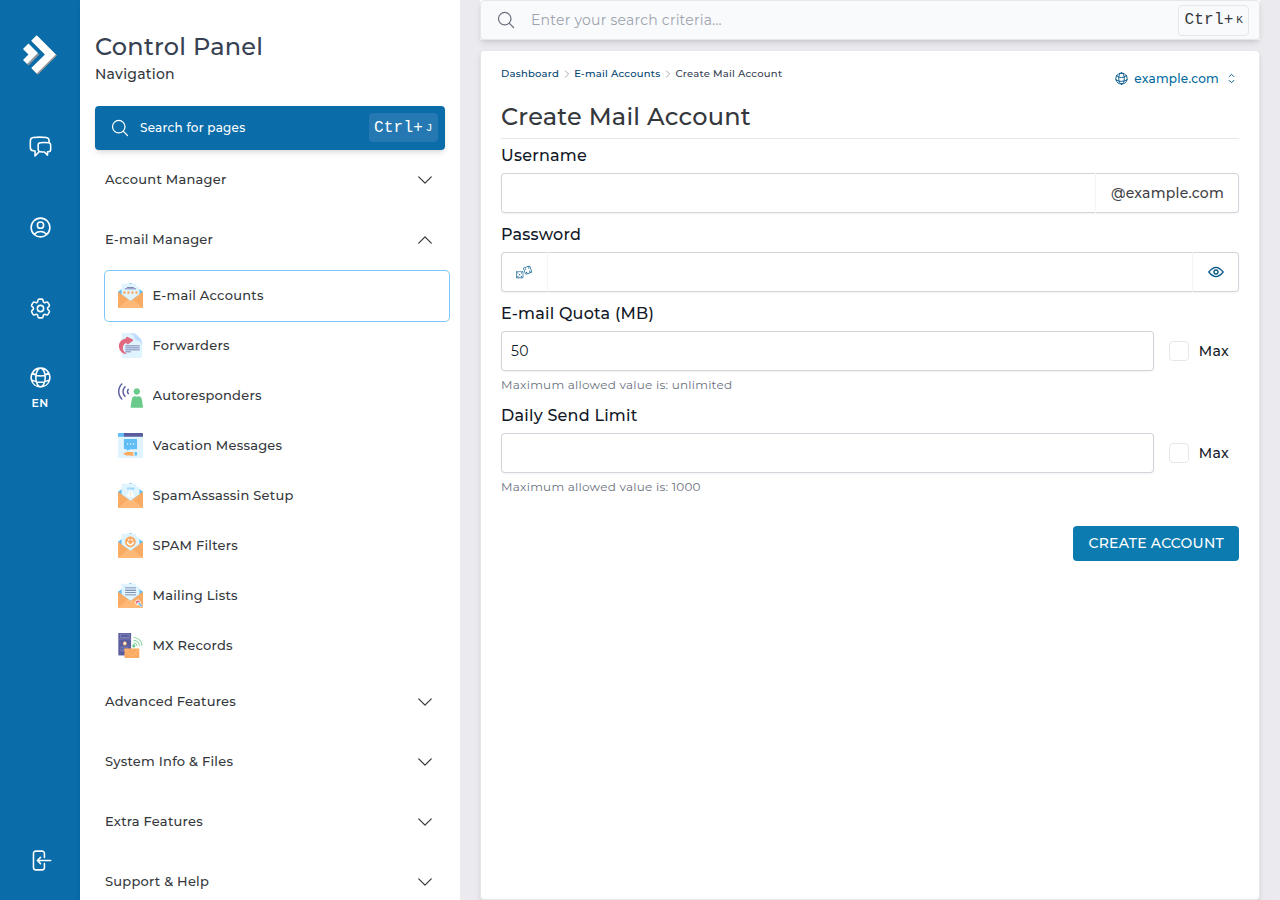
- Click CREATE ACCOUNT.The form that opens is titled Create Mail Account.
- Enter the username.Type the part before the @, for example
infofor [email protected]. If your account has several domains, pick the right one first. - Set a password.The form has one Password field; use a long, unique password.
- Set the quotain MB. Mailboxes share your plan's disk space with your website, so a fixed limit is safer than no limit. The form suggests 50 MB, which a busy business mailbox fills quickly; 1,024 MB or more is a practical size for most people. Leave Daily Send Limit empty for the default of 200 messages a day, or enter a higher number, up to 1,000.
- Click CREATE ACCOUNT.The address is ready to use.
To change a password or quota later, click Modify next to the account on the same page.
DA Starter includes 5 email accounts, DA Growth 50 and DA Business 250 (Domain India plan list, 19 September 2026). Forwarders don't use up an email account, so if one person reads both sales@ and info@, make one mailbox and forward the other address to it.
Removing an email account permanently deletes every message in it. When someone leaves, change the password or set up forwarding first, and delete the mailbox only after anything important has been saved.
2. Read your mail
- Webmail: open
https://yourdomain.com/webmailorhttps://yourdomain.com/roundcubeand sign in with the full email address and its password.webmail.yourdomain.comis not set up on DirectAdmin. See how to log in to webmail. - Mail apps: choose IMAP, use
mail.yourdomain.comas the server, your full email address as the username, and switch on outgoing (SMTP) authentication. The ports are in the port numbers guide, and app-by-app steps are in the full guide. - Out of Office and filters are set inside Roundcube webmail on our DirectAdmin server.
3. Limits and common fixes
- Outgoing mail: up to 1,000 messages per day per account. Largest message: 50 MB, including attachments.
- No mail arrives: your domain's MX record must point to your DirectAdmin server. If the domain uses your hosting nameservers, DirectAdmin manages it for you. See how do I change my nameservers.
- Receives but won't send: turn on SMTP authentication in the app. See I can receive mail but I cannot send it.
- Password rejected: use the full address as the username, or set a new password with Modify.
- 10 GB NVMe SSD Storage
- 50 GB Monthly Bandwidth
- 1 Website
- 5 Email Accounts
Prices on the cards exclude 18% GST.
Frequently asked questions
How do I create an email account in DirectAdmin?
Open E-mail Manager, then E-mail Accounts, click CREATE ACCOUNT, enter the part before the @, a strong password and a quota in MB, and click CREATE ACCOUNT on the form. The address works immediately.
What is the webmail address for DirectAdmin email?
Use https://yourdomain.com/webmail or https://yourdomain.com/roundcube and sign in with your full email address and its password. The webmail.yourdomain.com address is not set up on DirectAdmin.
How many emails can I send from a DirectAdmin email account?
Up to 1,000 messages per day per account (200 per mailbox by default) on Domain India DirectAdmin hosting. For newsletters and bulk mail, use a dedicated email delivery service.
How do I set an out-of-office reply on DirectAdmin email?
Sign in to Roundcube webmail and open its settings. On Domain India's DirectAdmin server, Out of Office replies and mail filters are managed inside Roundcube.
Ready to set up your addresses? Open DirectAdmin from your hosting services, then read How to create email accounts for your domain for DNS and deliverability. If something won't work, open a ticket.
Tell us the email address, what you tried and any error message, and we will check the mailbox and DNS with you.
Open a support ticket