Every domain you register or transfer to Domain India has its own page in the client area. From there you renew it, point it at your website, check its transfer lock and WHOIS privacy, get its transfer code and keep its owner details up to date. This guide shows where each setting lives and what to check before you change it.
Sign in, open Domains and click a domain. Its page has five tabs: Overview (renewal and the Security card), Nameservers, DNS, Transfer and Contacts. Change nameservers on the Nameservers tab, lock or unlock the domain and get the EPP code on the Transfer tab, and edit the owner details on the Contacts tab. DNS records normally live wherever your nameservers point, which is usually your hosting control panel.
1. Where to find your domains
- Sign in.Go to the client area and sign in with the email address on your account.
- Open Domains.Choose Domains in the left-hand menu. The My domains tab lists every domain on your account with its status and expiry date.
- Open a domain.Click the domain name to open its page. Until a domain is paid for and active, only its Overview tab is shown.
The Domains section has two more tabs. Contact profiles holds saved sets of registrant details you can reuse, and DNS tools helps with lookups. For a tour of the rest of the client area, see managing your account in the Domain India client area.
2. The domain page at a glance
| Tab | What you do there | Full guide |
|---|---|---|
| Overview | See the expiry date, renew, and check the Security card (transfer lock and WHOIS privacy) | Domain renewal |
| Nameservers | Choose which DNS provider answers for the domain | How do I change my nameservers |
| DNS | See where the domain's records are managed | How to change your domain DNS settings |
| Transfer | Lock or unlock the domain and get the EPP code | Get your domain auth code |
| Contacts | Update registrant, admin, tech and billing details | Change your domain's WHOIS information |
Most domains show all five tabs. If the Contacts tab is missing, the domain may still be registering or transferring in; open a ticket if it stays that way.
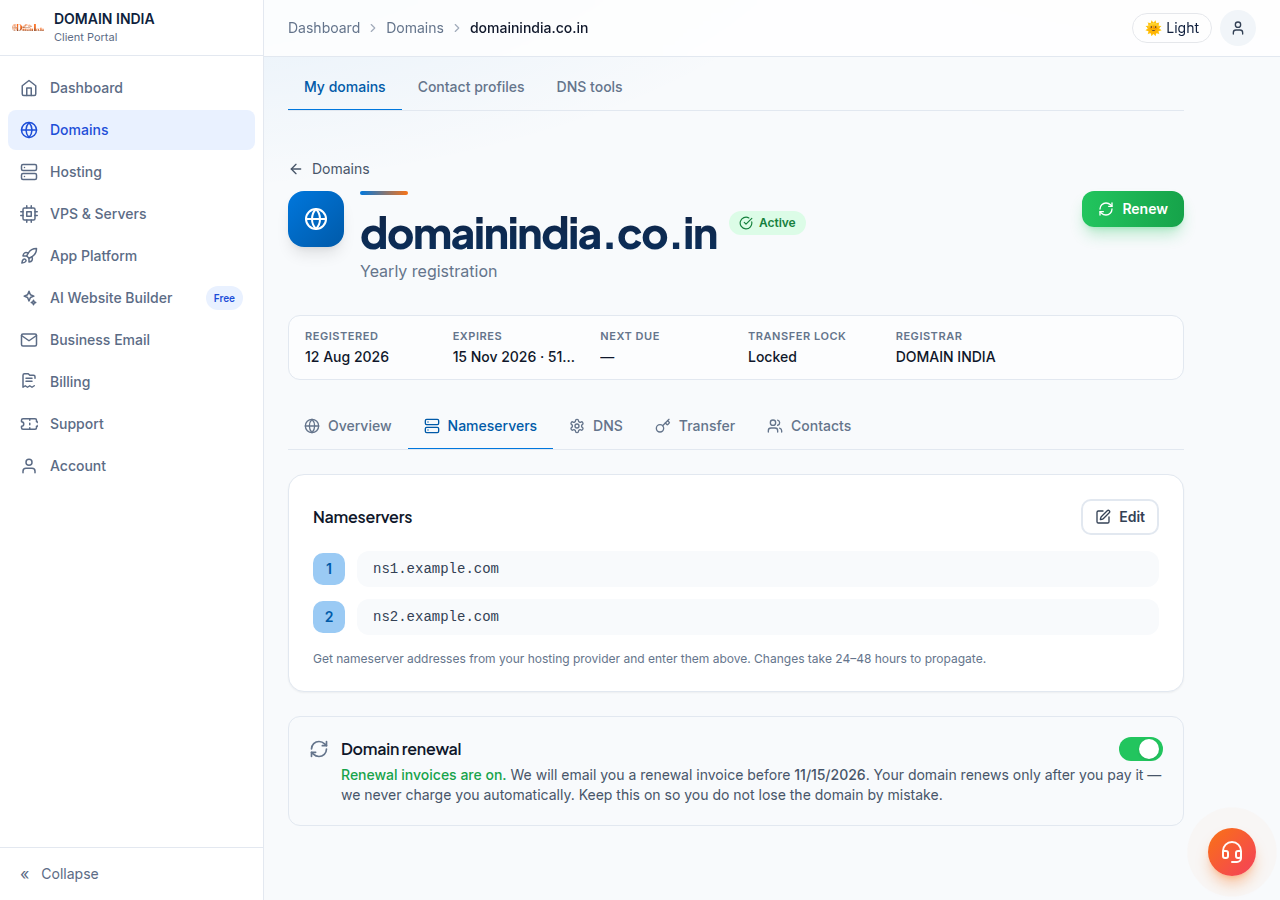
3. Renewal and expiry (Overview tab)
The Overview tab shows the domain's expiry date and a renewal card. You can renew at any time, for as many years as the extension allows, and paying early loses no time: the new period is added to the current expiry date.
- Nothing is charged automatically. Domain India never charges a saved card. A renewal invoice is generated up to 30 days before the due date and emailed to you, and the domain renews only when that invoice is paid.
- Don't want to keep a domain? Choose Don't renew on the Renewals tab under Billing, or simply leave the invoice unpaid.
- Renew well before the date. An expired domain stops working, and recovering it later costs far more than a renewal. A .in domain that is not renewed within 36 days of expiry can only be restored for ₹4,000, which includes GST and the renewal.
A .in costs ₹625 a year to renew and a .com ₹1,150, at Domain India list prices on 19 September 2026, excluding 18% GST. For the whole process, see how auto-renewal works and domain renewal.
4. Nameservers: pointing the domain at your website
Nameservers decide which DNS provider answers for your domain, and so where your website and email are found. To change them, open the Nameservers tab, click Edit, enter the new nameservers and click Save. The client area confirms "Nameservers updated".
- Take the values from your own account. For Domain India hosting, they are on your hosting service's page (the Point a domain to this hosting card) and in your hosting welcome email. Never copy nameservers from an old article or forum post.
- Allow time. A change usually takes effect within a few hours and can take up to 24-48 hours to reach every network.
- Your email moves too. Changing nameservers moves all of your DNS, including the MX records that deliver email. Make sure the new provider has every record you need first.
5. DNS records: where to edit them
DNS records (A, CNAME, MX, TXT and others) are edited wherever your nameservers point, not always in the client area:
- Domain on your Domain India hosting nameservers: edit records in your hosting control panel (for example the Zone Editor in cPanel).
- Domain on Cloudflare or another DNS provider: edit records in that provider's dashboard.
For a domain on hosting nameservers or an outside DNS provider, the client area's DNS tab says the records are managed elsewhere. That is expected. Where the tab does show a record list, those records take effect only while the domain uses the nameservers that serve them.
The DNS tab may offer Activate Free DNS or Switch to Free DNS. It changes your domain's nameservers without copying your existing records, so your website, email and verification records can stop working. To connect a domain to hosting, use the hosting nameservers or add A records at your current DNS provider instead, as described in how do I change my nameservers. If your domain has no hosting and no DNS provider, open a ticket and ask how to set up DNS for it.
6. Transfer lock and WHOIS privacy (Security card)
The Security card on the Overview tab has two rows: Transfer lock and WHOIS privacy.
Transfer lock. A locked domain cannot be moved to another registrar. Keep it locked. It does not block nameserver or DNS changes, and it does not affect your website or email. To lock or unlock, open the Transfer tab and use Unlock domain or Lock domain in the Transfer lock box. See domain lock and unlock.
WHOIS privacy depends on the extension:
- .in and its family: for .in and its second-level extensions (.co.in, .net.in, .org.in and others), personal registrant details are not shown in public WHOIS. This is free and automatic; there is nothing to switch on.
- .com and most other extensions: privacy is an optional add-on at ₹300 a year per domain (excluding 18% GST). If the WHOIS privacy row says "Not enabled", click Enable privacy protection and pay the invoice that opens. There is no self-service switch to turn it off; ask support.
The full guide is how to enable or disable privacy protection.
7. The EPP code, for moving a domain away
To move a domain to another registrar you need its authorisation (EPP) code. Open the Transfer tab, click Unlock domain, then Get EPP code in the Authorisation code (EPP) box, and copy it with the Copy button. The code appears on screen, not by email.
For some domains, including many .in domains, the box shows "Not Available" and there is no Unlock button. That does not mean the domain can't be transferred: open a ticket with the domain name and support will help. Treat the code like a password, and lock the domain again if you change your mind. See get your domain auth code.
8. Contact details (Contacts tab)
Every domain has registrant, admin, tech and billing contacts. Open the Contacts tab, pick the contact, click Edit contact, correct the details and click Save. Keep the registrant email current: renewal notices and verification requests go there.
On .com and other generic domains, changing the registrant's name, organisation or email can put a 60-day lock on transfers to another registrar. On .in domains the registrant is tied to identity verification (eKYC, completed at Identity verification), so for a change of owner, or for admin, tech or billing contacts, open a ticket rather than editing them yourself.
Details are in change your domain's WHOIS information.
9. Where Domain India fits
Domain India is a NIXI-accredited .IN registrar, and every domain you hold with us is managed from the same client area as your hosting, Business Email and invoices. Register a .in for ₹575 (₹625 a year to renew), a .co.in for ₹475 (₹525 to renew) or a .com for ₹1,150 a year, at Domain India list prices on 19 September 2026. If a domain is registered elsewhere, you can transfer it to Domain India and manage it here too.
Support is on 24/7 live chat, and every ticket gets a first response within 15 minutes; resolution can take longer depending on the issue. There is no phone support.
Where do I manage my domain at Domain India?
Sign in to the client area, open Domains and click the domain. Its page has Overview, Nameservers, DNS, Transfer and Contacts tabs, which cover renewal, nameservers, DNS, the transfer lock, the EPP code and contact details.
How do I change the nameservers for my domain?
Open the domain in the client area, go to the Nameservers tab, click Edit, enter the new nameservers and click Save. Use the values from your hosting service page or welcome email. The change usually takes effect within a few hours and can take up to 24-48 hours.
Where do I add DNS records such as A, MX or TXT?
Add them wherever your domain's nameservers point. If the domain uses your Domain India hosting nameservers, use your hosting control panel. If it uses Cloudflare or another DNS provider, use that provider's dashboard.
How do I get the EPP code for my domain?
Open the domain's Transfer tab, click Unlock domain, then Get EPP code, and copy the code. If the box says Not Available, open a support ticket with the domain name and support will help.
Do I need to buy WHOIS privacy for a .in domain?
No. For .in and its second-level extensions, personal registrant details are not shown in public WHOIS. This is free and automatic; there is nothing to switch on.
Will Domain India renew my domain automatically?
Domain India never charges a saved card. A renewal invoice is generated up to 30 days before the due date and emailed to you, and the domain renews when you pay it. You can also renew early from the domain's Overview tab.
Ready to manage your domains? Open your domains in the client area, register a new domain, or open a support ticket if a setting will not change.
Register .in, .com and other extensions with a NIXI-accredited .IN registrar, and manage renewals, nameservers, the transfer lock and contacts from one client area.
Search for a domain