Every domain name carries a set of contact details held by the registry: who owns it, who manages it and how to reach them. This is what people mean by "WHOIS information". If you have moved office, changed email address or taken over a domain from a former staff member, update them before important notices go to an address nobody reads. This guide shows how to do that in the Domain India client area, and what happens after you save.
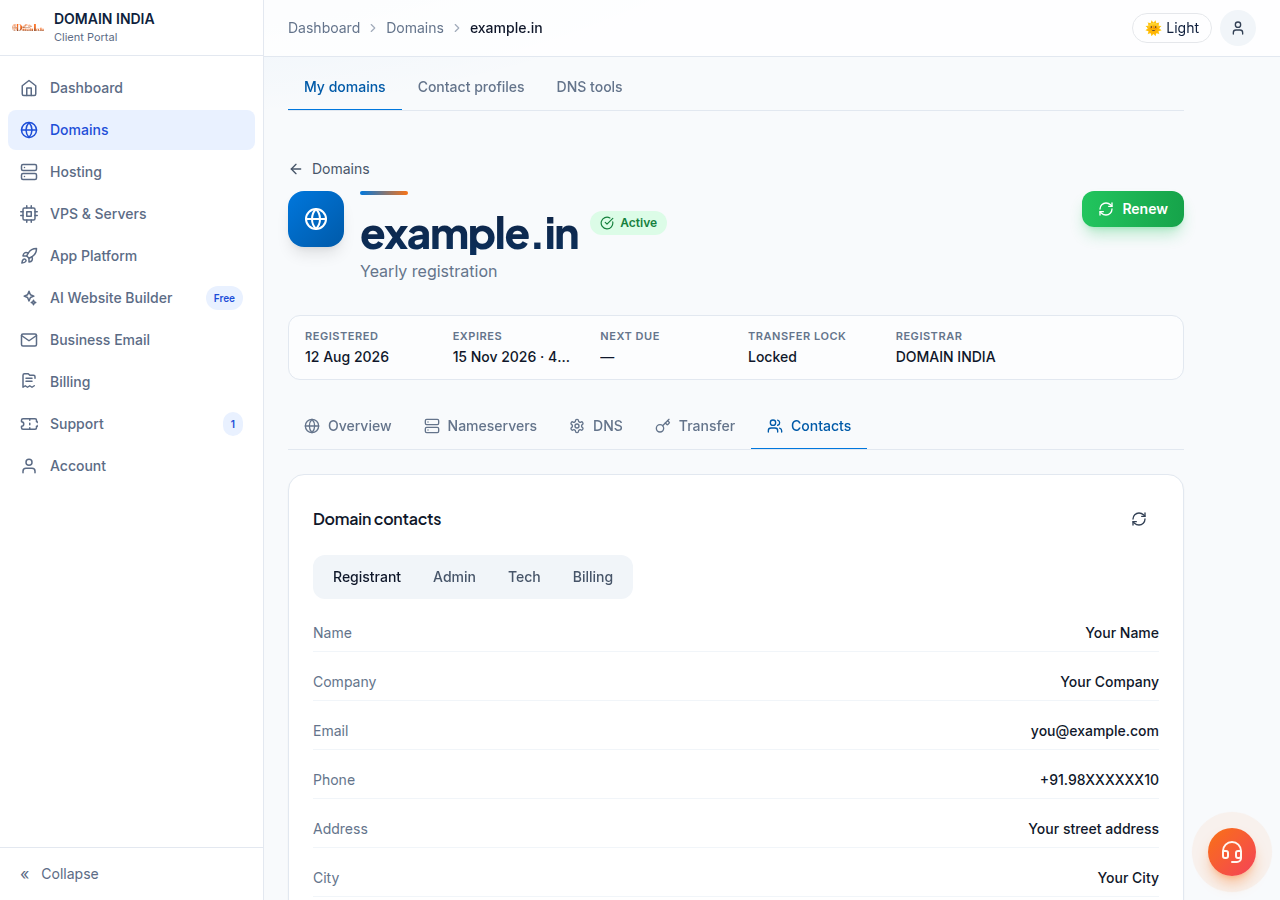
Log in, open Domains, click the domain, then open the Contacts tab. Pick Registrant, Admin, Tech or Billing, click Edit contact, correct the details and click Save. Changing the registrant's name, organisation or email on a domain such as .com can put a 60-day lock on transfers to another registrar. On .in domains the registrant is tied to identity verification (eKYC), so changing the owner's name may need a new verification and help from support.
1. What WHOIS contact information is
When a domain is registered, the registrar sends the owner's contact details to the registry for that extension. Anyone can look up a domain's public record. The old WHOIS protocol has largely been replaced by RDAP (Registration Data Access Protocol) for domains such as .com, but most people still call the record "WHOIS".
A domain can have up to four contacts:
| Contact | Who it should be | Why it matters |
|---|---|---|
| Registrant | The legal owner of the domain: you or your business | Ownership, disputes, transfers and registry verification are all tied to this contact |
| Admin | The person who manages the domain day to day | Receives administrative notices about the domain |
| Tech | Whoever runs your DNS, website or email | Contacted about technical problems with the domain |
| Billing | Whoever pays for the domain | Used for billing matters at the registrar level |
The registrant is the one that decides who owns the domain. If only one contact is correct, make sure it is that one.
Many registries now hide personal data from public lookups. If a lookup tool shows "REDACTED" instead of your details, your record is not wrong; the registry still holds your real details. Whether a domain can also use a paid privacy service depends on the extension, because each registry sets its own rules, so ask support about a specific domain. Privacy only changes what the public sees: the details you enter must still be accurate.
2. Why accurate contact details matter
Keeping this information current is part of your registration agreement, and it protects you in practical ways.
Put an address you check regularly on the registrant contact, ideally one that does not depend on the domain itself. If your only address is [email protected] and the domain is suspended, the email that would help you fix it cannot reach you.
3. How to update your domain contacts
You can edit contacts yourself for domains registered through Domain India.
- Log in.Sign in to the client area and open Domains.
- Open the domain.Click the domain you want to update. The domain page has tabs: Overview, Nameservers, DNS, Transfer and Contacts.
- Open the Contacts tab.You will see the current details under Domain contacts. Use the Registrant, Admin, Tech and Billing buttons to switch between the four contacts. The refresh button reloads them.
- Click Edit contact.The form has Name, Company, Email, Phone, Address, City, State, ZIP / PIN and Country.
- Fill in every required field.Name, Email, Phone, Address, City, ZIP / PIN and Country are required. Pick the country from the list rather than typing it into the address.
- Click Save.You will see "Contact updated" when the registrar accepts the change. If it is rejected, the reason appears in red above the form.
- Repeat for each contact you need to change.Each contact is saved separately, so update Admin, Tech and Billing one at a time if they are wrong too.
A few details help the save go through first time:
- Phone: include the country code, for example +91 followed by the number.
- Country: this is the value sent to the registry. On .in domains it also decides which identity check applies, so it must be your real country.
- Company: leave it empty if you hold the domain as an individual. If you fill it in, the domain is registered to that organisation, which matters if you later want to show personal ownership.
If you do not see a Contacts tab on a domain, its contacts cannot be edited from the client area. That can happen while a domain is still being registered or transferred in. Open a ticket and we will help.
4. What happens after you save
The change is sent to the registrar and registry when you click Save. It is not a request that waits for staff. What follows depends on what you changed:
- Address, phone or other details only: usually nothing more to do.
- Registrant email changed: for domains such as .com, expect a verification email at the new address. Click the link in it. Check your spam folder if it does not arrive, and contact support if it still does not arrive.
- Registrant name, organisation or email changed: for domains such as .com this counts as a change of registrant. See section 5.
- A .in registrant changed: see section 6.
Public lookup websites often cache old results. If a third-party WHOIS site still shows the old details, check the Contacts tab in the client area (use its refresh button) before assuming the change failed.
5. Changing the registrant on .com and other generic domains
Correcting a typo in your address is routine. Changing the registrant's name, organisation or email on a generic domain (.com, .net, .org and the like) is treated by ICANN as a change of registrant, even if the same person still owns the domain.
Under ICANN's Transfer Policy in force today, a change of registrant on a generic domain puts a 60-day lock on transfers to another registrar, unless the owner opted out before the change. The client area warns you about this when you edit the Registrant contact. ICANN is revising the Transfer Policy and the revised rules are expected to drop this lock, but until they take effect, plan for 60 days.
What this means in practice:
- If you plan to move the domain to another registrar soon, transfer first and update the registrant afterwards, or ask support before making the change.
- The lock does not affect your website, email or DNS. The domain keeps working normally. Only a transfer to another registrar is blocked.
- Changing the Admin, Tech or Billing contacts does not trigger the lock.
Selling or giving the domain to someone else is also a change of registrant: the new owner's details go on the Registrant contact, and the new owner confirms any verification email.
6. .in and other Indian domains
.in, .co.in and the other Indian extensions are run by the .IN registry, which has its own rules. The main difference: the registrant's identity is verified, through eKYC, which the client area runs with DigiLocker. You can see and complete your own verification on the Identity verification page. Each registrant is verified separately, and a domain registered to someone else has to be verified by that person.
What to expect when you update a .in domain:
- Full address required. The registrant address must be complete: building or street, area, city, state and PIN code. The form rejects an address that looks incomplete and tells you what is missing.
- Corrections are straightforward. Fixing your phone number, address or email is a normal edit on the Registrant tab.
- Changing the owner's name or organisation is different. It may require identity verification for the new registrant, and possibly support involvement, before the change is fully accepted. Do not treat a name change as instantly verified.
- Locked domains. If saving fails with a message that the domain is locked or has an update-prohibited status, it has to be unlocked first. On .in domains the lock is handled by support, so open a ticket.
- Admin, Tech and Billing contacts. On .in domains, the registrant is the contact that matters at the registry. If you need to change any other contact on a .in domain, open a ticket rather than editing it yourself.
Open a ticket before you edit the registrant name. Tell us who the new owner is and whether they can complete identity verification. We will explain the steps for that domain, so it does not end up held by the registry halfway through.
7. Troubleshooting
| What you see | Likely reason | What to do |
|---|---|---|
| "name, email, phone, address, city, zip, country are required" | A required field is empty | Fill in every field except Company and State, then save again |
| A message asking you to set the country field | The country chosen does not match the address | Pick the correct country from the list |
| A message that the street address is incomplete | A .in registrant address without building, area or PIN | Enter the full postal address and save again |
| A message that the domain is locked or update-prohibited | The domain has a lock that blocks contact changes | Open a ticket; support will unlock it |
| No Contacts tab | The domain is pending, or its contacts cannot be edited here | Open a ticket with the domain name |
| Domain suspended after an email change | The verification email was not confirmed | Find and click the verification email, or ask support to resend it |
For a suspended domain, also see Why is my domain suspended.
8. Managing your domains with Domain India
Domain India is a NIXI-accredited .IN registrar, and every domain you register or transfer to us is managed from one client area: contacts, nameservers, DNS, transfer settings and renewals are all on the domain's page.
Domain India list prices on 19 September 2026, excluding 18% GST:
| Extension | Register (1 year) | Renew (per year) |
|---|---|---|
| .in | ₹575 | ₹625 |
| .co.in | ₹475 | ₹525 |
| .com | ₹1,150 | ₹1,150 |
If your domain is registered elsewhere, you update its contacts at that registrar. To manage it here alongside your other domains, see Can I transfer an existing domain to Domain India.
Where do I change my domain's WHOIS details at Domain India?
Log in to the client area, open Domains, click the domain and open the Contacts tab. Choose Registrant, Admin, Tech or Billing, click Edit contact, update the details and click Save.
Which contact decides who owns the domain?
The registrant contact. It identifies the legal owner, and it is the contact used for ownership disputes, transfers and registry verification. Keep its name and email accurate above all others.
Will changing my contact details stop my website or email?
No. Contact details are separate from DNS, so your website and email keep working. The exception is a registrant email change on domains such as .com: if the verification email is not confirmed within 15 days, the domain can be suspended.
Why can't I transfer my .com domain after changing the owner's details?
Under ICANN's current Transfer Policy, changing the registrant's name, organisation or email on a generic domain is a change of registrant, which puts a 60-day lock on transfers to another registrar unless the owner opted out beforehand. The domain otherwise works normally during this time.
Can I change the owner's name on a .in domain myself?
You can correct details such as the address, phone and email on the Registrant tab. Changing the owner's name or organisation on a .in domain may require identity verification of the new registrant and help from support, so open a ticket before making that change.
Can I hide my contact details from public WHOIS?
It depends on the domain extension, because each registry sets its own rules and some do not allow privacy services. Ask Domain India support about the options for your specific domain.
Ready to tidy up your domain records? Open your domains and check the Contacts tab for each one. If something needs support's help, open a ticket. To register a new name, start at domain registration.
Register .in, .com and more than 500 other extensions, and manage contacts, DNS and renewals from one client area.
Search for a domain