To move a domain from Domain India to another registrar, you need its auth code, also called the EPP code or authorisation code. For a domain registered with us, you get it yourself on the domain's Transfer tab in the client area, and it appears on screen rather than by email. This short guide shows exactly where to click, and what to do if the code isn't there.
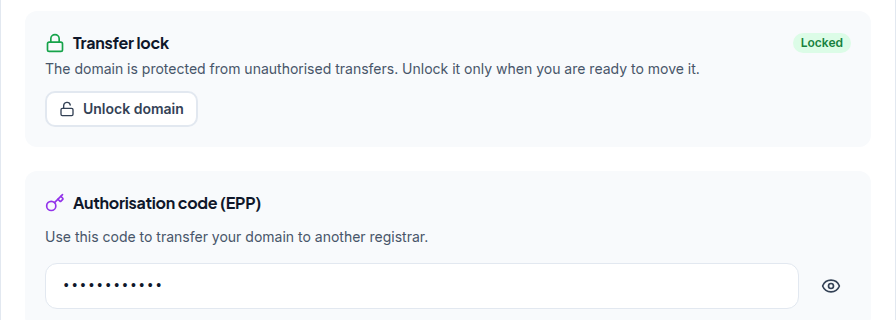
Sign in, open your domains, click the domain and open its Transfer tab. Click Unlock domain, then Get EPP code in the Authorisation code (EPP) box, or click the eye icon if a code is already shown behind dots. Copy it with the Copy button. If the box says "Not Available", or there is no Unlock domain button, open a ticket with the domain name and support will help.
This page covers only getting the code. For eligibility rules, protecting your website and email during the move, timing and what to do if a transfer fails, read Transferring a domain name to another registrar. For what the code is and how registrars use it, see What is a domain auth (EPP) code.
1. Check the domain can leave
The Transfer tab starts with a "Transfer-out requirements" notice. Before you ask for the code, make sure that:
- the domain is unlocked (you do this on the same tab);
- the domain is at least 60 days old; for .com and most generic extensions, a domain can't move within 60 days of registration or of its last transfer;
- WHOIS privacy is off. Paid privacy on a .com or similar is removed by support, so open a ticket. A .in domain needs nothing: for .in and its second-level extensions, personal registrant details are not shown in public WHOIS, and this is free and automatic;
- the domain is not expired or on hold. Renew it, or resolve the hold, first.
2. Get the code in the client area
- Sign into the client area and open your domains.
- Open the domainyou want to move. Until a domain is paid for and active, only its Overview tab is shown.
- Open the Transfer taband read the Transfer-out requirements notice.
- Unlock the domain.In the Transfer lock box, click Unlock domain. The status changes from Locked to Unlocked.
- Get the code.In the Authorisation code (EPP) box, click Get EPP code. If a code is already there, hidden behind dots, click the eye icon to show it.
- Copy itwith the Copy button and paste it straight into the new registrar's transfer form.
The code is shown on the page. You don't need to wait for an email from us, although the new registrar may send its own approval email to the domain's registrant address.
For some domains, including many .in domains, the code box shows "Not Available" and there is no Unlock domain button. That doesn't mean the domain can't be transferred. Open a ticket with the domain name, and support will help you get the code.
3. Use the code safely
Anyone who has the code of an unlocked domain can try to transfer it, so treat it like a password:
- give it only to the registrar receiving the domain, or type it into their form yourself;
- never paste it into a chat, a forum or a screenshot;
- paste it exactly: codes are case-sensitive, and a space copied at either end makes it "invalid";
- ask for the code only when you are ready to move, and use it promptly;
- if you change your mind, go back to the Transfer tab and click Lock domain.
4. Moving a domain to Domain India instead?
Then you need the code from your current registrar, not from us. Get it from their control panel, then start at Domain Transfer and enter the domain and the code. The transfer adds one year to the registration. Domain India list prices on 19 September 2026, excluding 18% GST: a transfer costs ₹625 for .in, ₹525 for .co.in and ₹1,150 for .com. The full walkthrough is Can I transfer an existing domain to Domain India.
Where do I find the EPP code for a domain registered with Domain India?
Sign in to the client area, open Domains, click the domain and open its Transfer tab. Click Unlock domain, then Get EPP code in the Authorisation code (EPP) box, or click the eye icon if a code is already shown. If it says Not Available, open a support ticket with the domain name.
Is the auth code emailed to me?
No. For a domain registered with Domain India, the code is shown on the domain's Transfer tab in the client area, with a Copy button. The registrar receiving the domain may still email the registrant address to confirm the transfer.
Why does my domain show Not Available instead of a code?
For some domains, including many .in domains, the code can't be fetched from the client area, and the Transfer tab shows Not Available with no Unlock button. Open a support ticket with the domain name and support will help you get the code.
Why does the new registrar say my auth code is invalid?
Usually a space was copied with it, a character was mistyped, the domain is still locked, or fewer than 60 days have passed since registration or the last transfer. Copy the code again from the Transfer tab, check that the domain shows Unlocked, and paste it exactly.
Do I need to turn off privacy on a .in domain before transferring?
No. For .in and its second-level extensions, personal registrant details are not shown in public WHOIS; this is free and automatic, and there is nothing to switch off.
How long does a transfer take after I give the code?
For .com and similar extensions, usually within about a week, depending on the registry and the registrars involved. Approve any confirmation email from the new registrar promptly.
Ready to move your domain? Open your domains and go to the Transfer tab. If the code isn't shown, open a ticket: support is on 24/7 live chat, and tickets get a first response within 15 minutes, though resolution can take longer.
Tell us the domain name and where it is going. We will check it is eligible and help you get the code.
Open a ticket