Child name servers are nameservers that carry your own domain name, such as ns1.yourbusiness.com. Because the name sits inside the domain it serves, the registry must also store its IP address, in what is called a glue record. This guide explains what they are, who needs them, how to register and remove them in the Domain India client area, and the registry rules that decide whether they will work.
A child name server (also called a private nameserver or glue record) lets you run nameservers named after your own domain, such as ns1.yourbusiness.com. You need one only if you run your own DNS server on a VPS or dedicated server, or if you resell hosting under your own brand. For a domain registered with Domain India, open the domain in the client area, go to the Nameservers tab and expand Custom nameservers (glue records). If that section is not available for your domain, open a support ticket and we will register the host at the registry for you.
1. What a child name server is
Normally your domain points to nameservers that belong to someone else, such as your hosting company or a DNS provider. Their names sit in their domain, so resolvers can look them up independently.
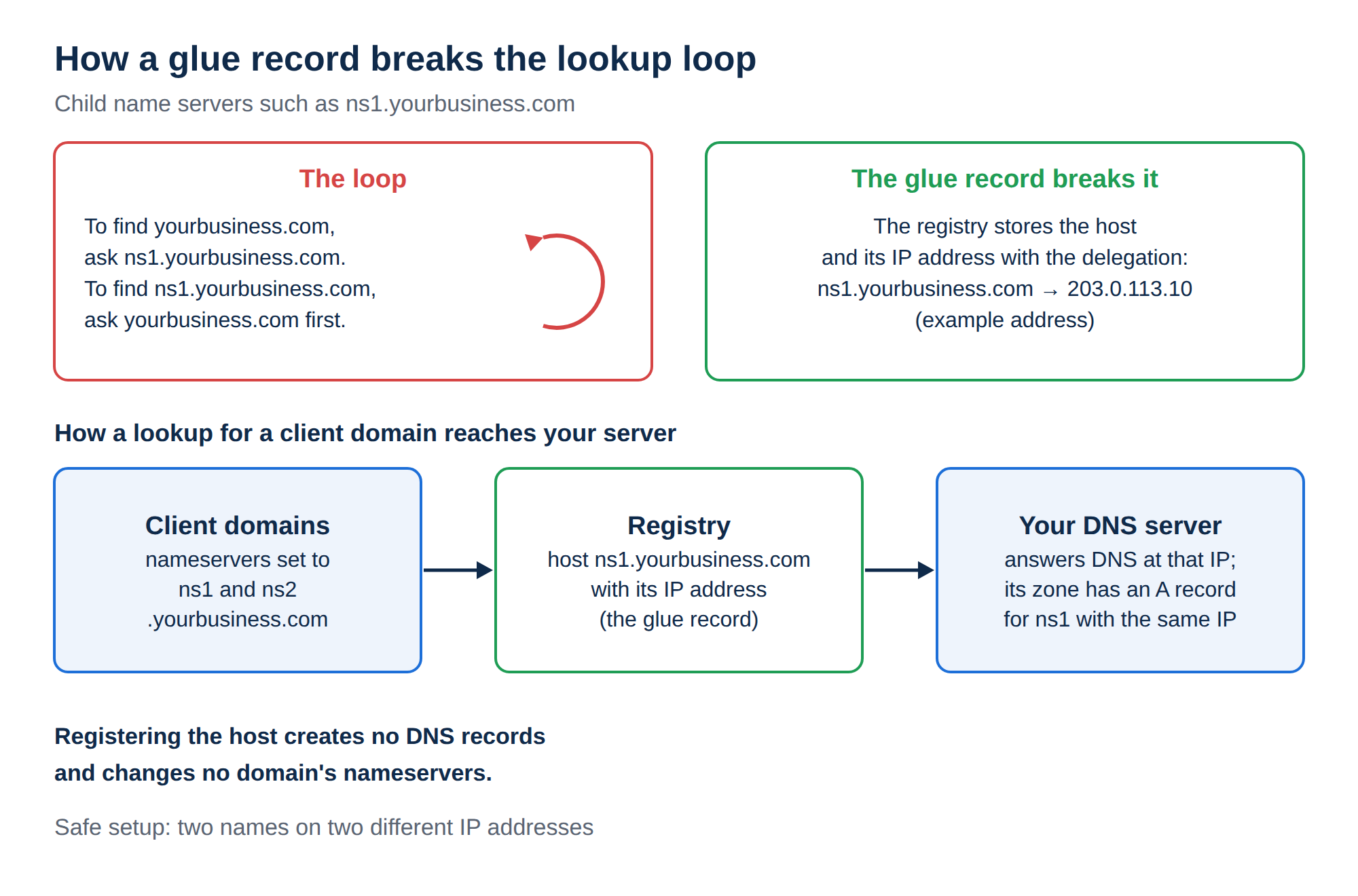
A child name server is different: its name is inside your own domain, which creates a loop. To find yourbusiness.com, a resolver is told to ask ns1.yourbusiness.com — but to find ns1.yourbusiness.com, it would have to ask yourbusiness.com first.
The registry breaks the loop by storing the IP address of the host alongside the delegation. That stored address is the glue record. Registering a child name server means creating that host, with its IP address, at the registry for your extension.
Only the owner of a domain can register child name servers under it: the owner of yourbusiness.com can create ns1.yourbusiness.com, and nobody else can.
2. Who needs one (and who does not)
If your website and email are on a Domain India hosting plan, use the nameservers shown on your hosting service page. They already work, they are maintained for you, and child name servers add nothing. See How do I change my nameservers.
- You run your own DNS server on a VPS or dedicated server and want it to answer as ns1.yourbusiness.com
- You resell hosting and want clients to see your brand in the nameservers instead of your provider's
- You want to keep the same nameserver names if you change provider later, by repointing the glue records
- You have one website on shared hosting
- You use your hosting provider's or a DNS provider's nameservers
- You only want to change where your website or email points, which is a DNS record change, not a nameserver change
3. What you need before you start
- A DNS server that answers for your domains.Usually your own VPS or dedicated server running DNS software, or a reseller account whose server handles DNS. A glue record pointing at a machine that does not answer DNS queries simply breaks the domain.
- The IP addresses of that server.For your own VPS, the server's public IPv4 address. If you resell hosting with Domain India, ask support which IP addresses to use.
- The domain that will carry the names, registered and active. Most people put ns1 and ns2 under one brand domain.
- At least two names.ns1 and ns2 are the usual pair. Where you have two separate server IP addresses, use one for each.
4. Register a child name server in the client area
For domains registered with Domain India, the Nameservers tab has a collapsible Custom nameservers (glue records) section, marked Advanced.
- Sign into the client area and open Domains → My domains.
- Select the domainwhose name you want to use, for example
yourbusiness.com. - Open the Nameservers taband expand Custom nameservers (glue records) at the bottom. It lists the hosts already registered under this domain, or "No custom nameservers configured".
- Click Add.The hostname field is pre-filled with
ns1.and your domain. Edit it if you want a different name; it must end with your own domain name. - Enter the IP addressof the server that will answer DNS for it, in the IP address (your VPS/server IP) field.
- Click Add.The client area confirms "Child nameserver added" and the host appears in the list. Repeat for
ns2.yourbusiness.com.
Two things to know: the section appears only for domains where the request can be sent to the registry from your account, so if you do not see it, or the request is refused, open a support ticket with the hostnames and IP addresses. And it takes one IPv4 address per hostname: for an IPv6 address, or more than one address on the same host, ask support.
Creating the glue record at the registry does not create any DNS records. Inside the zone for yourbusiness.com on your DNS server, you also need an A record for ns1 pointing to the same IP address (and an AAAA record if you use IPv6). If the two disagree, or the record is missing, lookups fail in ways that are hard to diagnose.
5. Then point domains at your new nameservers
Registering ns1.yourbusiness.com does not change any domain's nameservers by itself. It only creates the host. After that:
- Set the nameservers of each domain you want to serve to
ns1.yourbusiness.comandns2.yourbusiness.com. For a domain in the Domain India client area, that is the Edit button at the top of the same Nameservers tab. - Make sure a DNS zone for each of those domains exists on your server, with the right A, MX and TXT records.
- Allow up to 24-48 hours for the change to reach every network.
Check the result with a lookup rather than a browser:
dig A ns1.yourbusiness.com +short      # should return your server's IP address
dig NS clientdomain.com +short         # should return ns1/ns2.yourbusiness.com
dig A clientdomain.com @ns1.yourbusiness.com +short  # your server answers for the domain
On Windows, use nslookup ns1.yourbusiness.com and nslookup -type=ns clientdomain.com.
6. Changing or removing a child name server
The list in the client area shows each hostname with its IP address and a Remove button.
- To change the IP address, remove the entry and add it again with the new address. Do this only when the new server is ready: any domain using that nameserver stops resolving through it in the meantime.
- To remove a host, click the remove button and confirm. The client area warns that any domain delegated to it will stop resolving through it, so repoint those domains first and wait for the change to spread.
- The registry can refuse a removal while the host is still in use as a nameserver by another domain, including domains belonging to other people. Move those domains to different nameservers first.
7. Registry rules worth knowing
Rules differ between extensions, and the registry is the final authority. These points hold almost everywhere:
- The IP address must belong to a server that answers DNS queries. If nothing answers on port 53, the domain fails to resolve.
- Two nameservers on two different IP addresses are the safe setup. Two names on one machine look like redundancy without being it.
- The name must be inside the domain you own. You cannot register
ns1.someoneelse.com. - Some extensions apply their own limits, for example on how many addresses a host may have or whether IPv6 is accepted. If a request is refused, the registry's message explains why; send it to support if it is not clear.
- A host cannot be deleted while it is in use by any domain as a nameserver. This is the most common error people meet.
8. Where Domain India fits
Child name servers are registered at the registrar that holds the domain, so for a domain registered with Domain India you do it in the client area, on the domain's Nameservers tab. If the section is not available for your domain, open a ticket with the hostnames and IP addresses and support will register them at the registry. Support is available by 24/7 live chat and tickets, with a first response within 15 minutes; resolution can take longer. There is no phone support.
If you want your own nameservers because you run your own server, a VPS gives you full root access and a dedicated IPv4 address, from ₹553 a month (Domain India list price on 19 September 2026, excluding 18% GST). If you sell hosting under your own brand, Domain India's DirectAdmin reseller plans list private nameservers among their features, and support supplies the IP addresses to use.
- 1 vCPU
- 2 GB DDR4 RAM
- 64 GB NVMe SSD Storage
- 2 TB Monthly Bandwidth
Frequently asked questions
What is a child name server?
A nameserver whose name is inside your own domain, such as ns1.yourbusiness.com. Because a resolver cannot look it up without already knowing your domain, the registry stores its IP address in a glue record. Registering a child name server means creating that host and address at the registry.
Do I need child name servers for normal hosting?
No. If your website and email are on a hosting plan, use the nameservers your provider gives you. Child name servers are for people who run their own DNS server on a VPS or dedicated server, or who resell hosting under their own brand.
How do I register a child name server at Domain India?
Sign in to the client area, open Domains → My domains, select the domain, open the Nameservers tab and expand "Custom nameservers (glue records)". Click Add, enter the hostname (it must end with your own domain) and the IP address of your DNS server, then click Add. If the section is not available for your domain, open a support ticket and we will register it at the registry for you.
Does registering a child name server change my domain's nameservers?
No. It only creates the host at the registry. You still have to set each domain's nameservers to ns1 and ns2 of your domain, and create a DNS zone for each domain on your DNS server.
Why can I not delete my child name server?
Registries refuse to delete a host while it is still used as a nameserver by a domain, including domains owned by other people. Move those domains to different nameservers first, then delete the host.
Ready to set this up? Sign in to the client area to open your domain's Nameservers tab, read How do I change my nameservers for the delegation step, compare VPS plans, or open a support ticket with your hostnames and IP addresses.
Send us the nameserver hostnames and the IP addresses of your DNS server, and we will register them at the registry and confirm when they resolve.
Open a support ticket