Every registered domain has a public WHOIS record, and without privacy that record can show the owner's name, address, email and phone number to anyone who looks. How you keep those details private depends on the extension. On .in domains it is already done for you; on .com and most other extensions it is a paid add-on you switch on from the client area.
For .in and its second-level extensions (.co.in, .net.in, .org.in and others), personal registrant details are not shown in public WHOIS. This is free and automatic; there is nothing to switch on. For .com, .net, .org and most other extensions, WHOIS privacy is an optional add-on at ₹300 a year per domain (excluding 18% GST), which you enable from the domain's page in the client area. There is no self-service switch to turn it off; ask support.
1. What WHOIS privacy actually does
WHOIS (now also served through a newer protocol called RDAP) is the public directory of who holds a domain. Registrars must collect accurate contact details for every domain they register: a name, postal address, email and phone number. Without privacy, some or all of those details can appear in a public lookup, and people who collect them use them for spam, sales calls and phishing.
WHOIS privacy replaces your personal details in the public record with generic or proxy details, so a lookup shows that the domain is registered and managed, but not who you are or how to reach you directly.
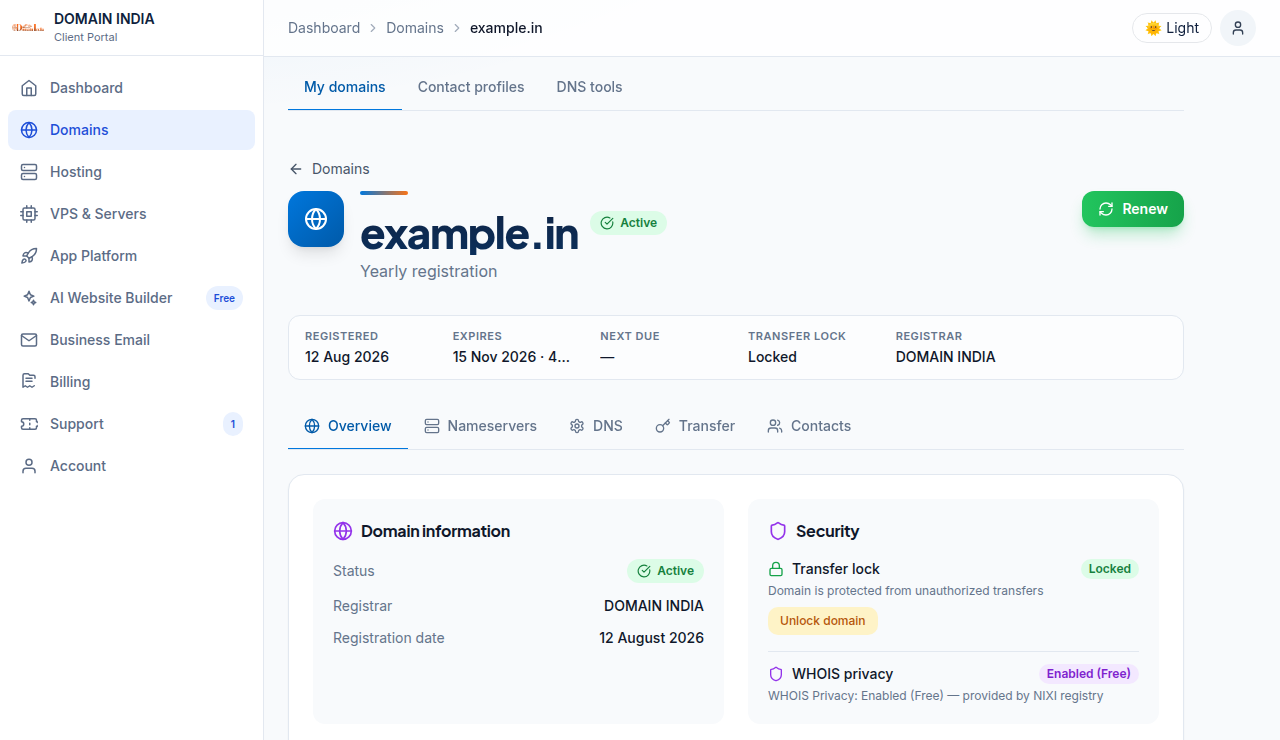
What privacy does not change:
- The domain name, registrar, creation and expiry dates, nameservers and status codes stay public on every extension.
- You must still give your registrar accurate contact details. Privacy hides them from the public; it does not let you register with false ones.
- Registrars and registries can still disclose registrant data when the law or a legitimate complaint requires it.
2. .in domains: free and automatic
For .in and its second-level extensions (.co.in, .net.in, .org.in and others), personal registrant details are not shown in public WHOIS. This is free and automatic; there is nothing to switch on.
The .IN registry applies this itself, so it covers every .in domain regardless of where it was registered, and it stays in place when a domain is renewed or transferred. You will not find a privacy product to buy for a .in domain, and you do not need one.
Personal details are hidden. If the domain is registered to a company or organisation, that organisation's name may still appear, and the public record always shows technical data such as the registrar, dates and nameservers. If you want to see exactly what the public sees, run your domain through the WHOIS lookup.
3. .com, .net, .org and other extensions: a paid add-on
On .com, .net, .org and most other global extensions, WHOIS privacy is not automatic. Domain India offers it as an optional add-on, bought per domain, per year.
| Extension | WHOIS privacy | Price |
|---|---|---|
| .in, .co.in, .net.in, .org.in and the rest of the .in family | Personal details hidden automatically by the registry | Free, nothing to buy |
| .com, .net, .org and most other extensions | Optional add-on, enabled per domain | ₹300 a year per domain |
The price is the Domain India list price on 19 September 2026 and excludes 18% GST. The add-on is bought after the domain is registered, from the domain's own page in the client area, not at checkout.
4. How to enable privacy on a .com or other extension
- Log in to the client areaand open your domains.
- Open the domainyou want to protect. Its page opens on the Overview tab.
- Find the Security card.It has two rows: Transfer lock and WHOIS privacy. The WHOIS privacy row shows the current status.
- Click "Enable privacy protection".The button appears when the status is "Not enabled" and privacy can be bought for that extension. It shows the yearly price.
- Pay the invoice.Clicking the button creates an invoice and takes you straight to the payment page.
- Check the status afterwards.Once the invoice is paid, the WHOIS privacy row should read "Enabled". If it still reads "Not enabled" after payment, open a ticket at /client/support/new with the domain name and invoice number so we can apply it.
If you do not see the button, either the domain already has privacy, the extension does not offer it, or the domain is still waiting for payment or registration. The status label tells you which (section 5).
5. What the status labels mean
The WHOIS privacy row on the domain's Overview tab shows one of four labels.
| Label | What it means | What to do |
|---|---|---|
| Enabled (Free) | Privacy is included at no cost | Nothing |
| Enabled | Privacy is active on this domain | Nothing; renew it with the domain if you want to keep it |
| Not enabled | Your contact details can appear in public WHOIS | Click "Enable privacy protection" if the button is shown |
| Not available | Privacy cannot be added to this domain | Ask support if you are unsure why |
6. How to disable privacy
There is no self-service switch in the client area to turn WHOIS privacy off. If you need it removed, open a ticket at /client/support/new (or /support/ticket if you are not logged in) with the domain name and the reason, and the support team will handle it.
You do not need to disable anything on a .in domain. The registry hides personal details on every .in record, and that cannot be switched off per domain.
7. Extensions with their own rules
Registries decide what their WHOIS records must show, and not every extension works like .com:
- Some registries hide personal data themselves, as the .IN registry does. On those extensions a paid privacy service adds little or nothing.
- Some registries do not allow privacy services at all, because their policy requires the registrant to be publicly identifiable. The United States extension, .us, is the best-known example.
- Some registries treat individuals and organisations differently, hiding a private person's details but publishing a company's.
If the WHOIS privacy row on your domain says "Not available", or you are about to register an extension and want to know how its WHOIS works, privacy options differ by extension; ask support before you buy.
8. Privacy when you transfer a domain
For a .in domain, a transfer does not change anything: the registry keeps personal details hidden before and after the move.
For a .com or other extension with paid privacy, the privacy service belongs to the registrar that provides it. If you are moving a domain away from Domain India, ask support whether privacy needs to come off first, so that the transfer's approval steps reach you. If you are moving a domain to us, the privacy you had at the old registrar does not come with it; enable it again here once the transfer completes. The transfer guide covers the rest of the process.
9. Keep the details behind the privacy accurate
Privacy only hides what is on file, so what is on file must be right. An out-of-date email address is the most common reason people miss renewal notices and verification requests. To check or change your registrant details, see how to change your domain's WHOIS information, and for the verification emails registries send, see verification of WHOIS details. For a deeper explanation of how the .in record looks, read the .IN WHOIS privacy guide.
10. Where Domain India fits
Domain India is a NIXI-accredited .IN registrar, so .in domains come to you directly from us, with personal details hidden in public WHOIS at no extra cost. A .in costs ₹575 to register and ₹625 a year to renew; a .co.in costs ₹475 and ₹525. A .com costs ₹1,150 a year, and WHOIS privacy on it is ₹300 a year more if you want it. These are Domain India list prices on 19 September 2026, excluding 18% GST.
If privacy matters to you and your customers are in India, a .in gives you both the local signal and hidden personal details without an add-on. If you also hold the .com, decide whether its record matters enough to pay for privacy; for a domain that only redirects to your main site, registering it with a business address and a business email may be enough.
Frequently asked questions
Do I need to buy WHOIS privacy for a .in domain?
No. For .in and its second-level extensions such as .co.in, .net.in and .org.in, personal registrant details are not shown in public WHOIS. This is free and automatic, and there is nothing to switch on or pay for.
How much does WHOIS privacy cost for a .com domain at Domain India?
₹300 a year per domain, excluding 18% GST, at Domain India list prices on 19 September 2026. It is an optional add-on that you enable from the domain's page in the client area after the domain is registered.
Where do I turn on WHOIS privacy for my .com domain?
Log in, open your domains, open the domain, and look at the Security card on the Overview tab. If the WHOIS privacy row says "Not enabled", click "Enable privacy protection", then pay the invoice that opens. The row should then read "Enabled".
How do I turn WHOIS privacy off?
There is no self-service switch for this in the client area. Open a support ticket with the domain name and the reason, and the support team will remove it. On .in domains the registry hides personal details for every domain, so there is nothing to turn off.
Will company details be hidden on a .in domain?
Personal details are hidden. If a .in domain is registered to a company or organisation, that organisation's name may still appear in public WHOIS, along with technical data such as the registrar, dates and nameservers.
I paid for privacy but the domain still says "Not enabled". What should I do?
Open a ticket from the client area with the domain name and the invoice number, so the support team can check the order and apply the privacy.
Can I use false contact details instead of buying privacy?
No. Registrars must hold accurate registrant details, and false details can lead to the domain being suspended or lost in a dispute. Privacy is the correct way to keep accurate details out of public view.
Ready to secure a name with privacy built in? Search for a .in or .com at domain registration, check what the public sees for any domain with the WHOIS lookup, or manage privacy on a domain you already hold from your domains. Our team is on live chat around the clock, or you can open a ticket.
Search .in and .com side by side and register for up to ten years from a NIXI-accredited .IN registrar.
Search for your domain