Email filters sort or stop mail automatically, so the messages you care about reach your inbox and the rest go somewhere else or nowhere. On DirectAdmin hosting you have two places to build them: SPAM Filters in the DirectAdmin panel, which blocks mail for a whole domain, and Filters in Roundcube webmail, which sorts mail for one mailbox. This guide shows when to use each, how to set them up, and how to fix a filter that doesn't behave.
To block a sender, a whole domain, a word or oversized mail for every address on a domain, use E-mail Manager › SPAM Filters in DirectAdmin, and choose whether matches are dropped or sent to the spam folder. To move, copy or delete mail for a single mailbox (for example, put every invoice from a supplier in its own folder), log in to Roundcube webmail and use Settings › Filters. Spam scoring is a third, separate tool: SpamAssassin Setup.
1. Three tools, three jobs
DirectAdmin gives you three ways to act on incoming mail. Picking the right one saves time.
| Tool | Where | Applies to | Best for |
|---|---|---|---|
| SPAM Filters | DirectAdmin › E-mail Manager | Every mailbox on the selected domain | Blocking a sender, a domain, a stop word, or messages above a size |
| Roundcube Filters | Webmail › Settings › Filters | One mailbox | Sorting mail into folders, copying, forwarding a copy, deleting |
| SpamAssassin Setup | DirectAdmin › E-mail Manager | Every mailbox on the domain | Scoring messages as spam and deciding where spam goes |
A simple rule: if you want something blocked for everyone, use SPAM Filters. If you want your own mail organised, use Roundcube Filters. If the problem is spam in general rather than one sender, tune SpamAssassin.
2. Log in to DirectAdmin
Open your hosting service from the client area and use the login button. If you need help, see how to log in to DirectAdmin. The email tools are in the E-mail Manager section of the menu.
We checked the labels below on our DirectAdmin server (DirectAdmin 1.710, Evolution skin) in September 2026. If your screen looks different, the tools are still in the email section; ask support if you can't find one.
3. Block a sender, domain, word or size with SPAM Filters
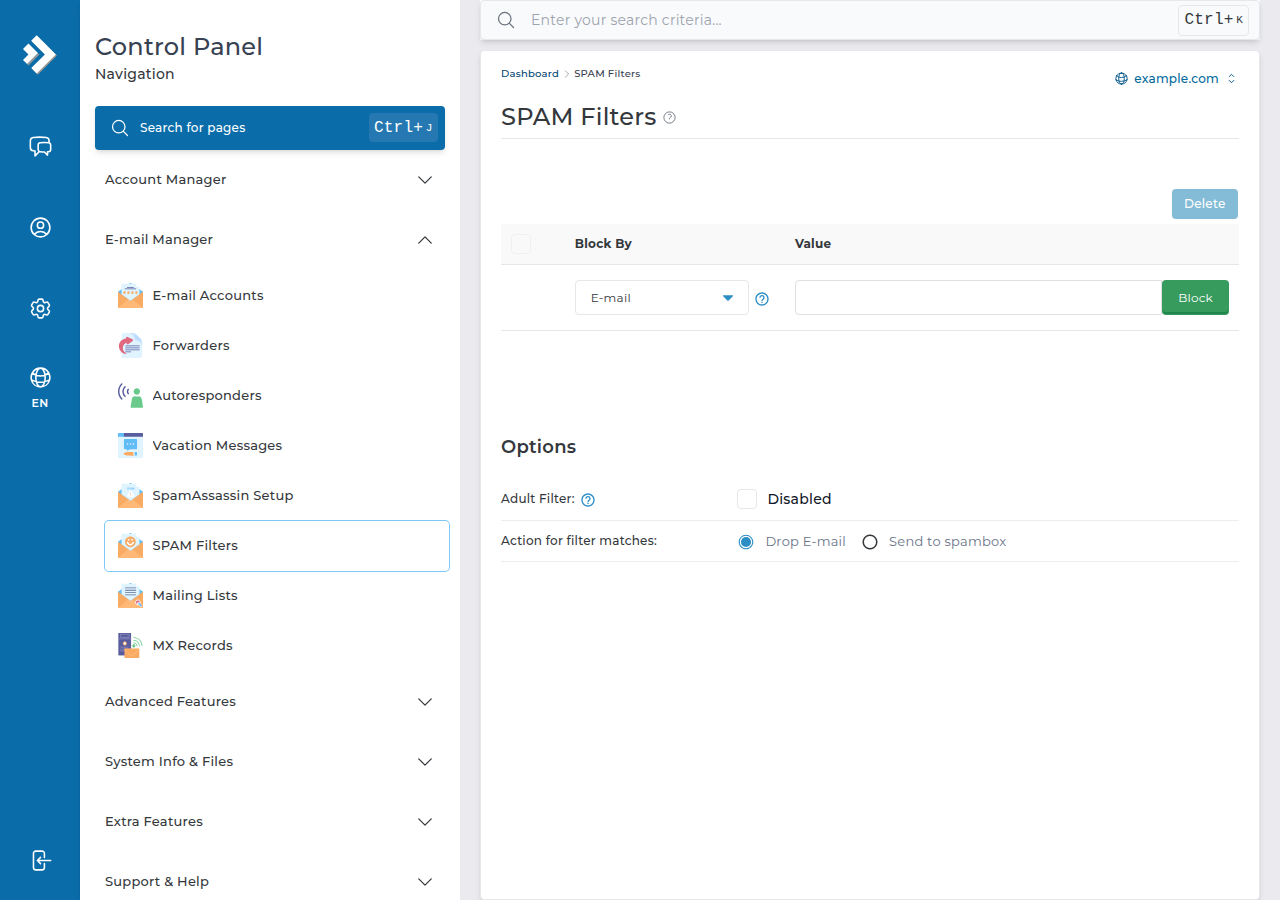
SPAM Filters has four kinds of rule and one choice about what happens to matching mail.
- Open SPAM Filters.In DirectAdmin, go to E-mail Manager › SPAM Filters. If you host more than one domain, make sure the right domain is selected.
- Choose what to block.Pick E-mail, Domain, Stop word or Size, and type the value.
- Add the rule.It appears in the list of filters for that domain.
- Set the action for filter matches.Choose Drop E-mail to delete matching messages on arrival, or Send to spambox to deliver them to the spam folder of the mailbox instead.
- Test it.Send a message that should match from another account, and check that it was dropped or landed in the spam folder.
To change a rule, delete it from the list and add the corrected one.
DirectAdmin's word filter matches partial words. Block "put" and a message containing "computer" is blocked too. To match a whole word only, add spaces on both sides: " put ". Start with Send to spambox rather than Drop E-mail until you are sure a rule catches only what you meant.
The same page also has an Adult Filter switch, which blocks common adult phrases, words and addresses. Check its setting for your domain on that page; on most domains it has never been switched on.
4. Sort mail for one mailbox with Roundcube Filters
Roundcube filters run on the mail server, so they work whether or not your computer or phone is on, and every device sees the same result. Rules made in Outlook or a phone app usually run only while that app is open, on that device.
- Open webmail.Go to
https://yourdomain.com/webmailorhttps://yourdomain.com/roundcubeand log in with the full email address and its password. See how to log in to webmail. - Open Settings › Filters.Roundcube creates a filter set for you the first time.
- Create a filter.Click the add (+) button and give the filter a clear name, such as "Supplier invoices".
- Add the rules.For example: From contains
[email protected], or Subject containsInvoice. Choose whether all rules or any rule must match. - Choose the action.Common actions are moving the message to a folder, copying it, redirecting it to another address, or deleting it. The list shown depends on the server.
- Save and test.Send yourself a matching message and check where it lands.
Filters run in order, top to bottom. If two filters could match the same message, put the more specific one first, and use the stop evaluating rules action where you don't want later filters to touch it.
Create the target folder in Roundcube before you set up a "move to folder" rule. Your email app shows the same folders if it uses IMAP.
If you simply want every message to an address sent on somewhere else, use a forwarder instead of a filter. See how to set up email forwarders in DirectAdmin. For out-of-office replies, see autoresponders in DirectAdmin.
5. When a filter doesn't work
Filters only act on new mail. Messages already in your inbox are not moved when you create a rule.
If mail you expected never arrives at all, the sending server may have been refused before any filter ran. See troubleshooting incoming email for the general checks, then open a ticket with the sender's address and the time it was sent.
6. Spam scoring: SpamAssassin Setup
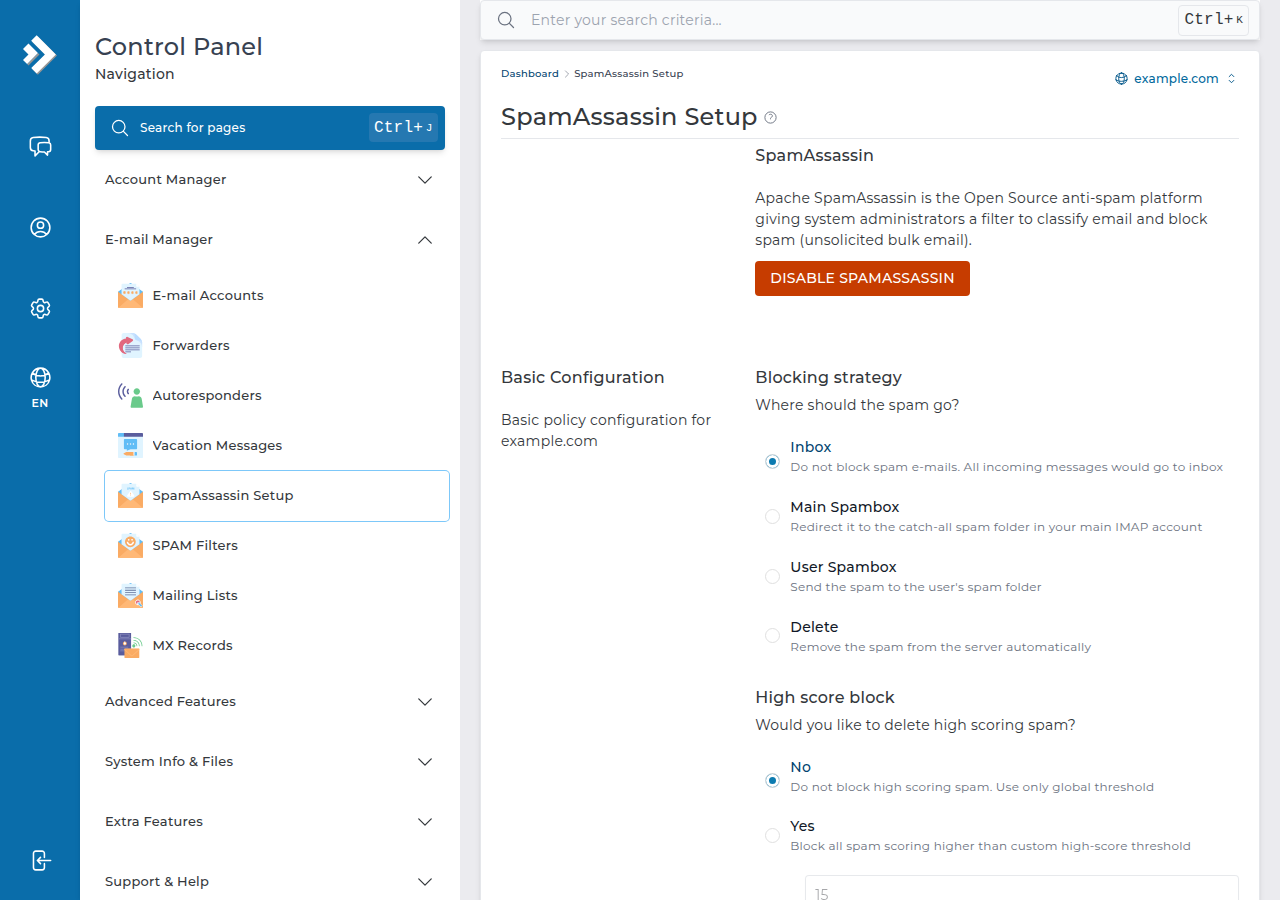
For spam in general, a filter per sender is a losing game. On our DirectAdmin server, SpamAssassin is already running and scores every message. In E-mail Manager › SpamAssassin Setup you choose the score threshold and where marked spam goes: the inbox, the user's spam folder, or removal from the server. By default marked spam is still delivered to the inbox, so many people switch it to the spam folder. The page also has lists of addresses that are always or never treated as spam.
For the details, see Easy Spam Fighter and SpamAssassin in DirectAdmin and SpamAssassin and the Spam Box.
7. Where Domain India fits
Every Domain India DirectAdmin plan includes email on your own domain with Roundcube webmail, SpamAssassin, SPAM Filters and Roundcube Filters, and there is nothing extra to install. Plans are compared on the DirectAdmin hosting page. The card below shows a live list price, which excludes 18% GST.
- 10 GB NVMe SSD Storage
- 50 GB Monthly Bandwidth
- 1 Website
- 5 Email Accounts
If you use Domain India Business Email rather than the email included with hosting, it runs on a separate platform with its own webmail at https://mail.yourdomain.com:8443/, and this guide doesn't apply to it. If you're on cPanel, the equivalent tools are in cPanel's Email section.
How do I block an email address in DirectAdmin?
Log in to DirectAdmin, open E-mail Manager › SPAM Filters, choose E-mail, type the address and add it. Then set the action for filter matches to Drop E-mail or Send to spambox. The rule applies to every mailbox on that domain.
Can I block a whole domain from emailing me?
Yes. In E-mail Manager › SPAM Filters, choose Domain and enter the domain name, for example example.com. All mail from that domain is then dropped or sent to the spam folder, depending on the action you chose.
Why is my DirectAdmin word filter blocking genuine emails?
The stop-word filter matches parts of words, so blocking "put" also blocks "computer". Put spaces on both sides of the word to match it on its own, and use Send to spambox until you are sure the rule is right.
How do I move emails to a folder automatically?
Log in to Roundcube webmail, open Settings › Filters, create a filter with a rule such as From contains a given address, and choose the action to move the message to a folder. Create the folder first. The filter runs on the server for that mailbox only.
Do filters apply to emails already in my inbox?
No. SPAM Filters and Roundcube Filters act on new mail as it arrives. Existing messages stay where they are, so move them by hand or with a search in webmail.
What is the difference between SPAM Filters and SpamAssassin Setup?
SPAM Filters blocks mail you name exactly: an address, a domain, a word or a size. SpamAssassin Setup scores every message for spam-like signs and decides what happens to mail above your threshold. Use both together.
Ready to take control of your inbox? Log in to DirectAdmin from your client area and open E-mail Manager, or compare plans on DirectAdmin hosting. If something doesn't work, open a ticket and include the address and a sample message.
DirectAdmin hosting with email on your own domain, Roundcube webmail, SpamAssassin and server-side filters.
See DirectAdmin plans