An email forwarder passes every message that arrives at one address on to one or more other addresses. It is how [email protected] can reach two people, or how an old address keeps working after a staff change. This guide shows how to create, change and remove a forwarder in DirectAdmin on Domain India hosting, and what happens to the original message.
It does not apply to Domain India Business Email, which runs on a separate platform with its own webmail at mail.yourdomain.com:8443. For cPanel, see how to create or delete an email forwarder, which also explains forwarding in more depth.
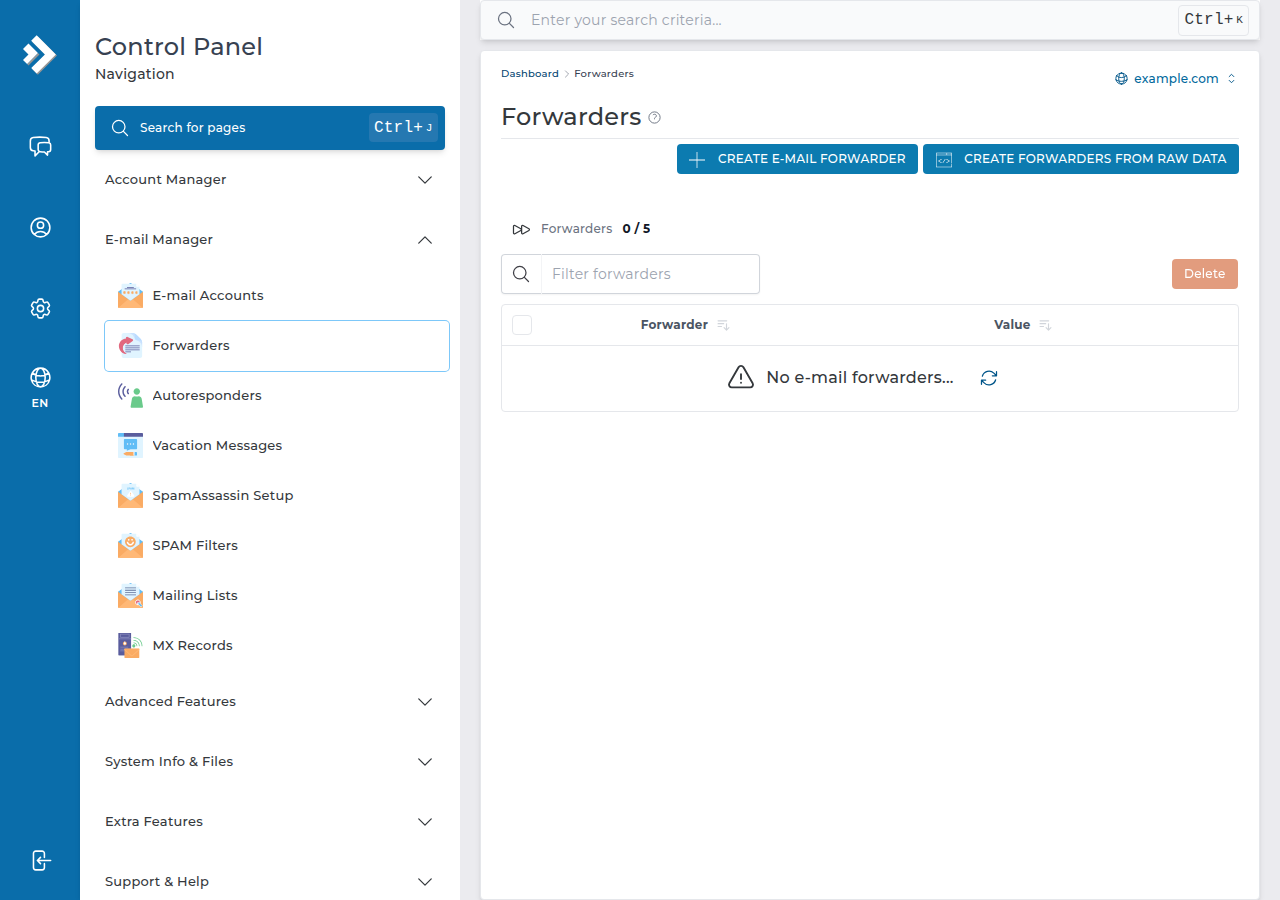
In DirectAdmin, open E-mail Manager › Forwarders, click CREATE E-MAIL FORWARDER, enter the Forwarder Name (the part before the @) and the Destination Email, then save. You can add several destinations to one forwarder. If the same address also has a mailbox, DirectAdmin keeps a copy in the mailbox and forwards another copy. To stop forwarding, remove the forwarder from the list.
1. Forwarder, mailbox or catch-all?
| You want | Use | What happens |
|---|---|---|
| One address that several people read | One forwarder with several destinations | Each destination gets its own copy |
| Mail to an old address to reach a new one | A forwarder, with no mailbox on the old address | Mail is passed on and nothing is stored |
| A copy on the server and another in your personal inbox | A mailbox plus a forwarder with the same name | Kept in the mailbox and copied out |
| Mail to addresses that do not exist to reach you | The Catch-All E-mail setting (some older plans only; current plans refuse unknown addresses) | Usually a bad idea: it collects spam |
For catch-all addresses, see email aliases and catch-all addresses.
2. Log in to DirectAdmin
The quickest way is from the client area: open My Hosting and click the DirectAdmin button on your domain's row, which signs you in. Your username, server IP and panel address are on the Access tab under Manage. For other ways in, see how to log in to your control panel.
3. Create a forwarder
- Open Forwarders.In DirectAdmin, find the E-mail Manager section and click Forwarders. If you cannot see it, type "forwarder" in the search box.
- Select the domain.If your account has more than one domain, check that the right one is selected at the top of the page.
- Click CREATE E-MAIL FORWARDER.
- Enter the Forwarder Name.
- Enter the Destination Email.Type the full address that should receive the mail. It can be on your own domain or outside, such as a Gmail address. Use Add Destination to add more addresses to the same forwarder.
- Save.The forwarder appears in the list and starts working straight away.
Test it by sending a message from an outside address that is not the one you are forwarding to. Gmail, for example, hides copies of messages you sent yourself, which makes a working forwarder look broken.
4. What happens to the original message
We checked the mail server configuration on our DirectAdmin server on 23 September 2026:
- If the address also has a mailbox, the message is delivered to that mailbox and a copy is forwarded. Nobody reads the stored copy, so the mailbox slowly fills. When it reaches its quota, new mail can bounce. Empty it now and then, or give it a sensible quota. See how to check email storage.
- If the address has no mailbox, the forwarder is all there is. Nothing is stored on the server, so there is nothing to fill up.
For an address that only exists to pass mail on, create the forwarder without creating a mailbox.
5. Change or remove a forwarder
- Open E-mail Manager › Forwarders.
- Click the forwarderyou want to change.
- Change the destinations.Add a new destination or remove one you no longer need, then save.
- Or remove it.Select the forwarder and choose Remove Forwarder, then confirm. Mail to that address stops being copied immediately.
After you remove a forwarder, think about what the address does now. If it has no mailbox, mail to it bounces back to the sender, or goes to your catch-all address if you have set one.
6. Forwarding to Gmail and other free mailboxes
Forwarding to Gmail, Outlook.com or Yahoo is where most "my forwarder stopped working" problems come from. The receiving service checks whether our server is allowed to send mail for the original sender's domain.
On our DirectAdmin server, the Sender Rewriting Scheme (SRS) is configured for forwarded mail (measured 23 September 2026). It rewrites the envelope sender so that the receiving server checks SPF against your domain rather than the original sender's. That helps, but the receiving service still judges the content.
A forwarder copies everything, including the spam your address receives. When Gmail sees a stream of spam arriving from our server, it can start filtering or refusing that mail. If an address gets a lot of junk, read it where it lives instead of forwarding it.
More reliable ways to read your hosting mail on a phone or in Gmail:
- Add the mailbox to your mail app over IMAP. The mail stays on the server and nothing is forwarded. Settings are in how to log in to webmail.
- Use webmail. On DirectAdmin, open
https://yourdomain.com/webmailorhttps://yourdomain.com/roundcube.
For how SPF, DKIM and DMARC fit together, see SPF, DKIM and DMARC.
7. Advanced: pipe to a program
DirectAdmin can also pass incoming mail to a script in your account instead of an address, for example a helpdesk that turns emails into tickets. This is the Pipe option. The script must be executable, and PHP scripts are subject to the same disabled PHP functions as the rest of your account, so test it before you rely on it. If you are unsure, ask support.
8. Where Domain India fits
Every Domain India DirectAdmin plan includes email accounts on your own domain, with forwarders and webmail managed in the same panel as your website.
- 10 GB NVMe SSD Storage
- 50 GB Monthly Bandwidth
- 1 Website
- 5 Email Accounts
Plan cards show Domain India list prices on 19 September 2026, excluding 18% GST. If email matters more than the website, Business Email runs on its own platform and is priced per mailbox.
Frequently asked questions
Where are email forwarders in DirectAdmin?
In the E-mail Manager section, under Forwarders. Click CREATE E-MAIL FORWARDER to add one. If you cannot find it, type "forwarder" in the DirectAdmin search box.
Can one DirectAdmin forwarder send mail to several addresses?
Yes. When you create or edit the forwarder, add each destination address. Every destination receives its own copy.
Does a DirectAdmin forwarder keep a copy on the server?
Only if the same address also has a mailbox. Then the message is delivered to that mailbox and a copy is forwarded. If there is no mailbox, the message is only forwarded.
Why are my forwarded emails not reaching Gmail?
Gmail may filter or refuse forwarded mail, especially when the address receives spam. Check the Gmail spam folder, test from an outside address, and consider adding the mailbox to your phone's mail app over IMAP instead of forwarding.
How do I stop a forwarder?
Open E-mail Manager, then Forwarders, select the forwarder and choose Remove Forwarder. Forwarding stops at once.
Does this work for Domain India Business Email?
No. This guide is for the email included with DirectAdmin hosting. Business Email runs on a separate platform with its own webmail and settings.
Ready to set it up? Sign in to DirectAdmin from My Hosting, or compare DirectAdmin hosting plans. If forwarded mail keeps going missing, open a support ticket with the forwarding address, the destination, the sender and the time.
Mailboxes, forwarders and webmail are included with every Domain India DirectAdmin hosting plan.
See DirectAdmin plans