SpamAssassin is the spam filter built into the email that comes with Domain India hosting. It reads every incoming message, gives it a spam score, and marks the message as spam when the score is high enough. With Spam Box switched on, marked messages go to a separate Spam folder instead of your inbox. This guide shows where the settings are in cPanel, what each one does, and how to tune them without losing genuine mail.
It covers mailboxes on cPanel, DirectAdmin, Webuzo and Windows (Plesk) hosting. Domain India Business Email runs on a separate platform with its own filters and its webmail at mail.yourdomain.com:8443. Not sure which you have? See Business Email vs the email included with your hosting.
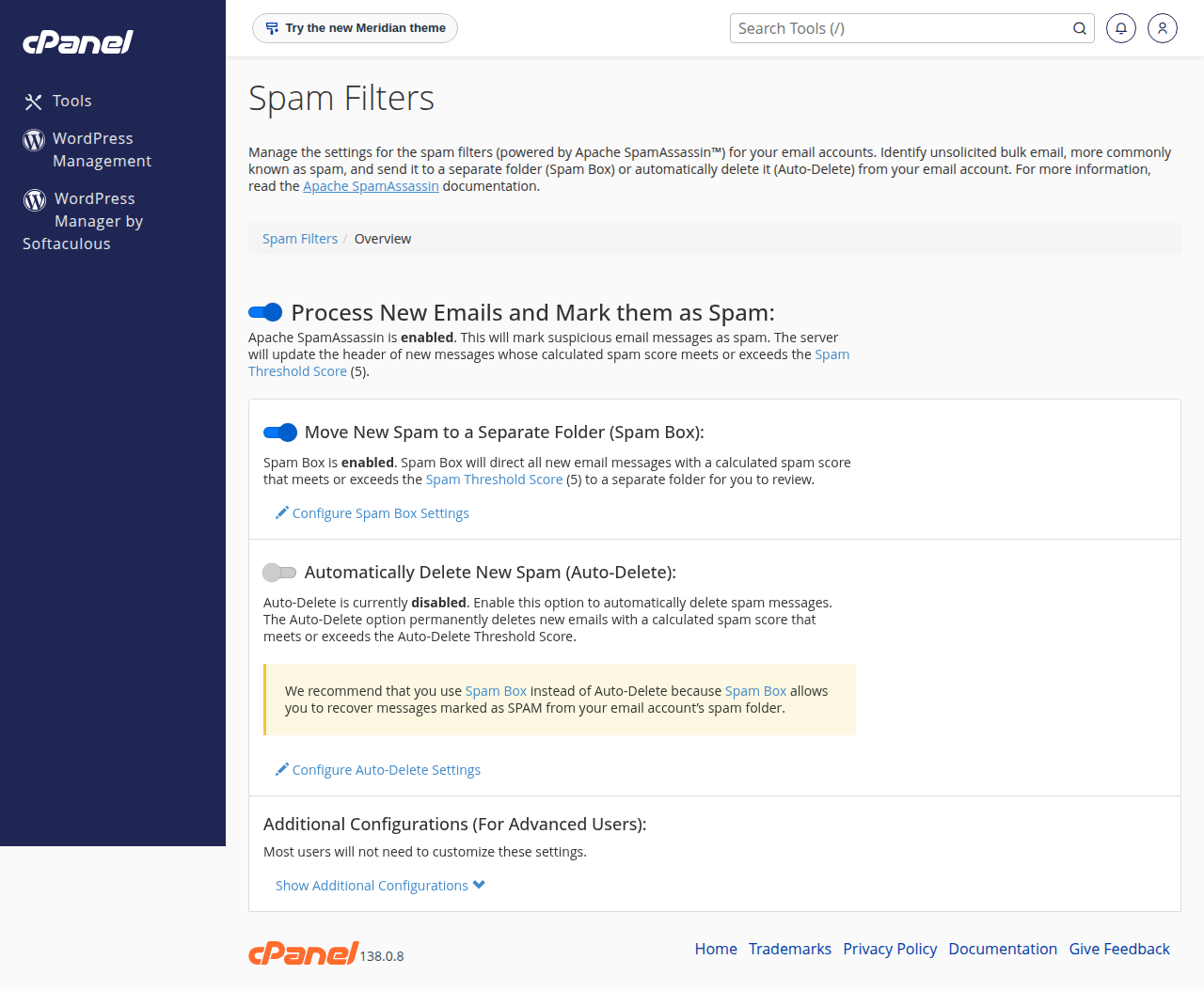
In cPanel, open Email › Spam Filters. On our cPanel server, spam filtering and Spam Box are already switched on for almost every account, and most accounts use the default Spam Threshold Score of 5. Raise the score if genuine mail is being marked as spam; lower it if too much spam reaches the inbox. Check the Spam folder in webmail regularly, and be careful with Auto-Delete: it deletes messages without keeping a copy.
1. How SpamAssassin decides what is spam
SpamAssassin runs hundreds of tests on each message: its headers, its content, the links in it, and whether the sending server looks trustworthy. Each test that matches adds points; some tests subtract points. The total is the message's spam score.
If the score reaches your Spam Threshold Score, the message is labelled as spam. Labelling adds spam headers to the message, which filters can act on. On our cPanel server the subject line is not changed. What happens next depends on your other settings: the message can stay in the inbox marked as spam, go to the Spam folder, or be deleted.
2. What is switched on already
We checked our cPanel server on 23 September 2026:
- SpamAssassin is running, and spam filtering is switched on for 918 of 939 cPanel accounts with mail.
- Spam Box is switched on for the same accounts, so marked spam goes to a Spam folder.
- Most accounts use a threshold of 5, the cPanel default.
- BoxTrapper, a cPanel challenge-response tool, is switched off on our servers and is not available.
So for most customers there is nothing to enable. The useful work is checking the Spam folder and tuning the score.
On our DirectAdmin server, SpamAssassin is also running, together with DirectAdmin's own spam-fighting add-on. The menu names there differ from cPanel; look in the email section of the panel or ask support. For Webuzo and Windows (Plesk), ask support what spam filtering your account has.
3. Open Spam Filters in cPanel
- Log in to cPanel.From the client area, open your hosting service and use the login button, or see how to log in to cPanel.
- Open Spam Filters.It is in the Email section.
- Check the first switch."Process New Emails and Mark them as Spam" must be on for any filtering to happen.
- Review the settings below it.Spam Box, Auto-Delete, and Show Additional Configurations for the score, whitelist and blacklist.
The settings on this page apply to every mailbox on the cPanel account. You do not need to set them up for each address.
4. The Spam Threshold Score
The threshold decides how strict the filter is. A lower number is stricter and marks more messages as spam; a higher number is more relaxed.
| Score | Effect | When to use it |
|---|---|---|
| 3 | Strict. Catches more spam, but more genuine mail is marked too | You get a lot of spam and check the Spam folder often |
| 5 | The cPanel default and a good balance | Most businesses |
| 8 to 10 | Relaxed. Marks only obvious spam | Genuine customer mail keeps landing in Spam |
Change it in small steps, one point at a time, and watch the Spam folder for a few days after each change. The old advice that a score of 10 marks nothing as spam is not correct: at 10, obvious spam is still caught.
To change it, click Show Additional Configurations, choose the option to configure the spam threshold score, enter the new value and click Update Scoring Options.
5. Spam Box: send spam to its own folder
With Spam Box on, every message labelled as spam is delivered to a folder called Spam in that mailbox instead of the inbox. Nothing is deleted, so a genuine message caught by mistake is still there.
- In webmail, the Spam folder appears in the folder list. See how to log in to webmail.
- On phones and in Outlook over IMAP, the folder may be hidden until you subscribe to it or refresh the folder list.
- Over POP3, only the inbox is downloaded. Spam in the Spam folder is never downloaded to your computer, so check it in webmail.
The Spam folder uses your mailbox storage. Spam Filters has buttons to empty the Spam Box folder for one address or for all of them; use them now and then, after checking there is nothing you need.
6. Auto-Delete: use with care
Auto-Delete permanently deletes incoming messages whose score reaches the Auto-Delete Threshold Score. There is no copy in the Spam folder and no warning to you or the sender.
The Auto-Delete score cannot be lower than your Spam Threshold Score. If you set them equal, for example both at 5, every message labelled as spam is deleted, including genuine messages marked by mistake. On 23 September 2026, 64 domains on our cPanel server had Auto-Delete set at 5. If customers tell you their mail never arrived, check this setting first.
If you use Auto-Delete, set it well above the threshold, for example 10 or higher, so only obvious spam is deleted and borderline messages still reach the Spam folder.
7. Whitelist and blacklist
Under Show Additional Configurations:
- Whitelist lists senders that should never be marked as spam, such as a supplier whose mail keeps getting caught. You can use
*and?as wildcards, for example*@supplier.com. - Blacklist lists senders that should always be marked as spam.
Do not whitelist your own domain. Spammers often forge your own address as the sender, and a whitelist entry for *@yourdomain.com lets their mail straight through.
The same area has Calculated Spam Scores, where you can change the points for individual SpamAssassin tests. Most people never need it; setting a test's score to 0 turns that test off.
8. More control with email filters
Spam Filters work on the score. For rules based on the sender, subject or other headers, use Email › Email Filters (for one address) or Global Email Filters (for the whole account). A filter can move a message to a folder, forward it, or discard it. Filters that discard mail are a common cause of missing messages, so review them if mail goes missing; see emails suddenly disappearing.
9. When your own mail lands in someone else's spam
SpamAssassin only filters mail coming into your mailboxes. If mail you send lands in your customers' spam folders, the fix is on the sending side: correct SPF, DKIM and DMARC records for your domain. See SPF, DKIM and DMARC and email going to spam: how to fix.
10. Where Domain India hosting fits
SpamAssassin comes with the email on Domain India cPanel and DirectAdmin hosting, managed in the same control panel as your website.
- 25 GB NVMe SSD Storage
- 50 GB Monthly Bandwidth
- 1 Website
- 10 Email Accounts
If you prefer mail on its own platform, separate from your website, Business Email is priced per mailbox and includes its own mail filters and rules.
- Priced per mailbox - start with one
- Email at your own domain ([email protected])
- Add and remove mailboxes yourself
- Webmail with calendar, contacts and tasks
Plan cards show Domain India list prices on 19 September 2026, excluding 18% GST.
Frequently asked questions
How do I enable SpamAssassin in cPanel?
Log in to cPanel, open Email, then Spam Filters, and switch on Process New Emails and Mark them as Spam. On Domain India cPanel hosting it is already switched on for almost every account, so usually you only need to check the settings.
What spam score should I use?
Start with 5, the cPanel default. If genuine mail keeps being marked as spam, raise it one point at a time. If too much spam reaches your inbox, lower it one point at a time. Watch the Spam folder for a few days after each change.
Where does mail marked as spam go?
With Spam Box switched on, it goes to a folder called Spam in the same mailbox. Open it in webmail, or subscribe to it in your mail app. Mail downloaded over POP3 only includes the inbox, so check the Spam folder in webmail.
Is it safe to use Auto-Delete?
Only with a high score. Auto-Delete removes messages permanently with no copy. If its score equals your Spam Threshold Score, every message marked as spam is deleted, including genuine mail marked by mistake. Set it to 10 or higher, or leave it off.
How do I stop a supplier's emails going to spam?
Add their address, or their domain with a wildcard such as *@supplier.com, to the whitelist under Show Additional Configurations in Spam Filters. Do not whitelist your own domain, because spammers often forge it.
Do the spam settings apply to all my email addresses?
Yes. In cPanel, the Spam Filters settings apply to every mailbox on the hosting account, so you set them once.
Is BoxTrapper available on Domain India hosting?
No. BoxTrapper is switched off on our cPanel servers. Use Spam Filters, the whitelist and email filters instead.
Ready to tune your filter? Log in to cPanel from your hosting services and open Email › Spam Filters, and read how to log in to webmail to check your Spam folder. If genuine mail keeps disappearing, open a ticket in the client area or use the public ticket form.
Tell us the mailbox, the sender and the time of a message that did not arrive, and we will trace it on the server.
Open a support ticket