To create an email ID at your own domain on Domain India hosting, open your control panel's email accounts page, enter the part before the @, set a password and a mailbox quota, and click Create. You can then read that mailbox in your browser through webmail, using the full email address as the username. This short guide covers DirectAdmin first, since that is where this article started, then points you to the full guides for every panel.
In DirectAdmin, go to E-mail Manager › E-mail Accounts, click CREATE ACCOUNT, enter the username, password and quota, and click CREATE ACCOUNT on the form. Then open https://yourdomain.com/webmail (or /roundcube) and log in with the full email address and the mailbox password. On cPanel the page is Email › Email Accounts; on Webuzo it is Email › Email Account. Mail only arrives once your domain's MX record points to your hosting server.
This article is a quick answer. For every panel, plus Business Email, DNS records and troubleshooting, read how to create email accounts for your domain and how to log in to webmail.
1. Create an email ID in DirectAdmin
First log in to DirectAdmin from your Domain India client area: open your hosting service at /client/services/hosting and use the control panel login there. See logging in to DirectAdmin if you need help.
- Open E-mail Accounts.In DirectAdmin, go to E-mail Manager and click E-mail Accounts.
- Click CREATE ACCOUNT.The form that opens is titled Create Mail Account.
- Enter the username.Type the part before the @, for example
info. - Set a password.The form has one Password field; use a long, unique password.
- Set the quota.Enter the mailbox size in MB. An optional send limit caps how many emails the account can send per day.
- Create the account.Click CREATE ACCOUNT. The address is ready to use.
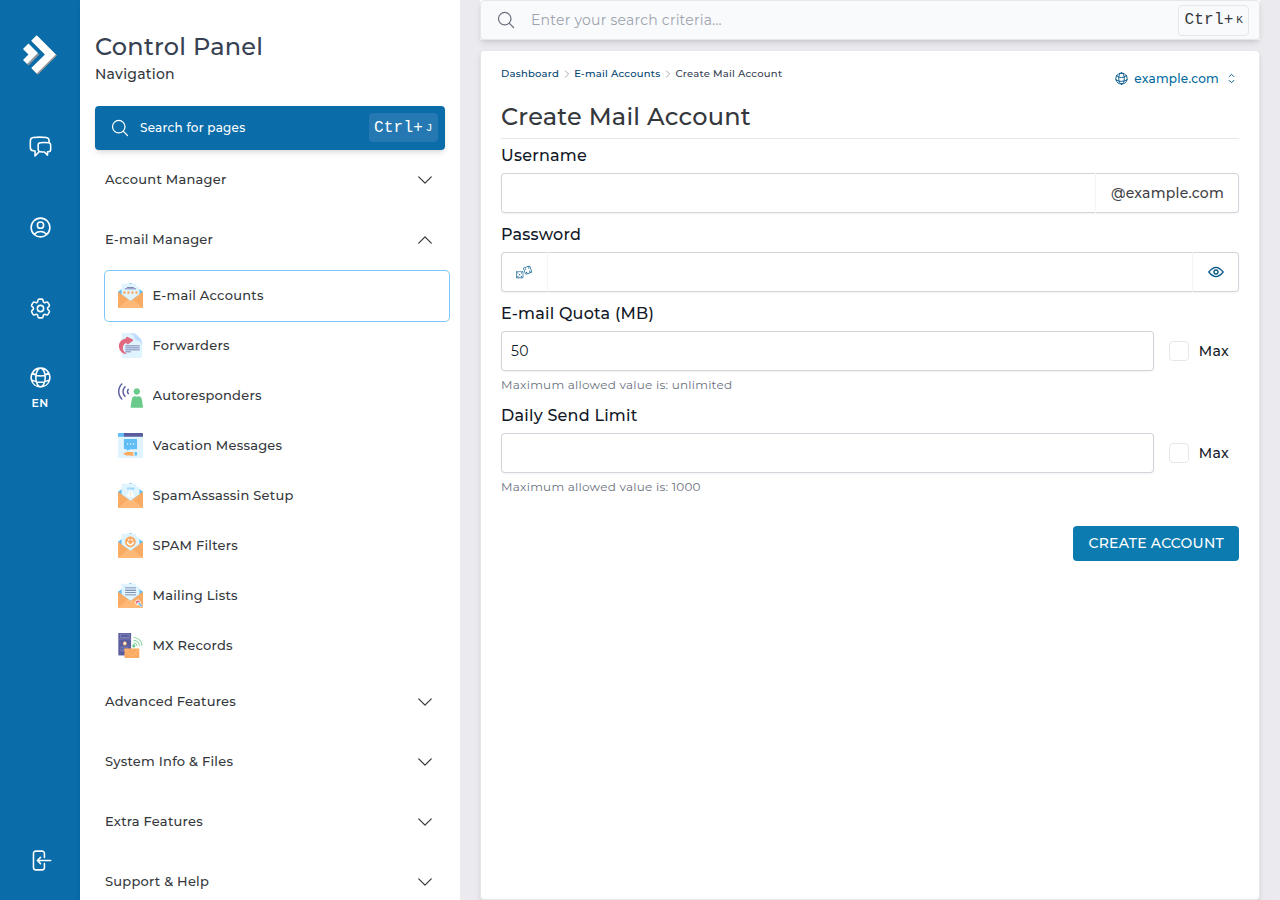
To change the password or quota later, click Modify next to the account on the same page.
On cPanel or Webuzo instead
- cPanel: Email › Email Accounts › + Create, then enter the username, password and storage, and click + Create.
- Webuzo: Email › Email Account, click Create, then add an account with the username, domain, password and quota.
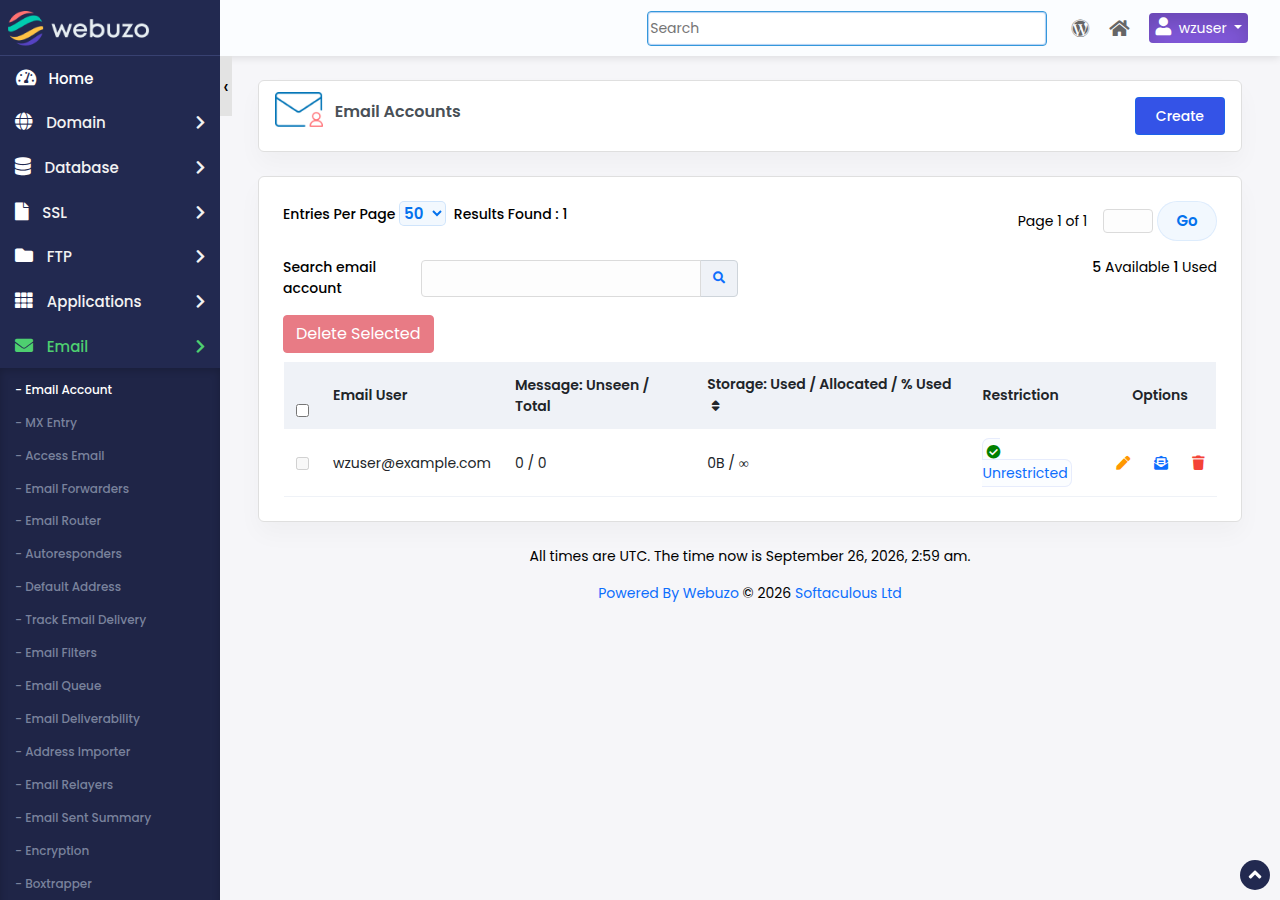
Every hosting mailbox shares your plan's disk space with your website, so set a sensible quota rather than Unlimited.
2. Open webmail
Webmail lets you read and send mail from any browser. Use the address for your panel, with your own domain in place of yourdomain.com:
| Hosting panel | Webmail address |
|---|---|
| DirectAdmin | https://yourdomain.com/webmail or https://yourdomain.com/roundcube |
| cPanel | https://yourdomain.com/webmail, https://webmail.yourdomain.com or https://yourdomain.com:2096 |
| Webuzo | https://yourdomain.com/webmail |
| Business Email | https://mail.yourdomain.com:8443/ |
There is no webmail.yourdomain.com address on DirectAdmin or Webuzo hosting; use the paths above. Log in with the full email address (such as [email protected]) and the mailbox password, not your client area or control panel password.
3. Everyday webmail options
DirectAdmin webmail is Roundcube. Once you are in:
- Compose and send: click Compose, add recipients, a subject and attachments, then Send.
- Folders: create, rename or delete folders under Settings › Folders.
- Contacts: save addresses in Contacts for quick access when you compose.
- Signature: add one under Settings › Identities.
Auto-replies and mail filters are set up in DirectAdmin itself: see autoresponders in DirectAdmin and managing email filters in DirectAdmin. To change a mailbox password, use E-mail Accounts › Modify in DirectAdmin. The Roundcube features guide covers the rest.
Mail goes to whichever server your domain's MX record points to. If your domain still points somewhere else, new mail goes there. The simplest fix is to point the domain at your hosting nameservers: see how do I change my nameservers.
4. Sending limits
Each hosting account has an outgoing limit that protects the shared server's reputation: 1,000 messages per day per account (200 per mailbox by default) on DirectAdmin and 200 messages per hour per account on cPanel. Everyday business mail stays well inside these limits. For newsletters, use a dedicated email delivery service.
Frequently asked questions
How do I create an email ID in DirectAdmin?
Log in to DirectAdmin, go to E-mail Manager › E-mail Accounts, click CREATE ACCOUNT, enter the part before the @, a strong password and a quota in MB, and click CREATE ACCOUNT on the form. The address works immediately.
What is the webmail address on Domain India DirectAdmin hosting?
Use https://yourdomain.com/webmail or https://yourdomain.com/roundcube, with your own domain. Both open Roundcube. There is no webmail.yourdomain.com address on DirectAdmin hosting.
What username and password do I use for webmail?
The full email address, such as [email protected], and that mailbox's own password. Your client area and control panel passwords do not work in webmail.
I forgot my email password. How do I reset it?
Log in to your control panel, open the email accounts page and set a new password for the mailbox. In DirectAdmin, click Modify next to the account.
Can I read this mailbox on my phone?
Yes. Add the account to your phone's mail app using IMAP, so the same mail shows on your phone, computer and in webmail.
Ready to set up your mailboxes? Log in to your control panel from the client area and create your first address, or read the full email accounts guide. If you get stuck, open a support ticket with your domain name.
Want email that runs separately from your website? Business Email gives you mailboxes with webmail, calendar and contacts, priced per mailbox and starting from one.
See Business Email