DirectAdmin can filter spam in two layers: Easy Spam Fighter, which checks each message while it is being delivered, and a content filter, either SpamAssassin or Rspamd, which scores the message itself. This guide explains what each layer does, what is already running on Domain India DirectAdmin hosting, and what you can tune in your own account. It ends with notes for people who run their own DirectAdmin server.
On Domain India DirectAdmin hosting, Easy Spam Fighter and SpamAssassin are already on, server-wide, and there is nothing to install. Rspamd is not used on our DirectAdmin server. What you control is your account's SpamAssassin settings: the score threshold (5.0 by default) and where spam goes. By default, marked spam is still delivered to the inbox, so switch it to a spam folder if you want it out of the way. Installing Rspamd needs root, so it only applies to your own DirectAdmin server.
1. What each layer does
| Layer | When it runs | What it checks | Who controls it |
|---|---|---|---|
| Easy Spam Fighter | While the sending server is still connected | SPF, DKIM, reverse DNS of the sending server, DNS blocklists | The server administrator |
| SpamAssassin | After the message is accepted | Hundreds of tests on headers, content and links, adding up to a score | You, in your account's spam settings |
| Rspamd | After the message is accepted (an alternative to SpamAssassin) | Similar scoring, with a web interface and learning features | The server administrator |
Easy Spam Fighter is a set of Exim rules shipped with DirectAdmin. Each check adds or subtracts points: a passing SPF or DKIM check lowers the score, a failing one or a sender on a blocklist raises it. When the total is too high, the server refuses the message during delivery, and the sender gets a bounce instead of your inbox getting spam. Because it runs before the message is accepted, it stops a large share of junk cheaply.
SpamAssassin then scores what was accepted. If the score reaches your threshold, the message is marked as spam with extra headers, and your settings decide what happens next.
2. What is on Domain India DirectAdmin hosting
We checked our DirectAdmin server read-only on 23 September 2026:
So you do not need to "turn on" Easy Spam Fighter or install anything. The useful work is tuning SpamAssassin for your mailboxes and checking what was marked.
3. Tune SpamAssassin in your DirectAdmin account
- Log in to DirectAdmin.From the client area, open your hosting service and use the login button, or see how to log in to DirectAdmin.
- Open the SpamAssassin settings.Go to E-mail Manager › SpamAssassin Setup. If you host more than one domain, pick the domain with the selector at the top right of the page.
- Choose where spam goes.Under Blocking strategy the default is Inbox, which leaves marked spam in the inbox. Choose User Spambox to send it to each mailbox's own spam folder instead.
- Set the threshold.5.0 is the default and a good balance. Lower it (for example to 4) to catch more spam; raise it (6 to 8) if genuine mail is being marked.
- Add trusted senders.Put addresses or domains you always want to receive in the whitelist, and persistent spammers in the blacklist.
- Save, then watch the spam folderfor a few days before changing anything else.
On our DirectAdmin server the spam folder is created as spam inside your mailbox. In webmail it appears in the folder list; see how to log in to webmail. In Outlook or a phone app over IMAP, you may need to subscribe to the folder before it shows. Over POP3 only the inbox downloads, so check the spam folder in webmail.
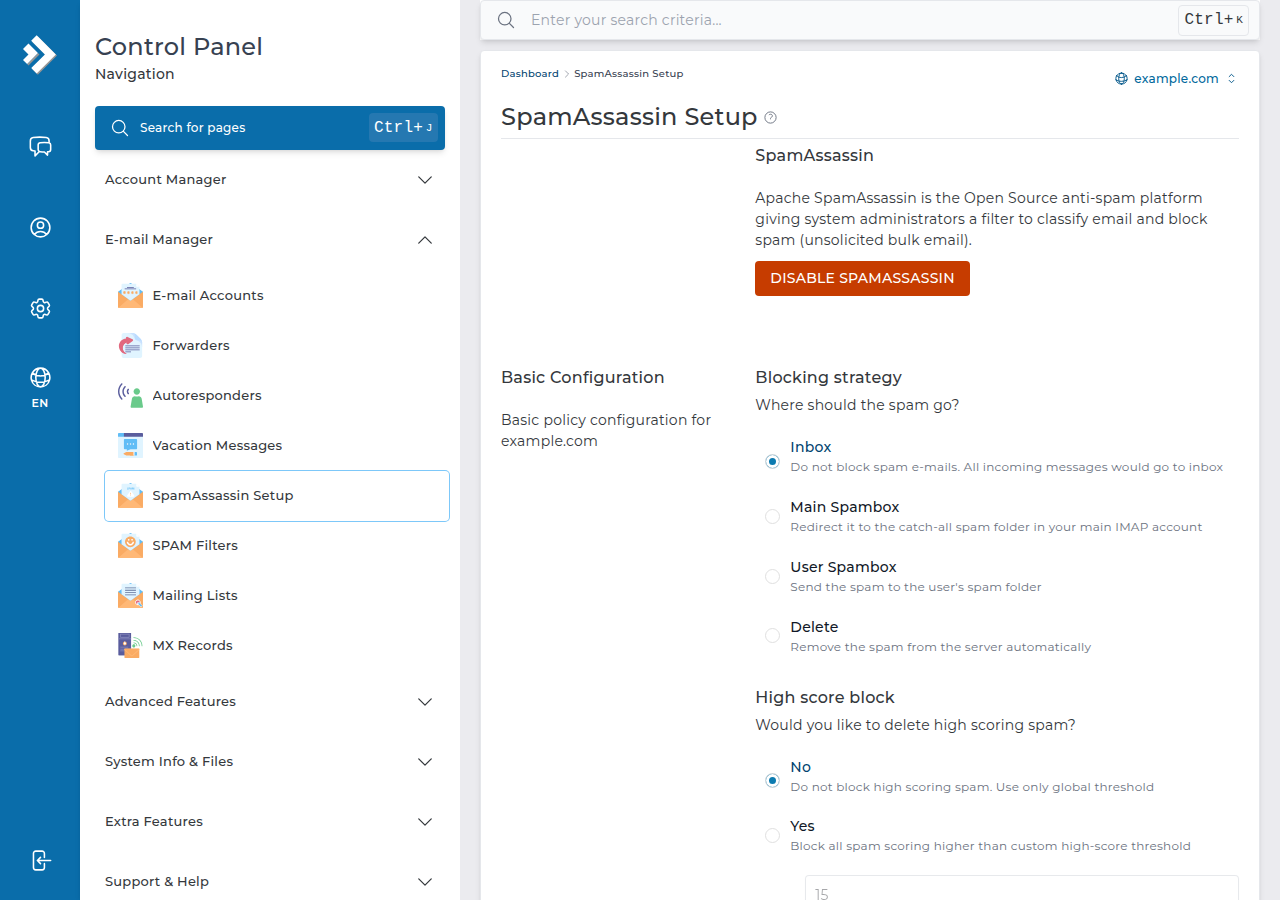
If you choose to delete high-scoring spam instead of keeping it, a genuine message that scores badly is lost for good. Keep spam in a folder for at least a few weeks after any change, and delete it by hand once you trust the settings.
4. When genuine mail is rejected or marked as spam
- The sender received a bounce. Easy Spam Fighter refused the message during delivery, usually because the sending domain's SPF or DKIM failed, or the sending server has no reverse DNS or is on a blocklist. The fix is normally on the sender's side. If a business contact can't fix it, open a ticket with the bounce message, and we can look at it.
- The message arrived but was marked as spam. Add the sender to your whitelist, or raise your threshold one point at a time.
- You send to others and your mail lands in their spam. That is about your own domain's records. Make sure SPF and DKIM are set up; see how to check and manage DKIM in DirectAdmin.
5. On your own DirectAdmin server
If you run DirectAdmin on your own VPS or server with root access, both layers are CustomBuild options. On our server they appear in options.conf as easy_spam_fighter=yes and spamd=spamassassin; the spamd option can instead be set to rspamd. Choose one content filter, not both, and follow DirectAdmin's current documentation for the build commands, because they change between DirectAdmin releases.
Easy Spam Fighter's scores live in /etc/exim.easy_spam_fighter/variables.conf. Put your changes in variables.conf.custom in the same folder, so an update does not overwrite them. None of this is possible on shared hosting, where the server settings are shared by every account.
6. Where Domain India fits
DirectAdmin shared hosting includes email accounts with Easy Spam Fighter and SpamAssassin already working, and outgoing mail allows up to 1,000 messages per day per account (200 per mailbox by default). If you want email on a separate platform from your website, Domain India Business Email runs on its own servers with its own filtering and webmail.
- 10 GB NVMe SSD Storage
- 50 GB Monthly Bandwidth
- 1 Website
- 5 Email Accounts
- Priced per mailbox - start with one
- Email at your own domain ([email protected])
- Add and remove mailboxes yourself
- Webmail with calendar, contacts and tasks
Prices on the cards are live Domain India list prices and exclude 18% GST.
Is Easy Spam Fighter enabled on Domain India DirectAdmin hosting?
Yes. It is enabled server-wide on our DirectAdmin server, together with SpamAssassin. There is nothing to install or switch on in your account.
Does Domain India DirectAdmin hosting use Rspamd?
No. Our DirectAdmin server uses SpamAssassin as its content filter, and Rspamd is not installed. Guides that describe an Rspamd page in the panel do not apply to our shared hosting.
Why is spam still reaching my inbox?
By default, marked spam is delivered to the inbox with spam headers. In DirectAdmin, open E-mail Manager, SpamAssassin Setup and, under Blocking strategy, choose User Spambox. You can also lower the threshold from 5.0.
What spam score threshold should I use?
Start with the default of 5.0. Lower it by one point if too much spam gets through, or raise it by one point if genuine mail is being marked. Watch your spam folder for a few days after each change.
Why did a sender get a bounce when emailing me?
Easy Spam Fighter refused the message during delivery, usually because the sender's SPF or DKIM failed, their server has no reverse DNS, or it is on a blocklist. Ask the sender to fix their records, or open a ticket with the bounce message.
Can I install Rspamd on shared hosting?
No. Installing or changing a mail filter needs root access to the server. You can do it on your own DirectAdmin server, where it is a CustomBuild option.
Ready to set it up? Log in to your panel and review your spam settings, or compare DirectAdmin hosting and Business Email. If genuine mail keeps bouncing, open a support ticket with the bounce message.
DirectAdmin hosting with email accounts, Easy Spam Fighter and SpamAssassin already running.
See DirectAdmin plans