If your application needs to create mailboxes automatically, for example one for each new staff member or client, you can do it from PHP by calling your control panel's API instead of clicking through the panel. On cPanel hosting that means cPanel's UAPI, authenticated with an API token that you create in your own cPanel account. This guide shows how to do it safely.
In cPanel, create an API token under Security › Manage API Tokens. From PHP, send a request to https://your-server:2083/execute/Email/add_pop with the header Authorization: cpanel USERNAME:TOKEN and the fields email, domain, password and quota. The reply is JSON: status is 1 on success, and errors lists what went wrong. Keep the token out of your code and out of public_html, leave SSL verification on, and never expose the script to anonymous visitors. If you only need a few mailboxes, create them in the panel instead.
1. Do you need an API at all?
For a handful of mailboxes, the control panel is quicker and safer: see how to create email accounts for your domain. Use the API when mailboxes are created as part of a process, such as onboarding in an HR or client-management system.
The method below is for cPanel hosting. It uses only your own cPanel account's permissions: no root, WHM or reseller access is involved. DirectAdmin and Webuzo have their own APIs, which this guide does not cover; ask support before you build on them.
2. Create an API token
- Open the tool.Log in to cPanel and open Manage API Tokens in the Security section.
- Create the token.Click Create, give it a name such as
mailbox-provisioning, and set an expiry date if your process allows one. - Copy it once.cPanel shows the token only at creation. Store it somewhere safe, such as an environment variable or a config file outside
public_html.
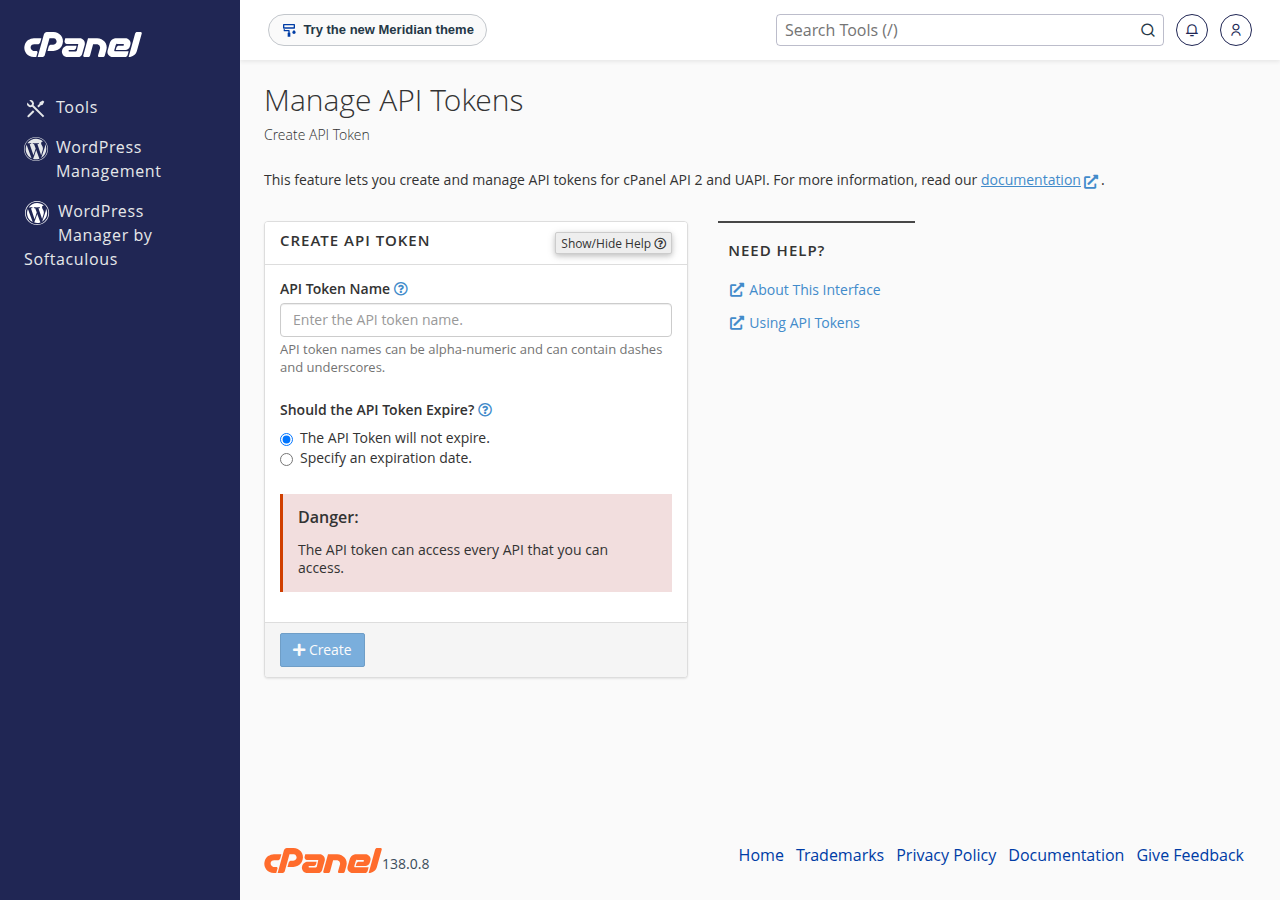
The token is not limited to email. Anyone who has it can change files, databases and settings on your account. Keep it out of Git and out of any folder the web can reach, and revoke it in Manage API Tokens the moment you suspect it has leaked, or when you stop using it.
You also need the server host name and your cPanel username. Both are in your client area: open the hosting service at Hosting › My hosting, then the Manage › Access tab. cPanel's API listens on port 2083 over HTTPS, the same port as the cPanel login.
3. Store the settings outside the web root
Put the settings in a file one level above public_html, for example /home/USERNAME/config/cpanel.php:
<?php
return [
    'host'  => 'server.example.com',   // from the Access tab
    'user'  => 'USERNAME',             // your cPanel username
    'token' => 'PASTE-YOUR-TOKEN-HERE',
];
4. Create the mailbox
The UAPI function is Email::add_pop. It takes the part before the @ as email, your domain as domain, a password, and a quota in megabytes (0 means no quota, within your plan's limits).
<?php
function cpanel_uapi(string $module, string $function, array $params): array
{
    $cfg = require '/home/USERNAME/config/cpanel.php';
    $url = sprintf('https://%s:2083/execute/%s/%s', $cfg['host'], $module, $function);

    $ch = curl_init($url);
    curl_setopt_array($ch, [
        CURLOPT_POST           => true,
        CURLOPT_POSTFIELDS     => http_build_query($params),
        CURLOPT_HTTPHEADER     => ['Authorization: cpanel ' . $cfg['user'] . ':' . $cfg['token']],
        CURLOPT_RETURNTRANSFER => true,
        CURLOPT_TIMEOUT        => 30,
        // SSL verification stays ON (the default). Never set CURLOPT_SSL_VERIFYPEER to false.
    ]);
    $body = curl_exec($ch);
    $code = curl_getinfo($ch, CURLINFO_HTTP_CODE);
    $err  = curl_error($ch);
    curl_close($ch);

    if ($body === false) {
        throw new RuntimeException("Connection failed: $err");
    }
    if ($code !== 200) {
        throw new RuntimeException("cPanel returned HTTP $code");
    }
    return json_decode($body, true, 512, JSON_THROW_ON_ERROR);
}

$local = strtolower(trim($_POST['mailbox'] ?? ''));
if (!preg_match('/^[a-z0-9][a-z0-9._-]{0,63}$/', $local)) {
    exit('Invalid mailbox name');
}
$password = bin2hex(random_bytes(12)); // or a password your user sets

$result = cpanel_uapi('Email', 'add_pop', [
    'email'    => $local,
    'domain'   => 'yourdomain.com',
    'password' => $password,
    'quota'    => 1024,
]);

if (($result['status'] ?? 0) === 1) {
    echo "Created {$result['data']}";
} else {
    echo 'Could not create the mailbox: ' . implode('; ', $result['errors'] ?? ['unknown error']);
}
Show the new password to the person once, over HTTPS, or let them set it themselves. Never write it to a log file or send it in a plain email.
5. Read the reply correctly
UAPI returns HTTP 200 with a JSON body even when the action fails, so always check status, not only the HTTP code:
| Field | Meaning |
|---|---|
| status | 1 when the mailbox was created, 0 when it was not |
| errors | A list of reasons when status is 0, for example a weak password or an address that already exists |
| data | The full address created, on success |
| messages and warnings | Extra information you can log |
A 401 or 403 HTTP code means the token or username is wrong, the token has expired, or it was revoked.
Common reasons for status 0:
- The address already exists. Check first with
Email::list_pops, or treat this error as "already done". - The password is too weak. cPanel rejects passwords below its strength threshold. Generate a long random one.
- The plan's limit is reached. Every plan allows a set number of email accounts. Delete unused ones or upgrade.
- The domain is not on the account.
domainmust be your main domain, an addon domain or a subdomain of the account.
6. Where to run the script
- On a different server (your application's own server, for example): that server must reach port 2083 on your hosting server, which is open.
- On the same cPanel account:
curl_execis available on our cPanel servers, so the code above runs from your hosting account as well. Test it once; if the connection times out, ask support.
On our DirectAdmin servers curl_exec is usually disabled for websites, which is one more reason this guide sticks to cPanel.
7. Keep the endpoint safe
A script that creates mailboxes is a tempting target. If spammers find it, they can create accounts and send spam from your domain, which gets your mail blocked.
- Put it behind your application's login, and check that the user is allowed to create mailboxes.
- Accept only the part before the
@, validated as in the example. Never let the request choose the domain. - Add CSRF protection and a rate limit.
- Log who created which mailbox and when, but never the password.
Mail sent from new mailboxes counts towards your account's outgoing limit: 200 messages per hour per account on cPanel.
8. Where Domain India fits
Every cPanel plan includes email accounts on your domain, and each plan sets how many you can create; the plan card shows the number. If you need mailboxes with calendar and contacts that you add and remove from the client area, and don't need an API, look at Business Email, which is priced per mailbox.
- 50 GB NVMe SSD Storage
- 100 GB Monthly Bandwidth
- 5 Websites
- 50 Email Accounts
- Priced per mailbox - start with one
- Email at your own domain ([email protected])
- Add and remove mailboxes yourself
- Webmail with calendar, contacts and tasks
Prices on the cards are Domain India list prices and exclude 18% GST.
How do I create a cPanel email account from PHP?
Create an API token in cPanel under Security › Manage API Tokens, then send a POST request from PHP to https://your-server:2083/execute/Email/add_pop with the header Authorization: cpanel USERNAME:TOKEN and the fields email, domain, password and quota. Check that the JSON reply has status 1.
Should I put my cPanel password in the script?
No. Use an API token, keep it outside public_html and out of version control, and revoke it if it leaks. Never embed a username and password in the URL.
Why does the API return HTTP 200 but no mailbox appears?
UAPI reports failures inside the JSON reply. Read the status and errors fields: common causes are a weak password, an address that already exists, or the plan's email account limit.
Is it safe to turn off SSL verification in cURL?
No. Turning it off lets anyone between your script and the server read your API token. Leave CURLOPT_SSL_VERIFYPEER at its default.
Does this work on DirectAdmin or Webuzo hosting?
This guide covers cPanel's UAPI only. DirectAdmin and Webuzo have their own APIs, and on Domain India DirectAdmin servers curl_exec is usually disabled for websites, so ask support before building on them.
Ready to automate? Create your token in cPanel, or read how to create email accounts for your domain if the panel is enough. If a request fails and the error is unclear, open a support ticket with the error text.
Send us the error from the JSON reply and where your script runs. We will help you work out what is blocking it.
Open a support ticket