When you try to create an email account in cPanel and see an error like "File open for /home/username/etc/yourdomain.com/passwd failed with error No such file or directory", cPanel cannot find the files where it keeps your mailboxes' details. The mail system itself is fine. Something in your hosting account's home folder, usually the etc folder, has been deleted, renamed or moved. This guide explains what those folders do, how to check them, and how to repair them safely.
The error means the etc folder in your home directory, or the folder for your domain inside it, is missing. If it was renamed, rename it back. If it was deleted, restore it from your weekly JetBackup backup in cPanel. Do not simply create an empty etc folder in File Manager: it will not have the ownership the mail server needs, and it will not contain your existing mailboxes' passwords. If you cannot restore it, open a support ticket.
1. What the error means
cPanel stores the details of your email accounts in plain files inside your home directory, not in a database. For each domain on the account there is a folder:
| Path in your home directory | What it holds |
|---|---|
etc/yourdomain.com/passwd | The list of mailboxes for that domain |
etc/yourdomain.com/shadow | The mailboxes' encrypted passwords |
etc/yourdomain.com/quota | Each mailbox's storage limit |
mail/yourdomain.com/ | The messages themselves, one folder per mailbox |
When you create a mailbox, cPanel opens etc/yourdomain.com/passwd to add the new address. If etc, or the domain's folder inside it, is not there, the file cannot be opened and you see the "No such file or directory" error.
The same missing folder usually causes other symptoms at the same time: existing mailboxes may stop logging in, and webmail may reject passwords that were working before.
2. Common reasons the folder goes missing
- A clean-up that went too far. Someone tidying the home directory in File Manager deleted folders that looked unused, such as
etc,mailorpublic_ftp. - A rename during troubleshooting, for example
etcrenamed toetc_oldoretc.bak. - An upload or restore that replaced the home directory, such as unpacking a site archive at the wrong level or copying files from another host over the top.
- A script or plugin with a faulty path that deleted files outside its own folder.
Your website files live in public_html. Folders next to it in the home directory, including etc and mail, belong to the control panel and the mail system. Leave them alone unless support asks you to change them.
3. Check what is there
- Log in to cPanel.From the client area, open your hosting service and use the login button, or see how to log in to cPanel.
- Open File Managerin the Files section. It opens in your home directory. See how to use the File Manager.
- Look for the
etcandmailfoldersalongsidepublic_html. - Open
etcif it is there, and look for a folder named after the domain you are adding the mailbox to. - Look for renamed copies,such as
etc_old,etc.bakormail-backup, in the home directory and inpublic_html.
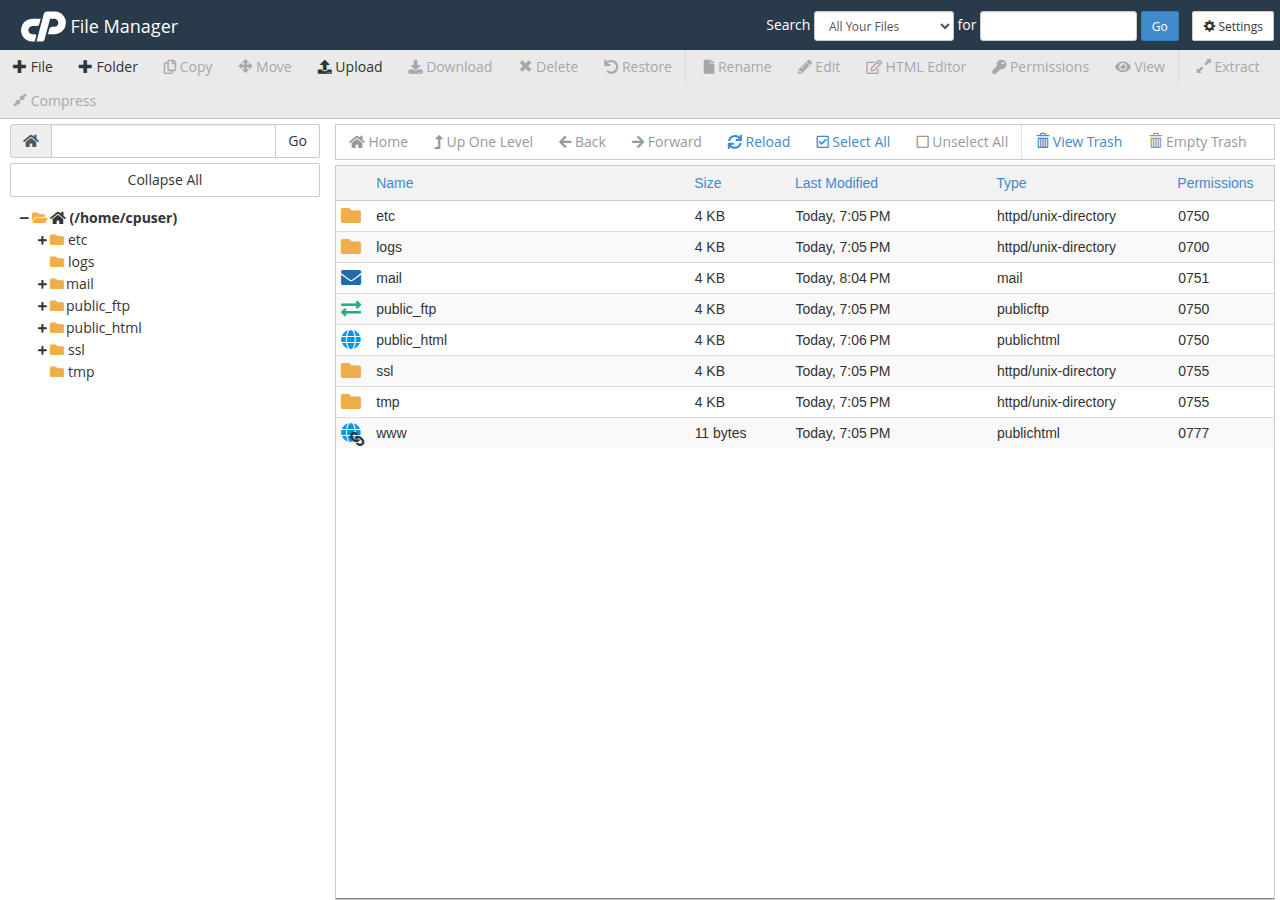
Write down what you find. It decides which fix below applies.
4. Fix it: rename, restore or ask support
etc (or mail) in File Manager, then try creating the mailbox again.etc, and mail too if it is also missing.Domain India takes weekly account backups with JetBackup 5 on cPanel and DirectAdmin, and you can restore files and folders from JetBackup in your panel. A restore brings the folder back with its original contents and ownership. Step-by-step instructions are in how to restore or download a backup using JetBackup.
After the repair, create the mailbox again. If existing mailboxes had stopped working, test each one by logging in to webmail. See how to log in to webmail.
5. Why not just create a new, empty folder?
Older advice said to recreate etc and mail in File Manager. That usually makes things worse.
We checked our cPanel server on 23 September 2026. On a working account, etc and each domain folder in it belong to the special mail group with permissions 750, and the passwd file is 640 in the same group. File Manager creates folders in your own group, which the mail server cannot read, and there is no way to change the group from File Manager. An empty etc also has no shadow file, so every existing mailbox loses its password, and an empty mail folder has none of your messages.
If you have already created empty folders, do not delete anything else. Open a ticket and tell us what you created; support can check the folders' ownership and advise on the repair. Mail and passwords that were deleted can only come back from a backup.
6. If the mail folder was deleted too
The mail folder holds the actual messages. If it was deleted, every mailbox on the account is empty on the server, even after etc is repaired.
- Restore
mailfrom JetBackup. Messages are only as recent as the backup. Mail that arrived after the last weekly backup and was then deleted cannot be recovered from it. - Check computers that use POP3. Anyone whose mail app downloads over POP3 has a local copy of what they had downloaded.
- Phones and IMAP apps keep only a temporary copy, and it disappears when the app next syncs with the empty server. Do not open them until the restore is done.
7. DirectAdmin, Webuzo and Windows
This exact error comes from cPanel. The other panels store email accounts in different places and show different errors. If you cannot create a mailbox on DirectAdmin, Webuzo or Windows (Plesk) hosting, note the exact error and open a ticket. For normal mailbox creation on each panel, see create an email account in cPanel, create an email account in DirectAdmin and create an email account in Plesk.
8. Where Domain India products fit
Every Domain India shared hosting plan includes email on your domain, with weekly JetBackup backups on cPanel and DirectAdmin that let you restore files and folders yourself.
- 25 GB NVMe SSD Storage
- 50 GB Monthly Bandwidth
- 1 Website
- 10 Email Accounts
If you would rather keep mail completely separate from your website files, Business Email runs on its own platform, is priced per mailbox, and is not affected by changes in your hosting home directory.
- Priced per mailbox - start with one
- Email at your own domain ([email protected])
- Add and remove mailboxes yourself
- Webmail with calendar, contacts and tasks
Plan cards show Domain India list prices on 19 September 2026, excluding 18% GST.
Frequently asked questions
What does "No such file or directory" mean when creating an email account in cPanel?
cPanel cannot open the file that lists your mailboxes, etc/yourdomain.com/passwd in your home directory. The etc folder, or the domain's folder inside it, has been deleted, renamed or moved. Restoring the folder fixes the error.
Can I fix it by creating a new etc folder in File Manager?
Not reliably. On a working cPanel account the etc folder belongs to the mail group with specific permissions, which File Manager cannot set, and a new empty folder has none of your existing mailbox passwords. Rename the original back, restore it from JetBackup, or ask support.
How do I restore the etc folder?
Log in to cPanel, open JetBackup and restore the etc folder from a backup taken before it went missing. Domain India takes weekly account backups with JetBackup 5 on cPanel and DirectAdmin. If there is no suitable backup, open a support ticket.
Will I lose my emails?
Messages are stored in the mail folder, not in etc. If only etc is missing, your messages are still on the server and come back once etc is restored. If the mail folder was deleted as well, restore it from JetBackup; mail newer than the last backup cannot be recovered from it.
Which folders in my home directory should I never delete?
Leave etc, mail and the other folders the control panel created alongside public_html. Your website files belong in public_html, and that is where your own changes should stay.
Does this error happen on DirectAdmin?
This exact error is specific to cPanel. DirectAdmin, Webuzo and Plesk store email accounts differently. If mailbox creation fails on those panels, open a ticket with the exact error message.
Ready to repair it? Log in to cPanel from your hosting services, check the home directory in File Manager, and restore from JetBackup if needed. If the folder cannot be restored, open a ticket in the client area or use the public ticket form.
Tell us the domain, the exact error and what changed in your home directory, and we will check the account's mail files.
Open a support ticket