An email forwarder sends a copy of every message that arrives at one address on to another address. It is how [email protected] can reach three people, how an old address keeps working after a staff change, and how some owners read their business mail in Gmail. This guide shows how to create and delete a forwarder in cPanel, what happens to the original message, and why forwarding to Gmail sometimes goes missing.
It covers the mailboxes that come with cPanel, DirectAdmin, Webuzo or Plesk hosting. It does not apply to Domain India Business Email, which runs on a separate platform with its own webmail at mail.yourdomain.com:8443. Not sure which you have? See Business Email vs the email included with your hosting.
In cPanel, open Email › Forwarders, click Add Forwarder, enter the address, choose Forward to Email Address, type the destination and click Add Forwarder. To remove one, click Delete next to it in the list. If the address also has a mailbox, mail is kept there and forwarded; if it has no mailbox, it is only forwarded. Forwarding to Gmail can fail SPF checks, so test it and read section 5.
1. Forwarder, mailbox or alias: which do you need?
| You want | Use | What happens |
|---|---|---|
| One address that several people read | A forwarder per person | Each copy goes to each destination |
| Mail to an old address to reach a new one | A forwarder on the old address, no mailbox | Mail is passed on and nothing is stored |
| A copy in the office mailbox and on your phone's Gmail | A mailbox plus a forwarder | Kept on the server and copied out |
| Every address nobody created to reach you | The default (catch-all) address | Usually a bad idea: it collects spam |
| To reject mail to an address with a clear error | A "discard with error" forwarder | The sender gets a bounce with your message |
For catch-all addresses and aliases, see email aliases and catch-all addresses.
2. Create a forwarder in cPanel
- Log in to cPanel.From the client area, open your hosting service and use the login button, or see how to log in to cPanel.
- Open Forwarders.It is in the Email section.
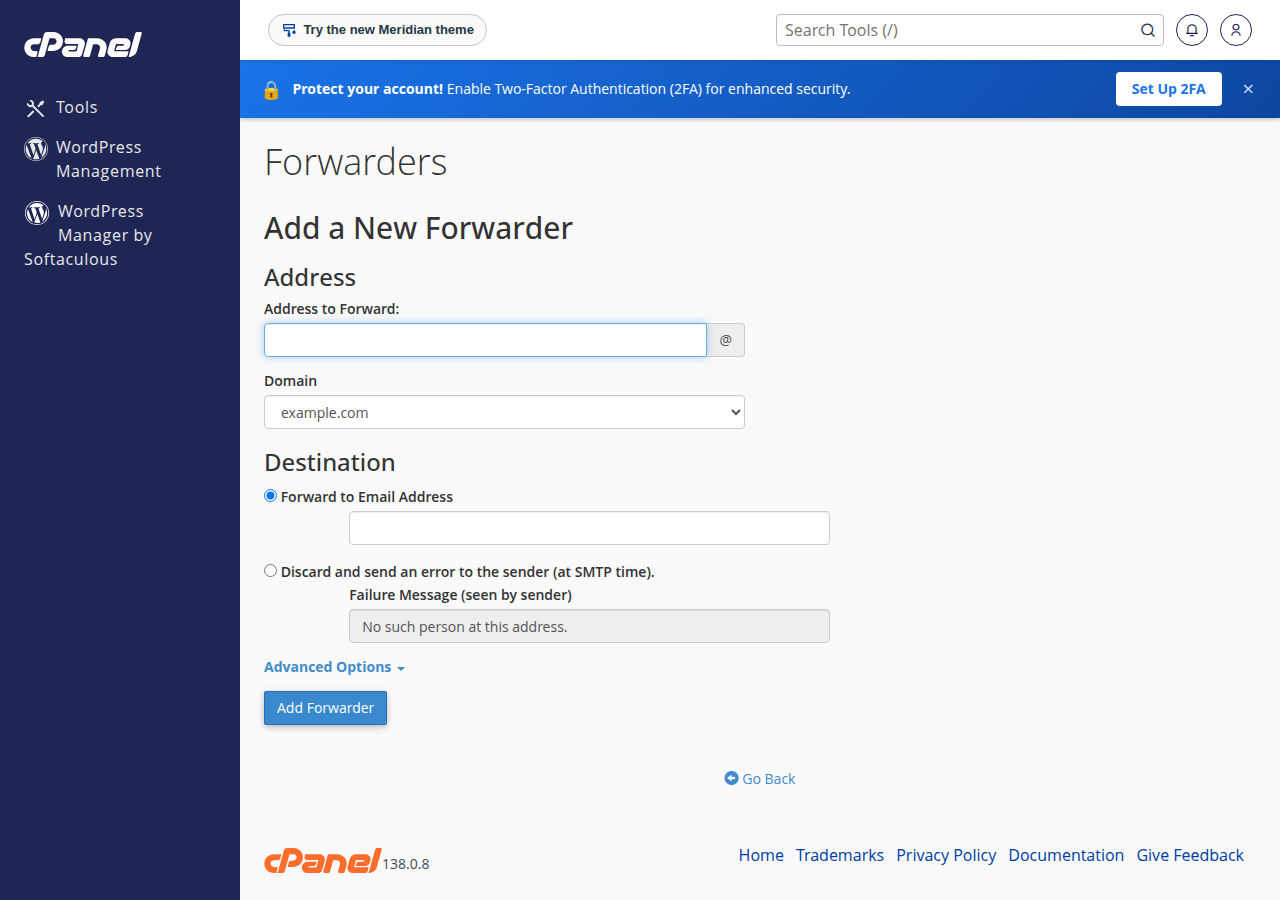
- Click Add Forwarder.This opens the form for a single address. (Add Domain Forwarder, next to it, sends all mail for one domain to another domain; most people do not need it.)
- Enter the address to forward.Type the part before the
@, then pick the domain from the drop-down. - Choose the destination.Leave Forward to Email Address selected and type the full address that should receive the copies.
- Click Add Forwarder.The new forwarder appears in the list on the Forwarders page and starts working straight away.
To forward one address to several people, add one forwarder for each destination address. The list shows each pair separately, so you can remove one person later without touching the others.
3. The other destination options
The form has two more choices under the destination:
- Discard and send an error to the sender (at SMTP time). The message is refused while the sending server is still connected, so the sender gets a bounce with the failure message you write, such as "This address is no longer in use; please write to [email protected]". This is the clean way to retire an address.
- Pipe to a program (under Advanced Options). The message is passed to a script in your account, for example a helpdesk that turns emails into tickets. Enter the script path relative to your home folder. The script must start with the correct interpreter line and be executable. PHP scripts are subject to the same disabled PHP functions as the rest of your account, so test before you depend on it.
4. What happens to the original message
This is the part the old advice got half right.
- If the address also has a mailbox, each message is stored in that mailbox and a copy is forwarded. Nobody reads the stored copy, so the mailbox slowly fills. When it reaches its quota, new mail to that address bounces and forwarding stops with it. Either read and empty it now and then, or set a sensible quota and clean it out.
- If the address has no mailbox, the forwarder is all there is. Nothing is stored on the server, so there is nothing to fill up. For an address that exists only to pass mail on, such as
info@going to a personal address, create the forwarder without creating a mailbox.
To check storage use, see how to check email storage.
5. Forwarding to Gmail, Outlook.com and Yahoo
Forwarding to a free mailbox is where most "my forwarder stopped working" reports come from. The reason is how anti-spam checks treat forwarded mail.
When your server forwards a message, it sends it to Gmail from our server's IP address but, on cPanel, still under the original sender's address. Gmail then checks that sender's SPF record, which lists the servers allowed to send for that domain. Our server is not on it, so SPF fails. If the original sender also signed the message with DKIM and the message was not changed, DMARC can still pass and the mail arrives. If not, Gmail may put it in spam, delay it or reject it.
What we measured on 23 September 2026:
- cPanel server: Sender Rewriting Scheme (SRS) is off. Forwarded mail keeps the original sender address, so the SPF problem above applies.
- DirectAdmin server: SRS is configured for forwarded mail, so the envelope sender is rewritten to your domain and SPF is checked against it.
A forwarder copies everything, including the spam your address receives. When Gmail sees a stream of spam arriving from our server, it can start filtering or refusing mail from it. If an address receives a lot of junk, do not forward it to Gmail. Read it where it lives instead.
More reliable ways to read hosting mail in Gmail or on your phone:
- Add the mailbox to the Gmail app on your phone as an IMAP account. The mail stays on your server and nothing is forwarded. Settings are in how to log in to webmail and the email client guides.
- Read it in webmail at
https://yourdomain.com/webmail. - If you must forward, test with a message from an outside address that is not the Gmail account you forward to. Gmail hides copies of messages that you sent yourself.
For how SPF, DKIM and DMARC work together, see SPF, DKIM and DMARC.
6. Delete or change a forwarder
- Open Email › Forwardersin cPanel.
- Find the forwarderin the list. Use the search box if you have many.
- Click Deletenext to it and confirm. Mail to that address stops being copied immediately.
- Decide what the address does now.If there is no mailbox and no other forwarder, mail to the address bounces or goes to the default address. Add a "discard with error" forwarder if you want senders to get a clear message.
There is no edit button: to change the destination, delete the forwarder and add a new one.
7. DirectAdmin, Webuzo and Plesk
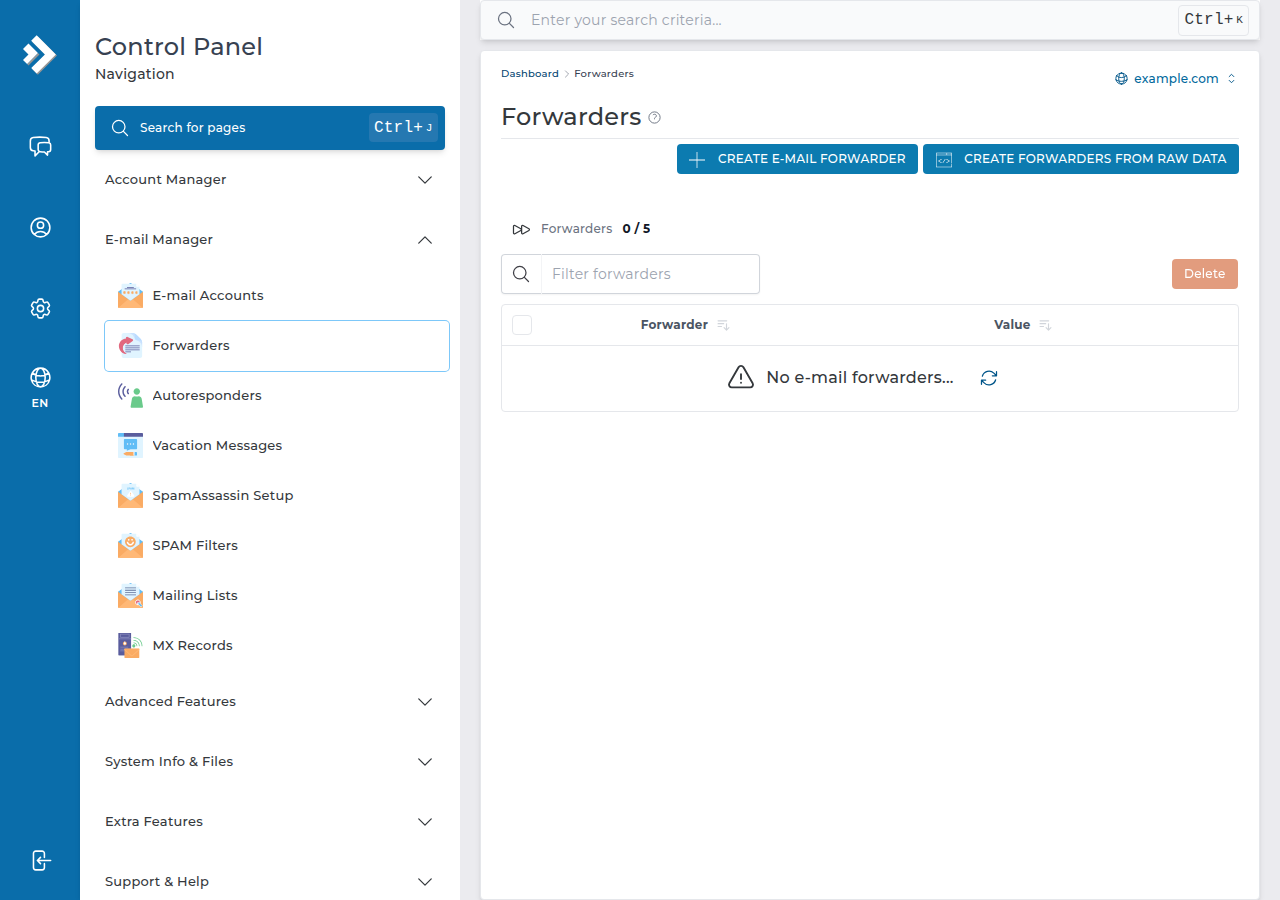
The idea is the same on every panel: an address, a destination, and a list where you remove entries.
- DirectAdmin: see how to set up email forwarders in DirectAdmin.
- Plesk (Windows hosting): see email forwarding in Plesk.
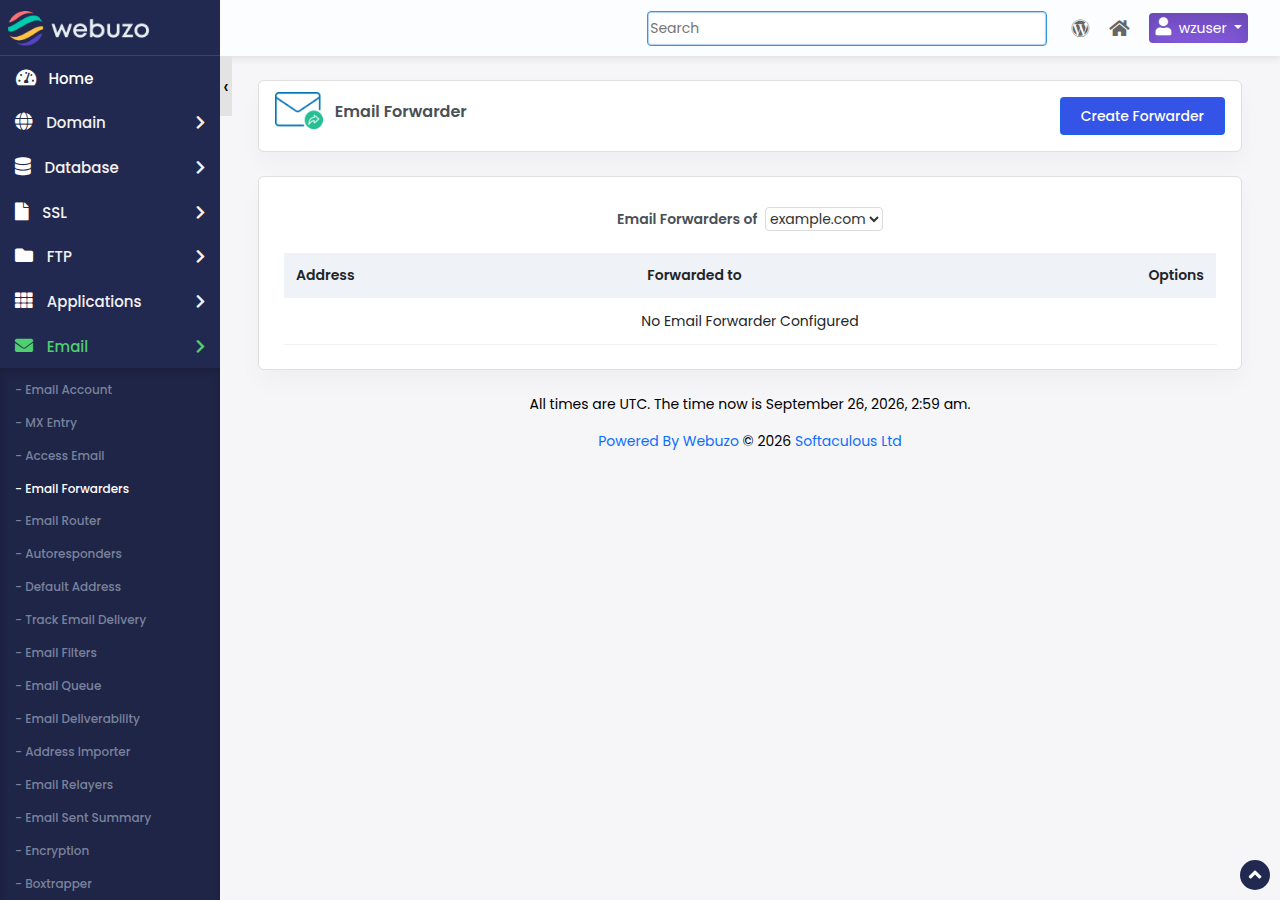
- Webuzo: open Email › Email Forwarders and click Create Forwarder.
8. Where Domain India hosting fits
Every Domain India shared hosting plan includes email accounts on your own domain, with forwarders and webmail managed from the same control panel as your website.
- 25 GB NVMe SSD Storage
- 50 GB Monthly Bandwidth
- 1 Website
- 10 Email Accounts
- 10 GB NVMe SSD Storage
- 50 GB Monthly Bandwidth
- 1 Website
- 5 Email Accounts
Plan cards show Domain India list prices on 19 September 2026, excluding 18% GST. If email matters more than the website, Business Email runs on its own platform and is priced per mailbox.
Frequently asked questions
Where are email forwarders in cPanel?
In the Email section of cPanel, under Forwarders. Click Add Forwarder to create one, or Delete next to an existing forwarder to remove it.
Does a forwarder keep a copy of the email on the server?
Only if the same address also has a mailbox. Then each message is stored in that mailbox and a copy is forwarded. If the address has no mailbox, the message is only forwarded and nothing is stored.
Can I forward one email address to several people?
Yes. In cPanel, add a separate forwarder for each destination address. Every destination receives its own copy.
Why are my forwarded emails not arriving in Gmail?
Gmail checks the original sender's SPF record, which does not list our server, so forwarded mail can land in spam or be rejected, especially when the address receives spam. Check the Gmail spam folder, test from an outside address, or add the mailbox to the Gmail app over IMAP instead of forwarding.
How do I change where a forwarder sends mail?
cPanel has no edit option for forwarders. Delete the old forwarder and add a new one with the new destination address.
How do I stop mail to an address I no longer use?
Delete its forwarders and mailbox, then add a forwarder with the option to discard and send an error to the sender. Senders receive a bounce with your message, for example the address they should use instead.
Ready to set it up? Log in to your control panel from the client area, read how to log in to webmail if you would rather not forward at all, or compare cPanel hosting plans. If forwarded mail keeps going missing, open a support ticket with the sender, the time and the destination address.
Mailboxes, forwarders and webmail are included with every Domain India shared hosting plan.
See hosting plans