DNS records are the entries that tell the internet where your website lives, which server receives your email and which services may act for your domain. Most domains need only five or six of them. This page is the short version: what each common record does, where you edit them for a domain on Domain India hosting, and how long a change takes.
Every record type, including CAA, SRV, PTR and DS, is explained in Understanding and managing DNS records. For step-by-step adding and editing, read Managing DNS records (A, CNAME, MX, TXT).
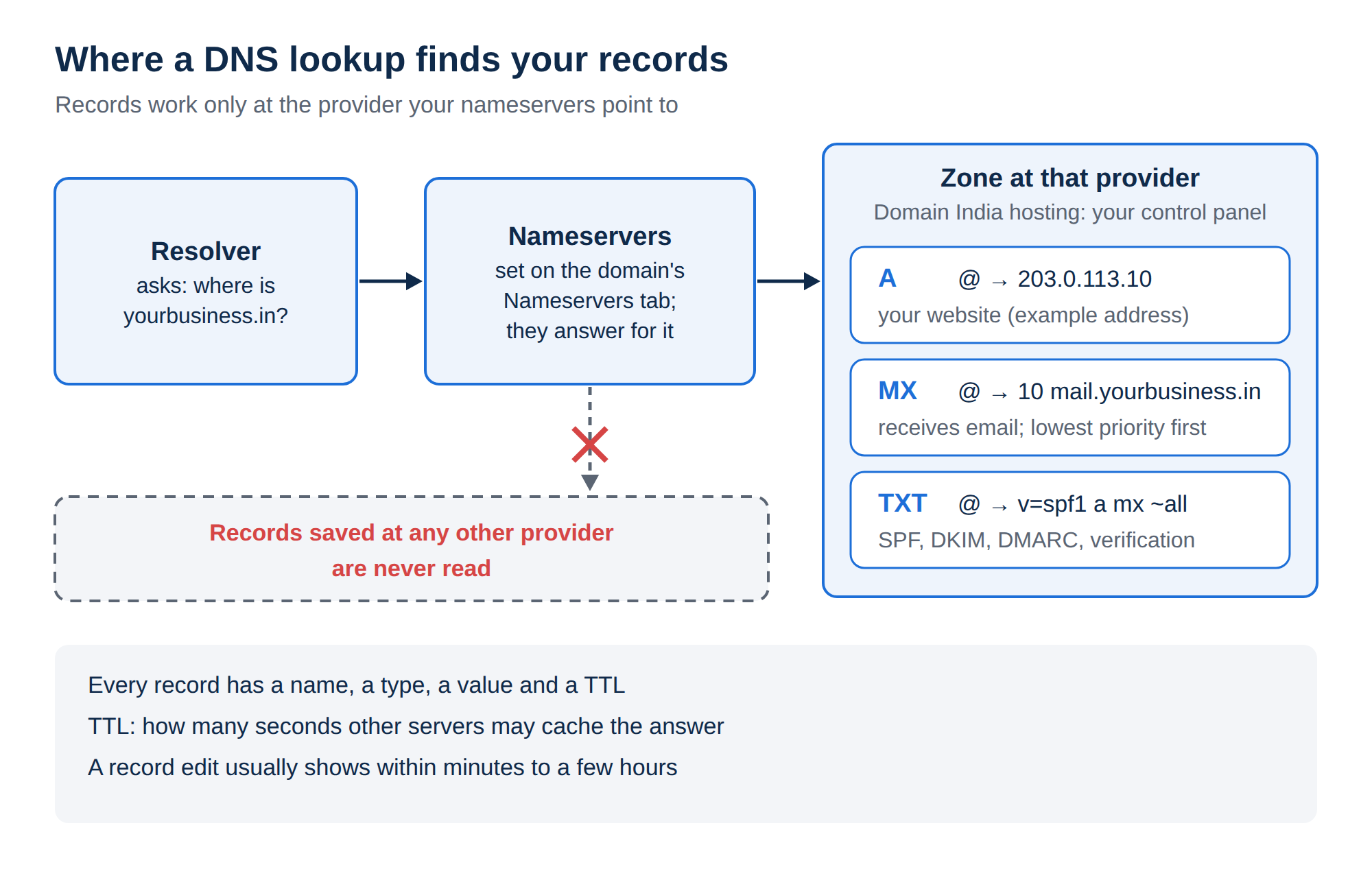
An A record points a name to an IPv4 address, AAAA to an IPv6 address, CNAME makes one name an alias of another, MX says which server receives email, TXT holds SPF, DKIM, DMARC and verification codes, and NS says which nameservers answer for the domain. Records only work at the provider your nameservers point to. For a domain on Domain India hosting nameservers, edit them in your control panel, for example the Zone Editor in cPanel.
1. The records most domains use
| Record | What it does | Example |
|---|---|---|
| A | Points a name to an IPv4 address | @ → 203.0.113.10 |
| AAAA | Points a name to an IPv6 address | @ → 2001:db8::10 |
| CNAME | Makes a name an alias of another hostname | www → yourbusiness.in |
| MX | Names the server that receives email, with a priority | @ → 10 mail.yourbusiness.in |
| TXT | Holds text that other services read | @ → v=spf1 a mx ~all |
| NS | Names the nameservers that answer for the domain | Set on the domain's Nameservers tab |
The addresses above are documentation examples. Always use the values your host or service gives you.
Every record has the same parts: a name (@ for the domain itself, or a label such as www), a type, a value and a TTL, which is how many seconds other servers may cache the answer. MX records also have a priority: lower numbers are tried first.
2. What each record is for
- A and AAAA send visitors to your website. Your hosting service's page in the client area shows the server IP address to use.
- CNAME is for aliases such as
www, or for a service that asks you to point a name at its own hostname. A name with a CNAME can't hold any other record, and the root of the domain (@) can't be a CNAME. - MX tells other mail servers where to deliver mail for your domain. Its value is always a hostname, never an IP address.
- TXT is used by email authentication: SPF lists the servers allowed to send your mail (only one SPF record per domain), DKIM publishes a signing key, and DMARC tells receivers what to do when checks fail. Services such as Google Search Console also ask for a TXT record to prove you own the domain.
- NS records are not added in the zone like the others. You change them on the domain's Nameservers tab in the client area; see How do I change my nameservers.
3. Where to edit records
First find out who answers for the domain. Run dig NS yourbusiness.in +short on macOS or Linux, or nslookup -type=ns yourbusiness.in on Windows. Then:
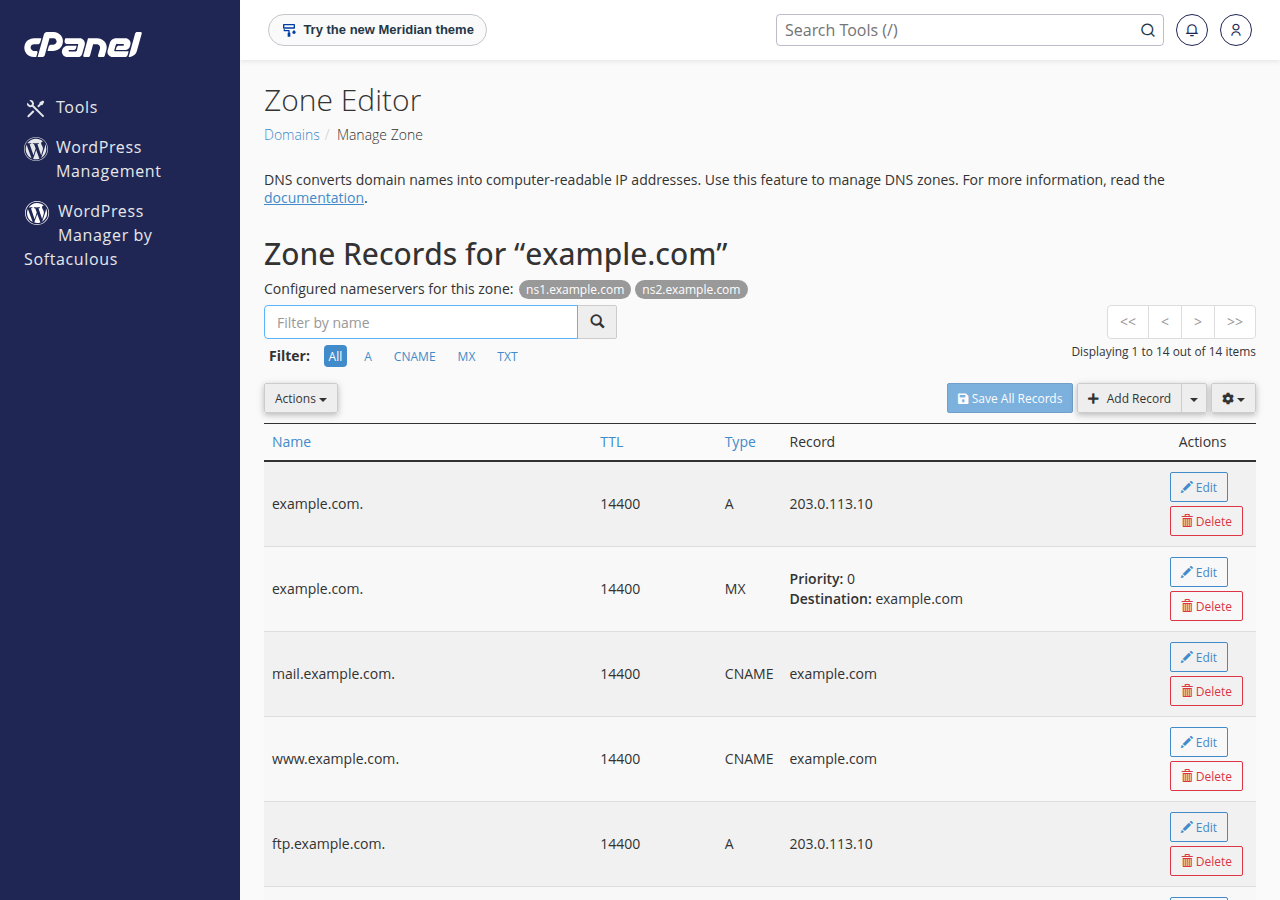
- Domain India hosting nameservers: edit the records in your hosting control panel. On cPanel use the Zone Editor; see How to make DNS changes in cPanel. On DirectAdmin use DNS Management; see How to manage DNS records in DirectAdmin.
- Cloudflare or another DNS provider: edit them there. Records saved anywhere else are never read.
The client area's domain DNS tab may offer Activate Free DNS or Switch to Free DNS. It changes your nameservers and doesn't copy your records, so your site and email can stop working. Point the domain to your hosting nameservers or add A records at your current DNS provider instead.
When you create an account, the control panel adds the usual records for you. On cPanel the default MX record points to the domain itself with priority 0; on DirectAdmin it points to mail.yourdomain with priority 10. You only need to change them if your email is hosted somewhere else; see How to set up MX records.
4. TTL and how long changes take
A record change usually shows within minutes to a few hours. Until the old record's TTL runs out, some visitors may still get the old answer. The old "24 to 48 hours" rule mostly applies to nameserver changes, not to record edits. More detail is in Understanding DNS propagation.
- Write down the current values.Before a change, copy the existing records, or export the zone if your panel offers it, so you can put them back.
- Lower the TTL the day before a move.Set the records you will change to 300 seconds, so the switch spreads within minutes.
- Make the change,then check it with
dig A yourbusiness.in +shortrather than a browser, which may show a cached page. - Raise the TTL againto 3600 or more once everything works.
Frequently asked questions
What is the difference between an A record and a CNAME record?
An A record points a name directly to an IPv4 address. A CNAME makes a name an alias of another hostname, which then supplies the address. The root of a domain can't be a CNAME, and a name with a CNAME can't hold any other record.
Where do I change DNS records for a domain hosted with Domain India?
If the domain uses your Domain India hosting nameservers, edit the records in your hosting control panel, such as the Zone Editor in cPanel or DNS Management in DirectAdmin. If the nameservers point to Cloudflare or another provider, edit the records there.
How long does a DNS record change take?
Usually minutes to a few hours. Other servers may keep the old answer until its TTL runs out, so lower the TTL to 300 seconds a day before a planned change.
Can an MX record point to an IP address?
No. An MX record must point to a hostname, which in turn has an A record. Pointing MX at an IP address breaks mail delivery.
Can I have two SPF records?
No. A domain may have only one SPF record. If two services send mail for you, merge them into one record with an include for each.
Should I use the Free DNS button in the client area to fix DNS?
No. It changes your nameservers without copying your records, so your website and email can stop working. Point the domain to your hosting nameservers, or edit the records at the DNS provider your nameservers already use.
Ready to make a change? Read Managing DNS records for the step-by-step guide, or How do I change my nameservers if the domain isn't pointing to your hosting yet. If a record still won't work, open a ticket in the client area.
Tell us the domain, the record you are trying to add and what you see, and we will check it with you. Support is on 24/7 live chat, and tickets get a first response within 15 minutes.
Open a support ticket