DNS records decide where your website loads from, where your email is delivered and how outside services confirm that you own your domain. This guide shows which record types you will use, where to add them for a domain registered with Domain India, and how to avoid the mistakes that take a site or mailbox offline.
DNS records only work at the provider your nameservers point to, so check that first. If the domain uses your Domain India hosting nameservers, edit the records in your hosting control panel, such as the Zone Editor in cPanel. If it points to Cloudflare or another DNS provider, edit them there. Don't use the client area's Activate/Switch to Free DNS button to fix a DNS problem: it replaces your nameservers and doesn't copy your records. Record changes usually show within minutes to a few hours.
1. Check where your DNS records live
Your domain's nameservers decide which provider answers for it, and the records have to be added at that provider. A record added anywhere else is simply never read, even if the screen said it was saved.
Sign in to the client area, open Domains → My domains, select the domain and look at the Nameservers tab. Then use this table:
| Your nameservers point to | Edit your records in |
|---|---|
| Your Domain India hosting server | Your hosting control panel: the Zone Editor in cPanel, or the DNS management page in DirectAdmin |
| Cloudflare, a website platform or another DNS provider | That provider's dashboard |
| Something you don't recognise | Nowhere yet: open a support ticket before you change anything |
You can also check from any computer with dig NS yourbusiness.in +short, or nslookup -type=ns yourbusiness.in on Windows. The hostnames in the answer tell you who is in charge of your DNS.
2. The record types you will use
In the Host field, @ means the domain itself (yourbusiness.in) and www means www.yourbusiness.in. The addresses below are documentation examples, so always use the values your provider gives you.
- A points a name to an IPv4 address, for example
@→203.0.113.10. Use it for your website. - AAAA points a name to an IPv6 address, for example
@→2001:db8::10. - CNAME makes a name an alias of another hostname, for example
www→yourbusiness.in. Website platforms often ask for a CNAME onwww. - MX tells the world which server receives email for the domain. It has a priority, and lower numbers are tried first.
- TXT holds text that other services read: your SPF record (
v=spf1 …), DKIM and DMARC records, and verification codes from Google, Microsoft and others. - SRV points a specific service, such as some calling or chat systems, to a server and port. Add one only when a provider asks for it.
You do not add NS records to change your nameservers. That is done on the Nameservers tab: see How do I change my nameservers.
3. Add or edit records in your hosting control panel
When your domain uses your Domain India hosting nameservers, the records live on your hosting server and you manage them in the control panel.
- Open your control panel.In the client area, open your hosting services and open cPanel or DirectAdmin from your service. See How to log in to cPanel for other routes.
- Open the DNS editor.In cPanel, that is the Zone Editor; in DirectAdmin, the DNS management page. Our guides for DNS changes in cPanel and managing DNS records in DirectAdmin go screen by screen.
- Add the record.Choose the type, then fill in the host (
@, or just the subdomain such aswwwormail), the value and the TTL. MX and SRV records also need a priority. - Save it,and repeat for each record your provider asked for.
- Edit or delete later.Existing records are listed in the same editor. Change one only when you know what uses it: an MX or TXT record you remove can stop your email.
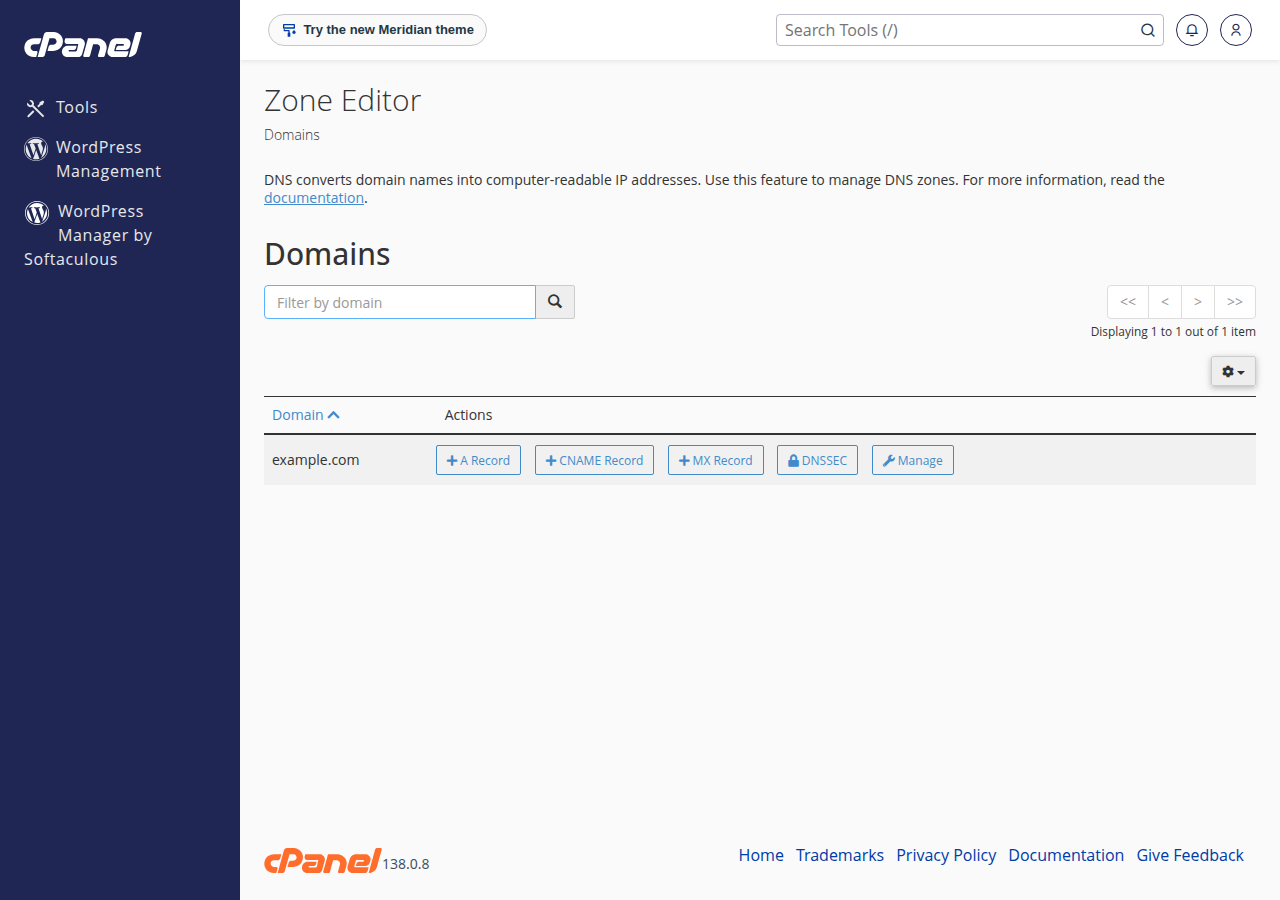
On Webuzo hosting, open Domain › DNS Zone Settings. If you can't find the DNS editor in your panel, ask support and we will point you to it.
What the client area's DNS tab shows. For a domain on hosting nameservers or an outside DNS provider, the domain's DNS tab says the records are managed wherever the nameservers point and can't be edited there. That is expected: use your control panel or DNS provider instead. Where the tab does show a record list, those records take effect only while the domain uses the nameservers that serve that zone. If the tab warns that the records are not in use, anything you add there is saved but never read.
The DNS tab may offer Activate Free DNS or Switch to Free DNS. Clicking it changes your domain's nameservers, and your existing records are not copied across, so email (MX, SPF, DKIM and DMARC), the website and any verification records stop working until they are re-created. For some domains it can also leave the domain answering from a zone that holds none of your records. Point the domain to your hosting nameservers, or add A records at your current DNS provider, as described in How do I change my nameservers. If your domain has no hosting and no DNS provider, open a support ticket and ask how to set up DNS for it.
4. Common record setups
Point the domain to a web server:
Type: A      Host: @      Value: 203.0.113.10
Type: A      Host: www    Value: 203.0.113.10
For Domain India hosting, you rarely need to type these: the Point a domain to this hosting card on your hosting service in the client area gives the hosting nameservers (Option 1) and, if you want to keep your current DNS provider, the server IP address for these two A records (Option 2).
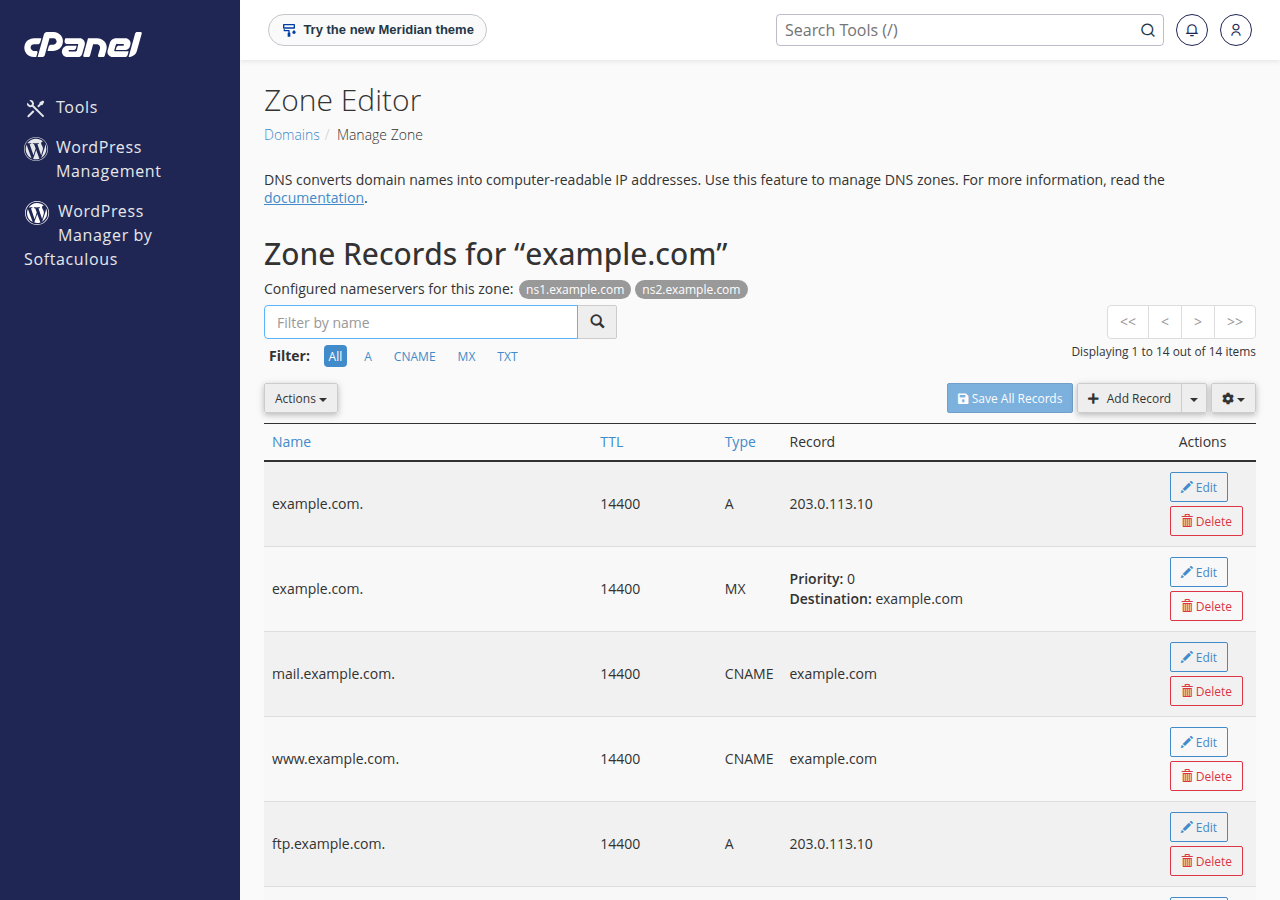
Connect a website platform (Shopify, Wix, Webflow and others): the platform usually asks for an A record on @ and a CNAME on www. The values differ between platforms and sometimes between accounts, so copy them from the platform's own "connect a domain" page.
Receive email with an outside provider:
Type: MX     Host: @      Value: mail.example-provider.com   Priority: 10
Type: TXT    Host: @      Value: v=spf1 include:_spf.example-provider.com ~all
Delete the old provider's MX records when you add the new ones, or some mail keeps going to the old mailbox. If the domain is on cPanel hosting nameservers, also set Email Routing to Remote Mail Exchanger. On DirectAdmin, untick Use this server to handle my e-mails under E-mail Manager › MX Records; on Webuzo, set the domain to Remote Mail Server under Email › Email Router. A verification code from Google, Microsoft or another service is added the same way, as a TXT record on @.
5. TTL and how long changes take
TTL (time to live) is how long, in seconds, other servers may keep a copy of a record: 300 is five minutes, 3600 one hour and 14400 four hours. Record changes usually show within minutes to a few hours. Until the old record's TTL runs out, some visitors may still see the old answer.
A day before the move, lower the TTL of the records you will change to 300 seconds. The switch then spreads within minutes. Raise it again once everything works.
To check a record, look it up directly rather than relying on a browser, which may show a cached page: dig A yourbusiness.in +short on macOS or Linux, or nslookup -type=mx yourbusiness.in on Windows.
6. Mistakes to avoid
- Records added at the wrong provider. Check the NS answer before you add anything.
- A CNAME on the root. The domain itself (
@) cannot be a CNAME. Use an A record for@and a CNAME only for subdomains such aswww. - A CNAME and another record on the same name. A name with a CNAME cannot hold any other record.
- Two SPF records. A domain may have only one
v=spf1TXT record. Merge them into one. - An MX record that points to an IP address. MX values must be hostnames, and that hostname needs its own A record.
- Typing the full domain in the Host field. Enter just
wwwormail, or you may end up withwww.yourbusiness.in.yourbusiness.in.
For the full picture, including Google Workspace and Microsoft 365 records, read How to Change Your Domain DNS Settings.
7. Where Domain India fits
Every domain registered with Domain India is managed from one client area, where you set its nameservers. For website and email in one place, a Domain India hosting plan manages all of your records from its control panel once the domain uses the hosting nameservers. For email alone, Business Email provides your SPF and DMARC records and signs every message with DKIM. Prices on the cards are live and exclude 18% GST.
- 10 GB NVMe SSD Storage
- 50 GB Monthly Bandwidth
- 1 Website
- 5 Email Accounts
- Priced per mailbox - start with one
- Email at your own domain ([email protected])
- Add and remove mailboxes yourself
- Webmail with calendar, contacts and tasks
Frequently asked questions
Where do I manage DNS records for a domain registered with Domain India?
At the provider your nameservers point to. On Domain India hosting nameservers, use your control panel's DNS editor, such as the Zone Editor in cPanel or the DNS management page in DirectAdmin. On Cloudflare or another provider, use that provider's dashboard. Records saved anywhere else are not read.
Which record types will I need?
Usually A records for the website, a CNAME for www if a platform asks for one, MX records for email, and TXT records for SPF, DKIM, DMARC and domain verification. AAAA and SRV records are needed only when a provider asks for them.
Should I click Activate Free DNS in the client area?
Not to fix a DNS problem. It changes your nameservers and doesn't copy your existing records, so email and the website can stop working. Point the domain to your hosting nameservers or add A records at your current DNS provider instead, and open a support ticket if the domain has no hosting and no DNS provider.
Why can I not add a CNAME record for my main domain?
DNS rules do not allow a CNAME at the root of a domain (@), because the root also holds other records such as MX and NS. Use an A record for the root and a CNAME for subdomains such as www.
How long does a DNS record change take?
Usually minutes to a few hours. Other servers may keep the old record until its TTL expires, so a record with a four-hour TTL can take up to about four hours to update everywhere.
Do I need to change nameservers to set up email with another provider?
No. Add the provider's MX and TXT records at your current DNS provider and delete the old MX records. Changing nameservers moves all of your DNS and is not needed for email alone.
Ready to add your records? Open your hosting services to reach your control panel, check your domain in My domains, or read the full DNS settings guide. If something still looks wrong, open a support ticket with your domain name and the records you are trying to set.
Send us your domain name and the records you want to set, and we will tell you where to add them.
Ask our support team