A 301 redirect tells browsers and search engines that a page has moved for good. A 302 says the move is temporary and the old address will come back. Pick the one that matches what really happened to the page, and on Domain India shared hosting you can add either in cPanel's Redirects tool or in your site's .htaccess file.
This is a short answer to the 301-versus-302 question. Our complete guide, Links and redirects: 301, 302, 404, 410 and more, also covers 307 and 308, custom 404 pages, 410 Gone and 503 maintenance mode.
Use a 301 when a page or site has moved permanently: a renamed URL, a switch to HTTPS or a new domain. Use a 302 only when the page will return, such as a short promotion or a test. Search engines follow both, but with a 301 they index the new address and with a 302 they usually keep the old one. Redirect each old URL straight to its final address in one step.
1. 301 or 302: which one to use
| Code | Meaning | Use it when | What search engines index |
|---|---|---|---|
| 301 | Moved permanently | You renamed a page, moved to HTTPS or changed domain | The new URL |
| 302 | Found (temporary) | A short sale page, an A/B test or brief maintenance of one page | Usually the old URL |
Older guides claim a 302 "passes no SEO value" or that a 301 passes a fixed percentage of ranking power. Neither is accurate today. Google treats both as redirects; what differs is which URL stays in its index. So the rule is simple: use a 301 for anything permanent, and don't leave a 302 in place for months.
For a permanent move of a form or API endpoint that receives POST data, the 308 code is the permanent version that keeps the request method. The full guide explains it.
2. Add a redirect in cPanel
- Open Redirects.Log in to cPanel and open Domains › Redirects. If you need help logging in, see how to log in to cPanel.
- Choose the type.Pick Permanent (301) or Temporary (302).
- Enter the addresses.Select the domain, type the old path (for example
/old-page) and the full new URL. - Choose the www optionthat matches your site, then click Add.
- Test itwith a cache-busting query string, as shown in section 4.
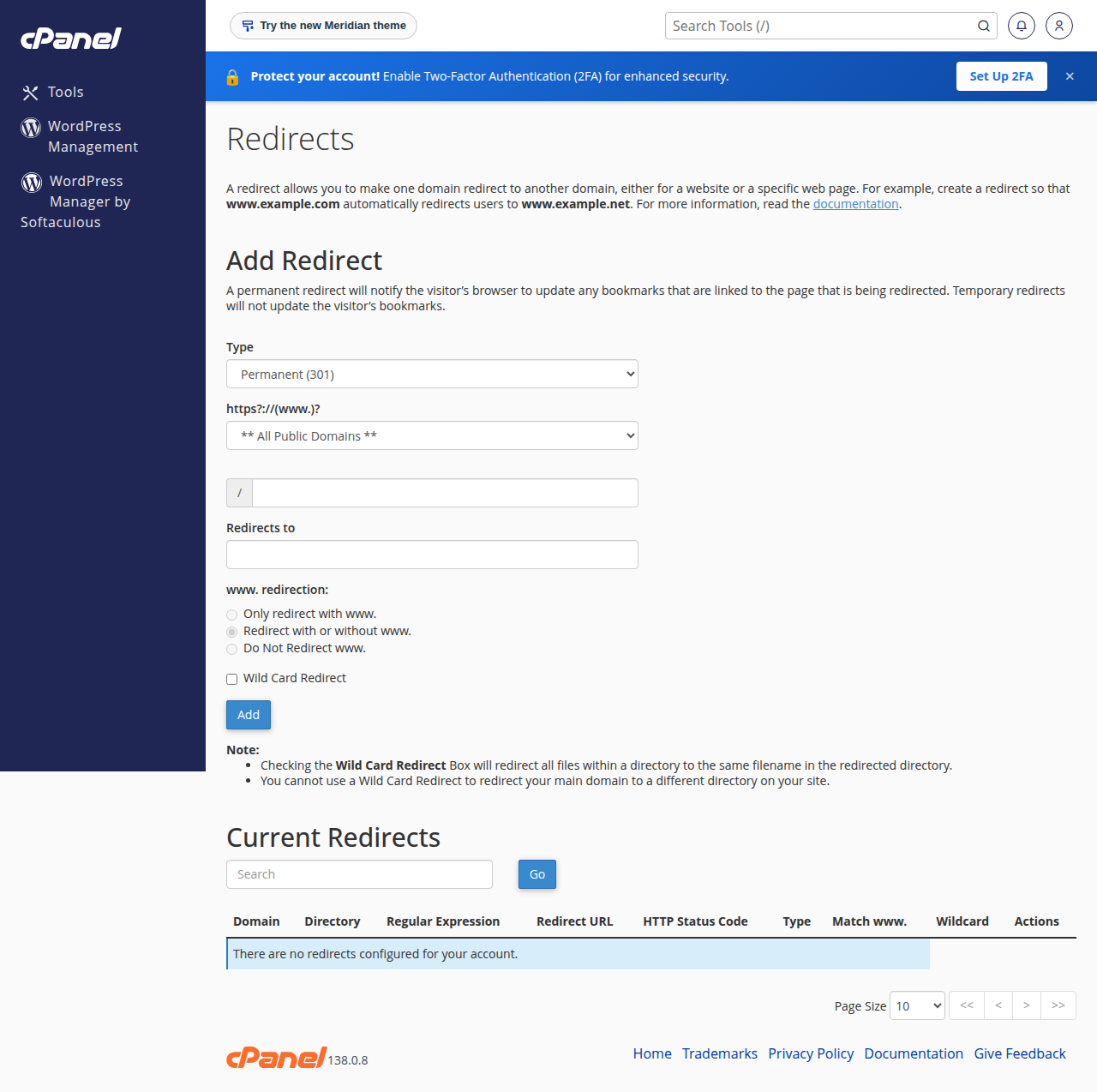
cPanel writes the rule into your .htaccess file. In DirectAdmin and Webuzo, write the rules in .htaccess as shown below. For a simple whole-site redirect, DirectAdmin also has Account Manager › Site Redirects and Webuzo has Domain › Redirects.
3. Add a redirect in .htaccess
Domain India shared hosting runs Apache, and mod_rewrite is enabled on cPanel, DirectAdmin and Webuzo. Put the rules in the .htaccess file in the site's document root, usually public_html.
# One page, permanent
Redirect 301 /old-page https://www.example.com/new-page

# One page, temporary
Redirect 302 /sale https://www.example.com/diwali-offer
To move a whole old domain to a new one, keeping the rest of the path, add this to the .htaccess of the old domain:
RewriteEngine On
RewriteCond %{HTTP_HOST} ^(www\.)?olddomain\.com$ [NC]
RewriteRule ^(.*)$ https://www.newdomain.com/$1 [R=301,L]
Note the escaped dots (\.) and the [NC] flag, which the old version of this article left out. For HTTPS and www rules, see how to redirect non-www to www.
Redirect and RewriteRule are handled by different Apache modules, so combining them for overlapping URLs can cause double redirects or a loop. If your site already uses RewriteRule (WordPress does), write your redirects with RewriteRule too.
On WordPress, a redirect plugin such as Redirection lets you manage redirects from the dashboard instead of editing files.
4. Test the result
Check the real status code with curl, adding ?t= and any value so you see the live answer rather than a cached one:
curl -sI "https://www.example.com/old-page?t=1" | head -n 5Our cPanel servers put an nginx cache in front of Apache that keeps normal pages and 301 and 302 responses for up to 120 minutes, so a redirect you just added or removed can look unchanged for that long without the query string.
Avoid chains. Send http://example.com straight to https://www.example.com in one hop instead of going through https://example.com first.
What is the difference between a 301 and a 302 redirect?
A 301 says a page has moved permanently, so search engines index the new URL. A 302 says the move is temporary, so they usually keep the old URL in the index. Use a 301 for any permanent change of address.
Does a 302 redirect hurt SEO?
A 302 is followed like any redirect, but search engines usually keep the old URL indexed. That is right for a short temporary move and wrong for a permanent one, so switch to a 301 if the move turns out to be permanent.
Where do I add redirects in cPanel?
Open Domains › Redirects, choose Permanent (301) or Temporary (302), enter the old path and the new URL, and click Add. cPanel writes the rule into your .htaccess file.
Why does my new redirect not work straight away on cPanel?
Domain India cPanel servers run an nginx cache that can keep pages and redirect responses for up to 120 minutes. Add ?t= and any value to the URL to see the live response from the server.
How do I redirect an old domain to a new one?
Keep the old domain pointing at your hosting and add a RewriteRule with R=301 to its .htaccess file, so every old URL goes to the same path on the new domain in one step.
Ready to move pages without losing visitors? Read the full links and redirects guide, see Mastering .htaccess, or open a support ticket if a redirect loops.
cPanel hosting includes the Redirects tool and full .htaccess support for every site on your plan.
See cPanel plans