MX records tell the rest of the internet which server accepts email for your domain. If they are missing or point to the wrong place, messages to you bounce or quietly land in an old mailbox. This guide explains how MX records work, when Domain India sets them up for you, and exactly what to add when your DNS is somewhere else or your email is with another provider.
If your domain uses your Domain India hosting nameservers, the MX record was created with your hosting account and you don't need to add anything. If your DNS is at Cloudflare or another provider, add the records there: an MX record on @ pointing to a hostname for your mail server (not an IP address), plus that hostname's A record, SPF and DKIM. For Business Email, copy the records from the service's Domain setup card in the client area. Always delete MX records that belong to your old email provider.
1. How MX records work
An MX record has two parts: a mail server hostname and a priority. When someone emails [email protected], their server looks up the MX records for yourbusiness.in and delivers to the hostname with the lowest priority number first. Higher numbers are only tried if the lower ones don't answer.
Type: MX Host: @ Priority: 10 Value: mail.yourbusiness.inTwo rules matter more than any other:
- An MX value must be a hostname, never an IP address. That hostname needs its own A record pointing to the mail server.
- All your MX records must belong to the same email service. An old provider's MX left in place sends part of your mail to the wrong mailbox.
2. First, find where your DNS is managed
MX records work only at the DNS provider your nameservers point to. A record added anywhere else is saved but never read. Open Domains in the client area, select the domain and look at its Nameservers tab, or run dig NS yourbusiness.in +short. Managing DNS records explains how to read the answer.
The domain's DNS tab in the client area may offer Activate Free DNS or Switch to Free DNS. Don't use it to set up email: it changes your nameservers without copying your records, so mail can stop arriving. Add MX records in your hosting control panel or at your current DNS provider instead.
3. Email on Domain India hosting, with hosting nameservers
This is the simplest case. When your hosting account was created, the server built a DNS zone for your domain with a working MX record, so mail starts arriving as soon as the domain points to the hosting nameservers.
| Panel | Default MX record | Mail hostname |
|---|---|---|
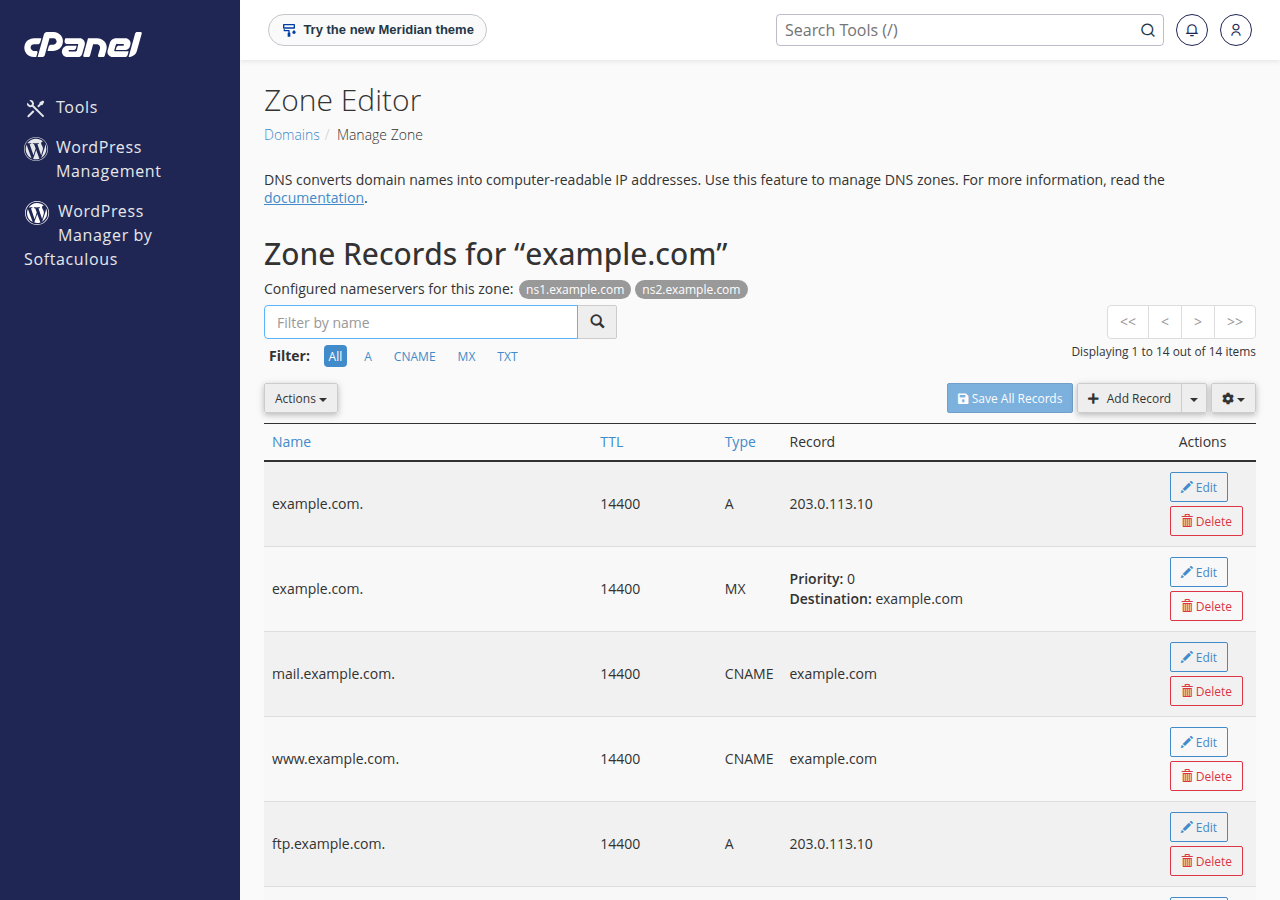
| cPanel | @, priority 0, pointing to your domain itself | mail.yourbusiness.in is an alias of your domain |
| DirectAdmin | @, priority 10, pointing to mail.yourbusiness.in | mail has an A record with the server's IP |
| Webuzo | Created with the account | Ask support if you need to check it |
You can see and edit these in the Zone Editor in cPanel or the DNS management page in DirectAdmin; see DNS changes in cPanel and DNS records in DirectAdmin. Leave the default MX alone unless you are moving email to another provider.
On cPanel, Email Routing (in the Email section) should stay on Automatically Detect Configuration or Local Mail Exchanger while your mailboxes are on our server.
4. Email on Domain India hosting, DNS somewhere else
If your domain's DNS is at Cloudflare or another provider but your mailboxes are on your Domain India hosting, add the records at that provider. Take the server IP address from the Access tab of your hosting service in the client area.
Type: A      Host: mail    Value: (your hosting server's IP)
Type: MX     Host: @       Priority: 10    Value: mail.yourbusiness.in
Then add the two records that stop your mail being treated as spam:
- SPF: one TXT record on
@that includes your hosting server. cPanel's Email Deliverability page shows the exact SPF value it suggests for your domain; copy it from there. - DKIM: a TXT record with your domain's public key. On cPanel it is published under
default._domainkeyand shown in Email Deliverability. On DirectAdmin the selector isx, so the record name isx._domainkey; see DKIM in DirectAdmin.
On Cloudflare, set the mail record to DNS only (grey cloud). Mail can't pass through Cloudflare's web proxy. The Cloudflare guide covers the rest.
5. Domain India Business Email
Business Email runs on its own mail platform, so its records are different from your hosting's. Open your Business Email service in the client area and find the Domain setup card. It lists each record with its type, name and value, and shows whether it is Published, Missing or a Mismatch.
The MX record points to your own hostname, mail.yourbusiness.in, with priority 10, and the card also gives you the A, SPF, DKIM and DMARC records. Add all of them wherever your DNS is managed, exactly as shown. At most DNS providers the priority (10) goes in its own field, not in the value. Then remove every other MX record, including your hosting server's, and click Check again on the card.
6. Email with Google Workspace, Microsoft 365 or Zoho
Use the MX values your provider gives you and delete every other MX record. If the domain uses your hosting nameservers, also tell the server the mail is remote (cPanel: Email Routing › Remote Mail Exchanger; DirectAdmin: untick Use this server to handle my e-mails under E-mail Manager › MX Records; Webuzo: Email › Email Router › Remote Mail Server), so mail sent from your website or other accounts on the server goes to the new provider instead of staying on our server. The full record sets are in Configuring third-party email with DNS.
7. Adding an MX record step by step
- Open your DNS editorat the provider your nameservers point to: the Zone Editor in cPanel, DNS management in DirectAdmin, or your DNS provider's dashboard.
- Delete MX records you no longer use.Keep only the ones for your current email service.
- Add the MX record.Type MX, host
@(some providers want it blank, or your domain name), the mail hostname as the value and the priority in its own field. - Add the hostname's A recordif your provider didn't give you a hostname that already exists.
- Add SPF and DKIMas TXT records, merging SPF into a single
v=spf1record. - Save, then test(section 8).
If your provider's editor asks for a trailing dot (mail.yourbusiness.in.), add it; most modern editors add it for you.
8. Check your MX records
dig MX yourbusiness.in +short
dig A mail.yourbusiness.in +short
On Windows, use nslookup -type=mx yourbusiness.in. The answer should list only your current mail service. New records usually show within minutes to a few hours; an old record can linger until its TTL runs out. To speed up a planned move, lower the TTL of your MX records to 300 seconds a day before. DNS propagation explains the timing.
Then send a test message from an outside address, such as Gmail, and reply to it.
| Problem | Likely cause | Fix |
|---|---|---|
| Senders get "no MX record" or "domain not found" | The MX is at the wrong provider, or not saved | Check the nameservers, then add the MX there |
| Some messages go missing | An old provider's MX is still published | Delete every MX that isn't your current service |
| "Host not found" for the mail server | The MX hostname has no A record | Add the A record for mail |
| Mail works but lands in spam | SPF or DKIM is missing or wrong | Add or correct the TXT records |
| Website form mail stays on the server | cPanel Email Routing is still Local | Set it to Remote Mail Exchanger |
9. Where Domain India fits
Every Domain India cPanel and DirectAdmin hosting plan includes email accounts at your domain, and the MX record is set up with the account. If you want email on its own, Business Email gives you mailboxes with webmail, calendar and contacts at your own mail.yourbusiness.in hostname, priced per mailbox; the card shows the live price, excluding 18% GST.
- Priced per mailbox - start with one
- Email at your own domain ([email protected])
- Add and remove mailboxes yourself
- Webmail with calendar, contacts and tasks
Frequently asked questions
Do I need to add MX records for Domain India hosting email?
Not if your domain uses your Domain India hosting nameservers. The MX record is created with your hosting account. You only add MX records yourself when your DNS is at another provider such as Cloudflare.
What priority should my MX record have?
With a single mail server, any number works; 10 is the usual choice. Lower numbers are tried first, so a backup server, if your provider gives you one, gets a higher number.
Can an MX record point to an IP address?
No. An MX record must point to a hostname, such as mail.yourdomain.in, and that hostname needs its own A record with the mail server's IP address.
Should I delete my old MX records when I change email provider?
Yes. Delete every MX record that does not belong to your new provider. If an old one stays, some senders keep delivering to the old mailbox.
Where do I find the MX records for Domain India Business Email?
Open your Business Email service in the client area and look at the Domain setup card. It lists the MX, A, SPF, DKIM and DMARC records for your domain and shows which ones are published.
How long do MX record changes take?
Usually minutes to a few hours. Servers that looked up the old record may keep using it until its TTL expires, so lower the TTL a day before a planned change.
Should I use Free DNS in the client area to set up email?
No. Activate or Switch to Free DNS changes your nameservers without copying your existing records, so email can stop arriving. Add the MX record in your hosting control panel or at your current DNS provider.
Ready to set up your email? Open your hosting services to reach your control panel, see Business Email for mailboxes on their own, or read Managing DNS records. If mail still isn't arriving, open a support ticket with your domain name.
Send us your domain name and where your email is hosted, and we will check your MX and mail records with you.
Ask our support team