The .IN registry, run under NIXI, requires the registrant of every .in domain to be verified. That covers .in and the Indian extensions that go with it, such as .co.in, .net.in, .org.in, .firm.in, .gen.in and .ind.in. At Domain India you complete this identity check, called eKYC, once for your whole account, in the client area. This page explains what happens if you don't, and what to do when a domain stays on hold.
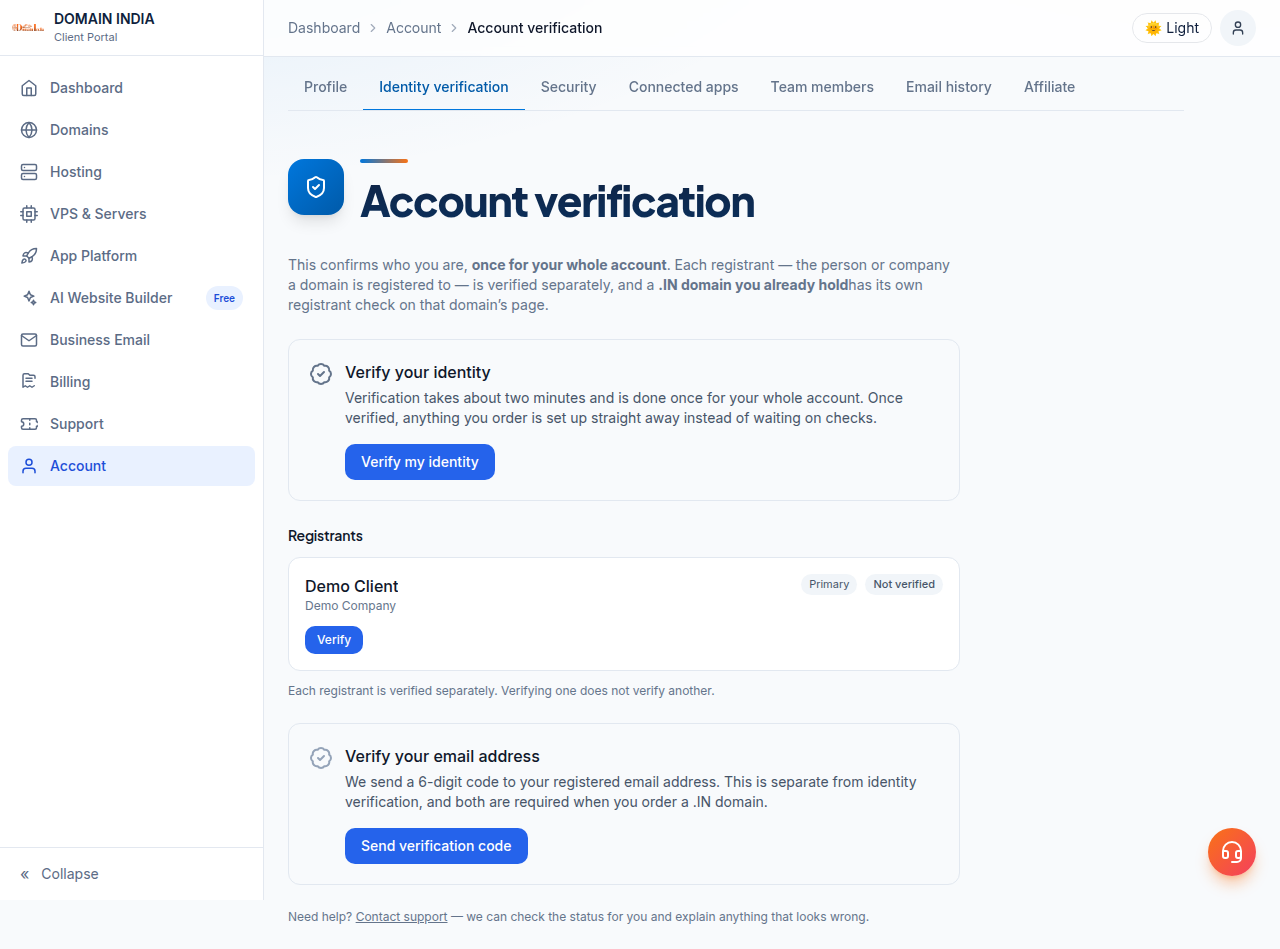
Log in, open Account › Identity verification (/client/kyc), click Verify my identity and finish the Aadhaar step on the government DigiLocker site. Under .IN registry rules, unverified .in domains are suspended by the registry, which takes the website and email on them offline. If a domain is still on hold after you have verified, or the name on your ID differs from the domain's registrant, open a support ticket.
Every screen, status label and special case is covered in How to Complete eKYC Verification. This page is the short version.
1. What happens if you don't verify
Under .IN registry rules, an unverified .in domain is suspended by the registry and stops working. There is often no error message: your website simply stops loading and email to the domain stops arriving. Verifying early, while the domain still works, avoids that.
Verification is not a fee and not a new order. It is an identity check that the registry requires, and Domain Registration India Private Limited, a NIXI-accredited .IN registrar, runs it for you in the client area.
2. How to verify
- Open Identity verification.Log in and go to Account › Identity verification, or open
https://domainindia.com/client/kycdirectly. A notice on your dashboard or on a .in domain's page also links there. - Click Verify my identity.You are sent to DigiLocker, the government site, to complete the Aadhaar step using the mobile number linked to your Aadhaar.
- Finish every DigiLocker screen.Signing in alone is not enough. If you stop early, the page shows Not finished; click Finish verifying.
- Check your domains.Back on the Identity verification page, the Your .IN domains list shows where each domain stands. New orders are covered by your account's verification. For a .in domain you already held, open it under your domains and choose Use my verification for this domain.
- Verify your email address.Click Send verification code and enter the 6-digit code we email you.
You never type your Aadhaar number into our site. DigiLocker shares your confirmed name and address with Domain India.
3. Check the name first: the most common problem
The name on your ID must match the registrant name on the domain. A missing middle name, initials instead of a full name, a different spelling, or a domain registered to a company while the ID belongs to its director are all enough to stop verification for that domain. The page then shows both names side by side.
Don't verify again, and don't edit the registrant contact yourself. Open a support ticket with the domain name, the name exactly as it appears on your ID, and the registrant name shown for the domain. Our team will tell you what that domain needs.
4. If the domain is still on hold
Open a support ticket with the domain name. Some holds can only be lifted by the registry once its requirements are met, and support can tell you which one applies to your domain. Don't send copies of your Aadhaar or other ID documents by ticket or email.
The same applies if the page shows The .IN registry has not confirmed your email yet: use Ask us to resend the registry confirmation and check your spam folder for the email.
5. Outside India, or no Aadhaar?
DigiLocker verification needs an Aadhaar with a linked mobile number. If you live outside India or don't have Aadhaar, open a support ticket and our team will explain how your verification is handled. A .in domain also needs a genuine connection with India; see Who Can Register a .IN Domain before you buy.
Where do I complete eKYC for my .in domain at Domain India?
In the client area under Account, Identity verification, at domainindia.com/client/kyc. Click Verify my identity and complete the Aadhaar step on the government DigiLocker site. Verification is done once for your whole account.
What happens if I don't complete eKYC for a .in domain?
Under .IN registry rules, unverified .in domains are suspended by the registry and stop working, which takes the website and email on that domain offline.
Which extensions need eKYC?
.in and the Indian second-level extensions that go with it, such as .co.in, .net.in, .org.in, .firm.in, .gen.in and .ind.in.
I verified, but my .in domain is still on hold. What should I do?
Open a support ticket with the domain name. Some holds can only be lifted by the registry once its requirements are met, and support will tell you which one applies to your domain.
The name on my Aadhaar is different from the domain's registrant name. What now?
Do not verify again and do not edit the registrant contact yourself. Open a support ticket with the domain name, the name exactly as it appears on your ID and the registrant name shown for the domain.
I live outside India. Can I complete eKYC?
DigiLocker verification needs an Aadhaar with a linked mobile number, so it is not available to you. Open a support ticket and the Domain India team will explain how your verification is handled.
Ready to verify? Log in and open Identity verification, read the full eKYC guide, or see Why is my Domain Suspended if you are not sure eKYC is the cause.
Complete eKYC once for your whole Domain India account and keep your .in domains working.
Open Identity verification