In DirectAdmin you manage your domain's DNS records (A, CNAME, MX, TXT and others) on the DNS Management page for each domain. Those records only take effect if the domain uses your hosting nameservers, so check that first. This page covers the DirectAdmin steps; the full guide to record types and common setups is linked below.
This is the DirectAdmin short version. For every record type, where your records live, common setups for websites and email, and the mistakes to avoid, see Managing DNS records (A, CNAME, MX, TXT).
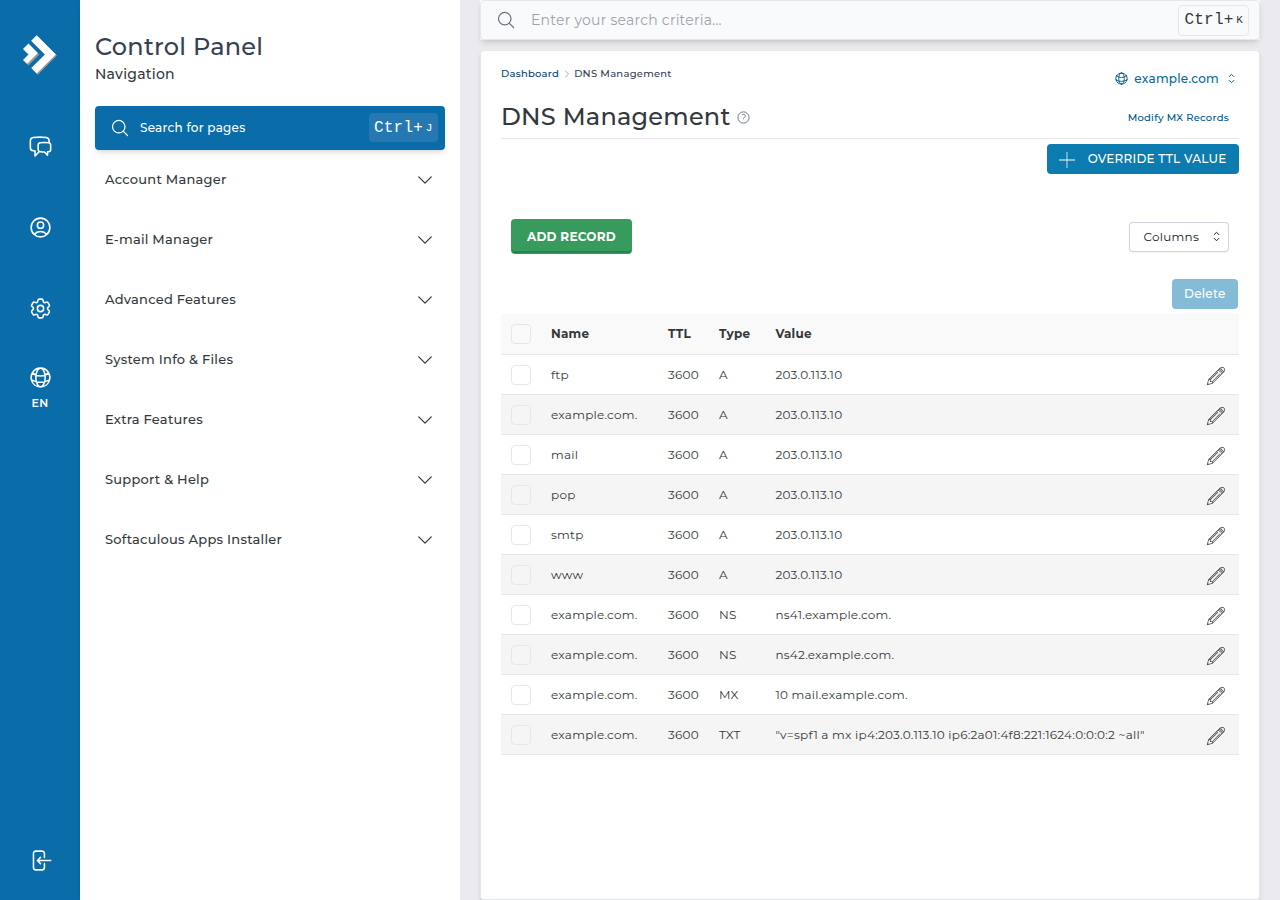
Open DirectAdmin from the client area, go to DNS Management, choose your domain, then add, edit or delete records there. Records you save in DirectAdmin work only while the domain uses your Domain India hosting nameservers; if it points to Cloudflare or another DNS provider, edit the records there instead. Changes usually show within minutes to a few hours.
1. First check: where does your DNS live?
A record added in DirectAdmin is read by the internet only if your domain's nameservers point to your hosting server. Sign in to the client area, open Domains › My domains, select the domain and look at the Nameservers tab. Compare them with the nameservers shown on the Point a domain to this hosting card of your hosting service.
- They match: edit your records in DirectAdmin, as below.
- They point to Cloudflare or another provider: edit the records in that provider's dashboard. DirectAdmin's copy is not used.
- You don't recognise them: open a support ticket before you change anything.
To switch a domain to your hosting nameservers, follow How do I change my nameservers.
2. Add, edit or delete a record in DirectAdmin
- Open DirectAdmin.In the client area, open your hosting services and click the DirectAdmin button on your domain's row. See one-click DirectAdmin login for other routes.
- Open DNS Management.It is under Account Manager › DNS Management. You can also type "DNS" in the Search for pages box at the top of the menu (Ctrl+J).
- Choose the domain.If your account has more than one domain, pick the one whose records you want to change.
- Add a record.Choose the type, enter the name (the domain itself for the root, or just
wwwormailfor a subdomain), the value and, for MX records, the priority. MX values are hostnames, never IP addresses. Save it. - Edit or delete.Existing records are listed on the same page. Change or remove one only when you know what uses it: deleting an MX or TXT record can stop your email.
3. Records DirectAdmin already creates
When a domain is added, DirectAdmin normally creates a zone that already points the domain, www and mail to your hosting server, with MX and SPF records for hosted email. On our DirectAdmin server most domains also have a DKIM key, published as a TXT record under the selector x (x._domainkey.yourdomain.in). You rarely need to add these by hand. See how to check and manage DKIM in DirectAdmin.
If your records don't seem to work, don't click Activate Free DNS or Switch to Free DNS in the client area. It changes your nameservers and doesn't copy your records, so your website and email can stop. Point the domain to your hosting nameservers, or add the records at your current DNS provider.
4. How long changes take
Record changes usually show within minutes to a few hours. Other networks may keep the old answer until the record's TTL (time to live) runs out. Before a planned move, lower the TTL to 300 seconds a day ahead so the switch spreads quickly. To check a record without the browser cache, run dig A yourdomain.in +short on macOS or Linux, or nslookup -type=mx yourdomain.in on Windows.
5. DirectAdmin hosting at Domain India
DirectAdmin hosting lets you manage the website, email and DNS records for your domains from one panel once the domain uses the hosting nameservers. The price on the card is live and excludes 18% GST.
- 10 GB NVMe SSD Storage
- 50 GB Monthly Bandwidth
- 1 Website
- 5 Email Accounts
Where do I edit DNS records in DirectAdmin?
Open DirectAdmin from the client area, go to Account Manager, DNS Management, then choose your domain.
I added a record in DirectAdmin but nothing changed. Why?
Most often the domain doesn't use your hosting nameservers, so the DirectAdmin zone is never read. Check the Nameservers tab of the domain in the client area. If the domain points to Cloudflare or another provider, add the record there instead.
How long does a DNS change in DirectAdmin take?
Usually minutes to a few hours. Other networks can keep the old record until its TTL expires, so a record with a long TTL takes longer to update everywhere.
What is the DKIM selector on Domain India DirectAdmin hosting?
The selector is x, so the DKIM key is published as a TXT record at x._domainkey followed by your domain. Most domains on our DirectAdmin server already have a key.
Should I use Free DNS in the client area if DirectAdmin records don't work?
No. It changes your nameservers and does not copy your records, so email and the website can stop working. Point the domain to your hosting nameservers or add the records at your current DNS provider.
Ready to change your records? Open DirectAdmin from your hosting services, read the full DNS records guide, or open a support ticket with your domain name and the records you want to set.
Send us your domain name and what you are trying to connect, and we will tell you which records to add and where.
Ask our support team