JetBackup 5 is the backup tool built into your Domain India control panel on cPanel and DirectAdmin hosting. It keeps weekly copies of your account, and you can restore any part of one, or download it, yourself. This guide shows how to find JetBackup, restore files, databases or email, and download a copy to your computer.
On Domain India cPanel and DirectAdmin hosting, JetBackup 5 takes a weekly backup of your account every Sunday and keeps the last 5 copies. Open JetBackup 5 in your control panel, pick the type (full account, home directory, databases, email and more) and a date, then choose Restore or Download. A restore overwrites what is there now, so download a copy of the current state first if you might need it.
1. What JetBackup keeps for you
| Item | On Domain India shared hosting |
|---|---|
| Tool | JetBackup 5, inside cPanel and DirectAdmin |
| Schedule | Weekly, on Sunday |
| Copies kept | The last 5 weekly backups |
| What a backup covers | Files in your home directory, databases, email, and account settings such as cron jobs and DNS zones |
| Price | Included with your hosting; there is no separate backup add-on |
Because the backup is weekly, the newest copy can be up to a week old. If your site changes every day, for example a shop taking orders, also keep your own copies; see section 6.
2. Open JetBackup 5
cPanel: log in to cPanel (see how to log in to cPanel), then open JetBackup 5. It is in the Files section, or type "JetBackup" in cPanel's search box.
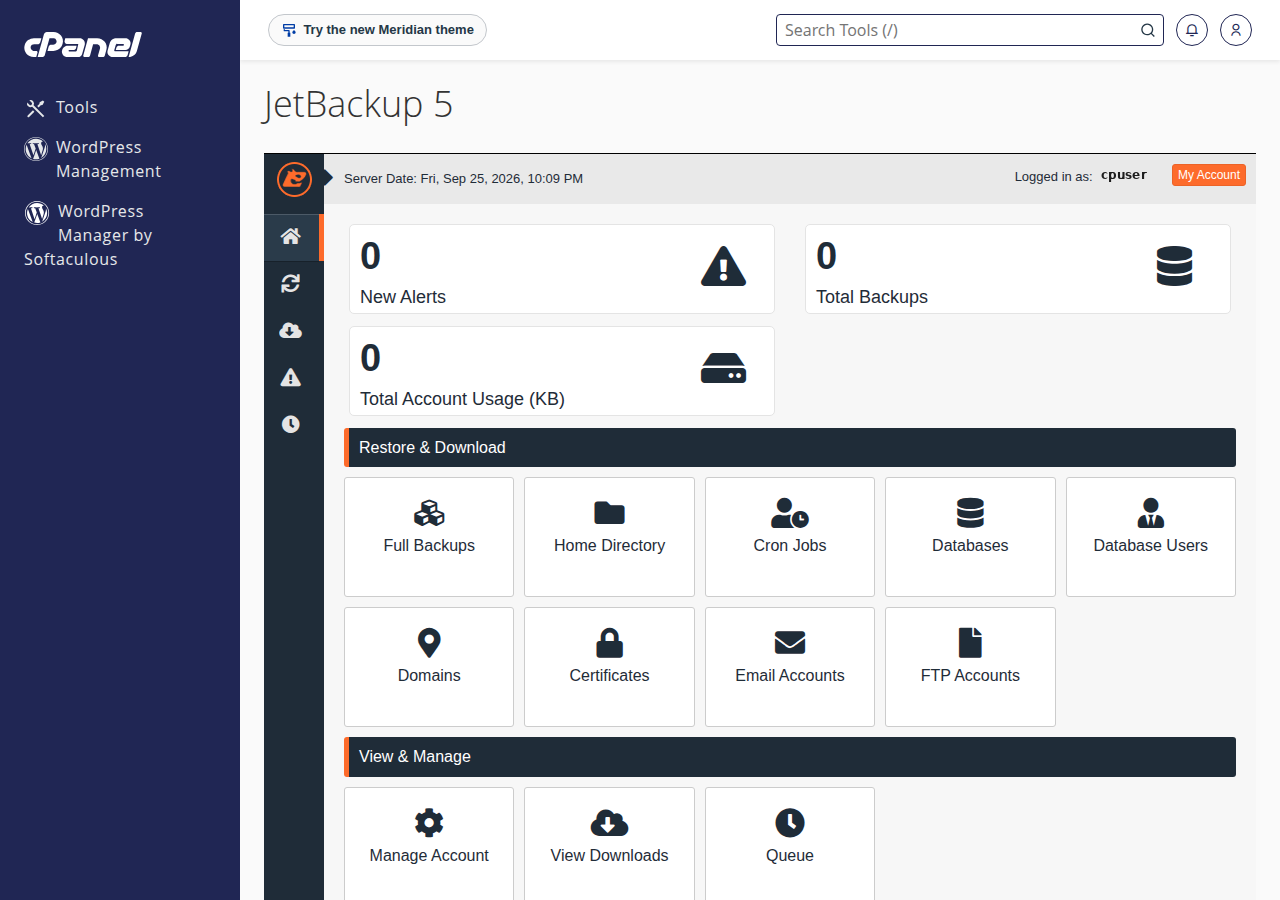
DirectAdmin: log in to DirectAdmin and open JetBackup 5. If it is not on the first screen, use the search box.
cPanel's own Backup and Backup Wizard pages are switched off on our servers. If an older guide tells you to use them, use JetBackup 5 instead.
3. The types of backup you can restore
JetBackup lets you restore the whole account or only the part you need. Restoring only what is broken is safer, because it leaves everything else as it is now.
public_html. You can restore a single file or folder.4. Restore from a backup
- Pick the type.In JetBackup 5, open the section for what you need to restore, such as Home Directory or Databases.
- Pick the date.Each row is one backup point. Choose a date from before the problem started.
- Select the items.For files, browse to the file or folder; for databases or email, tick the one you need.
- Choose Restore.Confirm when JetBackup asks. The job is added to the queue.
- Watch the queue.JetBackup shows the job's progress in its queue. Large restores take longer, so wait until it is marked complete before you test your site.
Restoring a database replaces the current database, and restoring files replaces the current copies of those files. Anything added since the backup date, such as new orders, posts or emails, can be lost. If you might need anything from the current state, download it or make your own copy first.
If your site was hacked, do not restore over and over: the backup may already contain the infection. Read what to do if your website has been hacked first, and choose a date from before the attack.
5. Download a backup to your computer
- Pick the type and dateexactly as for a restore, for example Full Account and the most recent date.
- Choose Downloadinstead of Restore. JetBackup prepares the file in the background.
- Save the file.When it is ready, open JetBackup's downloads list, click the file and save it to your computer or your own cloud storage.
A full account download is a compressed archive, usually a .tar.gz file, with your files, database dumps and mail inside. Labels can differ slightly between JetBackup versions, but the flow is always the same: choose a backup, request the download, wait, then save. The step-by-step guide to downloads is in how can I download a backup of my site.
6. Keep your own copies too
The weekly backups sit on our systems and roll over after five weeks. Keep your own copies as well:
- Before every big change (a WordPress update, a new theme, a migration), download a backup or take your own copy.
- Export databases in phpMyAdmin; see how to back up a MySQL database using phpMyAdmin.
- Keep several dates off the server. Malware or a bad change is often noticed days later, after the last good copy has rolled out of the schedule.
7. Webuzo and VPS
JetBackup 5 is on our cPanel and DirectAdmin servers. Webuzo accounts are backed up every night by Domain India to a separate backup server instead; to restore something, open a support ticket saying what to restore (a file, a folder, a database or the whole account) and from which date. On a VPS you control the server, so you plan and run its backups yourself.
8. Where Domain India fits
Weekly JetBackup 5 backups are included with every Domain India cPanel and DirectAdmin shared hosting plan, and you restore or download them yourself. Prices on the cards are live and exclude 18% GST.
- 25 GB NVMe SSD Storage
- 50 GB Monthly Bandwidth
- 1 Website
- 10 Email Accounts
- 10 GB NVMe SSD Storage
- 50 GB Monthly Bandwidth
- 1 Website
- 5 Email Accounts
Frequently asked questions
How often does JetBackup back up my Domain India hosting account?
On Domain India cPanel and DirectAdmin hosting, JetBackup 5 takes a weekly backup every Sunday and keeps the last 5 copies. Keep your own copies as well, especially before updates, because the newest backup can be up to a week old.
Where is JetBackup in cPanel?
Log in to cPanel and open JetBackup 5 in the Files section, or type JetBackup in cPanel's search box. cPanel's own Backup and Backup Wizard pages are switched off on Domain India servers.
Can I restore just one file or one database?
Yes. In JetBackup 5, open Home Directory to restore a single file or folder, or Databases to restore one database, pick the backup date and choose Restore. You do not need to restore the whole account.
Will a restore delete my newer changes?
It can. A restore replaces the current copy of what you restore with the version from the backup date, so newer orders, posts or emails in that part can be lost. Download a copy of the current state first if you might need it.
Can I download a JetBackup backup to my computer?
Yes. Pick the backup type and date in JetBackup 5 and choose Download. JetBackup prepares the file in the background; save it from its downloads list when it is ready.
Can I buy daily backups?
Domain India does not sell a separate backup product or add-on for shared hosting. For more frequent copies, use a WordPress backup plugin that works in pure PHP, or export your files and databases yourself.
Ready to protect your site? Download a copy now from JetBackup 5, read how can I download a backup of my site, or open a support ticket if a restore does not work.
Tell us the domain, what you need restored and the date it last worked, and we will help you pick the right backup.
Open a support ticket