An extra FTP account lets someone upload files to your website without knowing your DirectAdmin password. It is the right way to give a web designer, developer or colleague access, and to limit them to one folder. This guide shows how to create, change and delete FTP accounts on Domain India DirectAdmin hosting, which folder each account type opens, and how to connect securely.
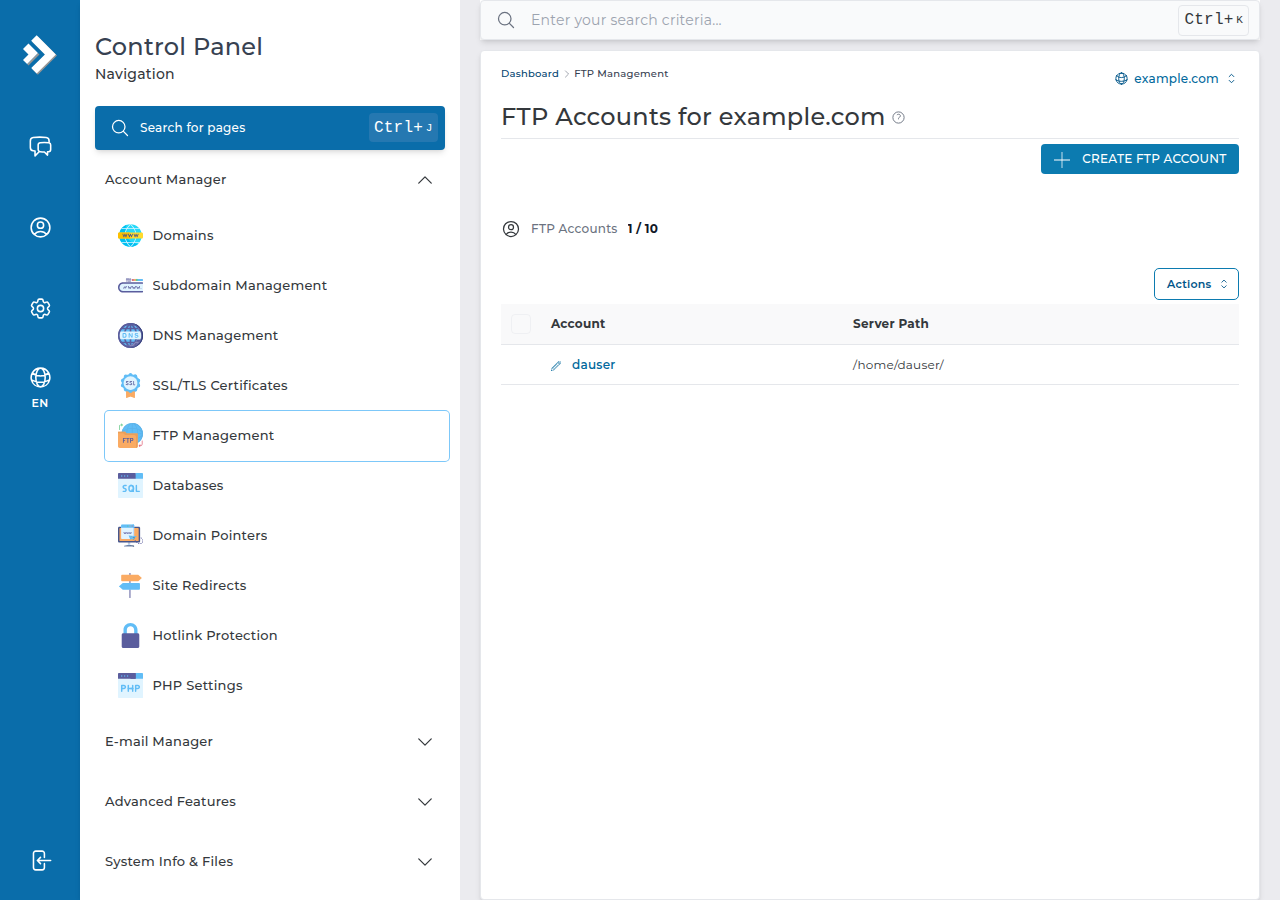
In DirectAdmin, open FTP Management (under Account Manager), click Create FTP Account, enter a name and a strong password, and choose the account type: Domain (the whole domain folder), FTP (the public_ftp folder), User (a folder of its own inside public_html) or Custom (any folder you choose). The login is the full name, such as [email protected]. Connect with FileZilla on port 21 using explicit FTP over TLS. Delete the account when the work is done.
1. Main account or extra FTP account?
Your DirectAdmin username and password already work for FTP, and open your whole home folder. That is fine for you, but don't hand those details to anyone else: the same password opens your control panel, email settings and databases.
An extra FTP account is safer for other people:
- it only logs in to FTP, never to DirectAdmin;
- it is locked to the folder you choose, and can't see anything above it;
- you can change its password or delete it at any time without touching your own login.
The number of FTP accounts you can create depends on your package; DirectAdmin shows your limit and how many you have used.
2. Create an FTP account
- Log in to DirectAdmin.In the client area, open My Hosting and click the DirectAdmin button on your account's row, or see logging in to DirectAdmin.
- Open FTP Management.It is under Account Manager. If you can't find it, type "FTP" in the search box at the top of DirectAdmin. If you host several domains, pick the domain the account belongs to.
- Click Create FTP Account.
- Enter the FTP username.Type a short name such as
designer. DirectAdmin adds your domain, so the full login becomes[email protected]. - Set a strong password.Use a password manager to generate one, at least 12 random characters long. Send it to the other person separately from the username.
- Choose the account type.This decides which folder the account opens (see the table below).
- Save.The account can log in straight away.
3. Which folder each account type opens
These are the four options on the create form of our DirectAdmin server:
| Type | Folder the account starts in | Good for |
|---|---|---|
| Domain | domains/yourdomain.com/, one level above public_html | A developer who looks after the whole site |
| FTP | domains/yourdomain.com/public_ftp/ | Exchanging files that are not part of the website |
| User | A folder named after the account inside public_html, for example public_html/designer/ | A contractor working on one section only |
| Custom | Any folder in your account that you type in | Limiting access to exactly one folder, such as a WordPress theme folder |
The account cannot move above its starting folder. With the Domain type, the website itself is inside, in public_html. For the folder layout of a DirectAdmin account, see what settings do I need to upload my website.
A designer changing a theme doesn't need your whole domain. Use Custom with the theme folder, or User with a folder of their own, and delete the account when the work is finished.
4. Change the password or folder
Open FTP Management, find the account in the list and choose to modify it. You can set a new password or change the account type or custom folder, then save. The change applies from the next login, so tell the other person their new details.
If someone who had access has left, change the password or delete the account; don't wait for them to stop using it.
5. Delete an FTP account
In FTP Management, tick the account, or open its menu, and choose delete, then confirm. Deleting an FTP account removes only the login. The files it uploaded stay in your website, so you don't lose any work.
6. Connect with FileZilla
Use these settings for your main account or any extra FTP account:
| Setting | Value |
|---|---|
| Host | Your server hostname, from your welcome email or the Access tab of your hosting service in the client area |
| Port | 21 |
| Protocol | FTP, with "Require explicit FTP over TLS" |
| Username | The full FTP login, such as [email protected], or your DirectAdmin username |
| Transfer mode | Passive (the FileZilla default) |
FTP over TLS works on our DirectAdmin server, and the server hostname matches its certificate, so use the hostname rather than your domain name or IP address. The first time you connect, FileZilla shows the certificate; check it names your server before you accept it. Plain FTP without TLS sends the password unencrypted, so avoid it. More: using SSL/TLS encryption in FTP clients.
SFTP uses SSH, not FTP accounts. Jailed SSH access is available on every shared hosting plan (cPanel, DirectAdmin, Webuzo); it is off by default, so ask support to enable it for your account. SSH login is with a key, not a password, and it uses the main account only. See SSH on DirectAdmin hosting.
7. Fixing common FTP problems
| Problem | Likely cause | Fix |
|---|---|---|
| "530 Login authentication failed" | Short username, wrong password, or the account was deleted | Use the full [email protected] login; reset the password in FTP Management |
| Connection times out after login, or the folder list never loads | Active mode, or a firewall blocking the data connection | Switch FileZilla to passive mode; try another network |
| Certificate warning | Connecting by domain name or IP address | Connect with the server hostname |
| The upload works but the site does not change | Files went to the wrong folder | Upload into public_html for your main domain, or the addon domain's own folder |
| Uploaded files give a 403 or 500 error | Wrong permissions, or a bad .htaccess line | Files 644, folders 755; see the 403 guide |
If you only need to upload a few files, the DirectAdmin File Manager works in the browser, with uploads of up to 500 MB, and needs no FTP account at all.
8. DirectAdmin hosting at Domain India
Every DirectAdmin plan includes FTP accounts, FTP over TLS, free SSL, jailed SSH on request and weekly JetBackup backups. Prices on the cards are Domain India list prices, excluding 18% GST.
- 10 GB NVMe SSD Storage
- 50 GB Monthly Bandwidth
- 1 Website
- 5 Email Accounts
- 30 GB NVMe SSD Storage
- Unmetered Bandwidth
- 5 Websites
- 50 Email Accounts
Frequently asked questions
How do I create an FTP account in DirectAdmin?
Log in to DirectAdmin, open FTP Management under Account Manager, click Create FTP Account, enter a username and password, choose the account type and save. The login becomes the full name, such as [email protected].
What is the FTP username for an extra FTP account in DirectAdmin?
It is the name you chose followed by your domain, for example [email protected]. Type the full name in your FTP program, or the login fails.
What do the Domain, FTP, User and Custom types mean?
Domain opens the whole domain folder above public_html. FTP opens the public_ftp folder. User opens a folder named after the account inside public_html. Custom opens any folder you type in. The account cannot move above its starting folder.
Which port and encryption should I use for FTP on DirectAdmin hosting?
Use port 21 with explicit FTP over TLS, and connect to your server hostname from the welcome email or the Access tab in the client area, in passive mode.
Can an FTP account log in to DirectAdmin?
No. An extra FTP account only works for FTP, and only in its own folder. It cannot open the control panel, email or databases.
Does deleting an FTP account delete the files it uploaded?
No. Deleting the account removes only the login. The files stay in your website folders.
Can I use SFTP with an FTP account?
No. SFTP runs over SSH and uses your main account with an SSH key. Jailed SSH is available on every shared plan but is off by default, so ask support to enable it.
Ready to give someone access? Open DirectAdmin from your hosting list and create the account in FTP Management. New to DirectAdmin? Compare DirectAdmin hosting plans, or open a ticket if an FTP login still won't work.
Tell us the FTP username, the error FileZilla shows and the time you tried. Never send the password.
Open a support ticket