PHP sessions let your site remember a visitor from one page to the next: who is logged in, what is in the cart, which language they chose. On Domain India's cPanel hosting, sessions work out of the box with no setup. This guide shows how sessions are configured on our servers, how to use them securely in your code, how to change how long they last, and how to fix sessions that keep getting lost.
Just call session_start() before any output; on our cPanel servers sessions are stored as files outside your website folders and cleaned up automatically. Don't create a sessions folder inside public_html. Harden the session cookie with secure, httponly and SameSite, turn on session.use_strict_mode, and call session_regenerate_id(true) at login. Sessions end after 24 minutes of inactivity by default; change session.gc_maxlifetime in the MultiPHP INI Editor or .user.ini, and use a separate "remember me" token for long logins.
1. How a PHP session works
When your script calls session_start(), PHP:
- reads the visitor's session cookie, called
PHPSESSID, or creates a new random ID if there is none; - loads the data saved under that ID on the server into
$_SESSION; - saves
$_SESSIONback at the end of the request.
The visitor's browser holds only the random ID. The data itself stays on the server, which is why sessions are the right place for a login state, and cookies alone are not.
2. How sessions are set up on our cPanel servers
Measured on our cPanel server on 23 September 2026, for PHP 8.3 (other versions follow the same pattern):
| Setting | Value | What it means |
|---|---|---|
| session.save_handler | files | Each session is a small file on the server |
| session.save_path | A server folder per PHP version | Outside your website folders; nothing to create |
| session.gc_maxlifetime | 1440 seconds | A session expires after 24 minutes without activity |
| Cleanup | A scheduled server job | Expired session files are removed for you |
| session.cookie_lifetime | 0 | The cookie lasts until the browser is closed |
| session.use_only_cookies | 1 | The session ID is never put in URLs |
| session.cache_limiter | nocache | Pages that start a session tell caches not to store them |
| session.use_strict_mode | 0 (off) | Turn it on yourself, see section 4 |
| session.cookie_httponly | off | Turn it on yourself, see section 4 |
The nocache setting matters here: our cPanel servers run a caching proxy in front of the web server, and PHP's no-cache headers keep personal pages, such as a logged-in dashboard, out of that cache. Don't change session.cache_limiter to public or private.
3. A minimal working example
<?php
session_start();

if (!isset($_SESSION['visits'])) {
    $_SESSION['visits'] = 0;
}
$_SESSION['visits']++;

echo 'Visits in this session: ', $_SESSION['visits'];
Save it as session-test.php in public_html, open it and reload a few times: the number goes up. Delete the file when you have finished.
session_start() must run before any output, including a blank line or a byte-order mark before <?php. Otherwise PHP reports "headers already sent" and the session cookie is never set.
4. Use sessions securely
Put this at the start of every request, before session_start(), for example in a shared bootstrap.php:
<?php
ini_set('session.use_strict_mode', '1');

session_set_cookie_params([
    'lifetime' => 0,
    'path'     => '/',
    'secure'   => true,     // send the cookie over HTTPS only
    'httponly' => true,     // JavaScript cannot read it
    'samesite' => 'Lax',    // not sent on most cross-site requests
]);

session_start();
At login and logout:
// After checking the password
session_regenerate_id(true);          // new ID, old one destroyed
$_SESSION['user_id'] = $user['id'];

// On logout
$_SESSION = [];
session_destroy();
setcookie(session_name(), '', ['expires' => time() - 3600, 'path' => '/']);
Good habits:
- Store IDs, not secrets. Keep a user ID in the session, never a password or card number.
- Use HTTPS everywhere. A
securecookie is not sent overhttp://; our hosting includes free SSL. - Regenerate the ID whenever the privilege level changes, such as at login or when an admin switches role.
If you prefer, the same settings work as lines in a .user.ini file in your site's folder:
session.use_strict_mode = 1
session.cookie_secure = 1
session.cookie_httponly = 1
session.cookie_samesite = Lax
.user.ini changes can take up to 5 minutes to apply. Never put these as php_value lines in .htaccess: on our servers that causes a 500 error.
5. Change how long a session lasts
A session expires after 24 minutes without a request. To keep visitors logged in longer while they are active:
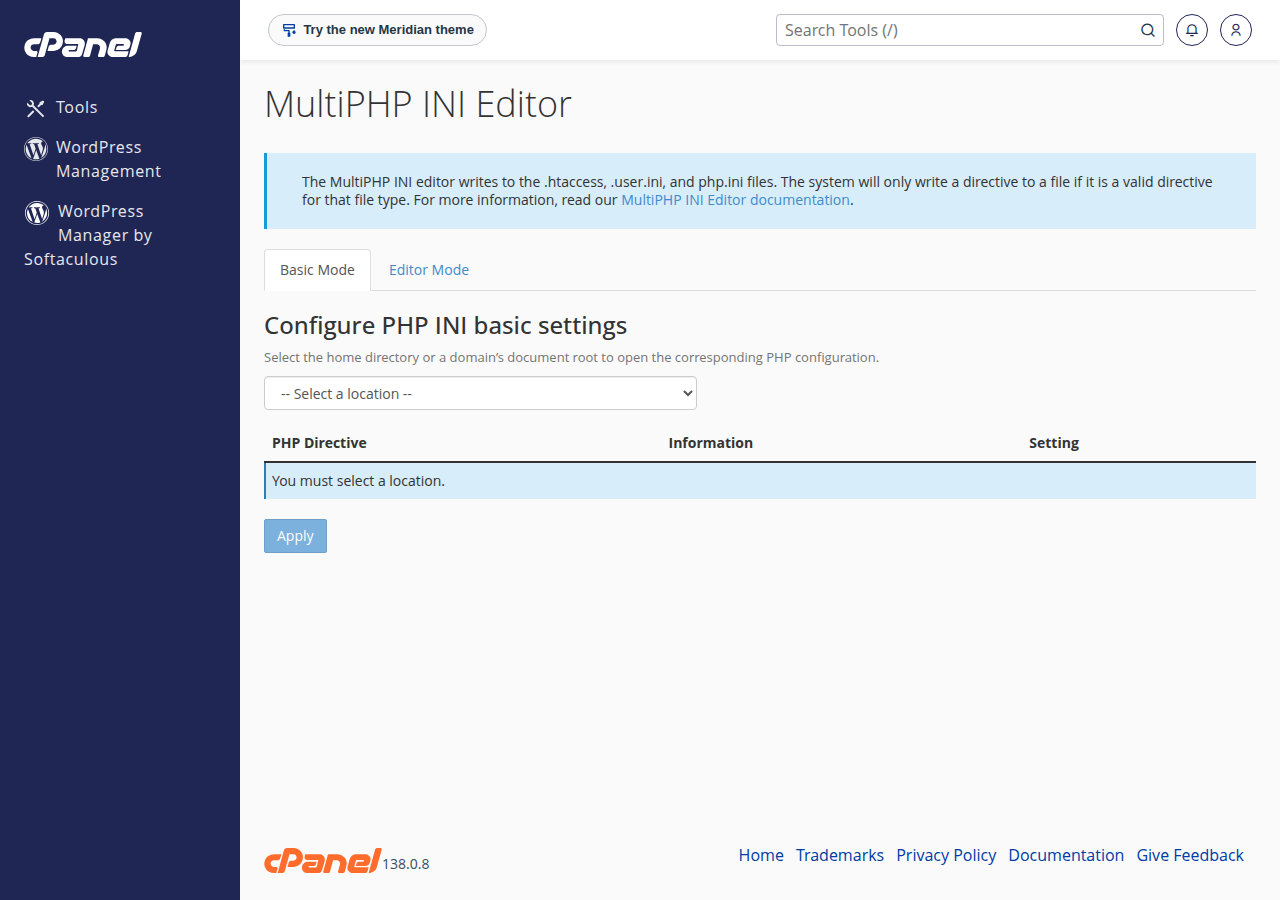
- Open MultiPHP INI Editorin cPanel's Software section and choose your domain in Basic Mode.
- Set session.gc_maxlifetimein seconds, for example
7200for two hours, if the editor offers it, and click Apply. Otherwise addsession.gc_maxlifetime = 7200to.user.ini. - Test it.Log in, wait longer than 24 minutes, and reload. If the session still ends, ask support, because the server's cleanup job also uses a lifetime.
For "keep me logged in for 30 days", don't stretch the session. Issue a separate long random token in its own cookie, store a hash of it in your database, and start a fresh session when a visitor returns with a valid token. Frameworks such as Laravel and WordPress already do this.
6. A custom session folder: only if you must
The old advice to create public_html/sessions is unsafe: session files there can be downloaded by anyone who guesses a name. If an application insists on its own folder, put it outside public_html, for example /home/youruser/sessions, with permission 700:
session_save_path('/home/youruser/sessions');
ini_set('session.gc_probability', '1');   // the server job doesn't clean custom folders
session_start();
With a custom folder, PHP's own cleanup must run, which the gc_probability line enables. The files count towards your disk space, so check the folder now and then.
7. When sessions get lost
- Logged out when moving between
wwwand non-www: the cookie belongs to one host name. Redirect everything to one version; see redirect non-www to www. - Logged out on
http://pages: asecurecookie isn't sent over plain HTTP. Force HTTPS for the whole site. - Logged out after about 24 minutes: the default lifetime; see section 5.
- "Headers already sent": output before
session_start(). Remove spaces or a byte-order mark before<?php, andechostatements above it. - Changes don't seem to apply: check you edited the PHP version your domain uses; see How to change your PHP version. The PHP error log tells you more; see reviewing error logs.
8. Where Domain India hosting fits
Our cPanel hosting comes with sessions configured, free SSL for secure cookies, and PHP versions from 5.1 to 8.5 per domain. The price on the card is live and excludes 18% GST.
- 25 GB NVMe SSD Storage
- 50 GB Monthly Bandwidth
- 1 Website
- 10 Email Accounts
If your application needs sessions in Redis or a database shared by several servers, a VPS gives you full control.
Do I need to set up anything to use PHP sessions on Domain India cPanel hosting?
No. Sessions are stored as files in a server folder outside your website folders and are cleaned up automatically. Call session_start() before any output and use $_SESSION.
How long does a PHP session last on Domain India cPanel hosting?
By default a session expires after 1440 seconds, or 24 minutes, without activity, and the session cookie lasts until the browser is closed. You can raise session.gc_maxlifetime in the MultiPHP INI Editor or a .user.ini file.
Should I create a sessions folder in public_html?
No. Files inside public_html can be downloaded from the web. The default server location is already outside your website. If an application needs its own folder, put it outside public_html with permission 700.
How do I make PHP session cookies secure?
Before session_start(), turn on session.use_strict_mode and call session_set_cookie_params with secure and httponly set to true and samesite set to Lax. Call session_regenerate_id(true) after a successful login.
Why does my session get lost between pages?
Common causes are switching between www and non-www, a secure cookie on an http page, output before session_start() causing "headers already sent", or the 24-minute default lifetime. Use one host name, force HTTPS and start the session before any output.
Can I set session options in .htaccess?
No. PHP runs through PHP-FPM or CGI on our shared servers, so php_value lines in .htaccess cause a 500 error. Use a .user.ini file, the MultiPHP INI Editor or ini_set() in your code.
Ready to build? Open your hosting services to reach cPanel, or read the PHP memory and settings guide for other PHP settings.
Send us the page address, what happens and when, and we will check the PHP settings and logs for your account with you.
Open a support ticket