PHP-FPM (FastCGI Process Manager) is the way most modern servers run PHP: a pool of PHP worker processes that stays ready to answer requests for a site. On Domain India's cPanel hosting, PHP-FPM is managed by our team, per domain, so there is nothing to switch on. This guide explains how PHP runs on our cPanel servers, what that means for your site's speed and limits, what you can change yourself, and how to set PHP-FPM up properly on a cPanel server of your own.
On Domain India cPanel hosting, PHP runs through PHP-FPM pools for most domains and through CGI for the rest; the handler and pool settings are set by the server, not by customers. You choose the PHP version in MultiPHP Manager and change settings in MultiPHP INI Editor or .user.ini. Each FPM domain gets up to 5 PHP workers at once, and a request is stopped after 60 seconds. On your own cPanel server, turn FPM on with the WHM API calls convert_all_domains_to_fpm and php_set_default_accounts_to_fpm, not with php_set_handler.
1. What PHP-FPM is
When a visitor opens a PHP page, the web server hands the request to PHP. How it does that is called the handler:
- CGI starts a PHP process for the request, then lets it finish.
- PHP-FPM keeps a pool of PHP workers for each site. Apache passes requests to a free worker, which answers and waits for the next one. Each pool runs as the site's own user, so one site's PHP can't read another's files.
FPM avoids starting PHP from scratch for every request and works well with OPcache, which keeps compiled PHP in memory. That is why it is the usual choice for WordPress and other busy PHP sites.
2. How PHP runs on our cPanel servers
Measured on our cPanel server on 23 September 2026:
| Setting | Value | What it means for your site |
|---|---|---|
| Server default handler | CGI, for every PHP version | Domains without an FPM pool run PHP as CGI |
| PHP-FPM pools | 2,224 per-domain pools across PHP 7.0 to 8.5 | Most domains run PHP-FPM |
| Process manager | ondemand | Workers start when requests arrive and stop after about 10 seconds idle |
| Workers per domain | 5 on almost every pool | Up to 5 PHP requests run at the same moment; more wait their turn |
| Request time limit | 60 seconds | A PHP request still running after 60 seconds is stopped |
The web server is Apache, with nginx in front of it as a caching proxy, so pages served from the cache don't use a PHP worker at all.
To see which handler your domain uses, upload a file with a hard-to-guess name containing <?php echo php_sapi_name();, open it, then delete it. fpm-fcgi means PHP-FPM; cgi-fcgi means CGI.
3. What you can and can't change
| You want to | How | Who |
|---|---|---|
| Change the PHP version of a domain | cPanel › MultiPHP Manager | You |
| Change memory_limit, upload size, max_execution_time | MultiPHP INI Editor, or a .user.ini file | You |
| Switch a domain between CGI and PHP-FPM | Server setting | Support |
| Change pool size, workers or the 60-second limit | Server setting | Support, where possible |
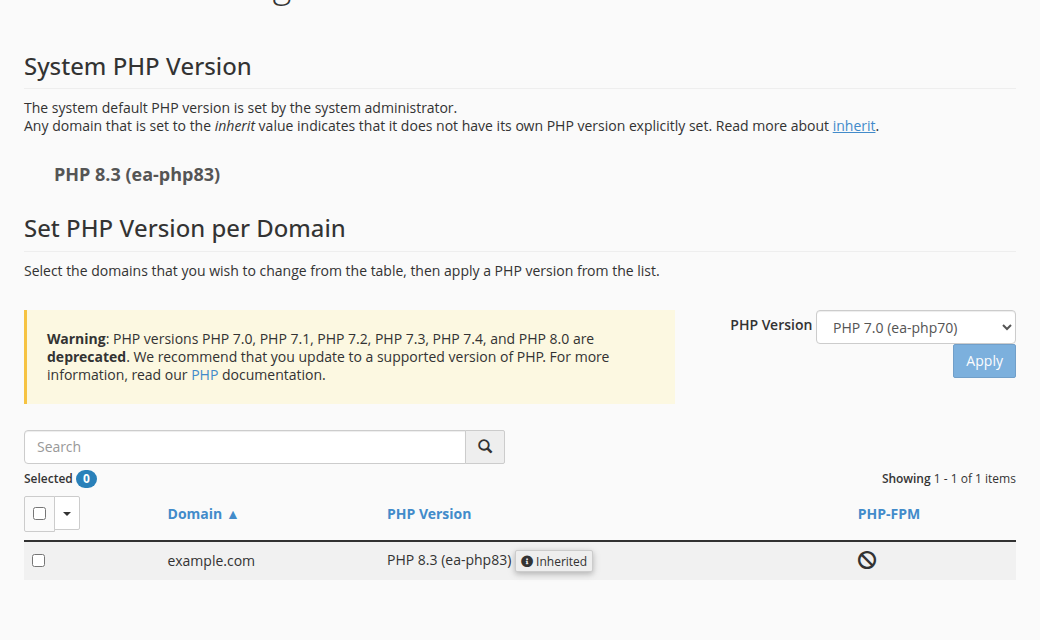
For version changes, follow How to change your PHP version. For settings, see fixing PHP memory errors and changing memory_limit.
Neither CGI nor PHP-FPM runs PHP as an Apache module, so a php_value or php_flag line in .htaccess makes the whole site return a 500 error. Put PHP settings in .user.ini or the MultiPHP INI Editor instead.
A max_execution_time higher than 60 seconds doesn't help on an FPM domain, because the pool stops the request at 60 seconds anyway.
4. Symptoms and what to do
- Slow pages or 503 errors under load. All 5 workers are busy, usually because some pages are slow (heavy plugins, slow database queries, calls to slow external APIs). Speed up the slow pages and use a caching plugin such as WP Super Cache or W3 Total Cache. See My website is slow.
- "Resource Limit Is Reached" (508). Your account hit its CloudLinux limit on simultaneous processes, which covers every site in the account. See the "Resource Limit Is Reached" guide.
- A long import or backup stops half-way. It hit the 60-second limit. Split it into batches, or run it as a cron job. Long-running jobs belong on a VPS.
- Blank page or 500. Read the PHP error log: on FPM domains it is
logs/yourdomain_com.php.error.login your home folder; otherwise theerror_logfile next to the script. See reviewing error logs. shell_exec,execorproc_open"undefined" or disabled. These are switched off on shared hosting whatever the handler; see PHP disabled functions.
If your site regularly needs more workers or longer requests, open a ticket with the domain and what the site does, and we will look at the options with you.
5. On your own cPanel server: turn PHP-FPM on correctly
This section is for a server where you have root and your own cPanel and WHM licence. A Domain India VPS is self-managed and comes without cPanel.
Older guides use rebuild_phpconf or whmapi1 php_set_handler … handler=fpm. On current cPanel versions these fail, often with an error that the fpm handler class has no get_config_string method. That is expected: in cPanel, PHP-FPM is a per-domain setting, not a server-wide handler. Use these WHM API 1 calls instead:
# Move every existing domain to PHP-FPM
whmapi1 convert_all_domains_to_fpm

# Make new accounts use PHP-FPM by default
whmapi1 php_set_default_accounts_to_fpm

# Turn FPM on or off for one domain (php_fpm=0 turns it off)
whmapi1 php_set_vhost_versions version=ea-php83 vhost=example.com php_fpm=1
Check the result in WHM › MultiPHP Manager, where each domain shows whether PHP-FPM is on. A WHM warning about the PHP DSO handler can appear only because the DSO package is installed; if no domain uses DSO, you can ignore it.
Size the pools to your memory
Tune pools in WHM › MultiPHP Manager › System PHP-FPM Settings or per domain, not by editing generated files by hand, which cPanel overwrites. The key values:
pm:ondemandsaves memory on servers with many small sites;dynamickeeps some workers warm for busy sites.pm.max_children: the most workers a pool may run. A rough ceiling is the memory you can give PHP divided by the average worker size.pm.max_requests: recycle a worker after this many requests to contain memory leaks.
To see workers per pool and their memory use:
ps -eo rss,args --sort=-rss | grep '[p]hp-fpm: pool' | head -20
ps -eo args | grep '[p]hp-fpm: pool' | sort | uniq -c
If the PHP-FPM error log for a version (under /opt/cpanel/ea-php83/root/usr/var/log/ for PHP 8.3) keeps saying server reached pm.max_children, raise it gradually or make the pages faster. Use AlmaLinux or Rocky Linux for new servers; CentOS is end-of-life.
6. Where Domain India hosting fits
Our cPanel hosting runs PHP 5.1 to 8.5, switchable per domain, with PHP-FPM, OPcache and the pools managed for you. Prices on the cards are live and exclude 18% GST.
- 25 GB NVMe SSD Storage
- 50 GB Monthly Bandwidth
- 1 Website
- 10 Email Accounts
- 50 GB NVMe SSD Storage
- 100 GB Monthly Bandwidth
- 5 Websites
- 50 Email Accounts
If you want to tune PHP-FPM yourself, set your own time limits or run long jobs, a VPS gives you full root access.
Does Domain India cPanel hosting use PHP-FPM?
Yes, for most domains. Measured in September 2026, our cPanel server had 2,224 per-domain PHP-FPM pools, and domains without a pool run PHP through CGI. The handler is managed by our team, so there is nothing to switch on.
Can I enable or disable PHP-FPM for my domain in cPanel?
Not yourself on shared hosting; the handler is a server setting. You can change your domain's PHP version in MultiPHP Manager and PHP settings in MultiPHP INI Editor or .user.ini. Ask support if you need the handler changed.
How do I check whether my site uses PHP-FPM?
Upload a file containing <?php echo php_sapi_name(); open it in your browser, then delete it. fpm-fcgi means PHP-FPM, and cgi-fcgi means CGI.
Why is my PHP script stopped after 60 seconds?
On our cPanel servers, PHP-FPM pools stop a request that runs longer than 60 seconds, whatever max_execution_time says. Split long jobs into batches or run them as cron jobs, or use a VPS for long-running work.
Why does whmapi1 php_set_handler fail for fpm?
In current cPanel versions PHP-FPM is set per domain, not as a server-wide handler, so php_set_handler with handler=fpm fails. Use whmapi1 convert_all_domains_to_fpm, php_set_default_accounts_to_fpm and php_set_vhost_versions instead.
Can I use php_value in .htaccess with PHP-FPM?
No. When PHP runs through PHP-FPM, Apache doesn't recognise php_value or php_flag lines, and on our servers they make the site return a 500 error. Use .user.ini or the MultiPHP INI Editor.
Ready to tune your site? Change the version in MultiPHP Manager from your hosting services, read How to change your PHP version, or see VPS plans for full control.
Tell us the domain, what the site does and the errors you see, and we will look at your PHP setup with you.
Ask our support team