Different websites need different PHP versions: a new WordPress site should run a current version, while an old custom script may only work on an older one. On Domain India hosting you choose the PHP version yourself, per domain, from your control panel. This guide shows how, which versions are available, and how to check the change worked.
On cPanel, open MultiPHP Manager, tick your domain, pick a version and click Apply. Our cPanel servers offer PHP 5.1 to 8.5, and new accounts use 8.3 by default. On DirectAdmin you choose the version per domain under Account Manager › PHP Settings; the server offers PHP 5.6, 7.2, 7.3, 7.4, 8.1, 8.2 and 8.3. To confirm the change, upload a one-line file containing <?php echo PHP_VERSION;, open it, then delete it. Don't set PHP options with php_value in .htaccess: on our servers that causes a 500 error.
1. Before you change: pick the right version
Check your application's requirements first. WordPress, Joomla, Laravel and most other software publish the PHP versions they support; running a version outside that range is the usual reason a site breaks after a switch.
Older PHP versions are kept so that legacy sites keep running, but they no longer get security fixes. For anything new, PHP 8.3 or newer is the safe choice in 2026. PHP 8.2 gets security fixes only until 31 December 2026, and every version older than 8.2 is already out of support.
Before a big jump, such as 7.4 to 8.3, update your CMS, plugins and theme, and take a copy of your files and database.
2. Which PHP versions are available
These were measured on Domain India's shared servers in September 2026. Servers are updated, so your control panel is always the final word.
| Hosting | PHP versions | Where you change it |
|---|---|---|
| cPanel | 5.1 to 8.5 (new accounts: 8.3) | MultiPHP Manager, per domain |
| DirectAdmin | 5.6, 7.2, 7.3, 7.4, 8.1, 8.2, 8.3 | Account Manager › PHP Settings, per domain |
| Webuzo | Not measured | Ask support |
For the rest of the server software (operating system, web server, database), see What software versions does Domain India web hosting support.
3. Change the PHP version in cPanel
- Open cPanel.In the client area, open your hosting services and click the cPanel button on your domain's row. See How to log in to cPanel for other routes.
- Open MultiPHP Managerin the Software section. It lists every domain in your account with its current PHP version.
- Tick the domainyou want to change. You can tick several at once.
- Choose the versionfrom the PHP Version dropdown and click Apply.
- Check your sitestraight away, and confirm the version as described in section 6.
A domain shown as inherit follows the account's default version. Setting a version on one domain doesn't affect your other domains, so you can run an old script on one site and a current WordPress on another.
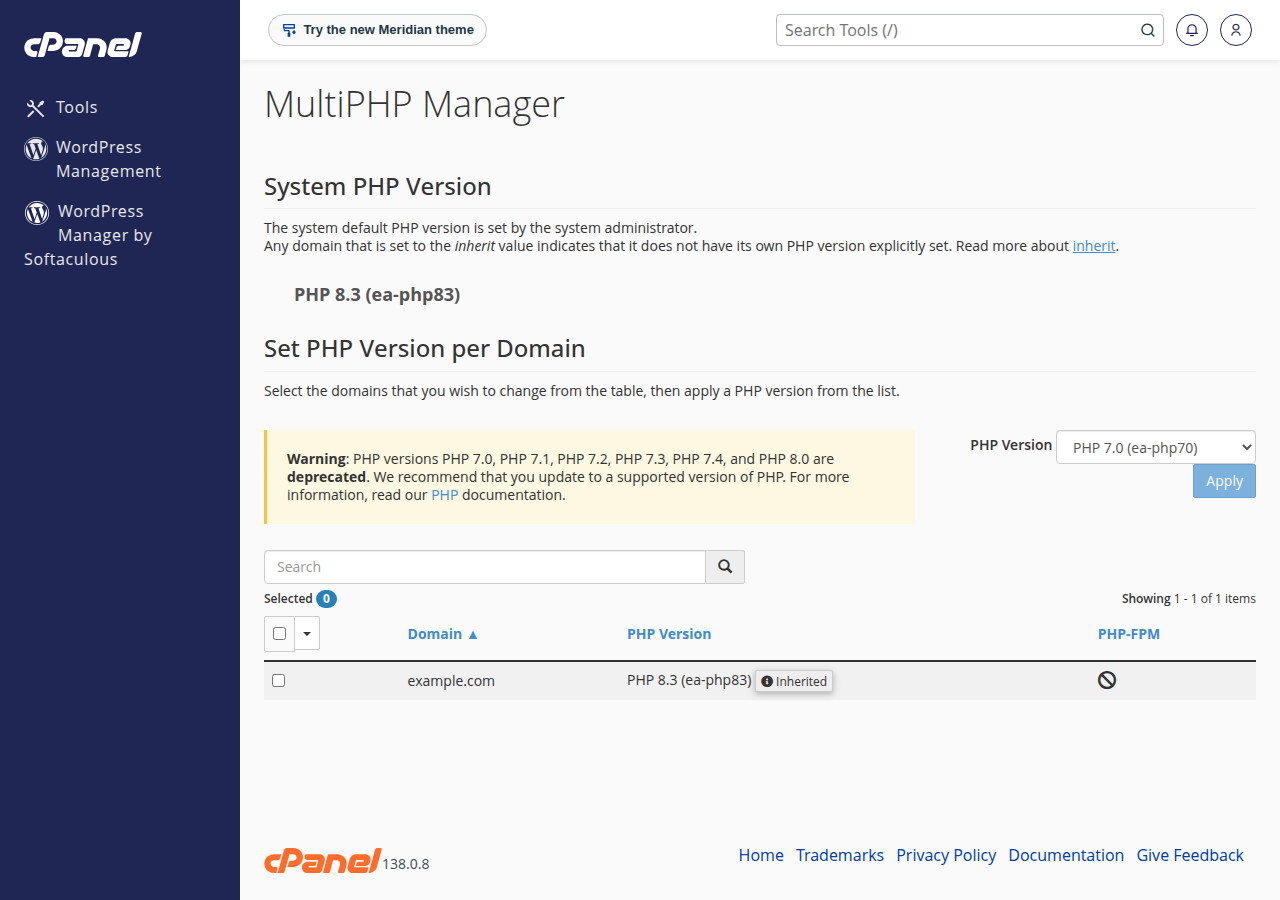
If you can't find MultiPHP Manager in your cPanel, or the version doesn't change, open a ticket and tell us the domain and the version you need.
4. Change the PHP version in DirectAdmin
In DirectAdmin, the PHP version is chosen per domain. Open DirectAdmin from your hosting service in the client area, select the domain in the selector at the top right, and open Account Manager › PHP Settings. Choose from the versions in section 2 in the PHP Version dropdown and click UPDATE VERSION.
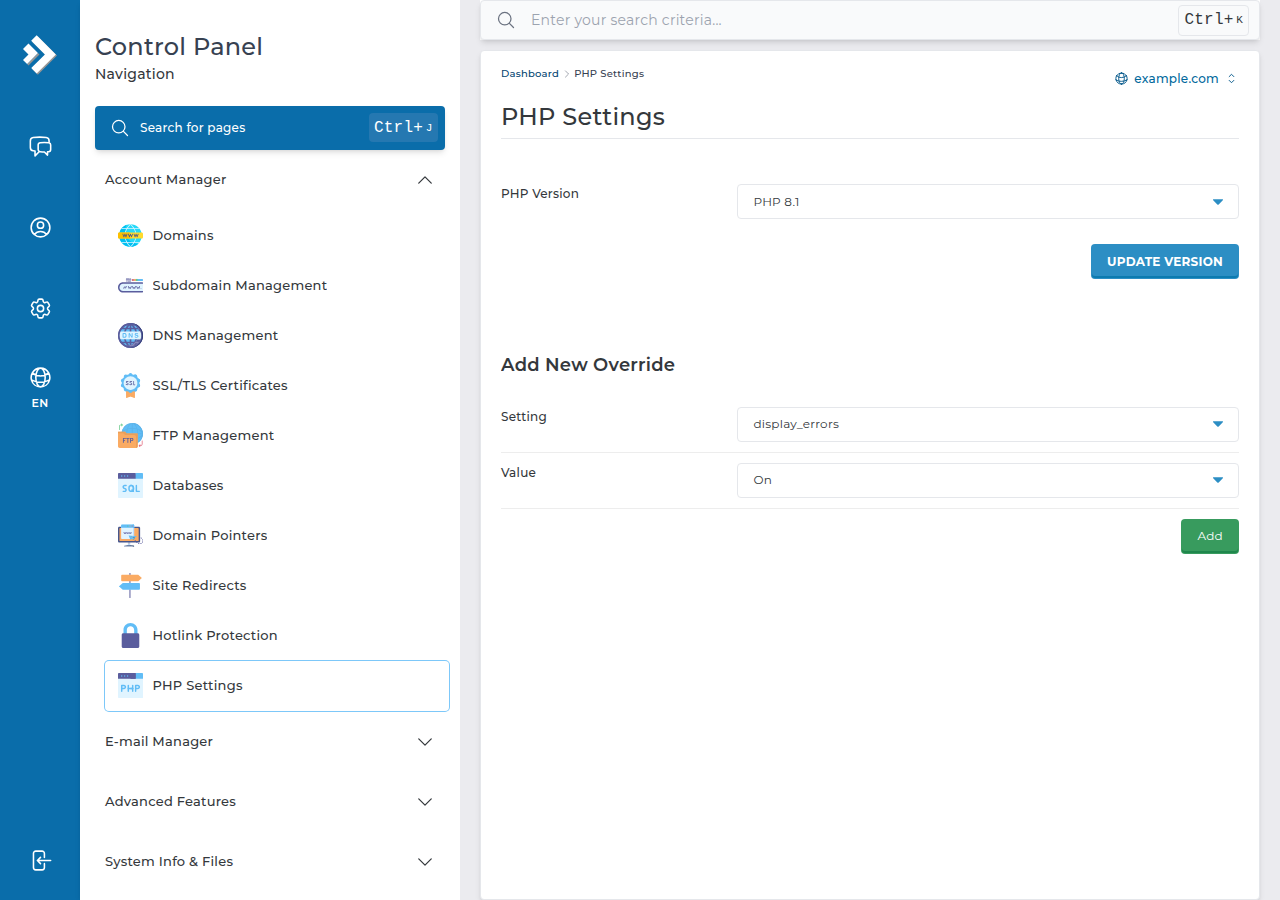
If the version doesn't change after you click UPDATE VERSION, ask support. Note that OPcache is off for PHP 8.3 on our DirectAdmin server and on for the other versions; see the PHP OPcache guide.
5. Webuzo and Windows hosting
- Webuzo: open MultiPHP Manager in the Webuzo panel, choose the version in the PHP Version list next to your domain, and click Apply. Our Webuzo server offers PHP 8.0 and 8.1, with 8.1 as the default (measured 30 September 2026). Both no longer get security fixes, so for a site that needs PHP 8.2 or newer choose cPanel or DirectAdmin hosting.
- Windows (Plesk) hosting is built for ASP.NET. If you need PHP on a Windows plan, ask support before you rely on it.
6. Check which version your site is using
- Create a small filein your site's folder, for example
public_html, with a hard-to-guess name such asv-7f3a9.php, containing one line:<?php echo PHP_VERSION; - Open it in your browser, for example
https://yourdomain.com/v-7f3a9.php. It shows only the version number, such as8.3.x. - Delete the filewhen you're done.
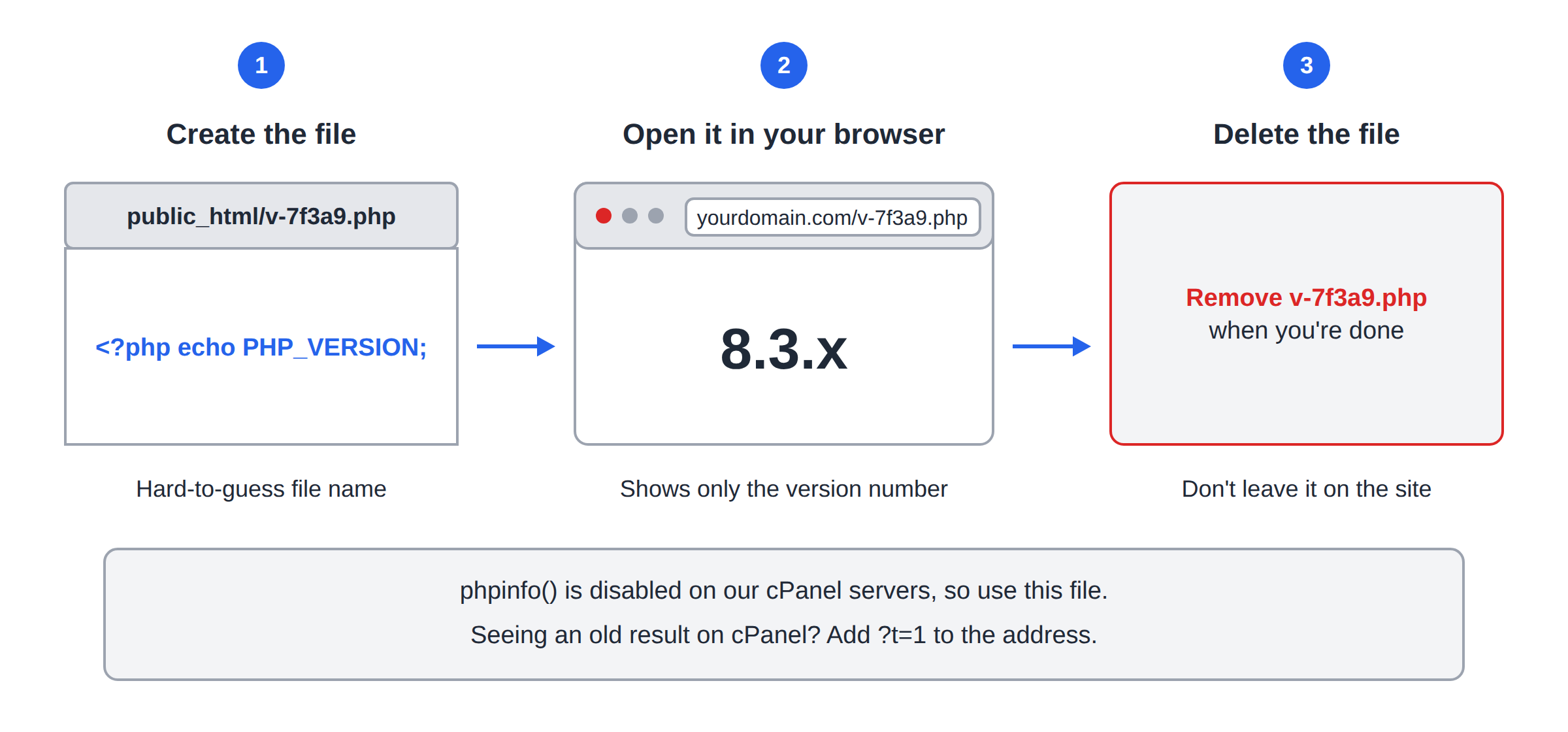
Don't use a phpinfo() page for this: phpinfo() is disabled on our cPanel servers. On cPanel, a cache in front of the web server can keep showing an old response for a while; add ?t=1 (any value) to the address to see the live result.
Other ways to check:
- WordPress: go to Tools › Site Health › Info and open the Server section.
- Over SSH, if SSH is enabled on your account (ask support):
php -vshows the command-line PHP version, which can differ from the one your website uses.
7. Adjust PHP settings after switching
Settings such as memory_limit, upload_max_filesize and max_execution_time belong to each PHP version, so a value you raised on the old version may need setting again.
- Use your control panel first. On cPanel, that is the MultiPHP INI Editor in the Software section.
- Or use a
.user.inifile in your site's folder, one setting per line, such asmemory_limit = 256M. Changes can take up to 5 minutes to apply.
Our shared servers run PHP through PHP-FPM or CGI, not as an Apache module. A php_value or php_flag line in .htaccess makes the whole site return a 500 error. If you see one after editing .htaccess, remove the line and set the value in your panel instead.
Full details and sensible values are in How to fix PHP memory errors and change memory_limit.
8. Extensions and disabled functions
Common extensions such as mysqli, pdo_mysql, gd, curl, mbstring, zip and intl are what most applications need. If your application reports a missing extension after a switch, open a ticket with the extension name and the PHP version you chose.
Some PHP functions are switched off for security on shared hosting, whatever version you choose. Tools that depend on them, such as Composer scripts or Laravel's scheduled artisan commands, fail for that reason, not because of the version. See PHP disabled functions on shared hosting.
9. If your site breaks after the switch
- Blank page or 500 error: switch back to the previous version in the panel first, so the site is up again. Then read the error log to see what failed; see A guide to reviewing error logs in cPanel and DirectAdmin and Troubleshooting 500 Internal Server Error.
- WordPress plugin errors: update plugins and the theme, then disable plugins one at a time to find the one that isn't compatible.
- Fatal errors about undefined functions: the function was removed in the newer version. The code must be updated, or kept on an older version until it is.
10. Where Domain India fits
For PHP and WordPress sites, cPanel hosting gives you the widest PHP choice, from legacy versions to the newest, switchable per domain. DirectAdmin is a lower-cost option with PHP up to 8.3. Prices on the cards are live, per month, and exclude 18% GST.
- 25 GB NVMe SSD Storage
- 50 GB Monthly Bandwidth
- 1 Website
- 10 Email Accounts
- 10 GB NVMe SSD Storage
- 50 GB Monthly Bandwidth
- 1 Website
- 5 Email Accounts
If you need a PHP version or setting that shared hosting doesn't offer, a VPS gives you full control of the server.
Frequently asked questions
How do I change the PHP version in cPanel?
Open MultiPHP Manager in the Software section of cPanel, tick the domain, choose a version from the PHP Version dropdown and click Apply. The change applies to that domain only.
Which PHP versions does Domain India offer?
Measured in September 2026, the cPanel servers offer PHP 5.1 to 8.5, with 8.3 as the default for new accounts, and the DirectAdmin server offers PHP 5.6, 7.2, 7.3, 7.4, 8.1, 8.2 and 8.3. The Webuzo server offers PHP 8.0 and 8.1, with 8.1 as the default.
Which PHP version should I use?
The newest version your application supports. For new sites in 2026, PHP 8.3 or newer is the safe choice; PHP 8.2 gets security fixes only until 31 December 2026, and older versions get none.
How do I check which PHP version my website is running?
Upload a file containing the single line <?php echo PHP_VERSION; to your site's folder, open it in your browser, then delete it. In WordPress, Tools › Site Health › Info › Server also shows it. phpinfo() is disabled on our cPanel servers.
Can I run different PHP versions for different domains?
Yes. On cPanel and DirectAdmin the PHP version is set per domain, so each website in your account can use a different version.
Can I set PHP options with php_value in .htaccess?
No. Our shared servers run PHP through PHP-FPM or CGI, so php_value and php_flag lines in .htaccess cause a 500 error. Use your control panel's PHP settings or a .user.ini file.
My site broke after I changed the PHP version. What should I do?
Switch back to the previous version in your control panel so the site works again, then check the error log to see which plugin, theme or script failed, and update it before trying the newer version again.
Ready to switch? Open your hosting services to reach your control panel, check the software versions on our servers, or open a support ticket if your application needs a version you can't find.
Tell us the domain, the application and the PHP version it needs, and we will confirm what your server offers and help you switch.
Ask our support team