You have paid, and now you are watching your inbox. This page tells you what happens in the minutes after a Domain India order is paid, what can slow it down, and what to do next.
Most Domain India hosting accounts are created automatically, usually within a couple of minutes of the payment being confirmed, and your login details are emailed to you as soon as the account exists. A few orders take longer: a payment still clearing, an order flagged for review, a domain not yet registered or not yet pointing at us, or a .IN domain waiting on eKYC. Your account existing and your website being visible are two different things: the account is ready in minutes, but a domain whose DNS you have just changed can take 24 to 48 hours to resolve worldwide. If nothing has appeared after a couple of hours, open a ticket with your order or invoice number.
1. What happens the moment your payment goes through
Ordering hosting is a short chain, and every link has to complete before your login details go out:
- Your payment is confirmed.Card, UPI and net banking confirm in seconds; a bank transfer or NEFT has to be matched by a person.
- The invoice is marked paid.This is what releases the order.
- The order is checked.Almost all pass straight through; a few are held for a manual review.
- The account is created on the server,with its username, home directory and default settings.
- The welcome email is sent,carrying your control panel address, username and password.
Steps 3 to 5 normally run in one go with no human involved, which is why it is usually over before you have read the receipt.
2. How long it usually takes
We measured this rather than guessing, over twelve months of real orders, matching each hosting account created against the paid invoice for the same plan:
So the honest answer is usually within a couple of minutes, with a small number taking longer because a person has to look at them. That is a measurement of what has happened, not a promise about your order: we publish no setup-time guarantee.
3. What makes a setup take longer
The payment is still clearing. Online payments confirm in seconds, but a bank transfer or NEFT has to be matched against your invoice by hand, and the order is not released until the invoice shows as paid. Check it under Invoices, and see Payment shows pending if it is stuck.
The order is flagged for manual review. A small share of orders are held for a fraud or eligibility check. This happens to genuine customers and usually means an hour or two. The state is under Billing › Orders.
The domain is not registered yet, or does not point at us. A hosting account is created for a domain name. If you are bringing a domain from elsewhere, the account can be built, but nothing loads on that domain until you change its nameservers. If you ordered the domain from us too, registration has to finish first.
A .IN domain is waiting on eKYC. Indian domains need a registry verification step, done per domain. Until you complete it the domain stays pending and your site will not go live on it, even though the hosting account is ready. Do this the same day: Complete eKYC verification.
The order needs manual work. A VPS or a Windows plan is not a one-click creation the way shared hosting is, so expect a hand-built setup.
Your welcome email goes to the address on your Domain India account. With a typo in it, the account can be created perfectly and you will never see the details.
4. The question behind the question: "why can't I see my site yet?"
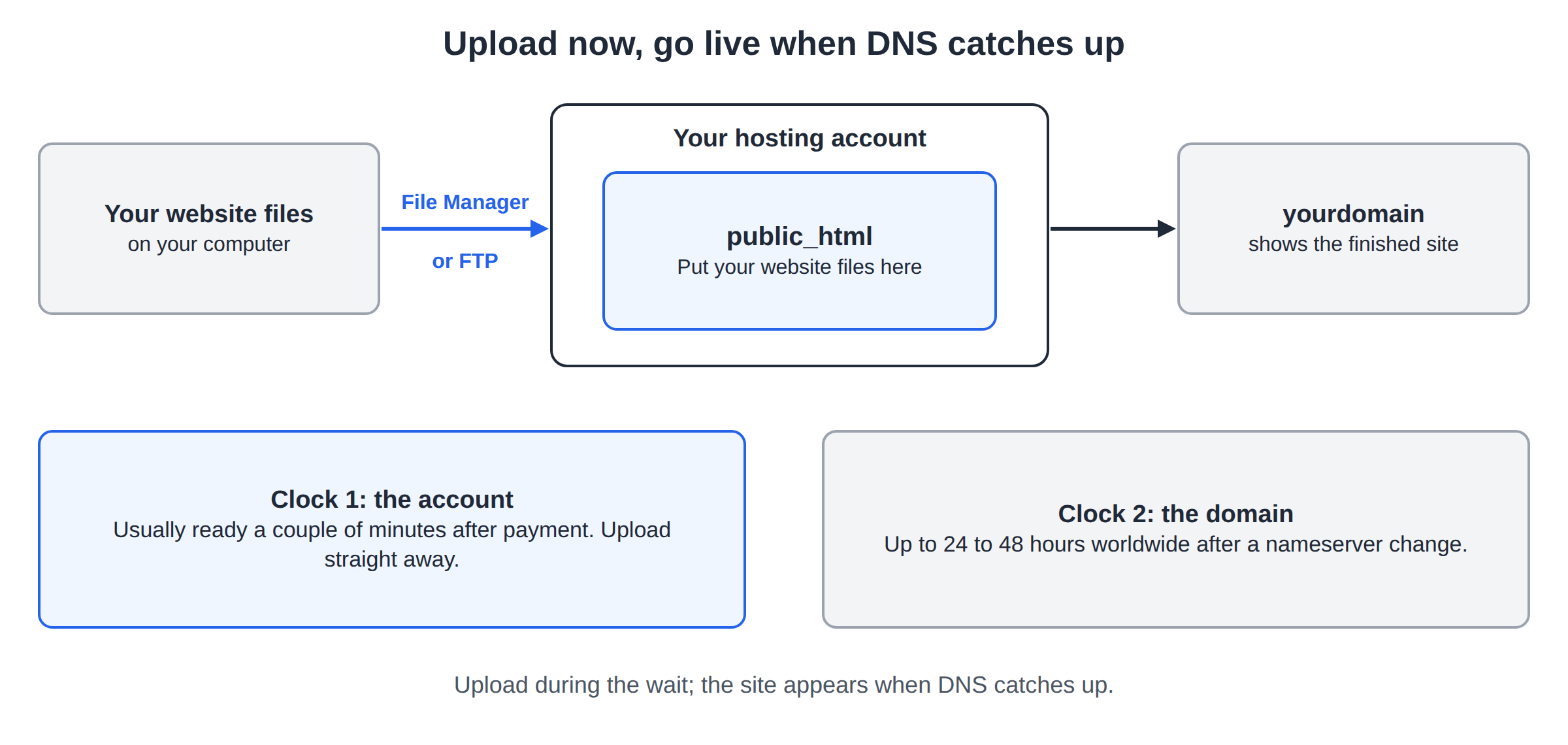
This is where the confusion lives: two separate clocks are running.
| What | How long | How you check it |
|---|---|---|
| Your hosting account exists on the server | Usually a couple of minutes after payment | Log in to the control panel with the welcome email details |
| Your domain resolves to our server worldwide | Up to 24 to 48 hours after a nameserver change | Load the site, and ask someone on another network to try too |
The account is ours to create, so it is fast. Where your domain points is published across the whole internet, and the rest of the world caches it: when you change nameservers, every network holding the old answer keeps using it until its cache expires. That is why a site can work on your phone and not on your office Wi-Fi for a day or so. Nothing is broken, and nobody can speed those caches up: change the nameservers once, correctly, then leave them alone. See How to change your domain DNS settings and Understanding DNS propagation.
You do not have to wait idly: upload your whole website while the domain is still resolving, so the finished site appears when DNS catches up instead of an empty folder.
5. What arrives, and where to find it if it did not
When the account is created we email you the control panel address, your username and your password. Keep that message: it is the one with your login details. If it is not in your inbox:
- Check spam and junk. Automated email carrying a password lands there often. Mark it as not spam so the next one does not.
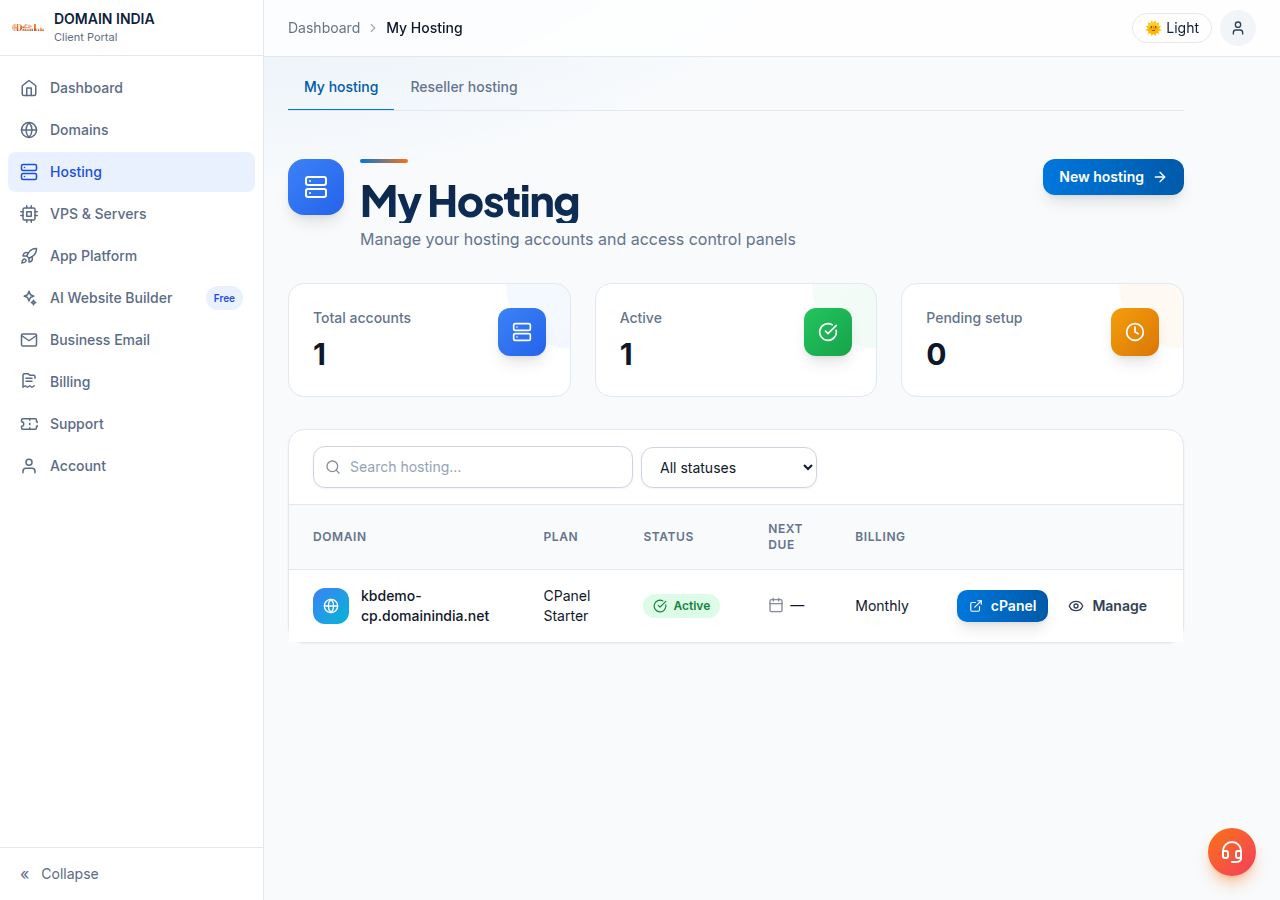
- Look in the client area instead. The email is a convenience, not the only copy. Sign in, open Hosting › My hosting and select your hosting service: you can reach the control panel and reset the password from there.
- Confirm the order is complete. If Hosting › My hosting is empty, the account does not exist yet, so read section 3 again rather than hunting for the email.
That password travelled through email, which is not a private channel. Set your own in the control panel on day one and keep it in a password manager.
6. Your first twenty minutes
- Log in to the control panel,with the welcome email details or from Hosting › My hosting in the client area: How to log in to cPanel.
- Upload your website.Put your files in the
public_htmlfolder, with the panel's File Manager or over FTP: What settings do I need to upload my website and How do I use the File Manager. - Point your domain at us,if it is registered elsewhere: set the nameservers, then allow up to 24 to 48 hours.
- Create your email accounts,then sign in at webmail.
- Turn on SSL.Free certificates are available from the panel, so the site loads over https once the domain resolves to us.
7. What to expect by order type
| You ordered | Usually ready | What can delay it |
|---|---|---|
| Shared hosting (cPanel, DirectAdmin, Webuzo) | A couple of minutes after payment; Webuzo accounts can take longer | Payment clearing, a manual review, no domain supplied |
| A domain name | Minutes, once payment is confirmed | Registry checks, and eKYC for a .IN domain |
| Business email | You set up the mailboxes yourself after the order | Mail DNS records for the domain still updating |
| A VPS or a Windows plan | Longer, and often hand-built | Manual provisioning and configuration |
| A transfer from another registrar | Days, not minutes | The standard transfer process at the registrar you are leaving |
Choosing your first plan and want the setup that happens automatically? Shared hosting is that route.
- 25 GB NVMe SSD Storage
- 50 GB Monthly Bandwidth
- 1 Website
- 10 Email Accounts
8. If your account still has not appeared
Give it a couple of hours if the order shows as paid, then stop refreshing your inbox and tell us, so we can look at the order itself.
- Open a ticket at /support/ticket and include the order number or the invoice number. That one detail turns a conversation about which order you mean into an answer.
- Or start a live chat, available 24 hours a day.
- Tickets get a first response within 15 minutes. How long the fix takes depends on what is wrong.
- We do not run phone support: everything goes through tickets and live chat, which also gives you a written record.
New to our ticket system? Read What is a support ticket system.
Frequently asked questions
How long does a Domain India hosting account take to set up?
Most hosting accounts are created automatically within a couple of minutes of the payment being confirmed. Across twelve months of real orders, the median time from payment to account creation was 31 seconds, and 48 of 57 accounts were live within two minutes. A few need a manual check and take longer. This is a measurement of past orders, not a guarantee.
My account is set up but my website does not load. Why?
Almost always DNS. The hosting account is created in minutes, but a domain whose nameservers you have just changed can take 24 to 48 hours to resolve everywhere, because networks cache the old answer until it expires. You can upload your site in the meantime.
I did not receive the welcome email with my login details. What do I do?
Check spam and junk first, since automated email carrying a password often lands there. If it is not there, sign in to the client area, open Hosting › My hosting and select your hosting service: you can reach the control panel and reset the password from there.
Why is my order still pending after payment?
Usually a payment that has not cleared, such as a bank transfer or NEFT that has to be matched by hand, or an order held for a manual review. Check the invoice status under Invoices and the order status under Billing › Orders in the client area.
Does a .IN domain take longer?
It can. Indian domains require an eKYC verification step for each domain. Until you complete it, the domain stays pending and your site will not go live on it, even though the hosting account behind it already exists. Complete eKYC the same day you order.
Can I start building my website before my domain points at Domain India?
Yes. Log in to the control panel, upload your files to public_html, create your mailboxes and set up SSL. When the nameserver change finishes propagating, the completed site appears straight away.
Ready to get going? Log in to cPanel, upload your website and set up your email. If your account has not appeared and the invoice shows as paid, a ticket is the fastest route.
Send us the order number or invoice number and the domain name, and we will check the order itself. Live chat is open 24 hours a day if you would rather ask there.
Open a support ticket