You paid, the money may even have left your bank account, but the invoice in your Domain India client area still says it is due. This usually sorts itself out within minutes, because the payment gateway confirms the payment to us directly. This guide explains what the invoice page shows, how long to wait, and what to send support if it doesn't update.
Don't pay a second time. An invoice keeps showing Payment Due (or Overdue) until the gateway confirms the payment, and most card and UPI payments show as Paid within about two minutes. Check whether your bank was actually debited. If it was and the invoice is still unpaid after about an hour, open a ticket with the invoice number and the transaction reference from your bank, UPI app or gateway receipt.
1. What the client area shows
Open your invoices and click the invoice. The page tells you where things stand:
| What you see on the invoice | What it means |
|---|---|
| Payment Due, with a Pay Now button | No confirmed payment is recorded against this invoice yet |
| Payment Overdue | The same, and the due date has passed |
| Payment Received, with Paid On and a Transaction ID | We have the payment; nothing more to do |
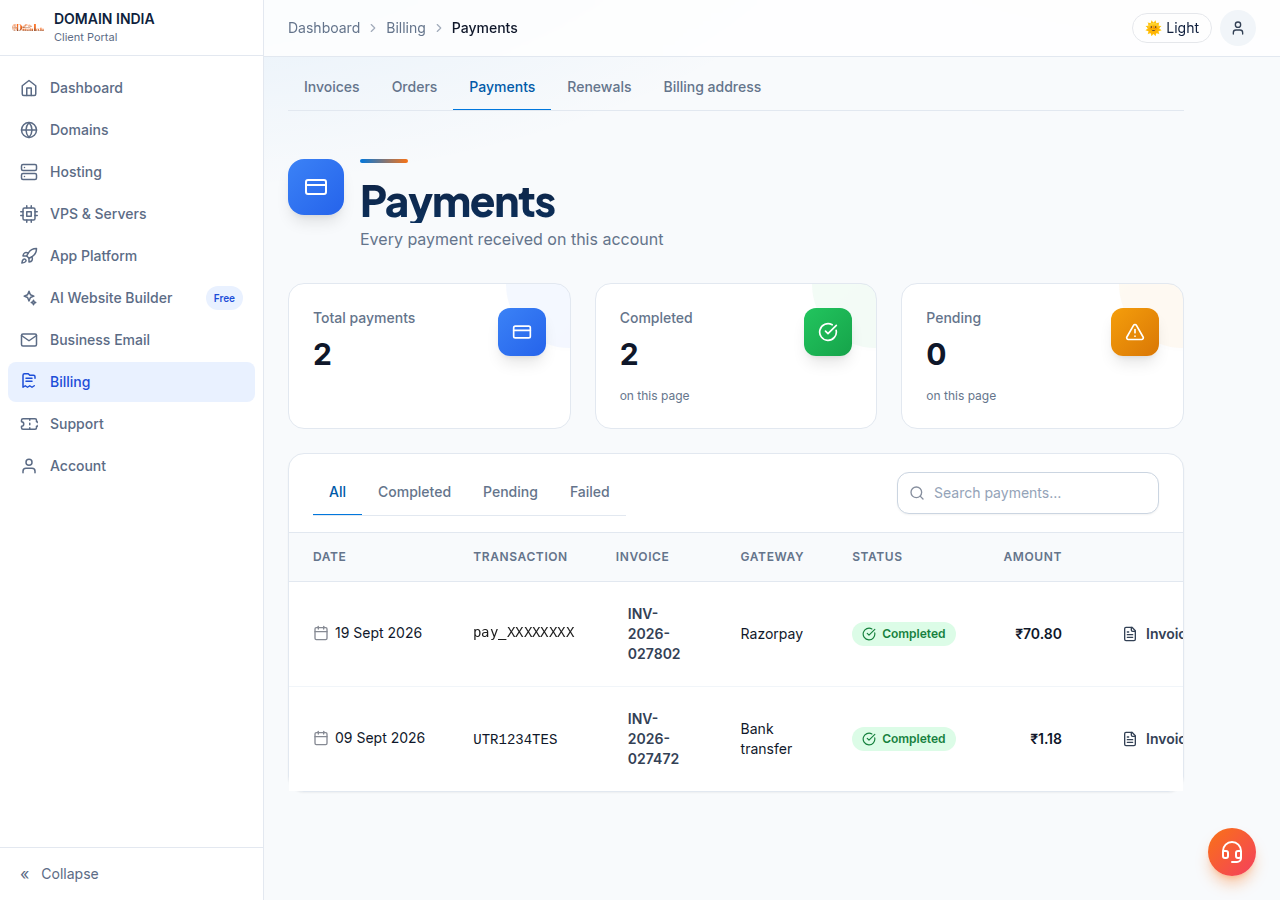
There is no separate "pending" status on an invoice. While a gateway is still confirming, the invoice keeps showing Payment Due. The Payments page lists every payment recorded on your account, with the date, invoice, gateway and transaction reference; if your payment is there, it has reached us.
2. Why a payment can look stuck
3. What to do, step by step
- Don't pay again.A second attempt can charge you twice. Wait first, even if the page shows an error.
- Wait a few minutes, then refresh the invoice.In our records, most payments through Razorpay show as Paid within about two minutes of starting the payment.
- Check your bank or UPI app.Look for a debit matching the invoice amount, and note its reference: the UPI reference or UTR number, the card transaction ID, or the payment ID on the gateway's receipt email.
- If you were not debited,the payment didn't go through. You can pay again, or choose a different method on the payment page.
- If you were debited and the invoice is still unpaid after about an hour,open a ticket with the details in section 4.
Don't pay again and don't raise a dispute with your bank yet. Either the payment will be matched to your invoice, or the bank or gateway will reverse the debit automatically. Send support the transaction reference so we can check which it is. A chargeback started before we have looked can hold up the fix.
4. What to send support
Open a ticket from the client area, or use the public ticket form if you can't sign in. Include:
- the invoice number shown on the invoice;
- the payment method you used (UPI, card, net banking, PayPal or bank transfer);
- the transaction reference: UPI reference or UTR, card transaction ID, or the gateway's payment ID;
- the date, time and amount of the debit;
- a screenshot of the debit in your bank or UPI app, with your account number hidden.
Never send your card number, CVV, OTP or banking password; support never needs them. Live chat is available 24/7, tickets get a first response within 15 minutes, and there is no phone support.
5. Payment methods on the invoice page
When you click Pay Now, the payment page lists the methods available for that invoice. On 24 September 2026 Domain India's active options were:
| Method | How it pays | When the invoice updates |
|---|---|---|
| Razorpay | Cards, UPI, net banking and wallets | Usually within minutes, confirmed by the gateway |
| Atom Pay | Net banking, UPI and Indian cards | Usually within minutes, confirmed by the gateway |
| Stripe | Credit and debit cards | After the card payment completes |
| PayPal | Your PayPal account | After PayPal finalises the payment, which can take a few seconds |
| Bank Transfer | Direct transfer using the bank details shown | After our team verifies the transfer by hand |
Some gateways charge in a currency other than rupees; the payment page shows the converted amount before you pay. For a bank transfer, keep the transfer's UTR and send it with your invoice number so we can match it quickly.
6. After the invoice shows Paid
Your order or renewal then goes ahead automatically. Most new hosting accounts are created within a couple of minutes of payment, and a small number need a manual check and take longer; see how long account setup takes. The invoice page also shows the payment method and transaction ID for your records.
If you paid twice for the same invoice by mistake, tell support with both transaction references. Refunds for eligible purchases are covered by our refund policy.
Why does my invoice still say Payment Due after I paid?
The payment gateway has not confirmed the payment to us yet. Most payments show as Paid within about two minutes. Refresh the invoice, and don't pay a second time.
Money was deducted but my invoice is unpaid. What should I do?
Wait about an hour. If the invoice is still unpaid, open a support ticket with the invoice number, payment method, transaction reference, date, time and amount. Support will check the payment with the gateway.
Should I pay again if the payment is stuck?
Not if your bank or UPI app shows a debit. Paying again can charge you twice. Pay again only if you have confirmed that no money left your account.
How long does a bank transfer take to show as paid?
Bank transfers are verified by our team by hand, so the invoice updates once the transfer has arrived and been matched. Send your UTR and invoice number in a ticket to speed this up.
What happens if a failed payment was debited from my account?
Either the payment is matched to your invoice, or your bank or the payment gateway reverses the debit automatically. Your bank can tell you the expected reversal date. Send support the transaction reference so we can confirm which it is.
Where can I see the payments on my account?
In the client area, the Payments page lists each payment recorded on your account with its date, invoice, gateway and transaction reference. Each paid invoice also shows its payment method and transaction ID.
Ready to check? Open your invoices and the Payments page. If the money left your account and the invoice is still unpaid after about an hour, open a ticket with the transaction reference.
Send the invoice number, payment method and transaction reference, and support will match your payment.
Open a ticket