You can design a business website without writing code, and you can start for free. Domain India gives you two website builders: the AI Website Builder, which writes and designs the site for you, and a drag-and-drop builder that comes with our Linux hosting plans. This guide walks through both, step by step, and shows when WordPress is the better choice. Prices are Domain India list prices, checked on the live site on 23 September 2026, and exclude 18% GST.
The quickest free start is the AI Website Builder: describe your business, and in about a minute you get a complete site on a free preview link, with no credit card. Publishing it on your own domain needs a paid plan, from ₹200 a month. If you already have (or want) hosting, the drag-and-drop builder in your control panel costs nothing extra, and WordPress is the choice when you need plugins, a full online store or email on the same plan.
1. Three ways to build your site
The right builder depends on how much you want to do yourself, and whether you also need email and other hosting features.
| Question | AI Website Builder | Drag-and-drop builder (with hosting) | WordPress (with hosting) |
|---|---|---|---|
| Who designs it | AI writes the text, picks the layout and images | You place every element yourself | You choose a theme and plugins |
| Time to a first version | About a minute, then refine | A few hours | A few hours to a day |
| Free to try | Yes: build and preview free, no card | Included with the hosting plan | WordPress itself is free; you pay for hosting |
| Cost to go live | From ₹200 a month | The hosting plan only | The hosting plan only |
| Email inboxes and databases | Not included | Included with hosting | Included with hosting |
| Best for | Owners who want the site done for them | People with a clear design in mind | Blogs, stores, anything needing plugins |
Whichever you pick, your domain stays yours, and you can move to a different builder later.
2. Before you start: what to prepare
A builder is only as good as what you give it. Ten minutes of preparation saves hours of editing.
- Your business name, category and city. This is all the AI builder needs to write a first draft.
- A phone number and email address for the contact section.
- Real photos of your shop, team, products or work. Real photos build more trust than stock images, and uploading your own is free on every AI builder plan.
- Your logo, if you have one. A wide (rectangular) file suits a website header best.
- A domain name. You can build and preview without one, but you need a domain to publish on your own address. A .in costs ₹575 for the first year and ₹625 a year to renew; a .com costs ₹1,150 a year. Search for a domain, or describe your business to the free AI Domain Advisor for name ideas.
3. Build your site with the AI Website Builder
The free plan, as the pricing card on the AI Website Builder page states it on 23 September 2026, is: ₹0, 1 site, full AI website generation, live preview on a free link, edit your site by chat, no credit card required, upgrade anytime to publish.
- Start free.Open the AI Website Builder page and click Start Free. New customers fill in a short sign-up form; existing customers log in with their Domain India account.
- Describe your business.Enter your business name and pick a category, or type your own, however niche. Add your city, phone number and email so the AI can fill in your contact section.
- Generate.In about a minute the AI builds the whole site: the text, the design and the pages your type of business needs. A restaurant gets a menu, a salon gets bookings.
- Preview it.Your site opens on a free preview link that works on any device and can be shared with a partner or friend. The preview is not shown to Google until you publish.
- Come back any time.Your sites are listed in the client area under AI Website Builder. Open a site there to keep editing.
Publishing on your own domain needs a paid plan. AI logo and AI image generation are part of the paid plans too, but you can upload your own logo and photos on the free plan. The free plan has a small AI allowance: enough to build and refine one site.
4. Design and edit your site
The editor opens on a chat box. That is the fastest way to change anything: type what you want in plain English, and the AI rewrites or restructures the site. You review every change before it goes live.
Examples of instructions that work:
- "Move the gallery up."
- "Add a menu page."
- "Write a services section for bridal makeup."
- "Make the tone more premium."
You can also click any text in the preview and edit it directly.
Templates, colours and fonts
The builder has 18 templates, any colour you like and 8 fonts. You can switch template, colour or font at any time without losing your content, and reorder the homepage sections with simple arrows. Hero layouts include a rotating slideshow of header photos.
Logo and photos
- Upload your own logo and photos: free on every plan.
- AI Logo Studio (paid plans): generate a logo, icon-only or with your business name, in a style you choose. Brand colours are matched automatically.
- AI images (paid plans): generate photos matched to your industry when you do not yet have professional photography. Pro and Business also include real stock photos.
Undo and version history
Every version of your content is saved, along with snapshots of the published site. You can undo a change or restore an earlier version in one click, so it is safe to experiment.
5. Add the features that bring customers
These are all listed on the live AI Website Builder page. Most are added by asking in the chat.
Some features depend on the plan. The AI chatbot that answers visitors from your own content is on all paid plans. The online cart (order a whole cart on WhatsApp, or pay the total by UPI) is on Pro and Business. AI drafts of replies to your enquiries are on Business only.
The AI writes a strong first draft, but it does not know your business. Check prices, opening hours, phone numbers, years in business and any numbers or ratings, and correct anything that is not true.
6. Publish and connect your own domain
- Choose a plan.Click Publish and pick Starter, Pro or Business. Every paid plan includes publishing, hosting for the builder site, a custom domain and free SSL.
- Publish.The preview banner disappears and search engines can now find your site.
- Connect your domain.In the editor's settings, enter your domain. The editor shows the exact DNS record to add. Add it wherever your domain's DNS is managed today: your hosting control panel's zone editor if the domain uses our hosting nameservers, or the DNS settings at your registrar or DNS provider. Not sure which? Ask support.
- Wait for DNS.Once the record takes effect, the domain is verified and SSL is issued automatically.
- Keep editing.After publishing, you edit through chat and republish instantly.
You do not need to change your domain's nameservers for this, and it is better not to: a nameserver change moves all of your domain's DNS, including email records. Add the record the editor shows instead. For help with DNS records, see How to change your domain's DNS settings.
For every screen of the builder in more detail, read the AI Website Builder complete guide.
7. What the AI Website Builder does not do
The live page is clear about this: the AI Website Builder designs and hosts your AI website only. It is not full web hosting.
- No email inboxes. For addresses like [email protected], add Business Email, from ₹60 per mailbox per month, or use a hosting plan that includes email accounts.
- No databases, and no other apps or websites on the same plan.
- Not a full online store. WhatsApp and UPI ordering suit direct selling. For a full store with cart and checkout, our page recommends a hosting plan with WooCommerce.
- Registering a new domain is bought separately. Connecting a domain you already own is included in every paid plan.
8. The free drag-and-drop builder that comes with hosting
If you buy a hosting plan anyway, you also get a drag-and-drop website builder at no extra cost. On our cPanel servers it is SitePad Website Builder, and our DirectAdmin and Webuzo servers also have SitePad installed. Our builder page lists 500+ ready-made templates.
To open it on cPanel:
- Sign in to cPanel.In the client area, open My Hosting and click the cPanel button on your domain's row. For other ways in, see How to log in to cPanel.
- Find the builder.In the Software section, click SitePad Website Builder, or type "SitePad" in the cPanel search box.
- Pick a template.Browse by category and preview a few. Choose one by its layout, not its colours: you can change colours and fonts later.
- Edit the pages.Drag elements onto the page, replace the sample text and images with your own, and add or remove pages.
- Publish.Publish the site to your domain. Your domain must already point at your hosting; see How do I change my nameservers.
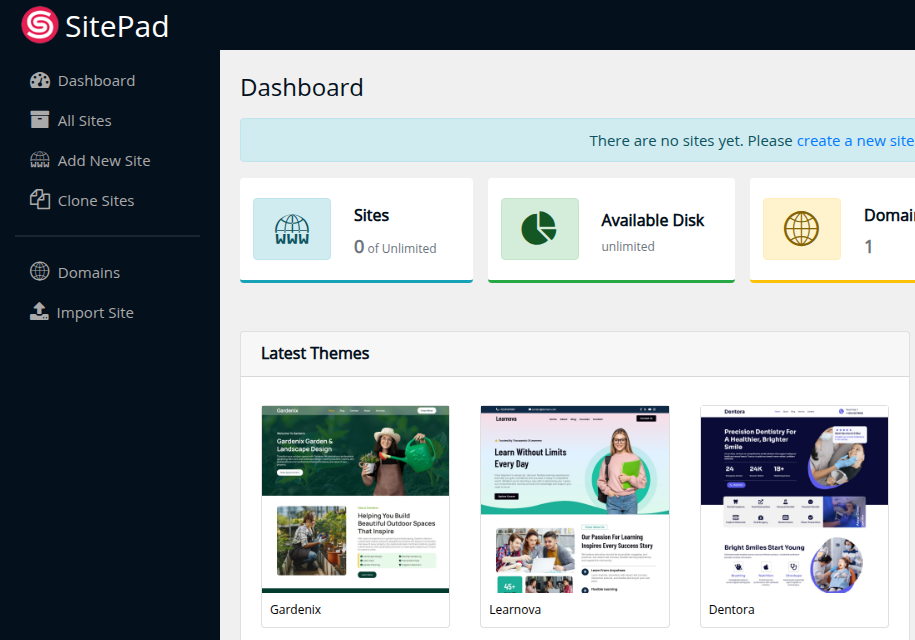
On DirectAdmin and Webuzo the menu names can differ. If you cannot find the builder in your panel, ask support through live chat or a ticket.
A site builder writes its own files into your website folder. If that folder already holds a site, download a copy of it first with the File Manager, or publish to a new domain or subdomain.
9. When WordPress is the better choice
Choose WordPress when you need plugins, a full online store with WooCommerce, membership features, or a large blog. Our cPanel servers have both Softaculous and WP Toolkit, and our DirectAdmin and Webuzo plans include Softaculous. Each installs WordPress in one short form.
- To install WordPress by hand and understand every part, follow How to install WordPress the do-it-yourself way.
- For themes, plugins, security and speed after install, read Mastering WordPress: a step-by-step guide.
WordPress gives you the most freedom, but you look after updates, plugins and security yourself. See Why and how WordPress websites get hacked before you start.
10. Where Domain India fits, and what it costs
All prices below are Domain India list prices on 23 September 2026, excluding 18% GST. AI Website Builder plans are billed monthly on the live page, and you can cancel any time.
| Plan | Price | Websites | Best for |
|---|---|---|---|
| AI Builder Free | ₹0 | 1 (preview only) | Trying the builder before you pay |
| AI Builder Starter | ₹200 a month | 1 | A single business site on your own domain |
| AI Builder Pro | ₹599 a month | Up to 5 | Stock photos, the visitor chatbot and the online cart |
| AI Builder Business | ₹999 a month | Up to 15 | Several brands, the highest AI limits, AI reply drafts |
| cPanel Starter hosting | ₹125 a month | 1 | SitePad or WordPress, with 10 email accounts |
- 1 website
- Publish on your own domain + free SSL
- AI creates your website
- AI chat editor
- 25 GB NVMe SSD Storage
- 50 GB Monthly Bandwidth
- 1 Website
- 10 Email Accounts
A simple way to decide: if you want the site written and designed for you, start the AI builder free and publish on Starter. If you also want email accounts and databases on one plan, or you want WordPress, take a hosting plan and use SitePad or WordPress. Shared hosting has a full refund within 30 days for new purchases; see our refund policy.
Is the Domain India website builder really free?
You can build and preview a site with the AI Website Builder for free: one site, full AI generation, a live preview on a free link and chat editing, with no credit card. Publishing it on your own domain needs a paid plan, from ₹200 a month excluding GST. The drag-and-drop builder that comes with hosting costs nothing extra on top of the hosting plan.
Do I need coding or design skills?
No. With the AI Website Builder you describe your business and edit by typing instructions in plain English. The drag-and-drop builder is point-and-click.
How long does it take to build a website?
The AI Website Builder produces a complete first version in about a minute, and you then refine it by chat. With the drag-and-drop builder, most people have a presentable site in a few hours.
Can I use my own domain name?
Yes. Every paid AI Website Builder plan lets you connect a domain you own: the editor shows one DNS record to add, and SSL is issued automatically. On the free plan the site runs on a preview address. With hosting, your domain is part of the hosting plan.
Does the AI Website Builder include email?
No. It hosts your AI website only, with no email inboxes or databases. Add Business Email, from ₹60 per mailbox per month excluding GST, or choose a hosting plan that includes email accounts.
Can I make my site in Hindi or another Indian language?
Yes. The AI Website Builder can translate your whole site into up to two extra languages from Hindi, Tamil, Telugu, Marathi, Bengali, Gujarati, Kannada, Malayalam and Punjabi, and adds a language switcher for visitors.
Which should I choose: the AI builder, the drag-and-drop builder or WordPress?
Choose the AI builder if you want the site written and designed for you. Choose the drag-and-drop builder if you already have hosting and a clear design in mind. Choose WordPress if you need plugins, a full online store or a large blog.
Ready to build? Start the AI Website Builder free, compare the two builders, or pick a cPanel hosting plan for SitePad and WordPress. Stuck at any step? Our support team is on 24/7 live chat, or you can open a ticket.
Describe your business and the AI builds the whole site. No credit card needed to try it.
Start free