The AI Website Builder turns a one-line description of your business into a complete, multi-page website in about a minute — premium design, on-brand copy, photos and SEO included. You can build and preview your site completely free (no credit card), edit it by simply chatting, and go live from ₹200/month when you're ready to publish. This guide walks the entire journey: starting free, editing by chat, AI logos and images, selling on WhatsApp & UPI, publishing, and connecting your own domain.
What the AI Website Builder does
Instead of dragging boxes around a blank page, you describe your business — "a dental clinic in Coimbatore", "a wedding photography studio in Kochi" — and AI generates the whole website: a distinctive headline, services, about section, testimonials, gallery, and a contact page with an enquiry form. It reads your business and designs to match — choosing from 18 professionally designed templates, a fitting colour palette and font, industry-appropriate photos, and confident, specific copy written in a voice that suits you (a café reads warm and sensory; a law firm precise and reassuring).
It even tailors the page structure to your trade: a restaurant leads with a menu, a photographer leads with the gallery and a booking section, a consultant leads with services. Nothing is generic filler — the design, layout and words are picked for your business.
From there, everything is editable — either by clicking on the text directly, or by telling the built-in assistant what to change in plain language ("make the headline about same-day appointments", "add a section about home visits", "make it more premium").
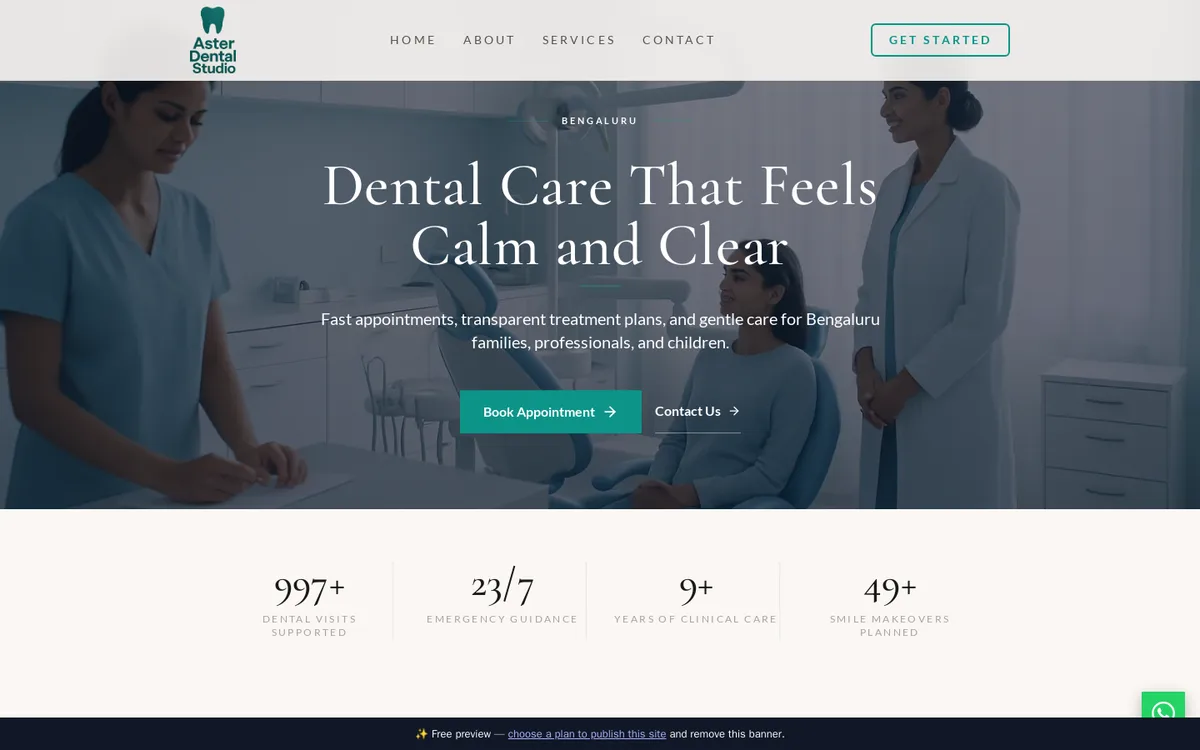 A complete site the AI built from one line — "a dental clinic in Bengaluru". Design, copy, photos and layout are all chosen to fit.
Start free — no credit card
- Create your account.Go to the AI Website Builder page and click Start Free. If you're new, the signup form takes under a minute (name, phone, email, password). Already a customer? Use the Log in link on that screen.
- Describe your business.Enter your business name, what you do (category), and your city. That's genuinely all the builder needs — though adding a phone number and email lets the AI wire up your contact section immediately.
- Generate.Click generate and wait about a minute. The AI writes every section of a complete multi-page site and picks the template, colour, font and page layout best suited to your industry.
- See it live instantly.Your site goes online immediately at a free preview link you can open on any device and share with friends or partners. The preview carries a small banner and is hidden from Google until you publish.
What the free trial includes: one website, full AI site generation, unlimited previewing, and AI chat edits. AI logo design and AI photo generation are part of the paid plans — but you can upload your own logo and photos free.
The editor: chat-first, five tabs
Open your site from Client Area → Services → AI Website Builder and you'll land in the editor. It opens on the Chat tab — the fastest way to build — with an icon rail for four more tabs, and your live site in a preview panel you can open beside your work:
- Chat — where you land. Build and refine your whole site by conversation: "move the gallery up", "add a menu page", "write a services section for bridal makeup", "make the tone more premium". The AI rewrites — and can restructure — your site in plain language, and you review every change before it goes live.
- Content — every section of every page: headlines, services, about text, testimonials, gallery, contact details. Click any text in the live preview to edit it in place, or jump to a section's settings.
- Design — switch between the 18 templates, colour presets, fonts, and hero layouts (Split with your photo as a side panel, Centered, or a Slider that rotates your header photos; the styles on offer depend on the template). Your content survives every design change, so experiment freely — you'll see a thumbnail of each template and a preview before you apply it.
- Grow — everything that gets you found and gets you business: SEO & analytics, your Google rating badge, client logo strip, booking link, WhatsApp ordering, social links — plus your enquiries and visitor analytics.
- Settings — custom domain, languages, published versions and site management.
A setup checklist tracks your progress (content generated → logo added → SEO title set → published → custom domain) and deep-links to each step.
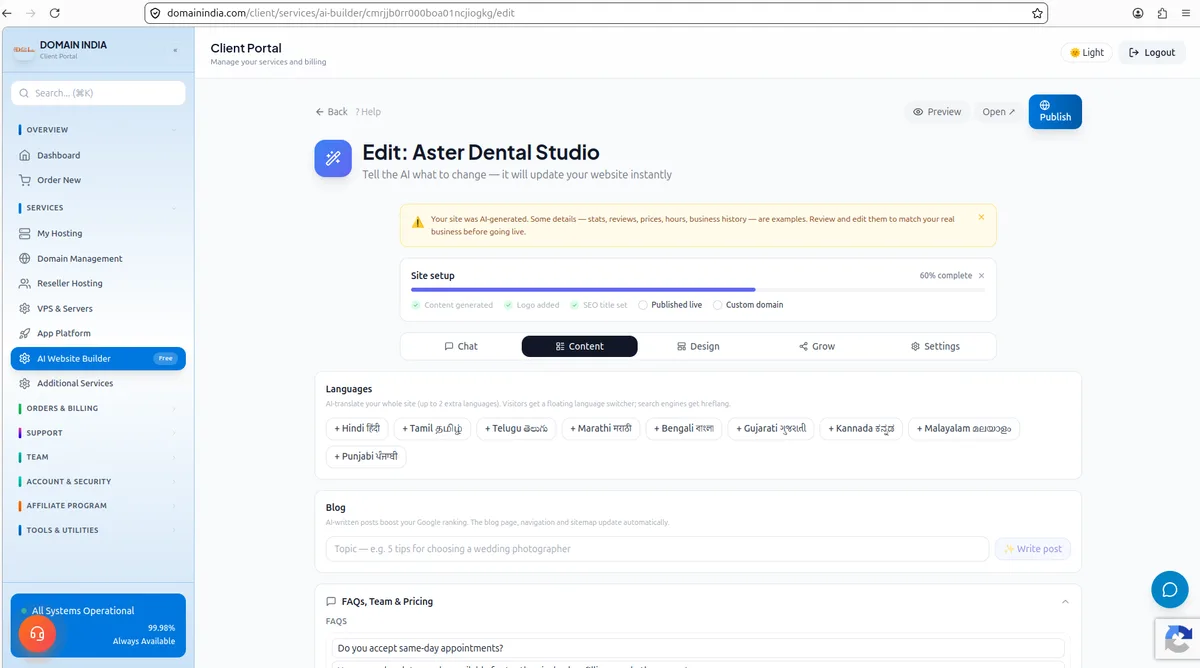 The editor — five tabs across the top, a setup checklist, and your live site a click away in the preview panel.
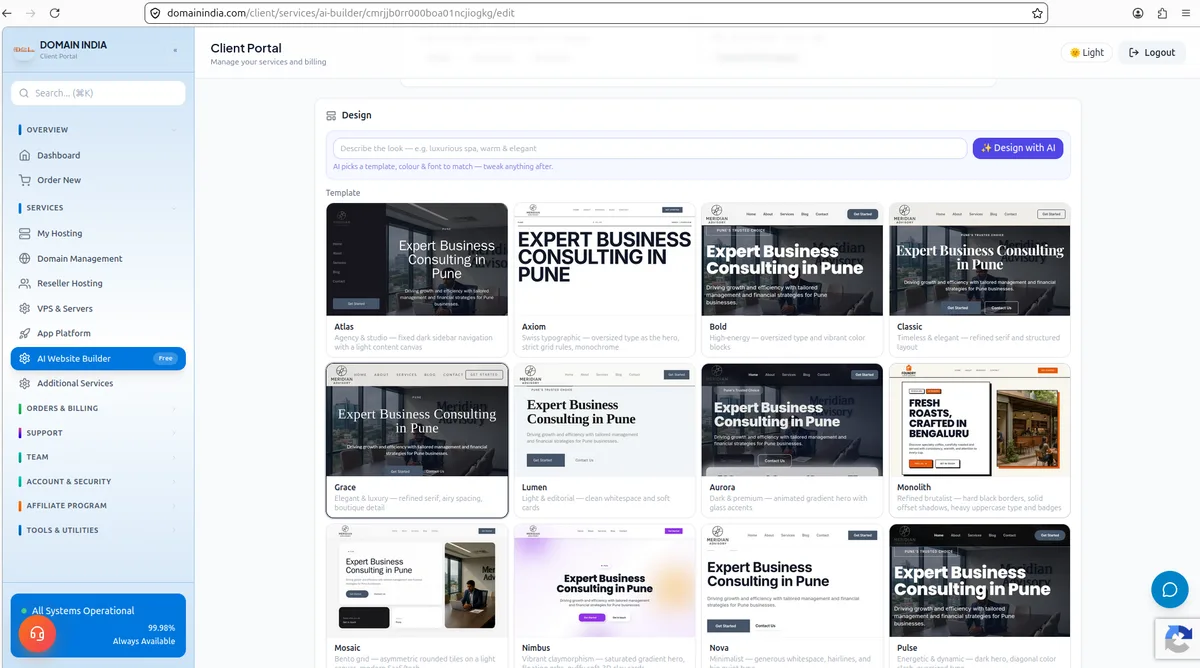 The Design tab: pick from 18 templates (or type a vibe and let "Design with AI" choose) — your content stays put.
Editing by chat
The Chat assistant is the heart of the editor. Type instructions the way you'd tell a colleague:
- "Change the headline to focus on 24/7 emergency service"
- "Add a services section for bridal makeup"
- "Make the tone more premium"
- "Translate the site to Hindi"
Each edit updates your live preview within seconds, with a plain-English summary of what changed. There's a full version history, so nothing is ever lost — undo any change in one click, or restore any earlier version of your content.
Logos: upload free, or let AI design one
Under the Design tab (Logo Studio) you have two paths:
- Upload your own logo file — free on every plan, including the trial. Wide (rectangular) files look best in the site header.
- AI Logo Studio (paid plans) — choose icon only or full logo with your business name, pick a style (minimalist, emblem, lettermark, abstract, gradient, mascot), optionally add a hint like "a coffee cup, warm earthy colours", and generate a batch of 4 professional designs. Tap your favourite and it's applied instantly, automatically trimmed and sized — and on dark templates it's rendered light so it stays visible.
Each plan includes a monthly number of logo batches (a batch = 4 designs). The editor shows how many you have left. Logo generation uses a premium image model — it's the most expensive thing the AI does, which is why it's metered separately from ordinary edits.
Photos: AI-generated or your own
- Your own photos (free, all plans): upload to the gallery or any section. Real photos of your actual shop, team and work always convert best.
- AI images (paid plans): generate photorealistic, art-directed images matched to your industry — a warm amber café, a calm clinic, a cinematic resort — so your hero and gallery look like one professional brand shoot rather than stock. Useful when you don't have professional photography yet.
Grow features — built for Indian businesses
- Sell on WhatsApp & UPI: add a shop or menu with prices; every item gets an Order-on-WhatsApp button, and once you save your UPI ID, a Pay button too. No payment-gateway paperwork.
- Google rating badge: show your real Google rating and review count with a link to your profile.
- Client logo strip: upload up to 8 client or partner logos for instant credibility.
- Booking link: connect Calendly or any booking URL and the site gets "book instantly" buttons.
- Languages (Settings tab): add Hindi, Tamil or other languages — the AI translates your whole site and visitors get a language switcher.
- Blog: publish posts from the editor to keep the site fresh for search engines.
Premium touches that make it look bespoke
Your site can carry the details that build trust and make it feel custom-built — added automatically where they fit your business, or on request:
- Hero slideshow: rotate several header photos for a cinematic first impression — switch it on under Design → Hero, Slider style (needs two or more hero images), or just ask the assistant.
- Before/after slider: a draggable comparison — ideal for salons, gyms, renovations and detailing.
- Google Map & one-tap directions on your contact page.
- Animated counters: your key numbers (years, clients, projects) count up as visitors scroll.
- Sticky mobile action bar: a fixed Call / WhatsApp / Book bar on phones, where most visitors are.
- Styled menu & a Google-reviews section for food, drink and local businesses.
Everything is responsive and fast — images are automatically optimised and sized for each device, so pages stay quick to load on mobile data.
Publishing: going properly live
The free preview is real and shareable, but it's marked "preview" and hidden from search engines. Publishing is what makes it your actual business website:
- Choose a plan.From ₹200/month (plus applicable taxes). Every plan includes publishing, hosting, SSL and custom domain support.
- Click Publish.The preview banner disappears, search engines are welcomed in (sitemap, clean robots, canonical URLs, LocalBusiness markup), and your site is live.
- Keep editing, then Republish.After publishing, keep editing by chat or on the page. When the status beside the Publish button reads Published · may be out of date, click Republish (or ask the assistant to "publish my changes") to put your edits live. A few settings, such as template and colour changes, re-publish as soon as you save them, and the editor says so.
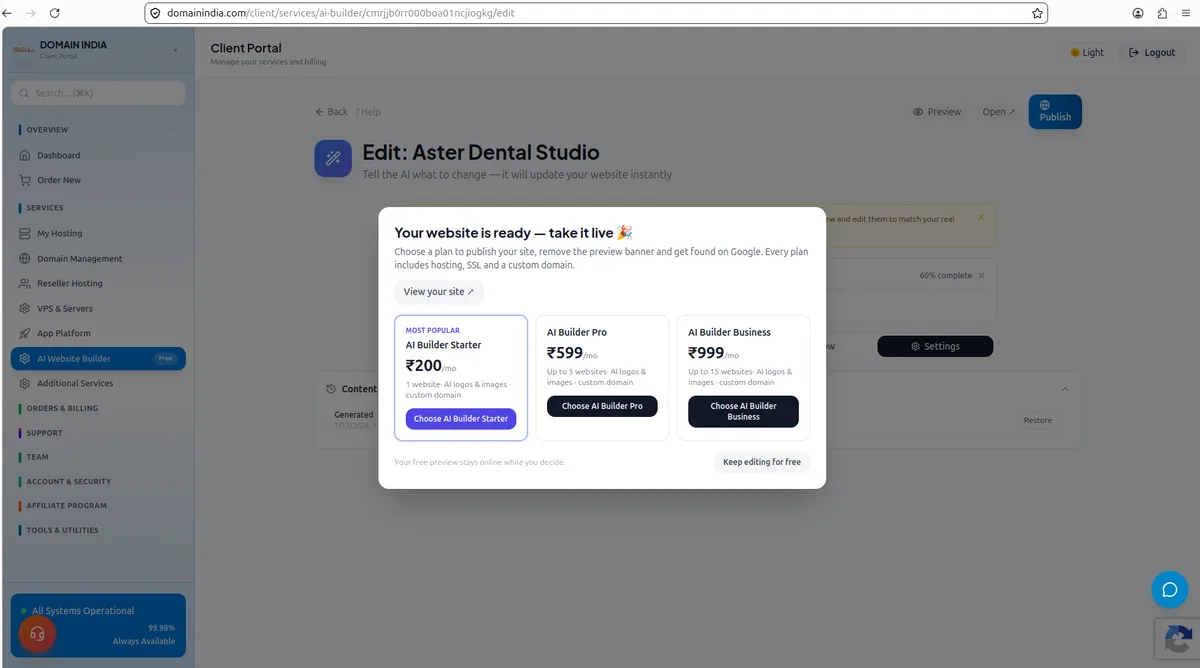 Hit Publish and pick a plan — from ₹200/month, everything included. Your free preview stays online while you decide.
Plans and monthly AI allowances
| Plan | Starter (₹200/mo) | Pro (₹599/mo) | Business (₹999/mo) |
|---|---|---|---|
| Websites | 1 | 5 | 15 |
| AI generations | ~30 / month | ~100 / month | ~300 / month |
| AI images | 10 / month | 30 / month | 60 / month |
| AI logo batches (4 designs each) | 3 / month | 6 / month | 10 / month |
| Custom domain | Included | Included | Included |
| Hosting & SSL | Included | Included | Included |
Allowances work on a rolling 30-day basis — they free up automatically as older usage ages out. Uploading your own logo and photos never counts against any allowance.
Connecting your own domain
Every paid plan includes custom-domain support:
- In the editor, open Settings → Custom domain and enter your domain (e.g.
www.yourbusiness.in). - Add the records the editor shows wherever your domain's DNS is managed (the screen shows exactly what to set). Your main domain and its www form both use A records; a subdomain uses a CNAME. If your domain is registered with us and already uses our DNS, the editor offers a button to add the records in one click.
- Once the records have spread, click Verify in the editor. After the domain verifies, a free SSL certificate is issued for it.
- Your site's SEO moves with you: canonical URLs, the sitemap and search listings all switch to your own domain automatically.
A few things worth knowing:
- www and non-www both work. The editor shows a recommended second DNS record — add it too, and both
yourbusiness.inandwww.yourbusiness.inwill serve your site with SSL. - Domain registered with us? If it already uses our DNS, the editor offers a button to add the records for you. Otherwise, add them wherever the domain's DNS is managed today: your hosting control panel's zone editor if it uses our hosting nameservers, or your registrar's or DNS provider's settings.
- No nameserver change needed — and we recommend against it. Switching nameservers moves all of your domain's DNS (including email) away from your current provider. The simple records above are all it takes.
Troubleshooting
"Free trial AI limit reached" — the trial includes a small number of AI operations to build and refine one site. Choose a plan to continue building and to publish. "AI logos and AI images are included in paid plans" — logo/photo generation is paid-only, but uploads are always free. "Plan limit reached: N/N sites" — your plan's website count is used up; upgrade or delete an unused site.
Is the free trial really free?
Yes — no credit card is needed. You get one website with full AI generation and chat edits, live at a preview link. You only pay when you want to publish it as your real website.
How long does it take to build a site?
About one minute for the first generation, and most businesses are ready to publish within an hour after a few chat edits and adding their own photos.
Can I use my own domain?
Yes, on every paid plan. You can also start on the free included subdomain and connect your domain later — your SEO transfers automatically.
What happens to my site if I delete it?
It's taken offline immediately, including the preview. Deleted sites can't be recovered, so export or note anything you need first.
Do my edits go live immediately after publishing?
Not all of them. Most edits wait until you click Republish; the status beside the Publish button reads "Published · may be out of date" until you do. Some settings, such as template and colour changes, re-publish as soon as you save them.
Can I switch templates without losing my content?
Yes. All 18 templates, colours, fonts and hero layouts are swappable at any time — your text, photos, logo and settings are preserved.
What if the AI writes something wrong about my business?
Everything is editable. Click the text to correct it directly, or tell the assistant what to change. The AI's first draft is a starting point you refine in minutes — and figures like stats or ratings are examples to verify before you publish.