Yes: a domain you register with Domain India is yours to manage. You decide who owns it on the record, where it points, whether it renews and whether it moves to another registrar. That control sits inside the rules every domain lives under, set by the registry that runs the extension, and this guide explains both: what you control, where to do it in the client area, and where the limits are.
The registrant on a domain is its legal owner, so keep that contact in your own or your business's name. From the client area you can edit contacts, change nameservers, unlock the domain and get its EPP code to move it elsewhere, and decide whether to renew. Renewal is by invoice; Domain India never charges a saved card. For .in domains, personal registrant details are hidden in public WHOIS for free and automatically.
1. Who controls a domain: the registrant
Every domain has a registrant, the person or organisation recorded as its owner at the registry. The registrant is what decides ownership in a dispute, a sale or a transfer.
Control in practice comes from two things:
If a web designer, agency or former employee registered your domain in their own name or their own account, they control it until it is moved to you. Ask them to update the registrant to you and to move the domain into your account, or to give you its EPP code so you can transfer it.
2. What you control from the client area
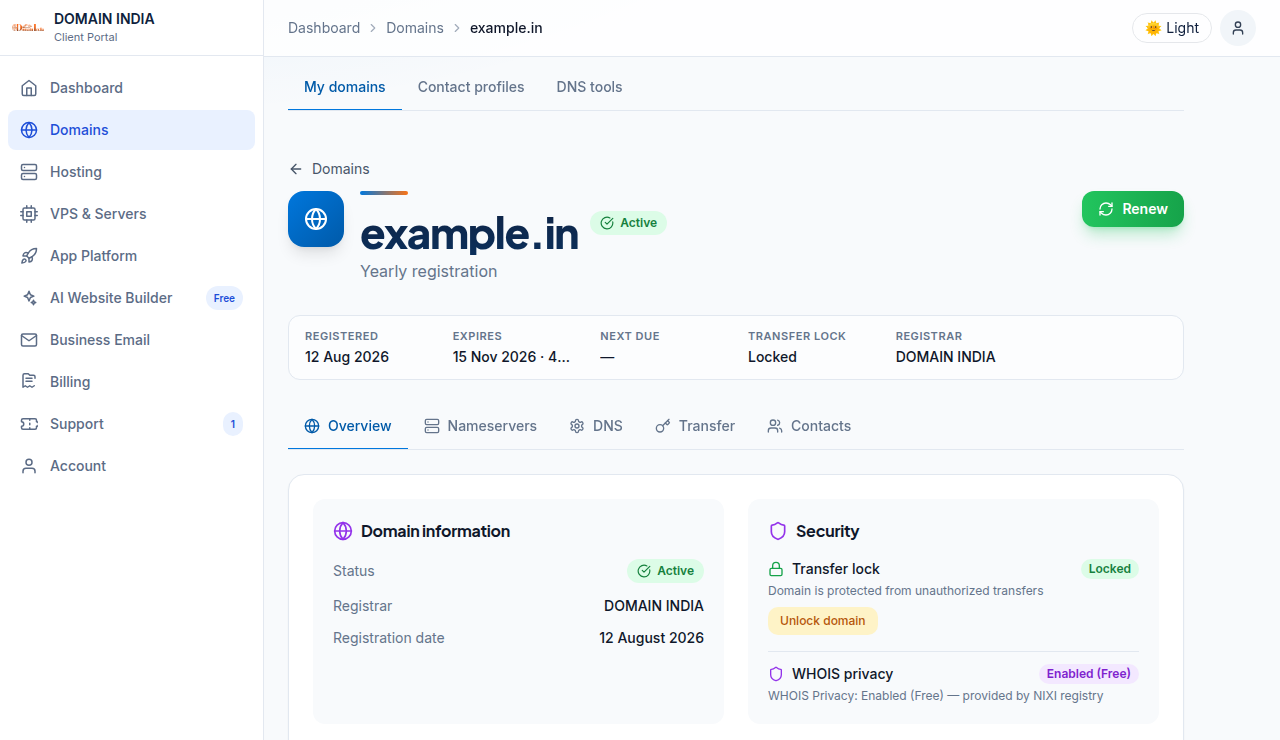
Each domain's page in your domains has five tabs. Until a domain is paid for and active, only Overview is shown.
| Tab | What you control there |
|---|---|
| Overview | The domain's status, expiry date and the Security card with the transfer lock and WHOIS privacy |
| Nameservers | Which nameservers answer for the domain, and custom nameservers (glue records) where available |
| DNS | DNS records, which take effect only if the domain uses the matching nameservers |
| Transfer | The transfer lock and the authorisation (EPP) code for moving the domain to another registrar |
| Contacts | The Registrant, Admin, Tech and Billing contacts |
3. Contacts: keep ownership in the right name
On the Contacts tab, choose Registrant, Admin, Tech or Billing, click Edit contact, update the details and click Save. The change goes to the registrar when you save.
Two rules to know:
- Generic domains (.com, .net, .org and similar). Changing the registrant's name, organisation or email counts as a change of registrant. It triggers an email verification and can start a 60-day lock on transfers to another registrar. The domain keeps working normally.
- .in domains. The registrant's identity is verified (eKYC) on the Identity verification page. You can correct the address, phone or email yourself; changing the owner's name or organisation may need a new verification and support's help, so open a ticket first. For Admin, Tech or Billing on a .in domain, open a ticket rather than editing it yourself.
The full guide is Change your domain's WHOIS information.
4. Where your domain points: nameservers and DNS
You decide which DNS provider answers for your domain, and so where your website and email are found.
- Nameservers. On the Nameservers tab, click Edit, enter the new values and click Save. Take the values from your hosting service's page in the client area or your hosting welcome email, never from an old article. See How do I change my nameservers.
- DNS records. Records such as A, CNAME, MX and TXT live wherever your nameservers point, usually your hosting control panel. See How to change your domain DNS settings.
- Custom nameservers. If you run your own DNS server or resell hosting, you can register nameservers named after your domain, such as ns1.yourbusiness.com. See Registering and managing child name servers.
To redirect a domain to another website, set the redirect in your hosting control panel or at your DNS provider; the domain page has no forwarding setting.
5. Moving the domain: transfer out
You can move your domain to another registrar whenever it is eligible. On the Transfer tab, the requirements notice lists three conditions: the domain is unlocked, it is at least 60 days old, and WHOIS privacy is off. Click Unlock domain, then Get EPP code, and give the code to the new registrar.
Keep the transfer lock on at all other times. It stops anyone from moving the domain without your action. The step-by-step guide is Transferring a domain name to another registrar.
6. Privacy: what the public sees
| Extension | Public WHOIS | What you do |
|---|---|---|
| .in, .co.in, .net.in, .org.in and the rest of the .in family | Personal registrant details are not shown | Nothing. This is free and automatic; there is nothing to switch on |
| .com, .net, .org and most other extensions | Details can be public unless privacy is added | Enable the optional privacy add-on from the Security card on the domain's Overview tab |
On .in domains, a company or organisation name may still appear, along with technical data such as the registrar, dates and nameservers. For generic extensions, privacy options differ by extension; the add-on price shows on the button, and there is no self-service switch to turn it off, so ask support. See How to enable or disable privacy protection.
7. Renewal: your choice, by invoice
A domain is registered for a fixed term and has to be renewed to stay yours. Domain India never charges a saved card automatically: a renewal invoice is generated up to 30 days before the due date and emailed to you, and the domain renews when you pay it. You can turn off renewal invoices for a domain, or decline a renewal on your Renewals page at no penalty.
Renew on time. A .in domain can be renewed at the normal price up to day 36 after expiry; from day 37 it can only be restored, for ₹4,000, which includes GST and the renewal. See How auto-renewal works.
8. The limits on control
Holding a domain is a registration for a term, under the registry's rules, not outright property. Your control is limited by:
- Registry and registrar policies, including accurate contact details, registrant email verification on generic domains and identity verification on .in domains.
- Transfer rules, such as the 60-day limit after registration, a transfer or a change of registrant on generic domains.
- Dispute policies. A trademark holder can challenge a domain under the UDRP for generic domains or the INDRP for .in, and an arbitrator's decision can move the domain.
- Abuse and legal orders. A domain used for phishing, malware or spam, or subject to a court order, can be suspended.
9. Domain India as your registrar
Domain India is a NIXI-accredited .IN registrar. Domain India list prices on 19 September 2026, excluding 18% GST:
| Extension | Register (1 year) | Renew (per year) |
|---|---|---|
| .in | ₹575 | ₹625 |
| .co.in | ₹475 | ₹525 |
| .com | ₹1,150 | ₹1,150 |
Do I own my domain name?
You hold it as the registrant for the term you paid for, under the registry's rules. The registrant contact on the domain is its legal owner, so keep it in your own or your business's name and renew before expiry.
Can I move my domain away from Domain India?
Yes. On the domain's Transfer tab, unlock it and click Get EPP code, then give the code to the new registrar. The domain must be at least 60 days old and have WHOIS privacy turned off.
Can I change my domain's nameservers myself?
Yes. Open the domain in the client area, go to the Nameservers tab, click Edit, enter the values from your hosting provider and click Save.
Is WHOIS privacy included for .in domains?
Yes. For .in and its second-level extensions, personal registrant details are not shown in public WHOIS. This is free and automatic; there is nothing to switch on.
Does Domain India renew my domain automatically?
Domain India sends a renewal invoice up to 30 days before the due date and never charges a saved card. The domain renews when you pay that invoice.
My web designer registered my domain. Is it mine?
The registrant contact decides ownership. If the designer's name is on it, or it sits in their account, ask them to update the registrant to you and move the domain into your account.
Ready to take charge of your domains? Open your domains and check each one's Contacts, Nameservers and Transfer tabs. If anything needs support's help, open a ticket: support is on 24/7 live chat, and tickets get a first response within 15 minutes, though resolution can take longer. To register a new name, start at domain registration.
Register .in, .com and other extensions, and manage contacts, nameservers, transfers and renewals from one client area.
Search for a domain