Placed a domain order and changed your mind, or spotted a typo in the name? What you can do depends on one thing: whether the domain has already been registered at the registry. This guide covers each stage and what Domain India's terms say.
If you have not paid, nothing is registered: cancel the order from your client area or simply leave the invoice unpaid. If you have paid but the domain may not be registered yet, open a ticket straight away. Once a domain is registered at the registry, the registration cannot be cancelled or refunded; you can let it expire by turning off renewal invoices, or transfer it to another registrar.
1. First, find out where your order stands
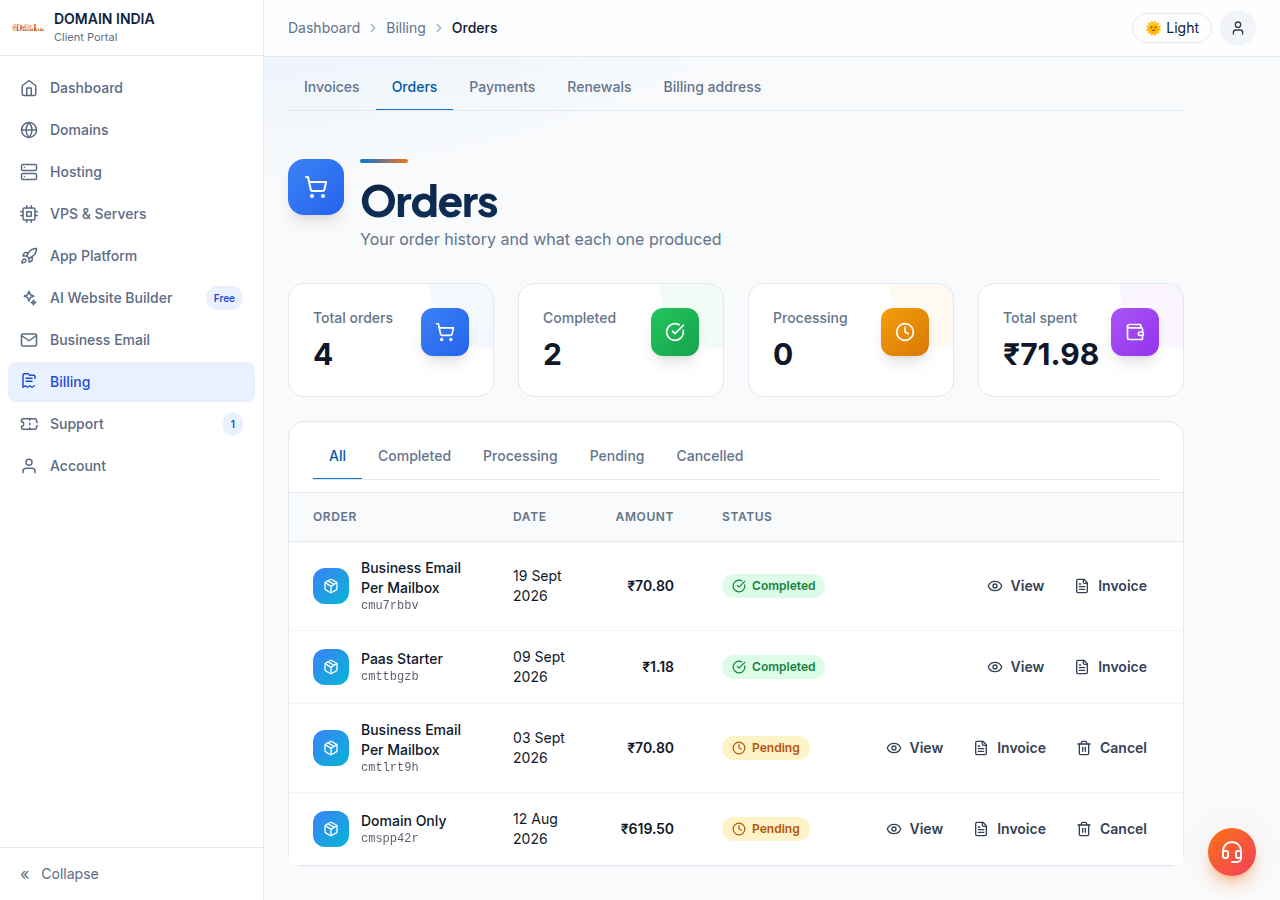
Check the order and its invoice in your client area under Billing › Orders and Domains.
| Where your order is | What it means | What you can do |
|---|---|---|
| Order pending, invoice unpaid | Nothing has been registered | Cancel the order yourself, or leave it unpaid |
| Invoice paid, domain not yet active | Registration may still be in progress | Open a ticket immediately |
| Domain active in your account | It is registered at the registry | No cancellation or refund; stop renewals or transfer it away |
| Renewal invoice issued for a domain you no longer want | The domain is still yours until expiry | Leave the renewal unpaid, or ask us to cancel the invoice |
2. You have not paid yet
Advance payment is required for every Domain India service, so an unpaid domain order is never registered. You have two choices.
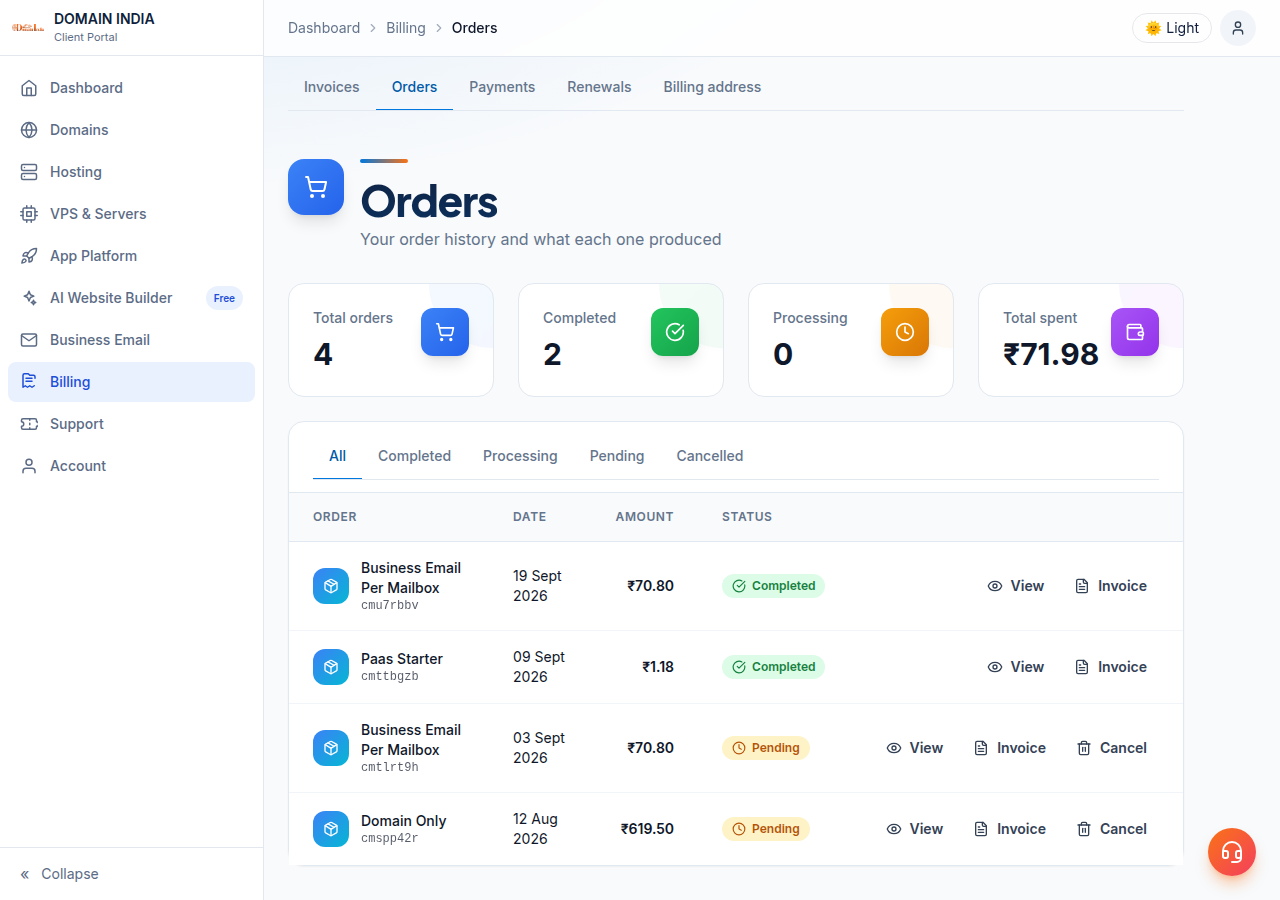
Cancel it yourself. A pending, unpaid order can be cancelled from your list of orders (Cancel) or from the order's own page:
- Open the order.In the client area, go to Billing › Orders and open the order you want to cancel.
- Choose Cancel this order.It appears next to Pay Now while the order is pending.
- Confirm you have not paid.Tick the box that confirms you have made no payment for this order.
- Click Cancel order.The order is cancelled and its invoice is voided. Any domain registration or hosting setup that was part of that order is cancelled too. This cannot be undone.
Or leave it unpaid. If you do nothing, the domain is not registered. You can also open a ticket and ask us to cancel the invoice. That is a normal request and costs nothing.
If you have already sent money by bank transfer or UPI and the order still shows as unpaid, do not cancel it. Open a ticket with your payment reference instead, so the payment can be matched to the right order.
An unpaid order does not reserve the name, so someone else may register it meanwhile.
3. You have paid, but the domain is not registered yet
Registration usually starts soon after payment, so time matters. Open a ticket in the Billing department at once. Tell us the domain name, the order or invoice number, and that you want the order cancelled before registration.
The terms make a domain non-refundable once it is registered at the registry. They set out no separate refund for a paid order that has not reached the registry, so we cannot promise one here; our team will check the order and tell you what can be done. If a refund does apply, the terms say it goes back to your original payment method only, less any third-party costs already incurred.
4. The domain is already registered
Once the registry has recorded your domain, it exists in your name for the full term. The Domain India terms list domain registration as non-refundable after registration and state that it is "non-refundable in any case once registered at the registry".
The domain is still yours, and you have two ways out:
- Let it expire at the end of the term, without paying anything more (section 6).
- Transfer it to another registrar if you would rather keep it somewhere else (section 7).
5. You made a typo in the domain name
What to do depends on the stage:
- Not paid yet: cancel the order as in section 2, then register the correct name at Register a domain.
- Paid, not active yet: open a ticket immediately and say the name was misspelt (section 3).
- Already registered: the misspelt domain cannot be cancelled or refunded. Register the correct name as a new order, then turn off renewal invoices on the misspelt one so it simply expires.
Before you pay, read the name on the invoice letter by letter, including hyphens and the extension (.in and .co.in are different domains). At Domain India list prices on 19 September 2026, excluding 18% GST, a new .in is ₹575 and a .com is ₹1,150 for the first year.
6. Stop renewal invoices and let the domain expire
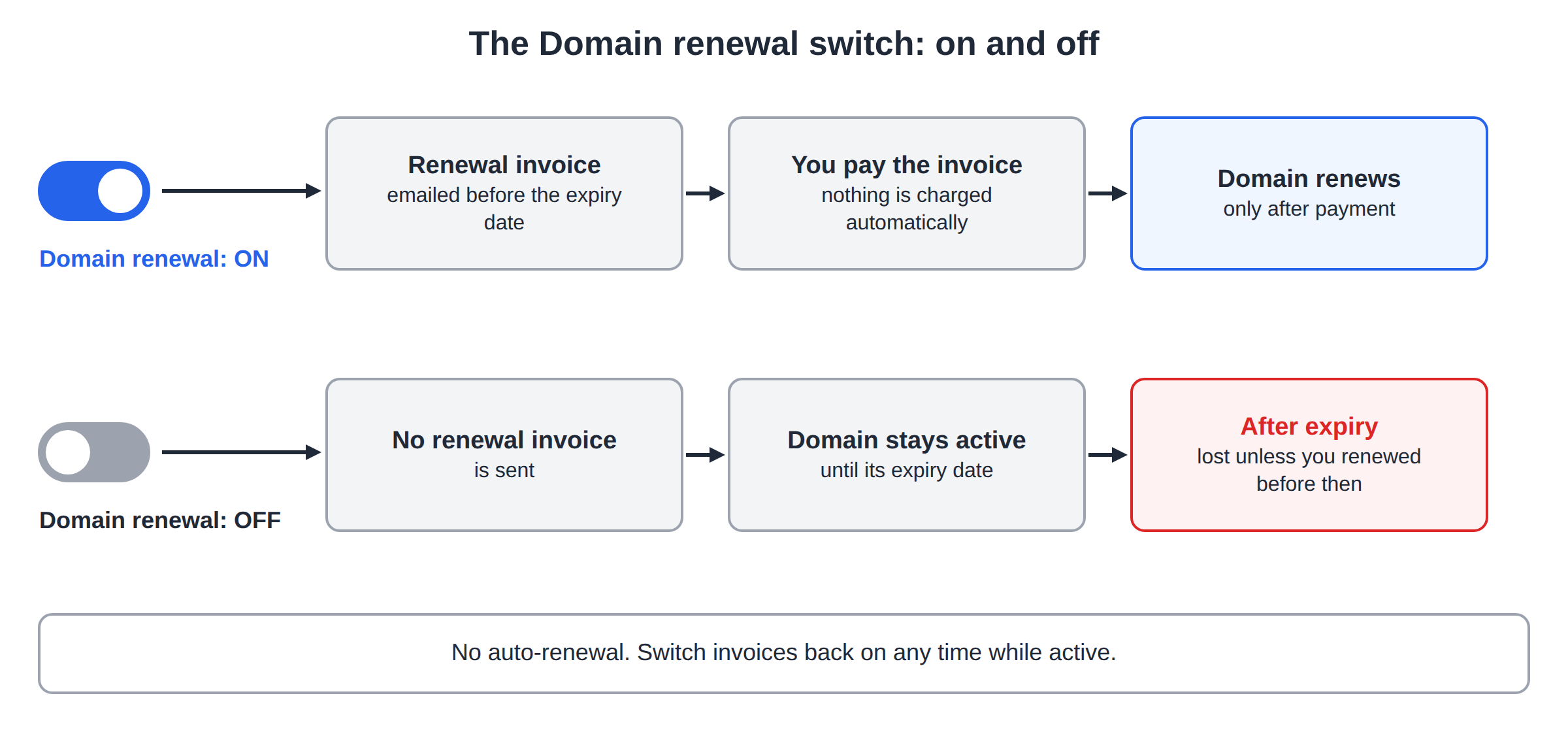
Domain India does not auto-renew domains or charge your card automatically. Each domain has a Domain renewal switch on its page in the client area. While it is on, we email you a renewal invoice before the expiry date, and the domain renews only after you pay that invoice.
To stop renewing a domain you no longer want:
- Open the domain in your client area.
- Find Domain renewal and turn renewal invoices off, then confirm.
The domain stays active until its expiry date. After that it is lost unless you renew it yourself before then. You can switch renewal invoices back on at any time while the domain is still active.
If a renewal invoice has already been issued, you can leave it unpaid or open a ticket and ask us to cancel it. The terms allow you to decline a renewal at any time before payment, without penalty.
Once an expired domain is deleted, anyone can register it. Before you let a domain go, make sure no website, email address or business listing still depends on it.
7. Transfer the domain to another registrar
If you simply want the domain managed elsewhere, transfer it: you keep the domain and only the registrar changes. You will need the domain's authorisation (EPP) code, which you find on the domain's Transfer tab. See What is a domain transfer secret or auth code for the full steps.
The client area lists the transfer-out requirements: the domain must be unlocked and at least 60 days old. So a domain registered only days ago cannot move yet. A transfer does not refund the fee you paid us; the new registrar normally charges its own transfer fee.
8. How to request a cancellation by ticket
Open a ticket from your client area when you are logged in, or use the public Submit a Ticket form. Choose the Billing department and include:
- the domain name, spelt exactly as ordered;
- the order number or invoice number;
- whether you have paid, and if so how (card, UPI, bank transfer) and the payment reference;
- what you want: cancel an unpaid order, cancel a renewal invoice, or check a paid order before registration.
Tickets get a first response within 15 minutes, and live chat is available 24/7 for quick questions, but a ticket is the best record of a cancellation request.
9. What the terms say about refunds
These points come from the Domain India Terms of Service, refund policy section:
| Service | Refundable? | When |
|---|---|---|
| Domain registration | No | Non-refundable after registration |
| Shared and reseller hosting | Yes | Full refund within 30 days of purchase |
| VPS hosting | No | Non-refundable after provisioning |
| SSL certificates | No | Non-refundable after issuance |
Where a refund applies, it goes to the original payment method only, less third-party costs already incurred. So if you ordered hosting together with a domain, the hosting part can be refundable within 30 days of purchase even though the registered domain is not.
Can I cancel a domain order at Domain India?
Yes, if you have not paid. A pending order with an unpaid invoice can be cancelled from the Billing › Orders section of the client area, which also voids its invoice, or you can simply leave it unpaid. Once a domain is registered at the registry, it cannot be cancelled.
Can I get a refund for a domain I already registered?
No. Domain India's terms state that domain registration is non-refundable once the domain is registered at the registry. You can let it expire by turning off renewal invoices, or transfer it to another registrar.
I registered the wrong domain name by mistake. What can I do?
If the invoice is unpaid, cancel the order and place a new one for the correct name. If you have paid, open a Billing ticket immediately. If the misspelt domain is already registered, it cannot be refunded; register the correct name and turn off renewal invoices on the wrong one so it expires.
Will Domain India renew my domain automatically and charge me?
No. Domain India does not auto-renew or charge automatically. The Domain renewal switch only controls whether you receive a renewal invoice, and the domain renews only after you pay it.
I paid by bank transfer but the order still shows unpaid. Should I cancel it?
No. Open a ticket with your payment reference so the payment can be matched to the order. Cancelling it would void the invoice your payment belongs to.
Ready to register the right name? Search for it on Register a domain, read the complete domain registration guide before you order, or open a ticket if you need a cancellation checked.
Tell us the domain, the order or invoice number and whether you have paid. Our team will check the order and explain your options.
Open a ticket