Your domain name is the address people type to find your business, and the part of your email address after the @. Registering one takes a few minutes, but the choices you make on the way, and how you look after the domain afterwards, decide whether it serves you for years or causes trouble. This guide covers what a domain is, how to choose the extension and the name, how to register one on Domain India, and how to manage, protect and renew it.
A domain is not bought once: you register it for 1 to 10 years and renew it before it expires. For a business serving India, a .in (₹575 to register, ₹625 a year to renew) or .co.in (₹475, then ₹525) is the usual choice, and a .com (₹1,300 a year) suits global reach. Pick a short name that is easy to say and spell, keep the transfer lock on and your contact email current, and renew early, because an expired domain can become expensive or impossible to get back.
1. What a domain name is and how registration works
A domain name such as yourbusiness.in is a human-friendly label for your website and email. Behind the scenes, the Domain Name System (DNS) translates it into the server addresses computers use.
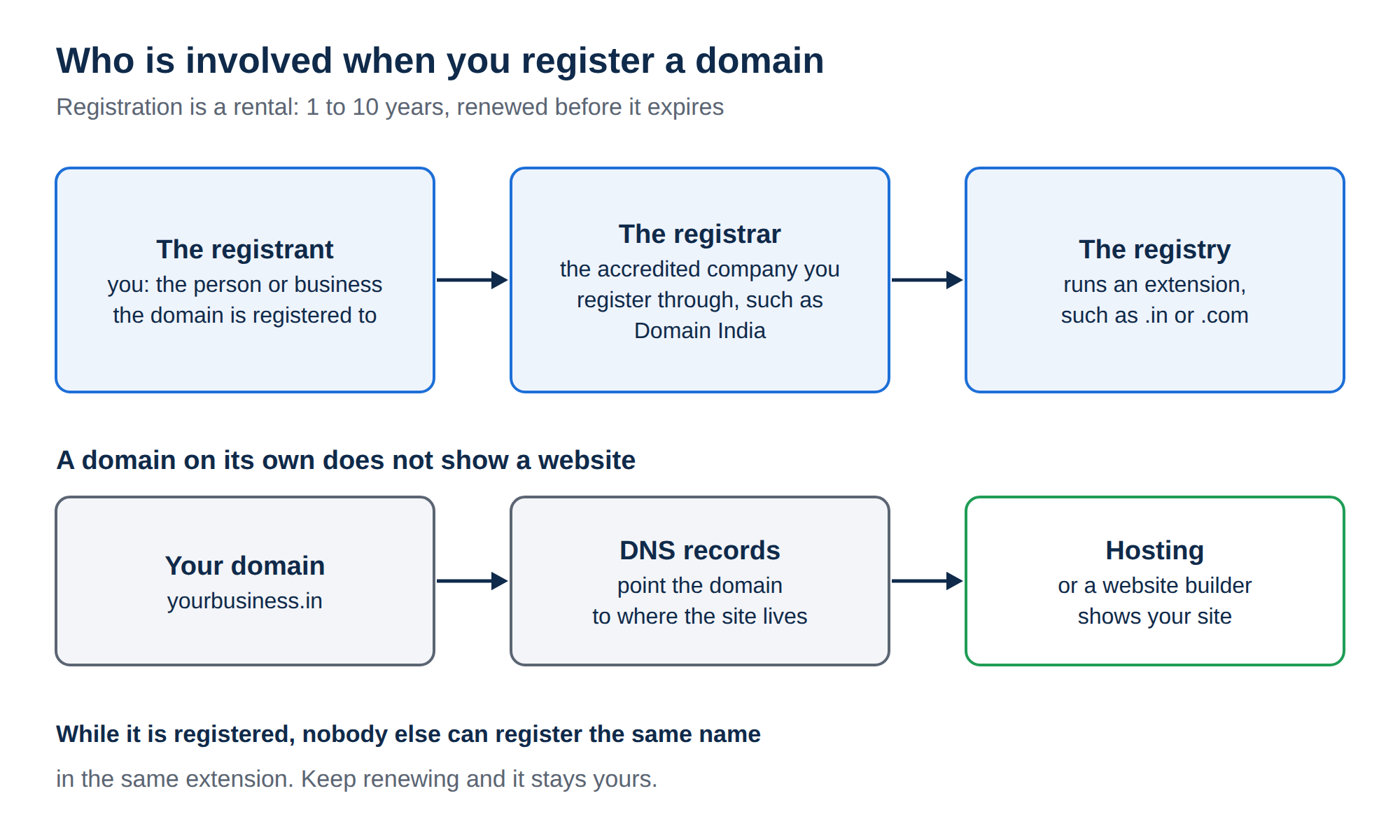
Three parties are involved in every registration:
- The registry runs an extension. NIXI (National Internet Exchange of India) runs .in and its second-level extensions such as .co.in; other registries run .com, .org and the rest.
- The registrar is the accredited company you register through. Domain India is a NIXI-accredited .IN registrar, operated by Domain Registration India Private Limited.
- The registrant is you: the person or business the domain is registered to.
Registration is a rental, not a purchase. You pay for a period of 1 to 10 years, and as long as you keep renewing, the name stays yours. While it is registered, nobody else can register the same name in the same extension.
A domain on its own does not show a website. You also need somewhere to host the site (or a website builder) and DNS records that point the domain there.
2. Choosing an extension: .in, .co.in, .com and others
The extension (the part after the dot, also called a TLD) tells visitors something before they read a word of your site. A .in says "India"; a .com says "global" or simply "familiar".
These are Domain India list prices on 19 September 2026, for one year, excluding 18% GST:
| Extension | Register (first year) | Renew (per year) | Good for |
|---|---|---|---|
| .in | ₹575 | ₹625 | Any business or person serving customers in India |
| .co.in | ₹475 | ₹525 | Indian companies and commercial businesses |
| .net.in, .org.in, .firm.in, .gen.in, .ind.in | ₹475 | ₹525 | Networks, organisations, firms, general use and individuals in India |
| .com | ₹1,300 | ₹1,300 | Businesses selling internationally, or where the .in is taken |
| .org | ₹1,230 | ₹1,230 | Non-profits, communities and associations |
| .net | ₹1,438 | ₹1,769 | Technology and network services |
| .भारत (and the other Indian-script extensions) | ₹599 | ₹599 | Indian brands that want a name in Hindi or another Indian script |
| .app | ₹1,850 | ₹2,028 | Mobile and web apps |
| .online | ₹3,015 | ₹3,315 | Online-only businesses and services |
| .io | ₹5,651 | ₹6,005 | Tech startups and developer tools |
Notice that some extensions renew at a higher price than the first year. Always compare the renewal column, because that is what you pay every year after. The Indian-script extensions such as .भारत are listed on the Bharat domains page.
How to decide:
- Your customers are mostly in India: choose .in. It is short, clearly Indian and one of the least expensive options.
- You are a registered company and want a traditional Indian business address: .co.in works well and costs less.
- You sell worldwide, or your audience expects .com: choose .com.
- Your ideal name is taken in .in and .com: a different extension can work, but first check that the name is not someone else's brand (see section 6).
Many businesses register both the .in and the .com of their name, use one as the main site and forward the other to it. That stops a competitor or a squatter taking the second one.
.in domains are subject to NIXI's registrant verification rules. Read Mandatory KYC for .IN Domains so that a verification request does not surprise you.
3. Choosing the name itself
A good domain name is easy to hear, say, spell and remember. Test it by saying it aloud over the phone: if the other person has to ask "how do you spell that?", keep looking.
Stuck for ideas? The free AI Domain Advisor suggests available names from a short description of your business, such as "organic bakery in Pune". For a longer method, read How to Choose the Right Domain Name for Your Business.
4. How to register a domain on Domain India
- Search.Go to domain registration and type the name you want. The search shows which extensions are available and what each costs.
- Choose the extension and period.Add the extensions you want to your cart and pick the registration period. A multi-year period means fewer renewals to remember.
- Add hosting or email if you need it.You can register a domain on its own, or add a hosting plan, the AI Website Builder or business email in the same order.
- Sign in or create your account.Use an email address you check often and will keep for years. Every renewal notice goes there.
- Enter accurate contact details.The registrant name and contact details must be correct. For .in domains they may need to be verified.
- Pay.Pay by UPI, credit or debit card, net banking or bank transfer. You receive a GST invoice.
- Manage it from your client area.Once the domain is active, open it in your client area to set its nameservers, contacts and transfer lock.
5. Managing your domain after registration
Registering is the start. Open the domain in your Domain India client area to see these settings.
Renewal invoices (auto-renewal)
The Domain renewal setting controls whether we send you a renewal invoice before the domain expires. Keep it on. Your domain renews once you pay that invoice; Domain India does not charge you automatically. If you turn it off, you will not be invoiced, and the domain will expire on its expiry date unless you renew it yourself. See How Auto-Renewal Works.
Contact details
The registrant and contact details on the Contacts tab (for extensions that support it) must stay accurate. An out-of-date email address means you miss renewal and transfer notices, and wrong registrant details can cause problems in an ownership dispute or a .in verification check. See Updating domain contact information.
Transfer lock
The Transfer tab shows the transfer lock (also called registrar lock or domain lock). While it is on, the domain cannot be moved to another registrar. Leave it on unless you are deliberately transferring the domain away. It is free on every domain. More in Understanding Domain Lock.
Nameservers and DNS
Nameservers decide which service answers for your domain. Records such as A, CNAME, MX and TXT then point your website, email and verification services to the right place, and they only take effect at the provider your nameservers point to.
- Hosting with Domain India: on the domain's Nameservers tab, enter the nameservers shown on your hosting service's page in the client area (the Point a domain to this hosting card). The hosting server then answers for your website and email, and you manage records in your control panel.
- Website or email elsewhere: enter that provider's nameservers on the Nameservers tab, or, if your DNS already lives with a DNS service such as Cloudflare, add the records your provider gives you there.
Don't use the DNS tab's Free DNS button to connect a website or email; use nameservers or records at your DNS provider as above. Nameserver changes can take some hours to take effect worldwide. See How do I change my Nameservers and Connecting domain to hosting.
Renewal reminders
We email a renewal invoice before expiry to the address on your account. Add your own reminder in your calendar as well: a reminder that lands in a spam folder or an old inbox protects nobody.
6. Protecting your domain
Your domain carries your website, your email and your customers' trust. Losing it, even for a few days, can stop both.
Secure the account, not just the domain
Anyone who can sign in to your registrar account can change your nameservers or unlock and transfer the domain. Use a strong, unique password, turn on two-factor authentication in your client area's security settings, and do not share the login with a web designer. If someone needs access to your DNS, give them the records to add, or add them yourself.
Keep the transfer lock on
The lock is your main defence against an unauthorised transfer. Unlock only when you are moving the domain yourself, and lock again if the move is cancelled.
Watch out for cybersquatting
Cybersquatting is when someone registers a name that copies or closely imitates your brand, to sell it back to you, divert your customers or run phishing. To reduce the risk:
- Register your name in the extensions that matter to you, usually .in and .com, plus obvious misspellings if your brand is well known.
- Search now and then for look-alike domains of your brand.
- Register your trademark. It makes any dispute far easier to win.
If someone has registered a domain that copies your trademark, there are formal dispute processes: the INDRP (.IN Domain Name Dispute Resolution Policy) for .in domains, and the UDRP for .com and most other generic extensions. Take advice from an intellectual-property lawyer before you start. See Domain dispute resolution and Domain squatting/cybersquatting.
Scam emails often claim your domain is "about to be cancelled" or offer "search engine registration" for a fee. Renew only from your Domain India client area, and check the sender before you click any link.
7. Subdomains or a new domain?
A subdomain is a name in front of your main domain, such as blog.yourbusiness.in or shop.yourbusiness.in. It costs nothing extra: you create it in your hosting control panel or with a DNS record.
| Situation | Use a subdomain | Register a new domain |
|---|---|---|
| A section of your existing business (blog, shop, support) | Yes | No |
| A staging copy to test changes before they go live | Yes | No |
| A separate brand or product with its own identity | No | Yes |
| Protecting your name in another extension | No | Yes |
| A campaign you want to be short and memorable | Sometimes | Often better |
A subdomain always carries your main brand and depends on your main domain staying renewed. A separate domain costs a yearly fee but stands on its own. See Creating and Managing Subdomains.
8. Renewal best practice
Most domain losses are not attacks. They are renewals that nobody noticed.
- Renew early. Do not wait for the last week. Pay the renewal invoice when it arrives.
- Keep renewal invoices switched on for every domain you want to keep.
- Keep your account email current. If the person who registered the domain has left, update the email now.
- Consider a multi-year renewal for your main domain, so a single missed email cannot take it offline.
- Keep a list of every domain your business owns, what it is used for and when it expires.
When a domain expires, your website and email stop working. After a short period, getting it back costs much more than a normal renewal, and later still the domain can be released for anyone to register. Do not let your main domain get anywhere near its expiry date.
9. Where Domain India fits
Domain India is a NIXI-accredited .IN registrar, so you can register .in, .co.in and the other Indian extensions directly with us, alongside .com, .org, .net and hundreds of other extensions. The transfer lock is free on every domain, and for .in and its second-level extensions, personal registrant details are not shown in public WHOIS: this is free and automatic, with nothing to switch on.
Main prices on 19 September 2026, excluding 18% GST: .in ₹575 (renews at ₹625), .co.in ₹475 (renews at ₹525) and .com ₹1,300 (renews at ₹1,300).
When you are ready to put something on the domain, you can keep everything in one account: cPanel hosting from ₹125 a month or DirectAdmin hosting from ₹100 a month for a WordPress or PHP website, the AI Website Builder from ₹200 a month if you would rather not manage hosting, and business email at ₹60 per mailbox per month. Domain, website and email with one provider means one bill, simpler DNS and one support team.
For the full picture of first-year costs, read How much does it cost to build a website for a small business.
Frequently asked questions
How much does it cost to register a domain in India?
At Domain India list prices on 19 September 2026, a .in domain costs ₹575 for the first year and ₹625 a year to renew, a .co.in costs ₹475 and then ₹525, and a .com costs ₹1,300 a year. Prices exclude 18% GST.
Should I choose .in or .com for my business?
Choose .in if most of your customers are in India; it is clearly Indian and costs less. Choose .com if you sell internationally. Many businesses register both and forward one to the other.
How long can I register a domain for?
You can register a domain for 1 to 10 years at a time. It stays yours as long as you keep renewing it before it expires.
Does Domain India renew my domain automatically?
With renewal invoices switched on, Domain India emails you a renewal invoice before the domain expires, and the domain renews once you pay it. You are not charged automatically. If you switch renewal invoices off, the domain expires unless you renew it yourself.
What happens if my domain expires?
Your website and email stop working. For a short time you can usually still renew it, but recovery soon becomes much more expensive, and eventually the domain can be released for anyone to register. Renew early to avoid this.
What is a registrar lock or transfer lock?
It is a setting that stops your domain being transferred to another registrar. Keep it on at all times, and switch it off only when you are moving the domain yourself. It is free on every domain registered with Domain India.
Do I need hosting to register a domain?
No. You can register a domain on its own and add hosting, a website builder or business email later. You need one of these before the domain shows a website or receives email.
What is the difference between a subdomain and a domain?
A subdomain, such as blog.yourbusiness.in, is part of a domain you already own and costs nothing extra. A new domain is a separate name with its own yearly fee, better suited to a separate brand.
Ready to claim your name? Search on domain registration, get name ideas from the AI Domain Advisor, or compare cPanel hosting and the AI Website Builder for your website.
Search for your name, see register and renew prices side by side, and manage everything from one Domain India account.
Search for a domain