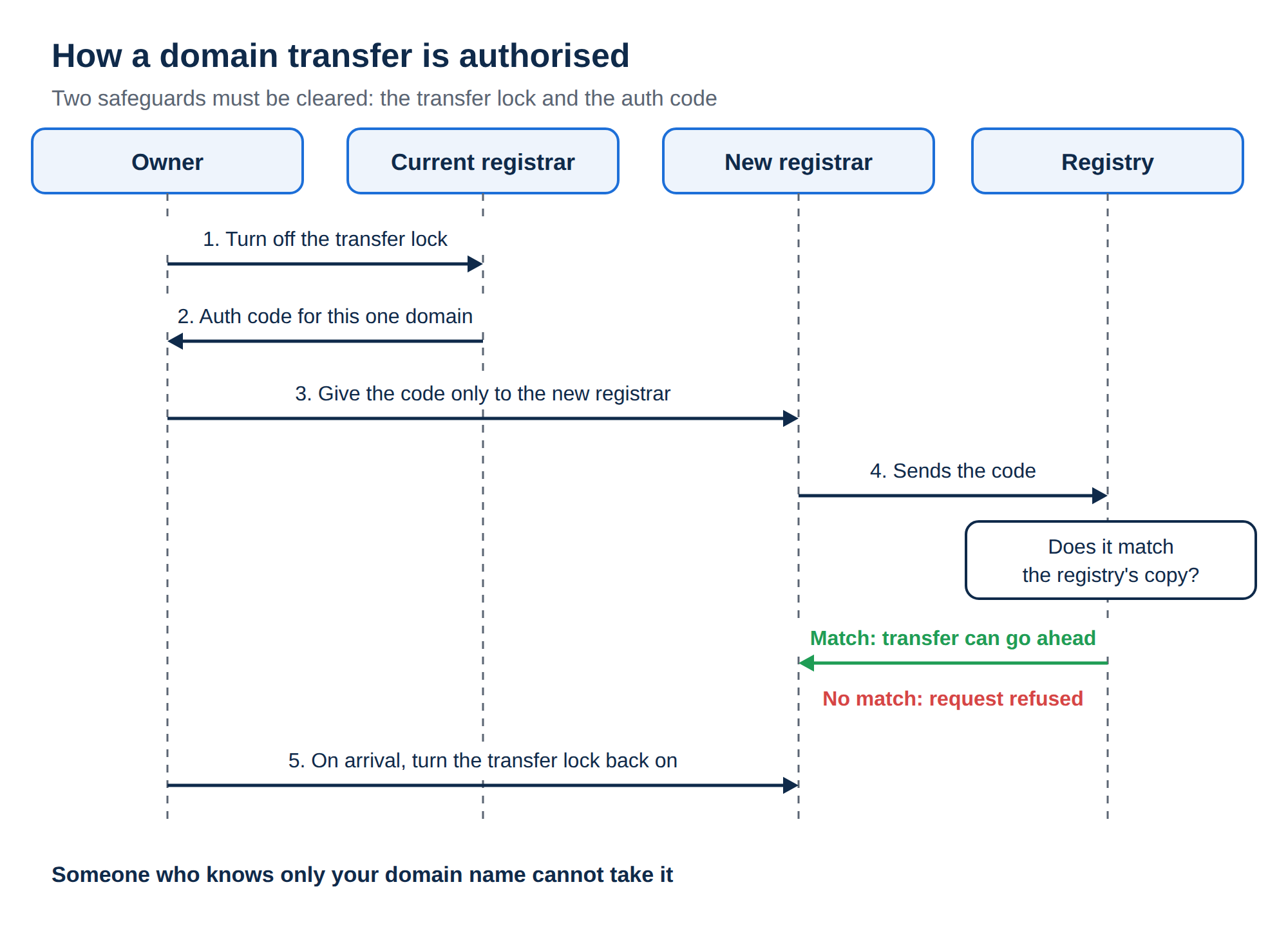
You can move a domain registered with Domain India to another registrar at any time, as long as the domain is eligible. You unlock it and get its authorisation (EPP) code from the client area, then start the transfer at the new registrar. This guide covers the eligibility rules, the exact steps in the Domain India client area, what happens during the transfer and how to keep your website and email running while it moves.
Open the domain in the client area and go to its Transfer tab. The domain must be unlocked and at least 60 days old, and a .com or similar domain must have paid WHOIS privacy removed (.in needs nothing). Click Unlock domain, then Get EPP code in the Authorisation code (EPP) box, and enter the code at the new registrar. The new registrar handles the rest. Before you start, make sure the domain is not expired or on hold, and copy any DNS records your website and email depend on.
1. Check the domain can be transferred
The Transfer tab on the domain's page shows a "Transfer-out requirements" notice with three conditions. Check them, and a few more, before you ask for the code.
| Condition | Why it matters | What to do |
|---|---|---|
| The domain is unlocked | A locked domain rejects every transfer request | Click Unlock domain on the Transfer tab |
| The domain is at least 60 days old | For .com and most generic extensions, a domain cannot move within 60 days of registration or of its last transfer | Wait until 60 days have passed |
| WHOIS privacy is off | Required before transfer out | Open a ticket to remove paid privacy on a .com or similar; .in needs nothing |
| The domain is not expired or on hold | An expired domain deep in its expiry process, or one on hold, usually cannot be transferred | Renew it or fix the hold first |
| No recent change of registrant | On generic domains, changing the registrant's name, organisation or email can start a 60-day transfer lock | Wait for the lock to end, or transfer before changing the registrant |
For .in domains, the registry hides personal registrant details in public WHOIS for free and automatically, so there is no privacy to turn off. If your .in domain has pending identity verification (eKYC) or a hold, resolve that first; see Why is my domain suspended.
2. Get the authorisation (EPP) code
- Sign into the client area and open your domains.
- Open the domainyou want to move. Until a domain is paid for and active, only its Overview tab is shown.
- Open the Transfer taband read the Transfer-out requirements notice.
- Unlock the domain.In the Transfer lock box, click Unlock domain. The status changes from Locked to Unlocked.
- Get the code.In the Authorisation code (EPP) box, click Get EPP code. If a code is already there, hidden behind dots, click the eye icon to show it.
- Copy the codewith the Copy button and keep it somewhere safe until you use it.
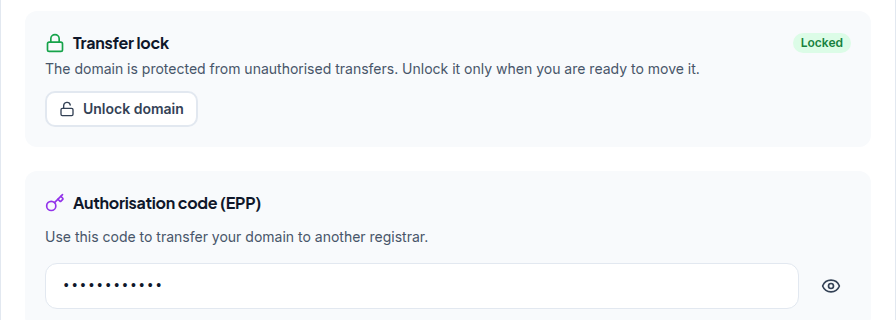
If the code box shows "Not Available", or there is no Unlock domain button for your domain, open a support ticket with the domain name.
Anyone who has the code of an unlocked domain can try to transfer it. Give it only to the registrar receiving the domain, or type it into their transfer form yourself. Never post it in a chat, a forum or a screenshot. If you change your mind, go back to the Transfer tab and click Lock domain.
More on the code itself: What is a domain transfer secret or authorisation code.
3. Protect your website and email before you move
A transfer changes only who the registrar is. It does not change your nameservers, so a website and email hosted elsewhere keep working throughout.
Check where your DNS is answered before you start:
- Nameservers point at your hosting or a DNS provider such as Cloudflare: nothing changes. Your records stay where they are.
- You are not sure: open the domain's Nameservers tab. If you are unsure whether those nameservers will keep answering after the move, copy all your records (A, CNAME, MX and TXT, including SPF and DKIM) and ask support before you start.
The new registrar may send approval or verification emails to the registrant email on the domain. If that address is out of date, or is on the domain you are moving, update it on the Contacts tab first. On a generic domain, changing the registrant email can start a 60-day transfer lock, so fix it well before you transfer, or ask support.
4. Start the transfer at the new registrar
- Go to the new registrar's transfer pageand enter the domain name.
- Paste the EPP codeexactly, with no spaces before or after it.
- Pay their transfer fee.For .com and most generic extensions, a transfer normally adds one year to the registration; ask the new registrar how it works for your extension.
- Approve the transferif the new registrar sends an email asking you to confirm it.
- Wait for completion.For .com and similar extensions, the transfer usually completes within about a week, depending on the registry and the registrars involved.
Your remaining registration period moves with the domain; nothing is lost by transferring before the expiry date.
5. After the transfer
Once the new registrar shows the domain as active in your account there:
- turn the transfer lock back on at the new registrar;
- check the contact details, especially the registrant;
- confirm the nameservers are still correct and your website and email work;
- set up renewal at the new registrar, because Domain India no longer sends renewal invoices for that domain.
6. Timing and cost
Transfer well before the expiry date. A domain close to expiry, or already expired, may need renewing first, and a .in domain can be renewed at the normal price only up to day 36 after expiry. From day 37 it can only be restored, for ₹4,000, which includes GST and the renewal.
Domain registrations are non-refundable under Domain India's terms, so there is no refund for the time left on the registration. That time is not lost: it moves with the domain.
7. If the transfer fails
| What went wrong | Likely cause | Fix |
|---|---|---|
| "Invalid auth code" | Typing mistake, a space copied in, or an old code | Get a fresh code on the Transfer tab and paste it exactly |
| Transfer rejected as locked | The domain was locked again, or has a hold | Unlock it on the Transfer tab; for a hold, open a ticket |
| Transfer refused within 60 days | The domain is new, was recently transferred, or had a recent change of registrant | Wait until 60 days have passed |
| Approval email never arrived | The registrant email is old or on the domain itself | Update the registrant email on the Contacts tab, then retry |
If you cannot see why a transfer is failing, open a ticket with the domain name and the new registrar's error message.
8. If you would rather stay
If the reason you are moving is price, support or something not working, tell us first; we may be able to fix it. If you are moving a domain the other way, to Domain India, see Can I transfer an existing domain to Domain India. Domain India list prices on 19 September 2026, excluding 18% GST: .in renews at ₹625 a year and .com at ₹1,150 a year.
How do I get the EPP code for a domain registered with Domain India?
Sign in to the client area, open Domains, click the domain and open its Transfer tab. Click Unlock domain, then Get EPP code in the Authorisation code (EPP) box, or click the eye icon if a code is already shown. If it says Not Available, open a support ticket.
What are the requirements to transfer a domain away from Domain India?
The domain must be unlocked and at least 60 days old, and a .com or similar domain must have paid WHOIS privacy removed; a .in domain needs nothing, because the registry hides its details for free. It should also not be expired or on hold, and on generic domains there should be no recent change of registrant.
Will my website and email stop during the transfer?
A transfer does not change your nameservers, so a website and email hosted elsewhere keep working. If you are unsure where your DNS is answered, copy your records and ask support before you start.
How long does a domain transfer take?
For .com and similar extensions, usually within about a week, depending on the registry and the registrars involved. Approve any confirmation email from the new registrar promptly.
Do I lose the time left on my registration?
No. The remaining registration period moves with the domain, and for .com and most generic extensions the transfer normally adds a year.
Do I need to turn off privacy on a .in domain before transferring?
No. For .in and its second-level extensions, personal registrant details are not shown in public WHOIS; this is free and automatic, and there is nothing to switch off.
Ready to move? Open your domains, go to the Transfer tab and get the code. If anything blocks you, open a ticket: support is on 24/7 live chat, and tickets get a first response within 15 minutes, though resolution can take longer.
Tell us the domain name and where it is going. We will check it is eligible and tell you what to do next.
Open a ticket