Most errors on a DirectAdmin website come from a short list of causes: a bad .htaccess line, a PHP fatal error, wrong permissions, a resource limit or a database setting. This guide lists the errors you are most likely to see on Domain India's DirectAdmin shared hosting, what each one means on our servers, and the fix, with links to the full guide for each.
Start with the error log: the domain's error log in DirectAdmin, or the error_log file next to the failing script. On our DirectAdmin servers, a php_value line in .htaccess always causes a 500, and only a few Options values are allowed. A 508 means too many PHP requests at once; memory and process limits show as 500 or 503. Uploads stop at 64 MB by default. If you can't find the cause, open a ticket with the URL, the time and the log line.
1. First step for any error: read the log
- Reproduce the error and note the time.Add a test parameter such as
?t=test1to the URL so you can recognise your own request. - Open DirectAdminwith the DirectAdmin button on your hosting service in the client area. It signs you in without a separate password.
- Check the domain's error logunder System Info & Files › Site summary & logs in DirectAdmin (the domain's Error log button), and the
error_logfile in the folder of the failing script, for exampledomains/yourdomain.com/public_html/error_log. - Match the line to your time.Older lines are history.
Older monthly logs are archived in domains/yourdomain.com/logs/ in your home folder. The full walkthrough is in How to access and analyse logs in DirectAdmin.
2. Error quick reference
| Error | Most likely cause on our DirectAdmin servers | Go to |
|---|---|---|
| 500 Internal Server Error | .htaccess line, PHP fatal error, memory or process limit | Section 3 |
| 403 Forbidden | No index file, permissions, blocked by a rule | Section 4 |
| 404 Not Found | Wrong folder, WordPress permalinks, missing rewrite rules | Section 5 |
| 508 Resource Limit Is Reached | Too many PHP requests at the same time | Section 6 |
| Error establishing a database connection | Wrong database name, user, password or host | Section 7 |
| curl_exec() has been disabled | A PHP function turned off for security | Section 8 |
| Upload fails or file too large | PHP upload limit of 64 MB | Section 8 |
| Your connection is not private | SSL certificate missing or not yet issued | Section 9 |
3. 500 Internal Server Error
Check these in order:
- PHP settings in
.htaccess. Our servers run PHP through PHP-FPM, not as an Apache module, so anyphp_valueorphp_flagline in.htaccessgives a 500 for the whole site. Remove it and set the value in a.user.inifile instead. - A disallowed
Optionsvalue. DirectAdmin allows onlyIndexes,IncludesNOEXEC,MultiViews,SymLinksIfOwnerMatch,FollowSymLinksandNonein.htaccess. Anything else, such as+ExecCGI, gives a 500. - Test
.htaccessitself. Rename it to.htaccess.bakin File Manager. If the site loads, the problem is in that file; restore it and remove lines until you find the one that breaks. - A PHP fatal error. The
error_logfile names the file and line; a path insidewp-content/plugins/names the plugin. - Memory or process limits. A 500 that comes and goes at busy times is often a resource limit, not a code fault. See section 6.
The full checklist is in Troubleshooting 500 Internal Server Error.
4. 403 Forbidden
- No index file. The folder needs an
index.htmlorindex.php. Note that DirectAdmin servesindex.htmlbeforeindex.php, so a leftover placeholderindex.htmlhides your PHP site. - Permissions. Folders should be
755and files644. On our DirectAdmin servers your home folder is710,domainsis711andpublic_htmlis755; don't change those. Never set777: it is unsafe and not needed. - A deny rule. Look for
Require all deniedorDeny fromlines in.htaccess, including in parent folders. - Your own IP is blocked. If every site on the server refuses you but works on mobile data, the server firewall may have blocked your IP after failed logins. Contact support with your public IP address.
More in Resolving the Forbidden error in DirectAdmin.
5. 404 Not Found
- Files in the wrong folder. Each domain's website lives in
domains/yourdomain.com/public_html. - WordPress posts return 404 but the home page works. In WordPress, open Settings › Permalinks and click Save Changes to rewrite
.htaccess.mod_rewriteis loaded on our DirectAdmin servers. - Custom 404 page. DirectAdmin on our servers has no Custom Error Pages tool. Put an
ErrorDocument 404 /404.htmlline in.htaccess, or place a404.shtmlpage inpublic_html, which the server serves for missing pages; see Managing custom error pages in DirectAdmin.
6. 508 Resource Limit Is Reached, and 503
Our DirectAdmin servers run CloudLinux, which gives each account its own limits. A 508 means your account hit its entry-process limit: too many PHP requests running at once. Memory and process limits show up as 500 or 503 errors instead.
Fix the cause before upgrading: cache pages (on WordPress, WP Super Cache or W3 Total Cache, because our shared hosting runs Apache), block abusive bots, move heavy jobs to quiet hours and put a timeout on every outside call your code makes. Full guide: Addressing Resource Limit Reached issues on DirectAdmin.
7. Database connection errors
"Error establishing a database connection" or "Access denied for user" nearly always means a setting in your configuration file (such as wp-config.php) does not match what exists in DirectAdmin.
- Names are prefixed. DirectAdmin adds your username to database and user names, for example
username_wp. Use the full names. - The user must be granted access to the database, and the password in the config file must match.
- The host is
localhostfor a site on the same account. - Remote connections: port 3306 is closed from outside on our shared servers, so connect from your own computer through an SSH tunnel. Jailed SSH is available on every shared plan; it is off by default, so ask support to enable it, and log in with a key.
Details: Database troubleshooting.
8. PHP limits: disabled functions and uploads
"Function has been disabled for security reasons." Our DirectAdmin servers disable functions that run system commands, including exec, shell_exec, system, proc_open and popen, and on most sites curl_exec and curl_multi_exec too. A plugin that needs one of them shows this warning or a fatal error. allow_url_fopen is on. If a Composer install stops with a proc_open message, run it again with --no-scripts, or build locally and upload the vendor folder. The full list and workarounds are in PHP disabled functions on shared hosting.
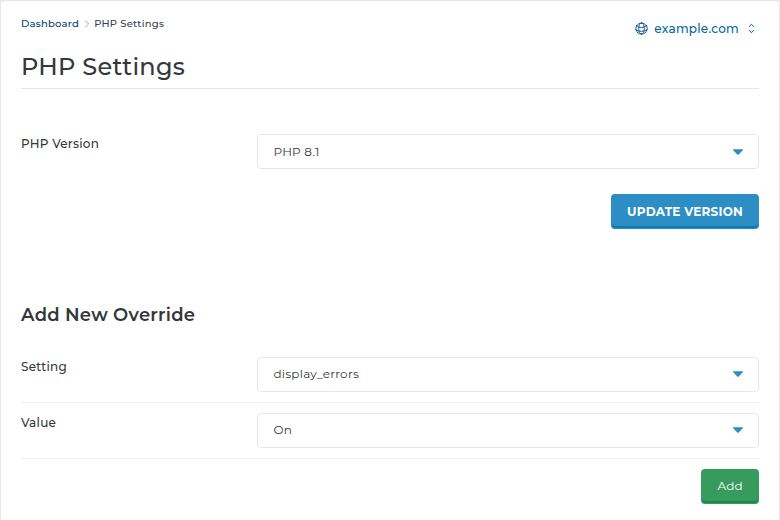
Uploads. PHP accepts uploads up to 64 MB by default on our DirectAdmin server. To raise upload_max_filesize and post_max_size, add them under Account Manager › PHP Settings › Add New Override, or use a .user.ini file in public_html; never php_value in .htaccess. DirectAdmin's File Manager accepts files up to 500 MB, and FTP is the better route for very large files. Also check your disk space. See PHP upload filesize limit.
9. SSL errors
Free Let's Encrypt certificates are issued from DirectAdmin and renew automatically, about a month before they expire. A new certificate can only be issued once the domain and www point to your hosting. If the browser warns after the certificate is in place, look for mixed content: images or scripts still loaded over http://. Steps: How to enable Let's Encrypt SSL in DirectAdmin.
Turn on logging without showing errors to visitors: add define('WP_DEBUG', true);, define('WP_DEBUG_LOG', true); and define('WP_DEBUG_DISPLAY', false); to wp-config.php, then read wp-content/debug.log. Switch it off when you are done. The default max_execution_time on DirectAdmin is 30 seconds, so very long imports can stop part-way.
10. Where Domain India fits
Domain India DirectAdmin hosting runs the setup described in this guide: CloudLinux account limits, PHP-FPM with PHP versions up to 8.3, free Let's Encrypt SSL, and weekly JetBackup backups you can restore from in the panel (see Restoring from JetBackup in DirectAdmin). If an error turns out to be a resource limit that caching and bot blocking don't fix, an active plan can be upgraded at any time from Hosting › My hosting with Change plan.
DirectAdmin plans start at ₹100 a month (Domain India list prices on 19 September 2026, excluding 18% GST); compare them on the DirectAdmin hosting page.
Frequently asked questions
Why does my DirectAdmin site show a 500 error after I edited .htaccess?
On Domain India's DirectAdmin servers, PHP runs through PHP-FPM, so any php_value or php_flag line in .htaccess causes a 500, and only a few Options values are allowed. Remove the line, or rename .htaccess to test, and set PHP values in a .user.ini file instead.
What does 508 Resource Limit Is Reached mean on DirectAdmin?
Your account hit its CloudLinux entry-process limit, meaning too many PHP requests were running at the same time. Caching pages, blocking abusive bots and putting timeouts on outside calls usually fixes it.
Where are the error logs in DirectAdmin?
Each domain's error log is under System Info & Files › Site summary & logs in DirectAdmin, and older archives are in domains/yourdomain.com/logs in your home folder. PHP also writes an error_log file in the folder of a failing script.
What is the upload limit on Domain India DirectAdmin hosting?
PHP accepts uploads up to 64 MB by default. You can raise it with a .user.ini file or ask support. The DirectAdmin File Manager accepts up to 500 MB, and larger files can go by FTP.
Why does a plugin say curl_exec has been disabled?
On most sites on our DirectAdmin servers, curl_exec and curl_multi_exec are disabled along with functions that run system commands. Use a plugin setting that avoids them, or ask support what is possible on your plan.
Can Domain India support look at the error for me?
Yes. Open a ticket with the page URL, the time you saw the error and, if you have it, the log line. Live chat is available 24/7, and tickets get a first response within 15 minutes.
Ready to fix it? Sign in to DirectAdmin from your hosting services, read the error log guide, or open a support ticket with the URL, time and log line. Planning a new site? Compare our DirectAdmin hosting plans.
Send us the page address, the time you saw the error and the log line, and we will find the cause with you.
Open a support ticket