Your website can be reached at up to four addresses: http://example.com, http://www.example.com, https://example.com and https://www.example.com. Search engines and browsers treat them as separate URLs, so you should pick one and send the other three to it with a permanent (301) redirect. This guide gives you copy-paste .htaccess rules for both choices, explains every line, and covers the traps that cause redirect loops: Cloudflare, WordPress settings and conflicting panel redirects.
Choose one canonical address, usually https://www.yourdomain or https://yourdomain, and redirect everything else to it with a single 301. Put the rule at the very top of the .htaccess file in your website's root folder, where Apache reads it. Make sure both DNS records exist and your SSL certificate covers both names, set WordPress's two address fields to the same URL, and use Cloudflare's Full (strict) SSL mode, never Flexible.
1. www or non-www: which should you choose?
Neither is better for SEO. Choose one and use it everywhere; search engines follow the 301 and combine the signals from all four addresses.
| Choose | Looks like | Good reasons |
|---|---|---|
| www | https://www.yourdomain.in | Familiar, and easier to point at a CDN or another provider through a CNAME record. |
| non-www | https://yourdomain.in | Shorter and cleaner on business cards and in ads. |
If your site is already indexed, keep whichever version Google shows in search results today. Switching later works, but it forces search engines to process every URL again.
2. Before you add any redirect
A redirect only runs after the browser has reached the first address, so check these three things first.
- Both DNS records exist.The root name (
yourdomain.in) andwwwmust both point to your hosting. Usually the root has an A record andwwwis a CNAME to the root, or has the same A record. See how to change your domain DNS settings. - Your SSL certificate covers both names.If the certificate only covers
www, a visitor typinghttps://yourdomain.insees a security warning before the redirect can run. Free SSL issued by the control panel normally covers both once both DNS records point to the server. See how to enable free SSL. - You have a backup of
.htaccess.Download the file, or copy its contents into a text file, before editing. If anything breaks, you can put the old version back in seconds.
The .htaccess file lives in your website's root folder, usually public_html for the main domain. It starts with a dot, so turn on "Show hidden files" in your file manager. If the file does not exist, create it.
3. Rule A: redirect non-www to www, with HTTPS, in one hop
Paste this at the top of .htaccess, above everything else, including any # BEGIN WordPress block.
# Canonical host: https://www.
RewriteEngine On
RewriteCond %{HTTPS} off [OR]
RewriteCond %{HTTP_HOST} !^www\. [NC]
RewriteCond %{HTTP_HOST} ^(www\.)?(.+)$ [NC]
RewriteRule ^ https://www.%2%{REQUEST_URI} [L,R=301]
What each line does:
RewriteEngine Onswitches on the rewrite module for this folder. Having it twice in the file (for example, once here and once in the WordPress block) is harmless.RewriteCond %{HTTPS} off [OR]matches any request that arrived over plain HTTP.[OR]means "this condition, or the next one".RewriteCond %{HTTP_HOST} !^www\. [NC]matches any host name that does not start withwww.. The!negates the pattern,\.is a literal dot, and[NC]makes it case-insensitive.RewriteCond %{HTTP_HOST} ^(www\.)?(.+)$ [NC]always matches. Its job is to capture the host name without anywww.into%2, so the rule works for any domain without editing.RewriteRule ^ https://www.%2%{REQUEST_URI} [L,R=301]redirects tohttps://www.plus the bare host plus the original path and query string.R=301makes it permanent andLstops processing further rules for this request.
The result: http://yourdomain.in/contact, http://www.yourdomain.in/contact and https://yourdomain.in/contact all go straight to https://www.yourdomain.in/contact in a single redirect.
4. Rule B: redirect www to non-www, with HTTPS, in one hop
If you prefer the shorter address, use this instead of Rule A. Never use both.
# Canonical host: https:// without www
RewriteEngine On
RewriteCond %{HTTPS} off [OR]
RewriteCond %{HTTP_HOST} ^www\. [NC]
RewriteCond %{HTTP_HOST} ^(www\.)?(.+)$ [NC]
RewriteRule ^ https://%2%{REQUEST_URI} [L,R=301]
The only differences from Rule A: the second condition now matches hosts that do start with www., and the target drops the www. prefix. The third line still captures the bare host name into %2.
Rule A redirects every host that does not start with www, including subdomains such as blog.yourdomain.in if that subdomain's folder sits inside public_html and has no .htaccess rewrite rules of its own. To exclude a subdomain, add a line such as RewriteCond %{HTTP_HOST} !^(blog|shop)\. [NC] directly above the RewriteRule line, using your own subdomain names.
Why one rule and not two
Many older guides use two separate blocks: one that forces HTTPS, then one that adds www. That works, but a visitor to http://yourdomain.in is redirected twice:
http://yourdomain.in -> https://yourdomain.in -> https://www.yourdomain.inThat is a redirect chain: each hop costs the visitor a round trip and crawlers an extra step. Rules A and B check the protocol and the host together, so every wrong address arrives in one hop. If your file already contains a separate "force HTTPS" block, remove it when you add Rule A or B.
5. Cloudflare and other proxies: avoid the redirect loop
If your domain uses Cloudflare with the orange-cloud proxy on, the SSL mode matters.
- Flexible mode connects to your server over plain HTTP, even when the visitor uses HTTPS. Your server sees
%{HTTPS}as off on every request, redirects to HTTPS, Cloudflare fetches over HTTP again, and the browser shows "too many redirects". - Full (strict) mode connects to your server over HTTPS with a valid certificate. Rules A and B then work unchanged. This is the setting to use, and your hosting's free SSL certificate satisfies it.
Change it in Cloudflare under SSL/TLS > Overview. You can also turn on Cloudflare's "Always Use HTTPS", which is compatible with the rules above.
If you truly cannot use Full (strict), use this version of Rule A. It trusts the X-Forwarded-Proto header that Cloudflare and most proxies send, but still works for requests that reach the server directly.
RewriteEngine On
RewriteCond %{HTTPS}:%{HTTP:X-Forwarded-Proto} !^(on:|off:https$) [NC,OR]
RewriteCond %{HTTP_HOST} !^www\. [NC]
RewriteCond %{HTTP_HOST} ^(www\.)?(.+)$ [NC]
RewriteRule ^ https://www.%2%{REQUEST_URI} [L,R=301]
The first condition joins the two values, for example off:https, and treats the request as secure if the server itself used HTTPS or the proxy reports HTTPS. For more, read the complete Cloudflare setup guide.
6. WordPress: make the two address fields match
WordPress has its own idea of its address. If it disagrees with your .htaccess rule, WordPress redirects one way and the server redirects back, which is a loop.
- Open Settings > Generalin the WordPress dashboard.
- Set WordPress Address (URL) and Site Address (URL)to exactly the same canonical URL, for example
https://www.yourdomain.in, with no trailing slash. - Save, then add Rule A or B to
.htaccessabove the# BEGIN WordPressblock. - Update old links in your content.Use a search-and-replace plugin or
wp search-replaceover WP-CLI to change oldhttp://or wrong-host links. Take a backup first.
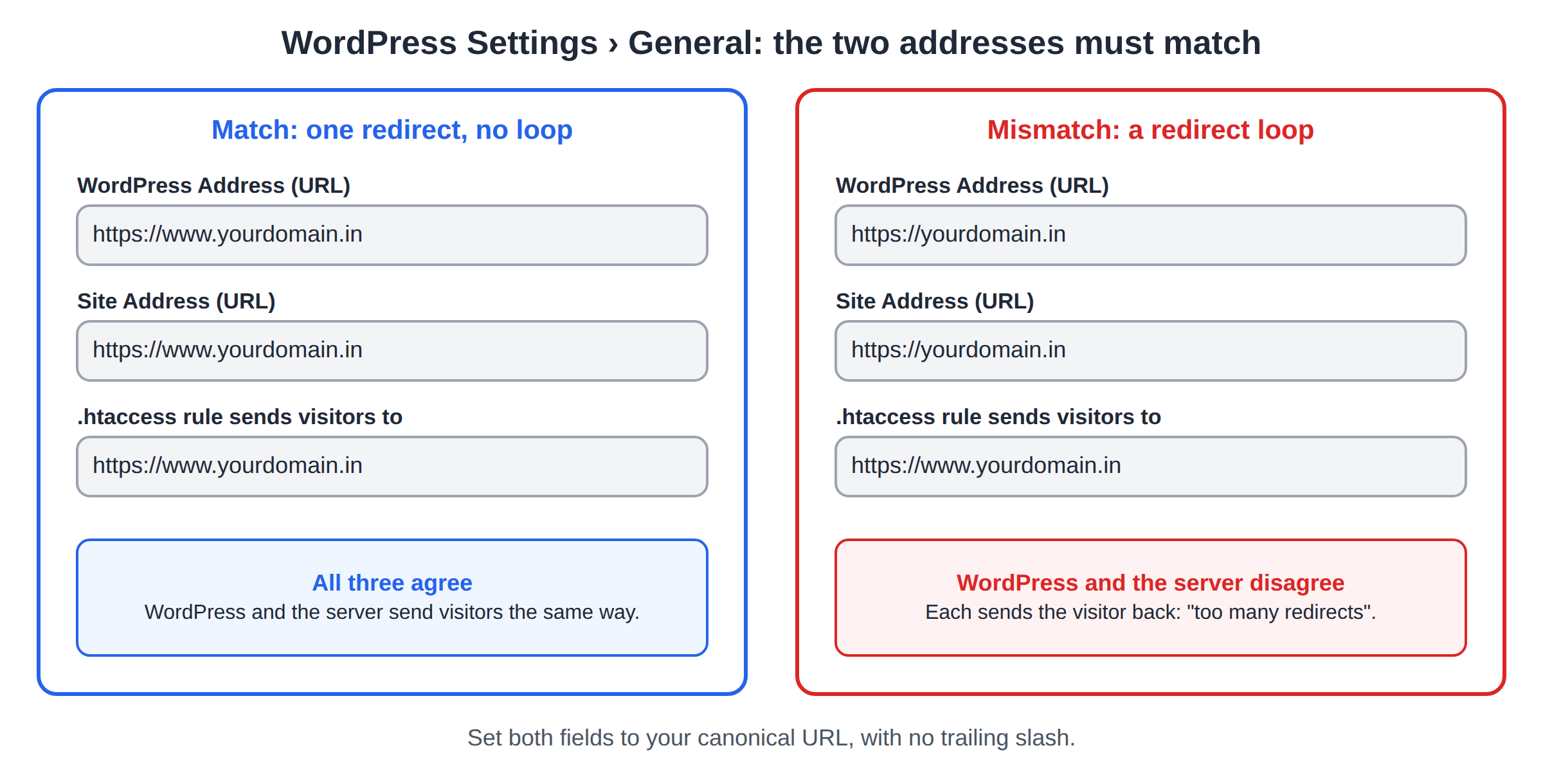
If the fields are greyed out, or a loop has locked you out, set WP_HOME and WP_SITEURL in wp-config.php to the canonical URL. Also turn off any plugin that does its own HTTPS or www redirect. For the standard WordPress rules, see how to create a default .htaccess file for WordPress.
7. Control panel alternatives
If you would rather not edit files, most control panels have tools that do part of the job:
- cPanel Redirects (Domains section) creates permanent (301) redirects with
wwwoptions. It suits sending one domain to another; for your own domain's canonical address,.htaccessgives more control. See how to log in to cPanel. - Force HTTPS switches. cPanel's Domains page has a "Force HTTPS Redirect" toggle per domain, and DirectAdmin has a similar option in the domain's SSL settings. These handle HTTP to HTTPS only, not www.
A panel redirect, an .htaccess rule and a WordPress plugin that each redirect in a different direction is the most common cause of "too many redirects". Pick one place to do the redirect, and remove the others.
8. Test it and finish the SEO
Browsers cache 301 redirects, so test in a private window or with curl. Check all four variants:
curl -I http://yourdomain.in/
curl -I http://www.yourdomain.in/
curl -I https://yourdomain.in/
curl -I https://www.yourdomain.in/
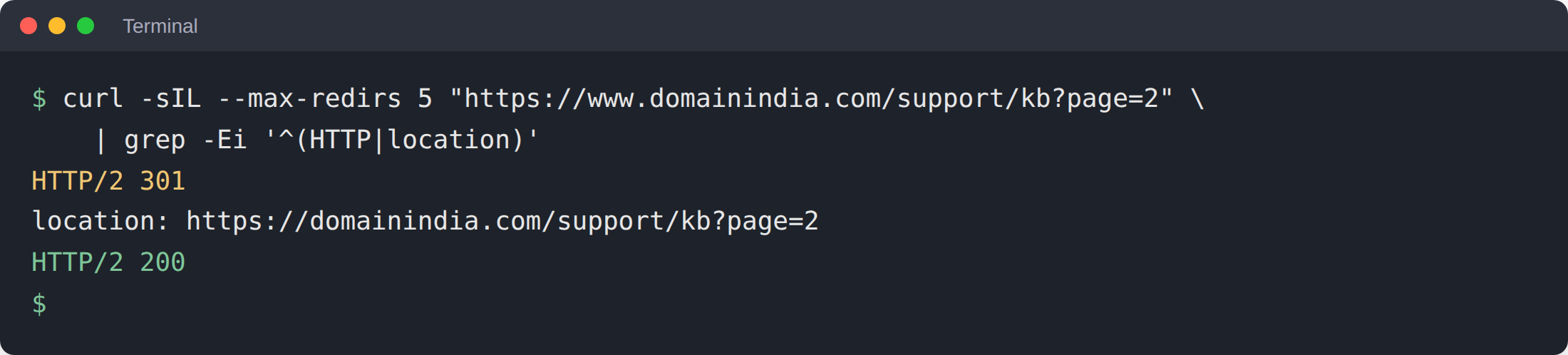
Three of them should return 301 with a Location: header pointing at your canonical URL. The canonical one should return 200. To follow the whole path and catch loops or chains, run:
curl -sIL --max-redirs 5 http://yourdomain.in/some-page | grep -Ei '^(HTTP|location)'You should see exactly one redirect line followed by 200. Also test a deep URL with a query string, such as /shop/?page=2, to confirm the path and parameters survive.
SEO: finish the job
- Canonical tags. Each page should have a canonical link tag in its head pointing to its own canonical URL. SEO plugins such as Yoast or Rank Math add it automatically for WordPress.
- Internal links and sitemap. Link to the canonical form everywhere and make sure your XML sitemap lists only canonical URLs.
- Google Search Console. Add a Domain property, verified by a DNS TXT record, which covers all four variants at once. Google removed the old "preferred domain" setting, so the 301 and canonical tags are how you tell it which one you want.
9. Fixing common errors
| Symptom | Likely cause | Fix |
|---|---|---|
| "Too many redirects" (ERR_TOO_MANY_REDIRECTS) | Cloudflare Flexible SSL, WordPress addresses that disagree with the rule, or two redirects pointing opposite ways | Use Full (strict), match the WordPress fields, keep one redirect method, then clear cookies or use a private window |
| 500 Internal Server Error right after saving | A typo in .htaccess, curly quotes pasted from a word processor, or a stray character | Restore your backup, then re-paste the rule from a plain-text source and check the error log |
| Security warning on one variant only | The SSL certificate does not cover both names | Make sure both DNS records point to your hosting, then reissue the free SSL |
| Subdomain now opens the main site | Rule A caught the subdomain host | Add the exclusion line from section 4 |
For a 500 error in general, see troubleshooting a 500 Internal Server Error.
10. Where Domain India fits
The Linux shared hosting plans at Domain India (cPanel, DirectAdmin and Webuzo) include free SSL and let you edit .htaccess from the file manager or over FTP. That is everything you need for the rules in this guide. If you are choosing a plan for a WordPress or PHP site, cPanel Starter is a sensible place to start:
- 25 GB NVMe SSD Storage
- 50 GB Monthly Bandwidth
- 1 Website
- 10 Email Accounts
Stuck with a loop or a 500 error? Open a support ticket from your client area and tell us your domain and which canonical address you want.
Frequently asked questions
Is www or non-www better for SEO?
Neither ranks better. What matters is choosing one version, redirecting the others to it with a permanent 301 redirect, and using that version in your canonical tags, internal links and sitemap.
Where do I put the redirect rule in .htaccess?
At the very top of the .htaccess file in your website's root folder, usually public_html, above any other rewrite rules including the WordPress block. Rules lower in the file may never be reached.
Should I use a 301 or a 302 redirect?
Use 301 for www and HTTPS redirects, because the move is permanent and search engines transfer ranking signals to the target. A 302 tells them the move is temporary, so they may keep the old address indexed.
Why do I get "too many redirects" after adding the rule?
The usual causes are Cloudflare's Flexible SSL mode, WordPress Address and Site Address fields that do not match the rule, or a second redirect in a control panel or plugin pointing the opposite way. Fix the conflict, then test in a private window because browsers cache redirects.
Why does my site show a 500 error after editing .htaccess?
A 500 error right after an edit almost always means a syntax error in .htaccess, such as a typo or curly quotes pasted from a word processor. Restore your backup copy, then paste the rule again from plain text.
Do I need a DNS record for www?
Yes. Both the root domain and www must point to your hosting, or visitors typing the other version never reach your server and the redirect cannot run. Your SSL certificate must also cover both names.
Ready to set it up? Check your records with the DNS settings guide, make sure free SSL covers both names, and compare cPanel and DirectAdmin hosting if you need a new plan. If you get stuck, open a support ticket.
Free SSL, file manager and FTP access on every plan, so you can set up your canonical address in minutes.
See cPanel hosting plans