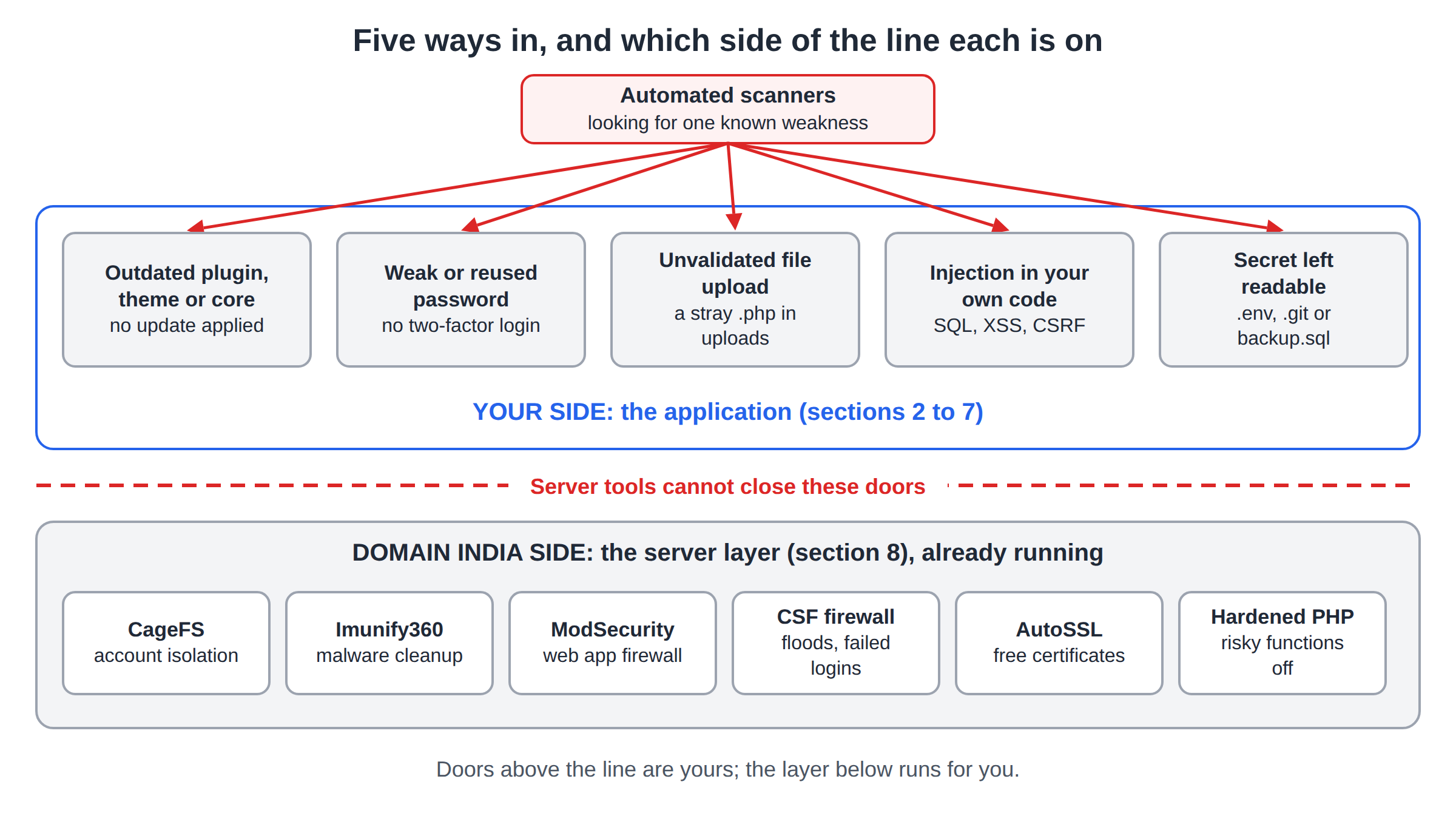
Most hacked WordPress sites were never chosen by a person. Bots scan millions of sites for one known weakness, such as a plugin with a published hole or an administrator with a reused password, and take whatever answers. The tips below close the doors those bots use, in order of how much they matter, and explain what your hosting already does for you.
Update WordPress, plugins and themes every week and delete what you do not use. Give every administrator a unique password and two-factor authentication. Block PHP in the uploads folder, turn off the dashboard file editor, and keep your own backup off the server. On Domain India shared hosting, Imunify360 scans and cleans malware automatically, but you cannot start a scan yourself and you are not emailed when it finds something, so a security plugin that alerts you is still worth having.
1. Update everything, every week
Outdated plugins and themes are the main way WordPress sites get hacked. When a hole is fixed, the fix is public, and bots start looking for sites that have not updated. The danger window is the time between the fix and your update.
- Turn on auto-updatesfor plugins and themes you trust (Plugins › Enable auto-updates). Leave WordPress's automatic core security updates on.
- Check weeklyfor anything that did not update itself.
- Delete, do not just deactivate, plugins and themes you are not using. Their files are still on the server and can still be attacked. Keep one default theme as a fallback.
- Replace abandoned plugins.If a plugin's WordPress.org page shows no update for over a year, or says it was closed, find a maintained alternative.
- Never install nulled themes or plugins.Pirated copies often carry a hidden backdoor and can never be updated.
Keep PHP on a supported version too. Check your control panel for the versions available, and test on a copy of the site before a big jump.
2. Strong, unique passwords and two-factor authentication
The second big route in is a stolen or guessed password. Bots try common usernames with common passwords, and they replay email and password pairs leaked from other websites.
- Use a password manager and a long, unique password for WordPress, your control panel, FTP, the database and your email. See best password managers.
- Turn on two-factor authentication (2FA) for every administrator and editor. WordPress core does not include it, so add it with a plugin such as Wordfence, Solid Security or the free Two Factor plugin, and use an authenticator app rather than SMS. See installing Wordfence and setting up two-factor authentication.
- Protect the logins above WordPress too. Your Domain India account and your email can reset everything else, so give them 2FA first; see two-factor authentication setup.
3. Clean up user accounts
- Do not use "admin" as a username. If you have one, create a new administrator with a different name, log in as it, and delete the old account, assigning its posts to the new user.
- Give each person their own login with the lowest role that works: Editor or Author for content, Administrator only for people who manage plugins.
- Remove people who have left, and review Users › Profile › Application Passwords for any you do not recognise.
- An administrator you did not create is the clearest sign of a hack. Check the user list monthly.
4. Slow down login attacks
Password guessing never stops, but you can make it pointless.
- Limit login attempts. Most security plugins include this. If you want only this feature, Limit Login Attempts Reloaded is a well-maintained choice.
- Block
xmlrpc.phpif you do not use it. One request to it can test hundreds of passwords. Jetpack and some older publishing apps still need it; if you use neither, block it in your security plugin or with this.htaccessrule in the WordPress folder:
<Files xmlrpc.php>
    Require all denied
</Files>- Add a second password in front of the admin area. See how to password protect the WordPress wp-admin directory in cPanel, which also covers the
admin-ajax.phpexception that keeps forms working.
5. Use HTTPS everywhere
Without HTTPS, login passwords and session cookies travel in plain text. Free, self-renewing Let's Encrypt certificates are issued automatically on our cPanel server, and DirectAdmin and Webuzo offer them from the panel; see how to enable free SSL. Then make sure WordPress's Site Address uses https:// and that plain http:// addresses redirect.
6. Lock down files
Stop PHP running in the uploads folder. Uploaded images never need to execute, but a malicious upload does. Create wp-content/uploads/.htaccess with:
<FilesMatch "\.(php|phtml|phar)$">
    Require all denied
</FilesMatch>
Test it by uploading a file called test.php there with the File Manager and opening it in a browser: you should get a 403. Then delete it.
Turn off the dashboard code editor. Add this line to wp-config.php, above "That's all, stop editing", so someone who gets into the dashboard cannot rewrite theme or plugin code from it:
define( 'DISALLOW_FILE_EDIT', true );Use sane permissions: 755 for folders, 644 for files, 640 or 600 for wp-config.php if the site still loads. Never 777. More in the complete WordPress hardening guide.
7. Keep backups you control
A backup is what turns a hack into an inconvenience instead of a disaster.
A plugin such as UpdraftPlus can schedule backups to Google Drive or similar storage. Domain India shared hosting also includes weekly backups: treat them as a safety net, not your only copy. See how to download a backup of your site.
8. Watch for trouble, because the server will not email you
Domain India's cPanel server runs Imunify360 in cleanup mode (measured 20 September 2026). New and changed files are scanned as they are written and again weekly, and malicious code is removed automatically, with the original file kept for 14 days. Its web application firewall, with WordPress rules, blocks many attacks before they reach your site.
Two things it does not do, and they shape your part of the job:
- You cannot start an Imunify360 scan yourself from the control panel.
- You are not emailed when malware is found. Cleanup is automatic and silent.
Removing an infected file does not fix the outdated plugin or stolen password that let the attacker in. If the same kind of file keeps coming back, find the entry point using the security checklist for hacked websites.
So set up your own early warnings:
- Install one security plugin such as Wordfence, Solid Security or Sucuri Security, and turn on its email alerts for new administrators, file changes and plugin vulnerabilities. Two security plugins together often conflict.
- Verify your site in Google Search Console. It reports malware and hacked-content warnings, often before customers notice.
- Check monthly: the administrator list, plugins waiting for updates, and files modified recently in the File Manager.
If Google is already warning visitors, follow how to handle the Google attack page warning. For the routes attackers use and how each one is closed, read why and how WordPress websites get hacked.
9. Where Domain India hosting fits
The host secures the server; you secure the WordPress site on it. On our cPanel and DirectAdmin servers, CloudLinux CageFS keeps each account isolated from the others, and Imunify360 and the CSF firewall run server-wide, with one configuration for every account on the server. You get the same protection on every plan, so choose by resources, not security.
- 25 GB NVMe SSD Storage
- 50 GB Monthly Bandwidth
- 1 Website
- 10 Email Accounts
- 10 GB NVMe SSD Storage
- 50 GB Monthly Bandwidth
- 1 Website
- 5 Email Accounts
Plan cards show Domain India list prices on 19 September 2026, excluding 18% GST. Hosting cannot update your plugins or stop someone who logs in with your real password; sections 1 to 7 are still yours.
Frequently asked questions
What is the most important thing I can do to secure WordPress?
Keep WordPress, every plugin and every theme updated, and delete the ones you do not use. Outdated and abandoned plugins are the most common way WordPress sites are hacked.
Do I need a security plugin if my host runs Imunify360?
It is still worth having one. Imunify360 on Domain India's shared servers blocks many attacks and cleans malware automatically, but you are not emailed when it finds something and you cannot start a scan yourself. A security plugin adds login protection, 2FA and alerts you can see.
Should I change the default admin username in WordPress?
Yes. Bots try "admin" first. Create a new administrator with a different username, log in with it, then delete the old admin account and assign its content to the new user.
How do I stop PHP files running in the WordPress uploads folder?
Add an .htaccess file in wp-content/uploads with a FilesMatch rule that denies .php, .phtml and .phar files. Test by uploading a test.php file and confirming the browser shows a 403 error, then delete it.
Does Domain India back up my WordPress site?
Domain India shared hosting includes weekly backups. Keep your own copies too, off the server and in several generations, because malware can go unnoticed for longer than a week.
Will Domain India clean my WordPress site if it is hacked?
Imunify360 removes known malicious code from files automatically on the shared servers, but that is not a full cleanup. You or your developer still need to find the entry point, remove backdoors and update everything. The security checklist for hacked websites explains the steps.
Ready to harden your site? Start with updates and 2FA today, add a second lock with the wp-admin protection guide, and read the guide to securing web applications for the full picture. If something on your hosting account looks wrong, open a support ticket.
CloudLinux isolation, Imunify360 with automatic malware cleanup, a web application firewall and free SSL on every Domain India cPanel plan.
See cPanel hosting plans