Every Domain India shared hosting plan includes a free SSL certificate from Let's Encrypt. On cPanel (AutoSSL) and DirectAdmin it is issued for you automatically; on Plesk you request it once in the panel; after that, the panel renews it on its own. This page is the short version for each panel and points you to the full guide for yours.
Point your domain at your hosting first, because Let's Encrypt checks that the domain really reaches our server. On cPanel, AutoSSL issues and renews the certificate automatically. On DirectAdmin it is issued and renewed automatically too. On Windows (Plesk), use the SSL/TLS or Let's Encrypt option for the domain. If the option is missing or the request keeps failing, open a ticket.
This page is an overview. For step-by-step instructions and error fixes, see Let's Encrypt SSL in DirectAdmin, AutoSSL in cPanel and Install SSL in Plesk.
1. What the free certificate gives you
Let's Encrypt is a free, automated certificate authority trusted by every modern browser. Its certificates encrypt traffic between visitors and your site and remove the "Not secure" warning. They are domain validated, which means they prove you control the domain, not who your company is. They are short-lived (90 days or less) and designed to renew automatically, which the control panel does for you.
For almost every website, blog or shop, this free certificate is all you need. If you need a paid certificate for a specific reason, ask support, or upload a certificate you bought elsewhere.
2. First: point your domain at your hosting
Let's Encrypt fetches a small file from your domain over plain http://. The request fails if the domain still points to an old host, if www has no DNS record, if a proxy or CDN answers instead of our server, or if a CAA record allows only another certificate authority.
Use the nameservers or server IP shown in the Access tab of your hosting service in the client area. See How do I change my nameservers. Wait until the site opens over http:// before you expect a certificate.
3. The steps on each panel
| Panel | How the certificate is issued | Full guide |
|---|---|---|
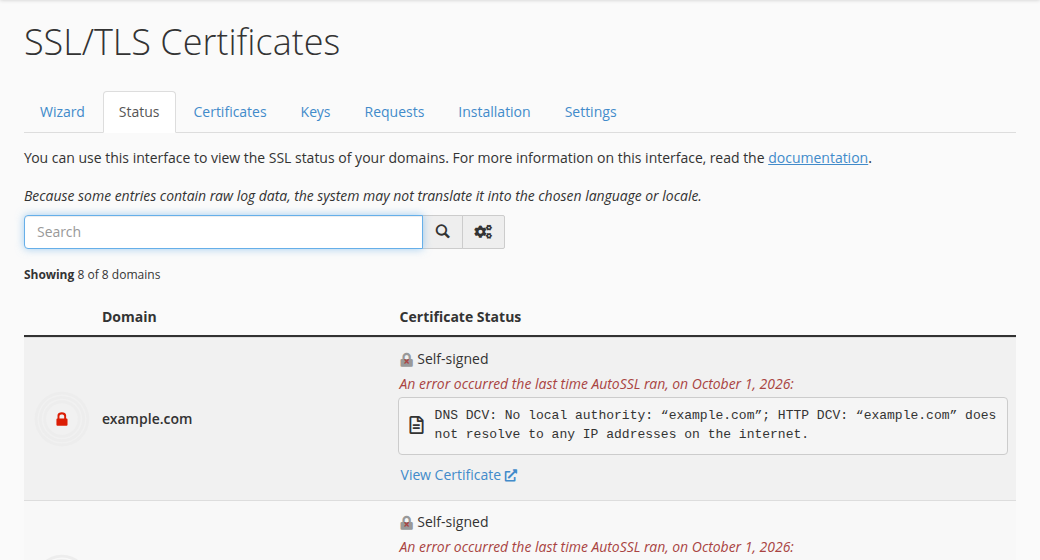
| cPanel | AutoSSL with Let's Encrypt, issued and renewed automatically; the Status tab of SSL/TLS Certificates shows each name | AutoSSL in cPanel |
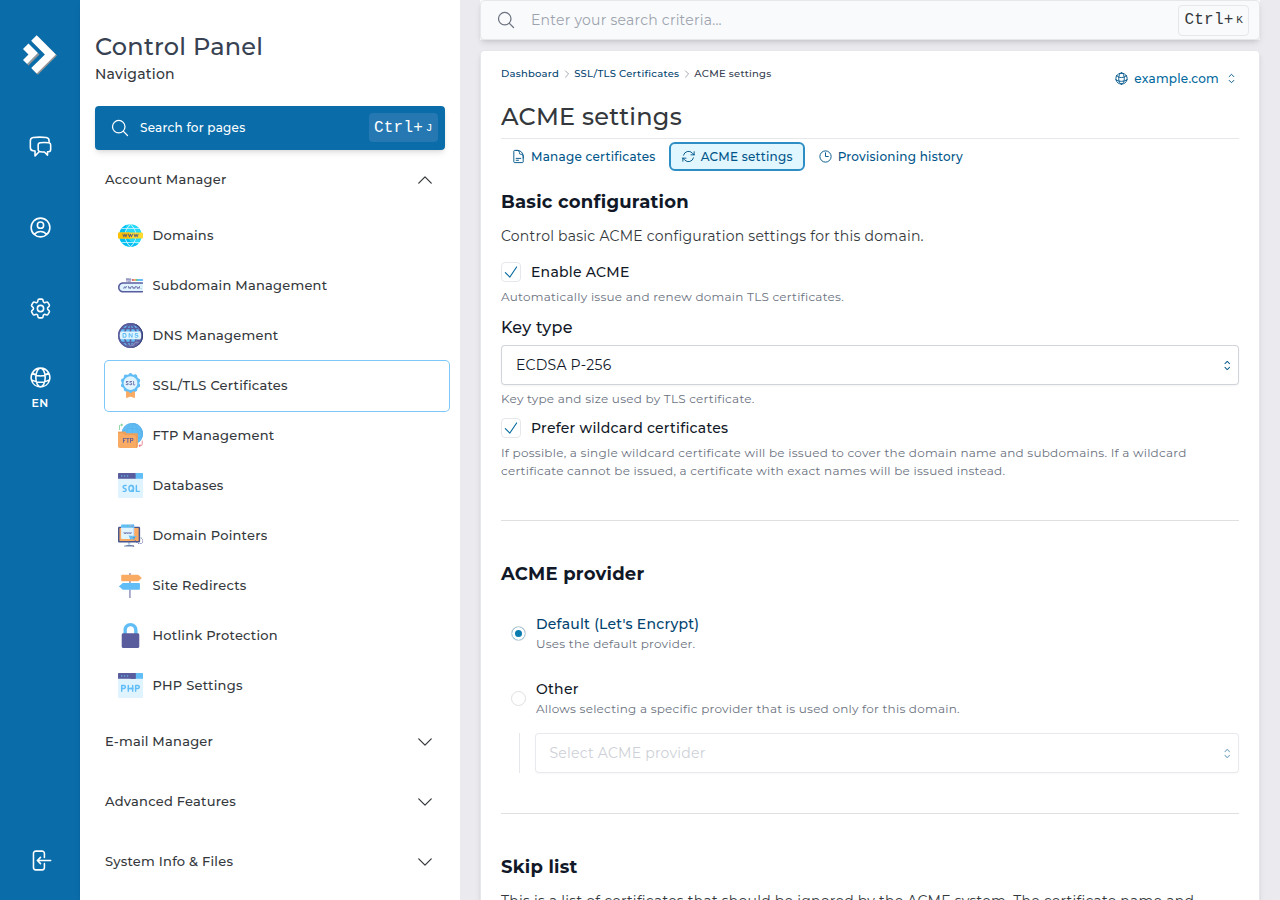
| DirectAdmin | Issued and renewed automatically; check Account Manager › SSL/TLS Certificates | Let's Encrypt SSL in DirectAdmin |
| Webuzo | Use the panel's SSL page; menu names are not documented here | Ask support |
| Windows (Plesk) | Use the domain's SSL/TLS or Let's Encrypt option, then it renews itself | Install SSL in Plesk |
- Open your control panel.In the client area, open your hosting services, choose the service and open its panel.
- Find the SSL page.cPanel: SSL/TLS Certificates in the Security section, Status tab. DirectAdmin: Account Manager › SSL/TLS Certificates. Plesk: the domain's SSL/TLS Certificates page.
- Check the certificate.On cPanel, AutoSSL runs on its own and the Status tab shows which names are covered. On DirectAdmin it is issued automatically too; the page lists each certificate and the reason for any name that failed. On Windows (Plesk) hosting, request the free Let's Encrypt certificate on the domain's SSL/TLS page and tick
wwwif it points to us. - Test.Open
https://yourdomain.comand check for the padlock.
4. After the certificate: redirect to HTTPS
A certificate does not move visitors to https:// on its own. On cPanel, DirectAdmin and Webuzo the web server is Apache with mod_rewrite, so this rule in public_html/.htaccess works:
RewriteEngine On
RewriteCond %{HTTPS} off
RewriteRule ^ https://%{HTTP_HOST}%{REQUEST_URI} [L,R=301]
In WordPress, also set both addresses under Settings › General to https://. If the padlock shows a warning, the page still loads images or scripts over http://.
5. Wildcard certificates
A wildcard certificate (*.yourdomain.com) needs DNS validation instead of the file check, and whether that works depends on where your DNS is hosted. Ask support before you try. For most sites, listing each subdomain in one normal certificate is simpler.
Is SSL free on Domain India hosting?
Yes. Every Domain India shared hosting plan includes free SSL: AutoSSL with Let's Encrypt on cPanel, and Let's Encrypt in DirectAdmin and Plesk. There is nothing to buy.
Do I need to renew the free SSL certificate?
No. Let's Encrypt certificates last 90 days or less and the control panel renews them automatically, as long as your domain keeps pointing to the hosting server.
Why was no certificate issued for my domain?
Usually the domain or www does not point to our server yet, a proxy or CDN answers instead, or a CAA record allows only another certificate authority. Fix the DNS, wait for it to spread, then request again or wait for AutoSSL on cPanel.
Does Domain India sell paid SSL certificates?
The free Let's Encrypt certificate covers almost every website. If you need a paid certificate, ask support, or upload a certificate you bought elsewhere in your control panel.
Can I get a wildcard certificate?
A wildcard needs DNS validation, which depends on where your DNS is hosted. Ask Domain India support first; covering each subdomain in one normal certificate is usually easier.
Ready to secure your site? Check your DNS with How do I change my nameservers, then open your hosting services to reach your panel.
Send us the domain and the exact message your panel shows, and we will check the DNS and the certificate request with you.
Open a support ticket