Most websites that get broken into were never chosen. A script scans millions of addresses for one known weakness — an out-of-date plugin, a reused password, a database backup in a public folder — and takes whatever it finds. The good news: one short list of controls stops nearly all of it, and most of it is one afternoon's work.
This guide walks the stack in the order attackers walk it: the hosting account, the software you installed, the connection, the files on disk, the code you wrote. It is written for a business owner running WordPress on shared hosting and for a developer shipping a first PHP or Node app, and it says plainly which parts your host handles and which are yours.
Eight things stop the large majority of website compromises: patch every piece of software; use long unique passwords with two-factor authentication on your hosting, domain and admin logins; serve everything over HTTPS; set sane file permissions; keep secrets and backups out of the web root; use prepared statements and validate input; take your own backups and test a restore; read your logs. On Domain India shared hosting the server layer — CSF, ModSecurity, Imunify360, CageFS isolation, free SSL and hardened PHP — already runs for you. The application layer is yours.
1. Know what you are defending against
Almost every compromise on shared hosting arrives through one of five doors. Knowing which is open tells you where to spend the afternoon.
| How they get in | What it looks like | Who is at risk |
|---|---|---|
| An outdated plugin, theme or CMS core | Mass scanning for a known bug, months after the fix | Any CMS site without updates |
| A weak or reused password | Logins from odd countries; an admin user you did not create | Anyone reusing a password |
| An unvalidated file upload | A stray .php file in an uploads folder | Any site with a form that accepts files |
| Injection in your own code | Strange query strings; data appearing or disappearing | Custom PHP, Node or Python applications |
| A secret left readable | A .env, .git folder or database.sql served over the web | Anyone who put a backup or config copy in public_html |
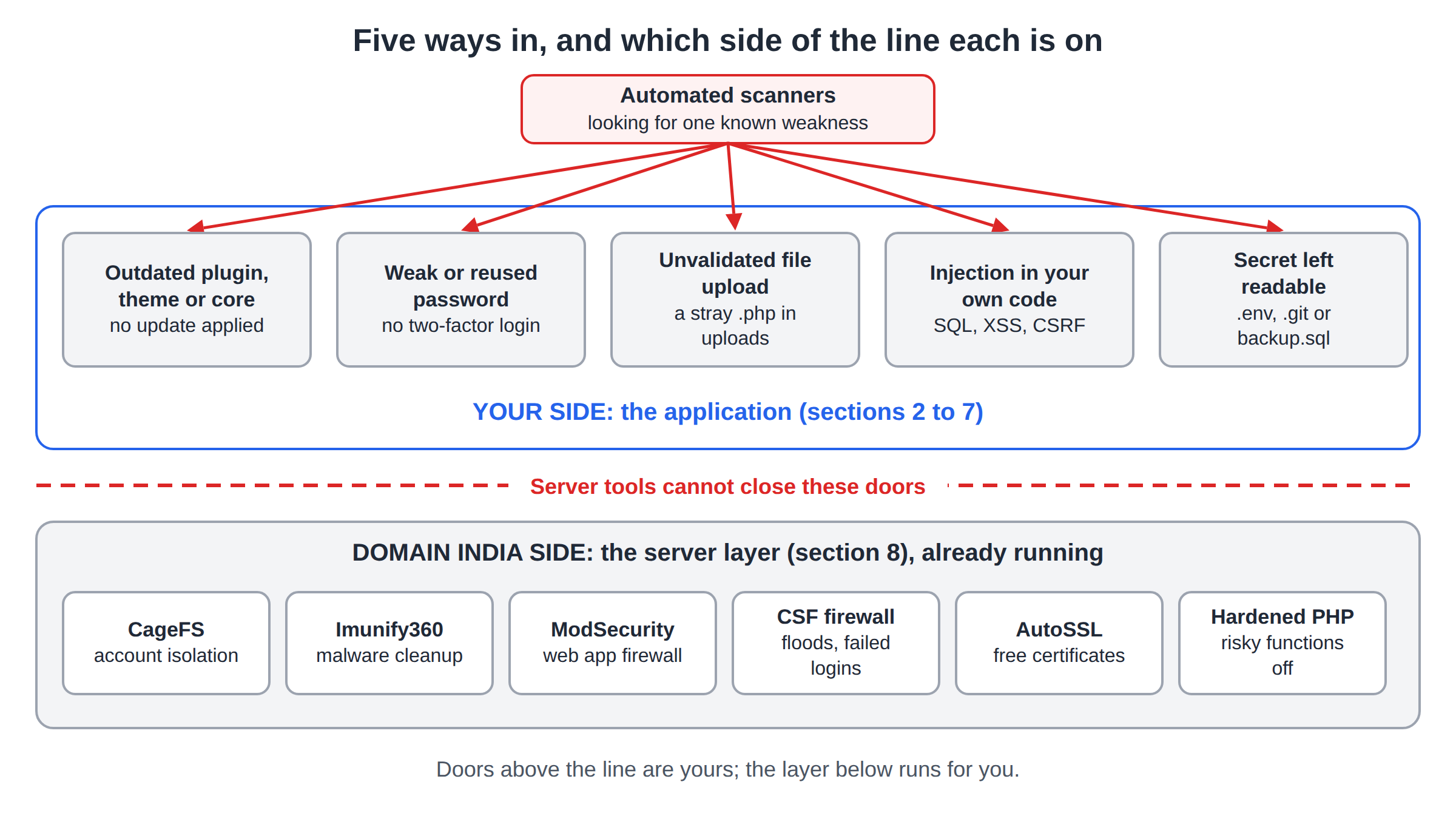
Notice what is not on that list: clever, targeted, zero-day attacks. They exist, but they are not what takes down a small business site. Boring maintenance is the defence.
2. Patch everything, on a schedule you keep
Most mass compromises exploit a bug fixed months earlier. The patch existed; nobody applied it.
- Put a date in the calendar.Once a week, ten minutes: log in, open the update screen, apply what is there.
- Update the core, themes and plugins — all three.A theme you are not using is still code on the server. Delete what you do not use, do not just deactivate it.
- Delete abandoned software.An old copy in
/old, a test install in/dev, a forum you stopped using in 2019 — each is a live entry point with no owner. - Keep PHP current.Old PHP branches stop receiving security fixes. Pick a supported version in your panel (in cPanel, MultiPHP Manager) and test the site afterwards.
- Update your own dependencies.Run
composer auditornpm auditmonthly. A framework untouched for two years is the same risk as an abandoned plugin. - Test on a copy when the site matters.Back up, or clone into a subdomain, before a major upgrade. An update you can roll back is an inconvenience; one you cannot is an outage.
The version selector is covered in how to change PHP versions in cPanel, and the CMS steps in the complete WordPress hardening guide.
3. Strong authentication, everywhere it matters
You have more logins than you think: client area, control panel, FTP and SSH, database, CMS admin, email. An attacker needs only the weakest one.
Use a password manager. A long random passphrase you never retype beats a clever pattern you reuse. If one password protects your email and your hosting, a leak elsewhere gives away both — password managers compare the practical options.
Turn on two-factor authentication, starting with the accounts that undo everything else: your Domain India account, your control panel, your CMS admin. See two-factor authentication setup and account security best practices.
Give every person their own login. Shared logins mean you cannot tell who did what, or revoke one person's access when they leave. In WordPress use the Contributor or Editor role, not Administrator; in your panel, create FTP accounts scoped to one folder instead of sharing the main password.
Protect the admin page. Brute-force attempts against /wp-admin never stop. Password-protecting the directory puts a second lock in front of the login.
Do not forget the domain. If someone takes over your registrar account they repoint your domain and every other control here becomes irrelevant. Keep that login on 2FA, the domain lock on and the contact email current — see domain security.
Your registrar account and your email account. Whoever controls your email can reset most other passwords; whoever controls your domain can point it anywhere. Give both a unique password and two-factor authentication before anything else on this list.
4. HTTPS on every page, not just the checkout
Plain HTTP exposes login forms, session cookies and form submissions to anyone on the network path — the café Wi-Fi, the hotel router, the ISP. Free auto-renewing certificates are included with Domain India shared hosting, so there is no reason to run without one.
- Issue the certificate.In cPanel, the Status tab of Security › SSL/TLS Certificates; in DirectAdmin and Webuzo, the Let's Encrypt option. See how to enable free SSL.
- Redirect HTTP to HTTPS.One
.htaccessrule, or the "Force HTTPS Redirect" toggle in cPanel's Domains page. Test with a plainhttp://address: you should land onhttps://. - Fix mixed content.If a page loads an image, script or stylesheet over HTTP, the browser warns or blocks it. In WordPress, update the site URL in Settings and search the database for hard-coded
http://yourdomainreferences. Check sitemaps, canonical tags, email templates and gateway callbacks too. - Add HSTS once it is stable.
Strict-Transport-Securitytells browsers never to try HTTP again. Add it only after HTTPS works everywhere: it is hard to undo.
While you are in .htaccess, add the cheap headers that close whole categories of attack:
# .htaccess — works on Apache, which is what Domain India shared hosting runs
Header always set X-Content-Type-Options "nosniff"
Header always set X-Frame-Options "SAMEORIGIN"
Header always set Referrer-Policy "strict-origin-when-cross-origin"
Header always set Strict-Transport-Security "max-age=31536000; includeSubDomains"
X-Content-Type-Options stops a browser guessing that an uploaded text file is really a script; X-Frame-Options stops your pages being framed to trick users into clicking. A Content-Security-Policy is the strongest and the fiddliest to get right — see security headers explained.
5. Files, permissions and secrets
Permissions are simple and people still get them wrong. The rule: the web server must read your files, and almost never write them.
| What | Permission | Why |
|---|---|---|
| Directories | 755 | The server can enter; nobody else can write |
| Files | 644 | The server can read; nobody else can write |
| Config files with a password | 600 or 640 | Only your account can read it |
| Anything at all | 777 | Never: any process on the server can rewrite the file |
If a plugin or installer tells you to chmod 777, it is wrong: fix the ownership, or use the File Manager, which writes as your user. On DirectAdmin, see how to manage file permissions.
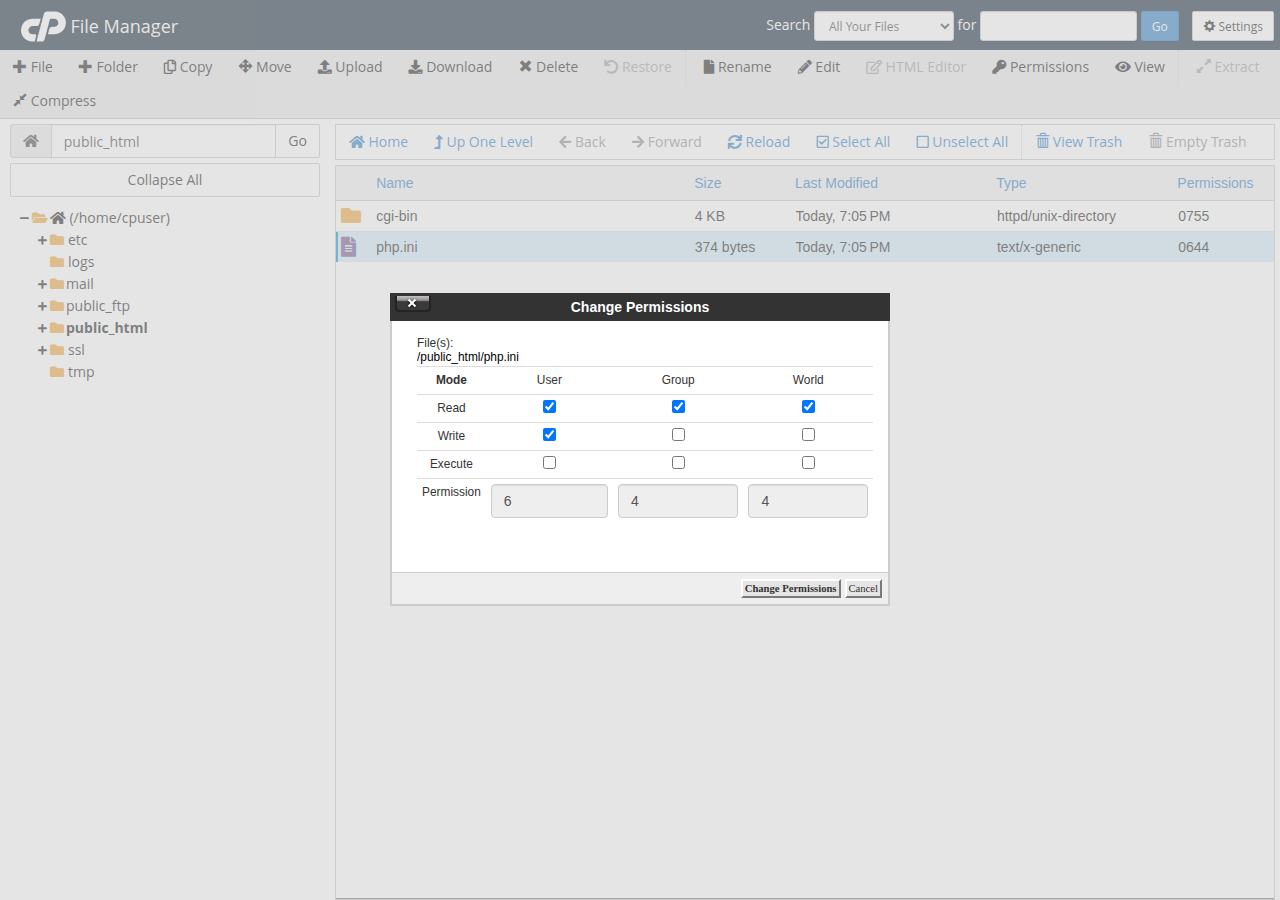
Turn off directory listing. A folder with no index file will show its contents; Options -Indexes in .htaccess stops it.
Keep secrets above the web root. A secret is anything that lets someone act as you: database passwords, API keys, SMTP and gateway credentials. Your home directory holds public_html, and nothing above public_html can be requested over HTTP. Put the config file there, chmod 600, and include it:
<?php
// /home/youruser/config/app.php — above public_html, chmod 600
return ['db_host' => 'localhost', 'db_name' => 'youruser_shop',
        'db_user' => 'youruser_app', 'db_pass' => 'a-long-random-string'];

// in public_html/index.php:  $config = require __DIR__ . '/../config/app.php';
Never commit secrets to Git. Add .env and your config file to .gitignore before the first commit. A secret that was ever committed lives in the history and must be rotated, not just deleted.
Give the database user only the rights it needs. An application almost never needs DROP or CREATE: in cPanel's Manage My Databases page, tick only SELECT, INSERT, UPDATE and DELETE, and keep a full-rights user for migrations. Port 3306 is firewalled, so the database is unreachable from the internet; for a desktop client, use an SSH tunnel.
Keep these out of public_html entirely: database dumps (backup.sql, dump.sql.gz), zip archives, config copies (wp-config.php.bak, config.old), the .git folder, and any script you uploaded "just to test something". If you deploy by cloning a repository into the web root, /.git/config and the objects are readable, often including credentials from your history.
Test it: open /.env, /.git/config and /backup.sql on your domain. Anything not a 403 or 404 is a five-minute fix.
Rotate everything after an incident or a staff change: database, panel, FTP, API keys, CMS admin. Changing one and leaving the rest is how sites get re-hacked a week later.
Scanners request /backup.sql, /db.sql.gz, /site.zip and a few hundred similar names on every site they touch. If one exists they take your entire database — customers, orders, password hashes — without touching your application. Download backups and delete the server copy.
6. Never trust input: the injection classes
This section is for anyone who writes code. A handful of bug classes cause most application-level breaches, and each has one fix you apply everywhere.
SQL injection
The fix is prepared statements with bound parameters. Not escaping, not quoting, not a filter function — parameters.
<?php
// Wrong: $sql = "SELECT * FROM orders WHERE id = " . $_GET['id'];

// Right: bound parameter, and ownership checked in the same query
$stmt = $pdo->prepare('SELECT id, total FROM orders WHERE id = :id AND user_id = :uid');
$stmt->execute(['id' => $_GET['id'], 'uid' => $currentUserId]);
$order = $stmt->fetch();   // false if it is not theirs
The same two rules apply in every language — in Node with mysql2, db.execute('SELECT id, total FROM orders WHERE id = ? AND user_id = ?', [orderId, currentUserId]). Binding the parameter stops injection; checking user_id stops your customer changing ?id=1001 to 1002 and reading someone else's order. That second bug is more common than injection, and no firewall catches it: the request looks normal. More in preventing SQL injection.
Cross-site scripting
Any value from a user must be escaped for the exact place it is printed.
<?php
function e(string $s): string {
    return htmlspecialchars($s, ENT_QUOTES | ENT_SUBSTITUTE, 'UTF-8');
}
echo '<p>Hello ', e($name), '</p>';   // the tag renders as text
HTML body, attribute, URL and JavaScript each need a different encoder — htmlspecialchars for the first two, rawurlencode for a URL. For rich text, use a sanitiser with an allow-list of tags; deny-lists always miss something. See preventing XSS.
Cross-site request forgery
Without a token, any page your logged-in user visits can quietly submit your forms as them — change their email, add an admin. Every form and JSON endpoint that changes data needs a random per-session token you verify on submission, or SameSite cookies plus an Origin check. Frameworks give you this; check you did not switch it off. See CSRF tokens in PHP forms.
File uploads
Decide the type by reading the bytes, not the extension or the Content-Type the browser sent. Give the file a random name and store it outside the document root — or, if it must stay web-reachable, stop the server executing anything there:
# uploads/.htaccess
<FilesMatch "\.(php|phtml|phar|cgi|pl)$">
    Require all denied
</FilesMatch>
Then test it: upload test.php, request it, and confirm you get a 403.
Passwords and errors
If your application has its own login, store passwords with password_hash() in PHP, or Argon2, bcrypt or scrypt elsewhere — never MD5, never SHA-1, never reversible — and rate-limit the login. See secure password hashing. And turn display_errors off in production: a stack trace hands over your file paths and framework version.
7. Backups you actually control, and a restore you have tested
A backup is not a backup until you have restored it. Ransomware, a bad update and a fat-fingered DELETE all have one answer.
public_html.Domain India shared hosting includes weekly backups. Treat that as a safety net for the server, not your backup strategy: a weekly snapshot may not hold this morning's order, and a compromise found three weeks late is older than the snapshot. Take a fresh copy from the panel before any change — how do I download a backup of my site — and for a scheduled off-site copy, automated backups with cron and rclone.
8. What Domain India's servers already do — and what they cannot
This is the part you do not have to build. The table below was measured on our cPanel shared server on 20 September 2026; the DirectAdmin server runs the same CloudLinux, CageFS, Imunify360 and CSF stack. None of it needs setup from you.
| Layer | What runs | What it means for you |
|---|---|---|
| Account isolation | CloudLinux 8.10 with CageFS | Each account sees only its own filesystem; nobody else on the box can read your files |
| Malware scanning and cleanup | Imunify360 in cleanup mode | Files are scanned as they are written and again weekly; malicious code is stripped automatically, original kept 14 days |
| Web application firewall | ModSecurity with the full Imunify360 rule set, WordPress WAF on | Injection, scanner and WordPress-specific traffic is blocked before your code sees it |
| Run-time protection | Proactive Defense in KILL mode, PHP immunity on | Malicious PHP is stopped as it executes, not just matched on the way in |
| Network | CSF firewall and Imunify360 DoS protection | Floods and repeated failed logins are handled at the edge |
| Transport | AutoSSL with Let's Encrypt | Every domain pointed at the server gets a free self-renewing certificate |
| PHP | 5.1 to 8.5 per account, ~50 risky functions disabled | Pick your version in the panel; shell, process and socket calls are off |
| Database | Port 3306 closed from outside | Your database is not reachable from the internet |
Two things it does not do: you cannot start a malware scan yourself from the panel, and you are not emailed when something is found. Cleanup is automatic and silent — which is why the weekly checks in section 9 matter, and why finding the entry point is still your job.
That PHP hardening is also why some software will not run here. proc_open, popen, fsockopen and dozens more are disabled for both web and command-line PHP, which blocks much of what uploaded malware does — and also stops Composer scripts, some SMTP transports and job runners that shell out. The full list is in PHP disabled functions on shared hosting; the cPanel ModSecurity guide explains the rules if a legitimate request is blocked.
No server-side tool can tell a SQL query built from user input apart from a normal one, know that order 1002 belongs to a different customer, notice that your admin password is admin123, or update the plugin you have ignored since March. Sections 2 to 7 are yours; section 8 is ours — and the five doors in section 1 are all on your side of the line.
That stack is configured server-wide, one configuration for every account, so it is the same on Starter, Growth and Business. You pay for resources, not protection.
- 25 GB NVMe SSD Storage
- 50 GB Monthly Bandwidth
- 1 Website
- 10 Email Accounts
- 10 GB NVMe SSD Storage
- 50 GB Monthly Bandwidth
- 1 Website
- 5 Email Accounts
Prices are Domain India list prices on 19 September 2026, excluding 18% GST. All plans: cPanel hosting, DirectAdmin hosting.
9. Notice it early, and know what to do if it happens
Everything above is prevention. The last control is detection: what separates an incident from a disaster is how many days passed before anyone noticed.
Check these weekly:
- Google Search Console. It reports malware and hacked-content warnings before most owners notice anything. Verify your site if you have not.
- Error and raw access logs: requests to files that do not exist,
.phprequests inside your uploads folder, spikes from one IP. - New files you did not create. Sort the File Manager by modified date.
- Your user list. An unexplained administrator account is the clearest sign there is.
- Your outbound mail. A bounce flood usually means your account is sending spam.
- An external change monitor. A free checker that emails you when the site goes down or the homepage changes buys days.
If it has already happened, stop reading and work the incident checklist instead. The order matters: doing it out of order re-infects the site.
Start with the security checklist for a hacked or defaced website — take the site offline, change every password, find the entry point, then restore. If it is WordPress, why and how your WordPress website gets hacked explains where to look. If Google is warning your visitors, how to handle the Google attack page covers cleanup and the review request. This guide is the layer above those three: what you do so you never need them.
And plainly: restoring a backup without finding the entry point is not a fix. The attacker walks back in through the same door within days.
Frequently asked questions
I only have a small business website. Is anyone really going to attack it?
Nobody chooses a small site, but automated scanners find it anyway. They scan for known vulnerabilities, compromise whatever answers, and use the site to send spam, host phishing pages or serve malware to visitors. Size does not protect you; maintenance does.
Does Domain India's Imunify360 mean my site cannot be hacked?
No. Imunify360, ModSecurity, CageFS isolation and DoS protection stop many automated attacks, and infected files are cleaned automatically with the original kept 14 days. But no server-side tool understands your application's logic: it cannot know your admin password is weak, or that one customer can read another's invoice by changing a number in the URL. Server protection and application security are different jobs.
What file permissions should I use on shared hosting?
755 for directories, 644 for files, 600 or 640 for config files holding passwords. Never 777 — it lets any process on the server rewrite your file. If software asks for 777, the problem is ownership, not permissions.
Where should I keep database passwords and API keys on shared hosting?
In a file above public_html, in your home directory, with permissions 600, included by a relative path. Nothing above public_html can be requested over HTTP. Never commit it to Git, and never leave a .bak or .old copy inside the web root.
Do I still need HTTPS if my site has no login or payment form?
Yes. Browsers mark plain HTTP pages as not secure, search engines prefer HTTPS, and without it anyone on the network path can modify the pages your visitors see, including injecting ads or scripts. Free auto-renewing certificates are included with Domain India hosting.
Can I run Composer or a Laravel queue worker on shared hosting?
Composer, yes: with jailed SSH (on request) download composer.phar and run php composer.phar install, and run it again with --no-scripts if it stops with a proc_open message. A queue worker, usually not. Around fifty PHP functions, including the process and socket functions it relies on, are disabled on the shared servers for both web and command-line PHP — the same hardening that limits an uploaded web shell. See the article on PHP disabled functions on shared hosting, and consider a VPS if your application needs them.
Ready to tighten things up? Three quick wins: turn on two-factor authentication, confirm your free SSL certificate is issued and forcing HTTPS, and check that /.env and /backup.sql return 404. Still choosing a host? Compare cPanel and DirectAdmin hosting — the same stack runs on both. If something on your account looks wrong, open a ticket and our team will check it from the server side.
CloudLinux CageFS isolation, Imunify360 with automatic cleanup, ModSecurity, CSF, hardened PHP and free auto-renewing SSL on every shared hosting plan.
See hosting plans