A backup is only useful if you can get it back when something breaks: a bad plugin update, a deleted folder, a hacked site. This guide shows how to download a backup of your website on Domain India shared hosting, using the backup tool in your control panel, and how to make your own copy of your files and databases at any time.
Domain India shared hosting includes backups: weekly on cPanel and DirectAdmin, and nightly on Webuzo, where support restores them on request. On cPanel and DirectAdmin, open JetBackup 5 in your control panel, pick a backup date, choose Download, and save the file once it is ready. For a copy of today's site, download your files with the File Manager or FTP and export each database in phpMyAdmin. Keep your own copies off the server, and ask support if you need help restoring.
1. What a full backup of your site contains
A website is more than the files you can see. A complete backup has:
- Files: everything in your home directory, including
public_html, uploads, themes and plugins. - Databases: WordPress, WooCommerce and most PHP applications keep their content in a MySQL database, not in files.
- Email: the mailboxes and messages on your hosting account.
- Settings: cron jobs, DNS zones, SSL certificates and FTP accounts.
If you copy only public_html, you do not have your WordPress posts, orders or users. Those are in the database.
2. The backups included with your hosting
Every Domain India shared hosting plan includes backups: weekly on cPanel and DirectAdmin, and nightly on Webuzo. There is no separate backup product or add-on to buy.
| Control panel | Backup tool in the panel | How to download |
|---|---|---|
| cPanel | JetBackup 5, under Files | Choose a backup, click Download, save the file when it is ready |
| DirectAdmin | JetBackup 5 | Same method as cPanel |
| Webuzo | None in the panel; Domain India backs up your account every night | Open a support ticket saying what you need and from which date |
A weekly backup protects you against a disaster, but not against losing the last few days of work. If your site changes every day, such as a shop with new orders, also keep your own copies (section 6).
3. Download a backup in cPanel with JetBackup 5
- Log in to cPanel.Open your hosting service in the client area and use the login button, or sign in directly. See how to log in to cPanel.
- Open JetBackup 5.It is in the Files section. You can also type "JetBackup" in cPanel's search box.
- Choose what to download.Pick Full Account Backups for everything, or a single type such as the home directory (files), databases or email.
- Pick a date.Each row is one backup point. Choose the date from before the problem started.
- Choose Download.JetBackup prepares the download in the background. Large accounts can take a while.
- Save the file.When the download is ready, click its link and save the file to your computer or your own cloud storage.
The labels can differ slightly between JetBackup versions, but the flow is always the same: choose a backup, ask for a download, wait for it to be prepared, then save it.
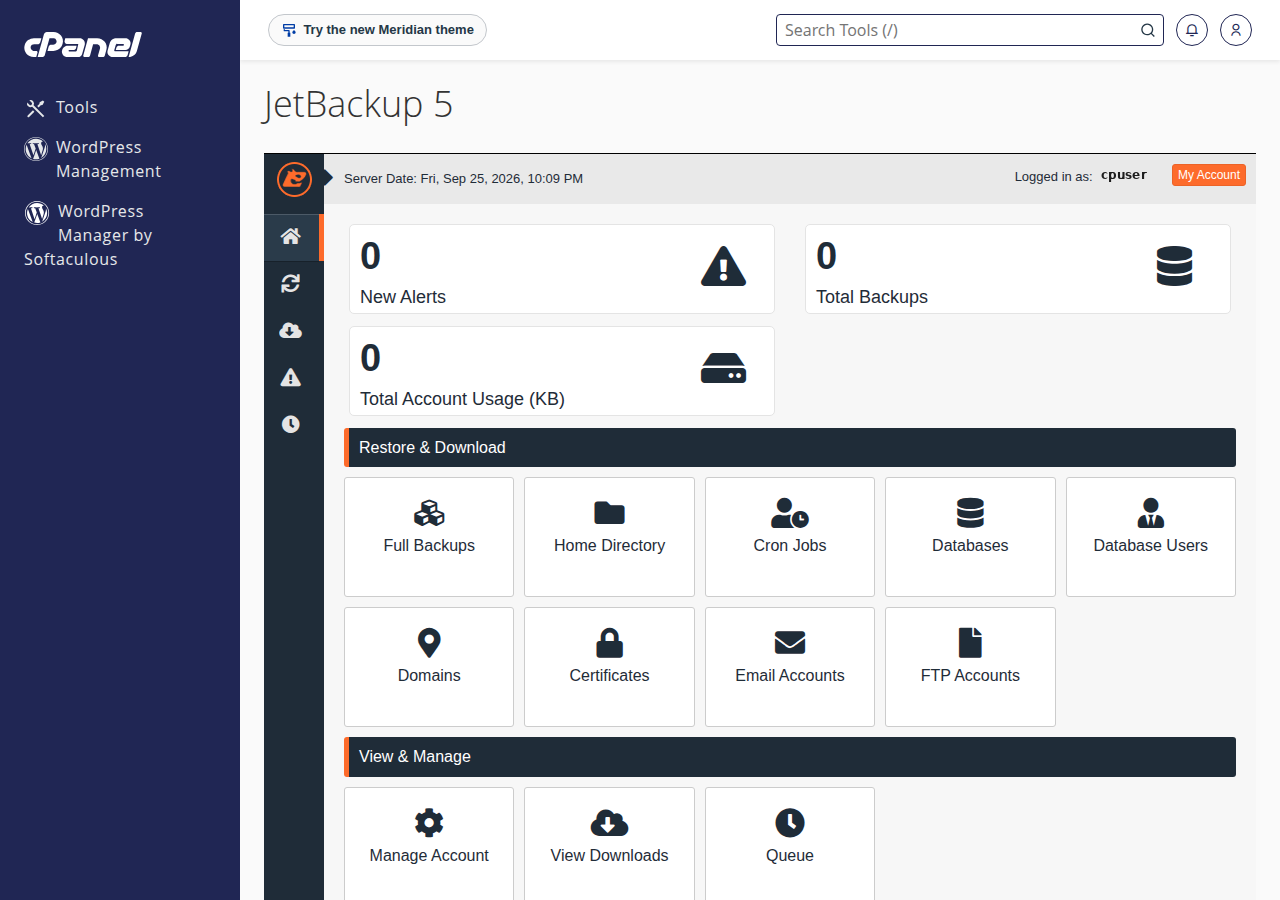
On Domain India cPanel servers, backups run through JetBackup 5, and cPanel's own Backup and Backup Wizard pages are switched off. If an older guide tells you to click Backup, then Download a Full Website Backup, use JetBackup 5 instead.
What the download contains
A full account backup is a compressed archive, usually a .tar.gz file. Inside are your home directory, database dumps (.sql files), mail and account settings. Windows opens .tar.gz files with 7-Zip; macOS and Linux open them from the command line with tar -xzf.
4. DirectAdmin: JetBackup 5
DirectAdmin plans also use JetBackup 5 for the weekly backups. Log in to DirectAdmin, find JetBackup 5 (use the search box if it is not on the first screen), then follow the same flow: choose the backup type and date, request the download, and save the file once it is ready.
5. Webuzo
Domain India backs up Webuzo accounts every night to a separate backup server, covering website files, email, databases, Webuzo account settings and DNS zones. There is no self-service download or restore for these backups: open a support ticket with your domain name, what you need (a file, a folder, a database or the whole account) and the date. The Backups section inside the Webuzo panel is not Domain India's backup system, so don't rely on it. For a copy you can download yourself at any time, see section 6.
6. Make your own copy at any time
The weekly backup is taken on a fixed schedule. Before a big change (a WordPress update, a theme switch, a migration), take your own copy of the site as it is right now. It takes two parts.
Your files
- With the File Manager: select
public_html(or your whole home folder), choose Compress, make a.zipor.tar.gzarchive, then download the archive. Delete it from the server afterwards so it does not use your disk space or sit where others could download it. See how to use the File Manager. - With FTP: connect with an FTP client such as FileZilla and download the folder. Use FTP over TLS on port 21. The settings are in what settings do I need to upload my website.
Your databases
Export each database in phpMyAdmin to a .sql file (or a compressed .sql.gz). The step-by-step method is in how to back up a MySQL database using phpMyAdmin.
Your posts, pages, users, orders and settings live in the database. Always export the database as well, and keep the two copies from the same day together.
Backup plugins
A WordPress backup plugin can send copies to Google Drive, Dropbox or another cloud store on a schedule. Choose one that works in pure PHP. Our shared servers disable the PHP functions that run other programs, so plugins that call mysqldump or zip fail; see PHP disabled functions on shared hosting. Schedule plugin backups for quiet hours, because they are heavy work for your account.
7. Restoring from a backup
On cPanel and DirectAdmin, JetBackup 5 can also restore. Choose the backup and the part you need (a folder, a database, one mailbox) and pick Restore instead of Download. Restoring overwrites what is there now, so download a copy of the current state first if you might need anything from it.
To restore your own copy, upload the files with the File Manager or FTP and import the .sql file in phpMyAdmin.
If you are not sure what to restore, or the restore fails, open a support ticket with the domain, what you want restored and the date it last worked. Do not restore a hacked site over and over; the backup may already contain the infection. Read what to do if your website has been hacked first.
8. Good backup habits
9. Where Domain India fits
Backups are included with every Domain India shared hosting plan at no extra cost: weekly on cPanel and DirectAdmin, nightly on Webuzo. On cPanel and DirectAdmin you download and restore them yourself with JetBackup 5. Prices on the cards below are live and exclude 18% GST.
- 25 GB NVMe SSD Storage
- 50 GB Monthly Bandwidth
- 1 Website
- 10 Email Accounts
- 10 GB NVMe SSD Storage
- 50 GB Monthly Bandwidth
- 1 Website
- 5 Email Accounts
If you run your own server, a VPS gives you full control, and you plan and run its backups yourself.
Support is on 24/7 live chat, and tickets get a first response within 15 minutes; how long a restore takes depends on its size. We do not offer phone support.
Frequently asked questions
How often does Domain India back up my website?
Weekly on cPanel and DirectAdmin hosting, and every night on Webuzo. Because a weekly backup can be up to a week old, keep your own copies as well, especially before updates and on sites that change every day.
How do I download a backup in cPanel?
Log in to cPanel, open JetBackup 5 in the Files section, choose Full Account Backups or the type you need, pick a date and choose Download. JetBackup prepares the file in the background; save it to your computer when it is ready.
Why can't I find the Backup Wizard in cPanel?
On Domain India cPanel servers, backups run through JetBackup 5, and cPanel's own Backup and Backup Wizard pages are switched off. Use JetBackup 5 in the Files section to download or restore a backup.
Does a backup include my database and email?
A full account backup includes your files, databases, mailboxes and account settings. A copy you make yourself with the File Manager contains only files, so export each database in phpMyAdmin as well.
Can I buy extra or daily backups?
Domain India does not sell a separate backup product or add-on for shared hosting. If you need more frequent copies, use a backup plugin or your own exports, and keep them off the server.
Can Domain India restore my website for me?
On cPanel and DirectAdmin you can restore from JetBackup 5 yourself. If you need help choosing or restoring a backup, open a support ticket with the domain, what you want restored and the date it last worked.
Ready to secure your site? Take a copy now with JetBackup 5 or the File Manager, export your databases with phpMyAdmin, or open a support ticket if you need help finding or restoring a backup.
Tell us the domain, what you need back and the date it last worked, and we will help you find the right backup.
Open a support ticket