cPanel is the control panel that comes with Domain India's cPanel hosting plans. It is a web page where you manage your hosting account yourself: files, email addresses, databases, domains, SSL and app installs, without typing server commands. This page is a quick map of its main sections.
cPanel groups its tools into sections: Files, Databases, Domains, Email, Metrics, Security and Software. Use the search box at the top to find any tool. At Domain India you open cPanel from the cPanel button in the client area, or at https://yourdomain.com:2083. Backups are in JetBackup, and WordPress installs through Softaculous or WP Toolkit.
What cPanel is, how it differs from WHM, what runs on our cPanel servers and how it compares with DirectAdmin and Webuzo: read What is cPanel.
1. The main sections
The exact list depends on your plan, so if a tool is not where you expect it, type its name in the search box at the top of cPanel.
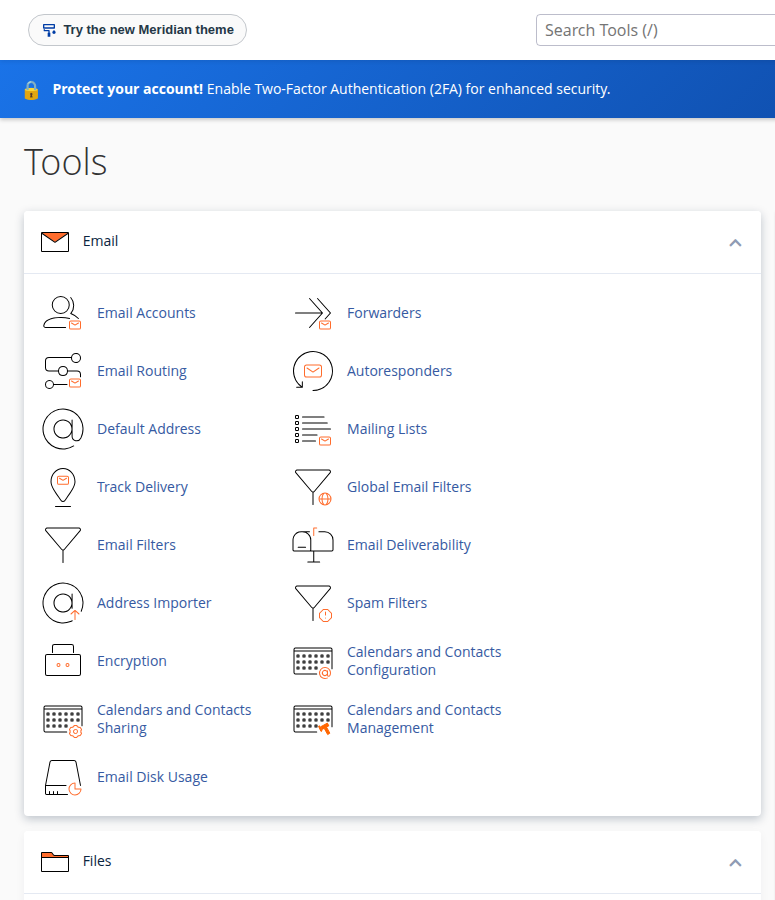
| Section | Main tools | Use it to |
|---|---|---|
| Files | File Manager, Disk Usage, FTP Accounts | Upload and edit website files, create FTP logins, see what uses your space |
| Databases | Manage My Databases, Database Wizard, phpMyAdmin | Create a database and user, import or export data |
| Domains | Domains, Redirects, Zone Editor | Add another website or a subdomain, redirect addresses, edit DNS records |
| Email Accounts, Forwarders, Autoresponders, Spam Filters, Email Deliverability | Create mailboxes, forward mail, check SPF and DKIM | |
| Metrics | Visitors, Errors, Raw Access, Resource Usage | See traffic, read error logs, check whether the account hits its limits |
| Security | SSL/TLS Certificates, Two-Factor Authentication, IP Blocker, Hotlink Protection | Check your free SSL, protect the login, block abusive addresses |
| Software | Softaculous, WP Toolkit, PHP version settings | Install WordPress and other apps, choose the PHP version |
A few notes on what changed from older cPanel guides:
- Backups are in JetBackup (search for it on the cPanel home page), which keeps weekly backups you can download or restore. cPanel's own Backup and Backup Wizard tools are switched off. See backup and restore with JetBackup.
- Addon domains and subdomains are both added from the single Domains page in current cPanel.
- IP Blocker blocks visitors from your website only. See blocking IP addresses.
2. How to open cPanel
- Sign in to the client areaand open your hosting list.
- Click cPanelon your domain's row. A new tab opens, already signed in.
- Or log in directlyat
https://yourdomain.com:2083with your cPanel username and password. They are under Manage › Access on the hosting page.
Your client area password and your cPanel password are separate. Full steps and fixes: How to log in to cPanel.
3. Four tools most people need first
- File Manager for your website files in
public_html. See How do I use the File Manager. - Email Accounts to create
[email protected]mailboxes. Read mail athttps://yourdomain.com/webmail. - Softaculous or WP Toolkit to install WordPress in a few clicks.
- Resource Usage when the site is slow or shows a resource limit error. See how to check hosting resource usage.
Frequently asked questions
What is cPanel?
cPanel is a web-based control panel for a Linux hosting account. It lets you manage files, email accounts, databases, domains, SSL certificates and application installs from your browser, without server commands.
How do I log in to cPanel at Domain India?
Sign in to the client area, open your hosting list and click the cPanel button on your domain's row; it signs you in without a cPanel password. You can also go to https://yourdomain.com:2083 and use your cPanel username and password.
Where are backups in cPanel?
In JetBackup. Domain India cPanel hosting takes weekly backups that you can download or restore from JetBackup in cPanel. cPanel's own Backup and Backup Wizard tools are switched off.
How do I find a tool in cPanel?
Type its name in the search box at the top of the cPanel home page. The list of tools depends on your plan, so the search box is the fastest way to find one.
Ready to explore? Open your hosting list and click cPanel, read the full What is cPanel guide, or compare plans on cPanel hosting.
Tell us which tool you are looking for and what you want to do, and we will point you to it.
Open a support ticket