WordPress stops with "Your PHP installation appears to be missing the MySQL extension which is required by WordPress" when PHP cannot give it a way to talk to the database. The fix depends on why: a very old copy of WordPress, a site running on a different PHP version than you think, or, on your own server, a PHP database extension that was never installed. This guide shows how to find which one it is and fix it.
Modern WordPress talks to MySQL or MariaDB through PHP's mysqli extension. On Domain India shared hosting, mysqli is loaded on every PHP 7 and PHP 8 version we checked, so the error there usually means a very old WordPress that only knows the removed mysql_* functions, or a site that is not running the PHP version you selected. Check the real PHP version with a small test file, then update WordPress or fix the version. On your own VPS, install the PHP MySQL package and restart PHP-FPM.
1. What the error means
PHP had two ways to talk to MySQL: the old mysql extension and the newer mysqli (plus PDO). The old mysql extension was deprecated in PHP 5.5 and removed completely in PHP 7.0. WordPress switched to mysqli in version 3.9, released in 2014, and modern WordPress uses only mysqli.
When WordPress starts, it checks that one of these is available. If neither is, it stops with the "missing the MySQL extension" message, and recent versions add "Please check that the mysqli PHP extension is installed and enabled."
Wrong details in wp-config.php (database name, user, password or host) do not cause this message. They cause "Error establishing a database connection", which is covered in database troubleshooting. If you see that error instead, start there.
2. Check which PHP version really runs your site
Create a file called check-db.php in your site's main folder (public_html on cPanel) with File Manager:
<?php
echo 'PHP ' . PHP_VERSION . '<br>';
echo 'mysqli: ' . (extension_loaded('mysqli') ? 'loaded' : 'MISSING');
Open https://yourdomain.com/check-db.php in your browser, note the two lines, then delete the file. (phpinfo() is disabled on our cPanel servers, so use this test instead.)
| Result | What it means | Go to |
|---|---|---|
| PHP 7 or 8, mysqli loaded | PHP is fine; WordPress itself is too old | Section 3 |
| PHP version is not the one you selected | Something overrides your choice | Section 4 |
| mysqli MISSING | The extension is not enabled for this PHP | Section 4 on shared hosting, section 5 on a VPS |
3. Very old WordPress on a modern PHP
This is the most common cause after a server or PHP upgrade: a site that has not been updated for years, running WordPress older than 3.9, which looks only for the old mysql functions. Your database is fine; the WordPress code cannot use it.
Do not try to fix this by switching the site back to PHP 5. Those versions have had no security fixes for years. Update WordPress by hand instead:
- Back up first.Download the site files and export the database, or take a copy with JetBackup in your control panel. See backup and restore with JetBackup.
- Download the latest WordPressfrom wordpress.org and unzip it on your computer.
- Replace the core folders.Upload the new
wp-adminandwp-includesfolders over the old ones, and the loose files in the main folder, exceptwp-config.php. Do not touchwp-content, which holds your themes, plugins and uploads. - Run the database upgrade.Open
https://yourdomain.com/wp-admin/and click the database update button if WordPress asks. - Update themes and plugins.Very old themes and plugins are likely to break on current PHP. Update them, replace abandoned ones, and test the key pages.
WordPress, themes and plugins that are years out of date have well-known security holes. After updating, check for unfamiliar admin users and files, and read the security checklist for hacked websites.
4. On Domain India shared hosting: fix the PHP version
We checked the PHP builds on our cPanel and DirectAdmin servers on 24 September 2026: mysqli is loaded on every PHP version from 7.0 to 8.5 on cPanel, and on every version DirectAdmin offers. So if your test shows mysqli missing or an unexpected version, the site is not running the PHP you intended.
- Choose the version in your panel. In cPanel open MultiPHP Manager, tick the domain and pick a current PHP 8 version your theme and plugins support. See how to change PHP versions in cPanel. For DirectAdmin, see changing the PHP version in DirectAdmin.
- Look for an old handler line. Sites moved from another host often carry an
AddHandlerorSetHandlerline in.htaccessthat forces a different PHP. On cPanel, keep only the block marked "cPanel-generated handler" and remove the others (download a copy of.htaccessfirst). - Run the test file again. When it shows a PHP 8 version with mysqli loaded, reload your site.
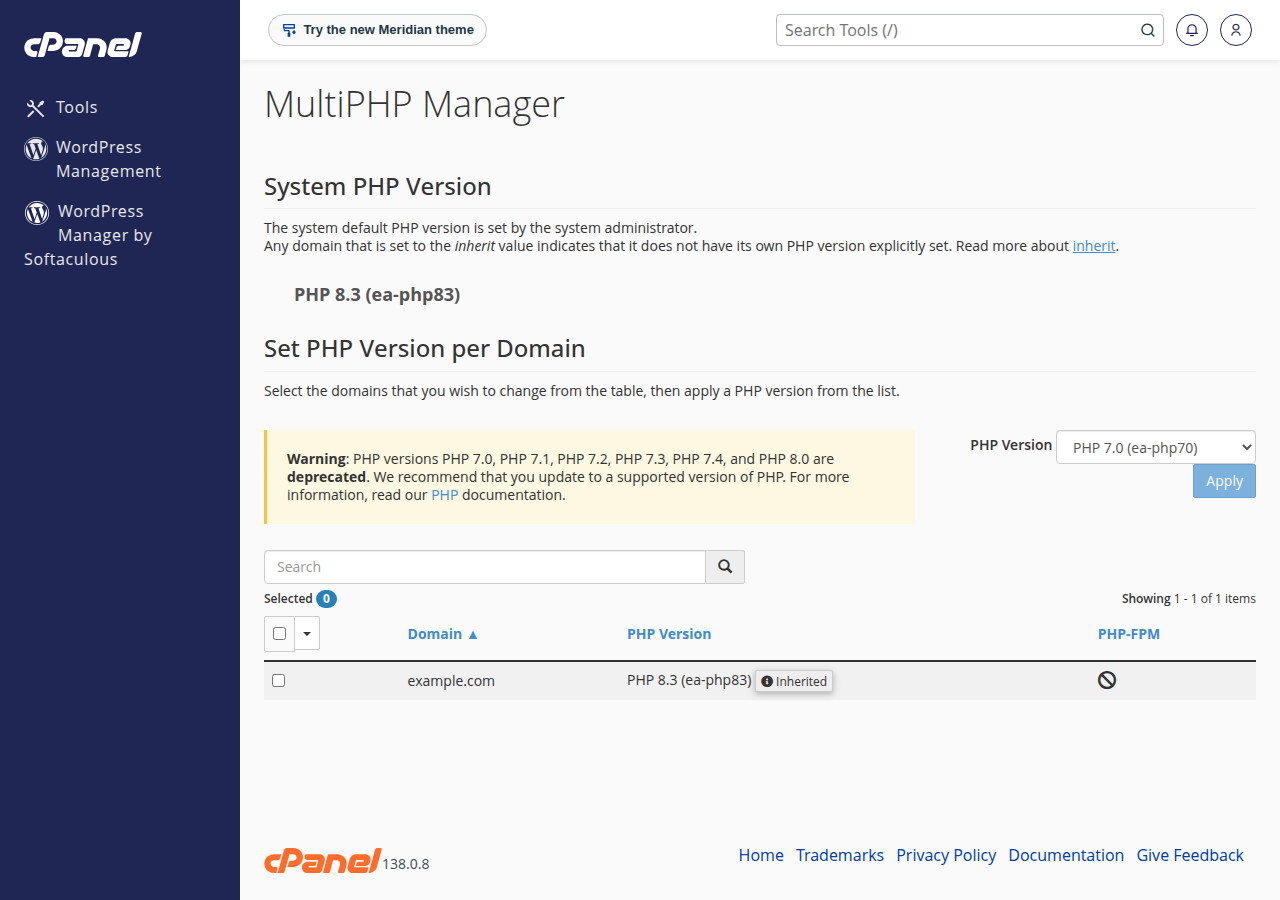
If the test still shows mysqli missing on a current PHP version, open a support ticket with the test output and the domain name. You cannot install PHP extensions yourself on shared hosting.
5. On your own VPS or server
On a server you manage, the PHP MySQL extension is a separate package that a minimal install may not include.
# Ubuntu / Debian (package name follows your PHP version)
sudo apt install php8.3-mysql
sudo systemctl restart php8.3-fpm

# AlmaLinux / Rocky Linux
sudo dnf install php-mysqlnd
sudo systemctl restart php-fpm
Then confirm with php -m | grep -i mysqli. The command line and the web server can use different PHP versions on the same machine, so check with the test file from section 2 as well. If you run Apache with PHP-FPM, restart Apache too if the change does not show.
6. Keep it from coming back
- Keep WordPress core, themes and plugins updated, or turn on automatic updates for minor releases.
- Stay on a supported PHP 8 version; old versions get no security fixes and run slower. WordPress lists its current recommendation at wordpress.org/about/requirements.
- Test before you switch PHP versions: take a backup, switch, then check your key pages, forms and checkout.
7. Where Domain India fits
Domain India cPanel and DirectAdmin hosting let you choose the PHP version per account and include weekly JetBackup backups you can restore yourself, and every Linux shared plan has an installer for a fresh, current WordPress. If you are moving an old site to us, our WordPress hosting page shows the plans.
- 25 GB NVMe SSD Storage
- 50 GB Monthly Bandwidth
- 1 Website
- 10 Email Accounts
Frequently asked questions
What does "Your PHP installation appears to be missing the MySQL extension" mean?
WordPress could not find a PHP extension it can use to talk to the database. Modern WordPress needs the mysqli extension. The error usually means the site runs a very old WordPress that only knows the old mysql functions, or PHP is running without mysqli.
Why did the error appear after a PHP upgrade?
The old mysql extension was removed in PHP 7.0. WordPress versions older than 3.9 only know that extension, so they stop working on PHP 7 or 8. Update WordPress by hand to the latest version instead of going back to PHP 5.
Can wrong database details in wp-config.php cause this error?
No. Wrong database name, user, password or host causes "Error establishing a database connection", a different message. The missing MySQL extension error is about PHP itself.
Is mysqli available on Domain India shared hosting?
Yes. When we checked on 24 September 2026, mysqli was loaded on every PHP version from 7.0 to 8.5 on our cPanel servers and on every PHP version offered on DirectAdmin. If a test file shows it missing, open a support ticket with the output.
How do I fix the error on my own VPS?
Install the PHP MySQL package for your PHP version, for example php8.3-mysql on Ubuntu or Debian, or php-mysqlnd on AlmaLinux and Rocky Linux, then restart PHP-FPM and check with php -m.
Should I switch back to PHP 5 to get my old site working?
No. PHP 5 has had no security fixes for years. Back up the site, update WordPress core by hand, then update or replace old themes and plugins on a current PHP 8 version.
Ready to fix it? Check your PHP version with MultiPHP Manager, work through database troubleshooting, or read the complete WordPress guide. If you are stuck, open a support ticket.
Send us the output of the test file and your domain name, and our support team will check your account's PHP setup. Live chat is available 24/7.
Open a support ticket