Email forwarding passes every message that arrives at one address on to another, such as [email protected] to your own inbox or a colleague's. On Domain India hosting you set it up in your control panel in about a minute, and it works as soon as you save. This page gives the quick steps for each panel and the few rules that decide whether forwarded mail actually arrives.
The complete, current guide is Email forwarding setup. For every cPanel option, including retiring an address and piping mail to a script, see how to create and delete an email forwarder.
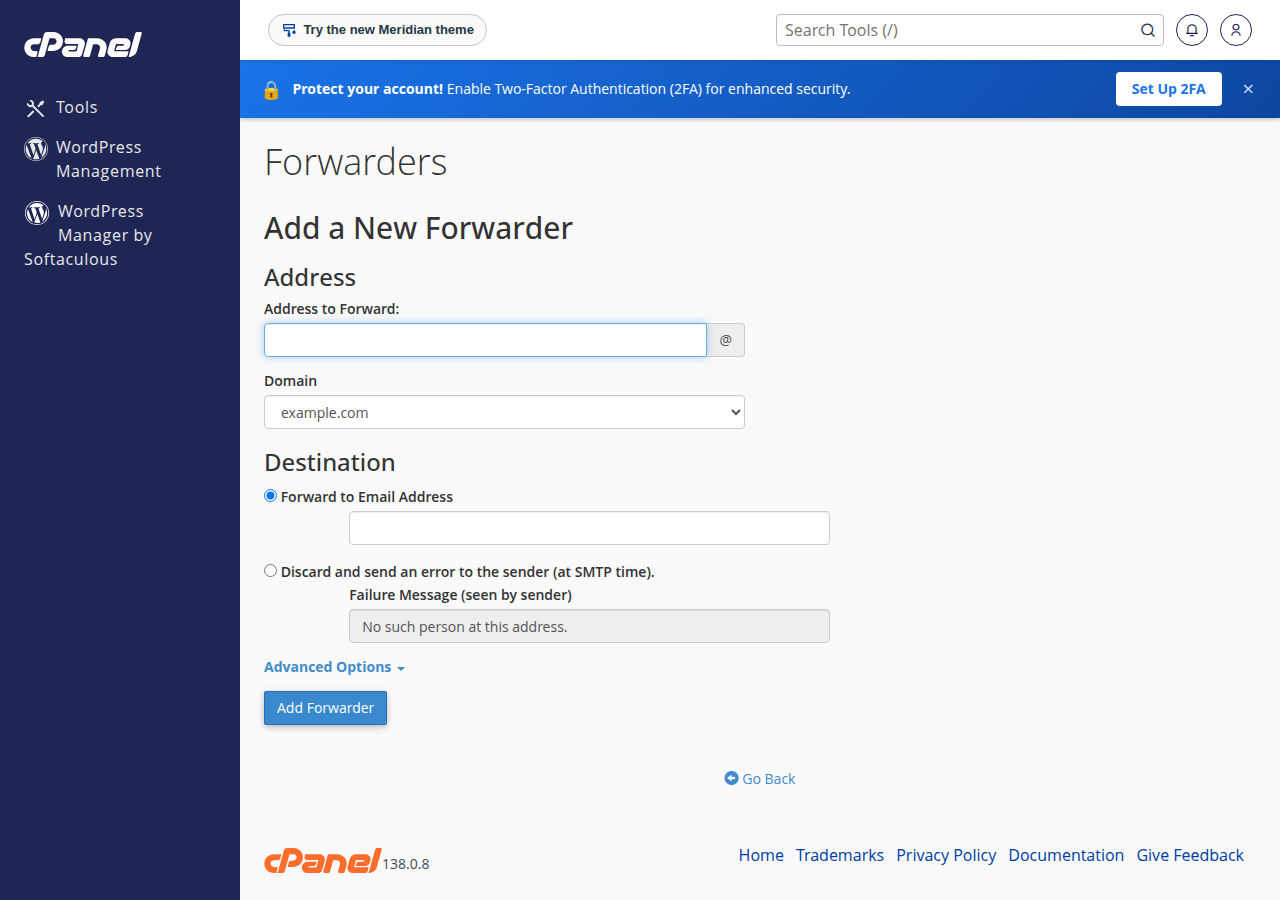
In cPanel, open Email › Forwarders, click Add Forwarder, enter the address, keep Forward to Email Address, type the destination and click Add Forwarder. In DirectAdmin, use E-mail Manager › Forwarders. A copy stays on the server only if the address also has a mailbox. To reach several people, add one forwarder per destination in cPanel, or several destinations to one forwarder in DirectAdmin.
This page is for the email included with cPanel, DirectAdmin, Webuzo and Windows (Plesk) hosting. Business Email is a separate product with its own webmail at https://mail.yourdomain.com:8443/; see Business Email vs the email included with your hosting.
1. Forward an address in cPanel
- Log in to cPanelfrom your hosting service in the client area; see how to log in to cPanel.
- Open Forwardersin the Email section and click Add Forwarder.
- Enter the address.Type the part before the
@and choose the domain. - Enter the destination.Keep Forward to Email Address and type the full address that should receive the mail.
- Click Add Forwarder.It works straight away.
cPanel has no edit button: to change a destination, delete the forwarder under Email › Forwarders and add a new one.
2. DirectAdmin, Webuzo and Plesk
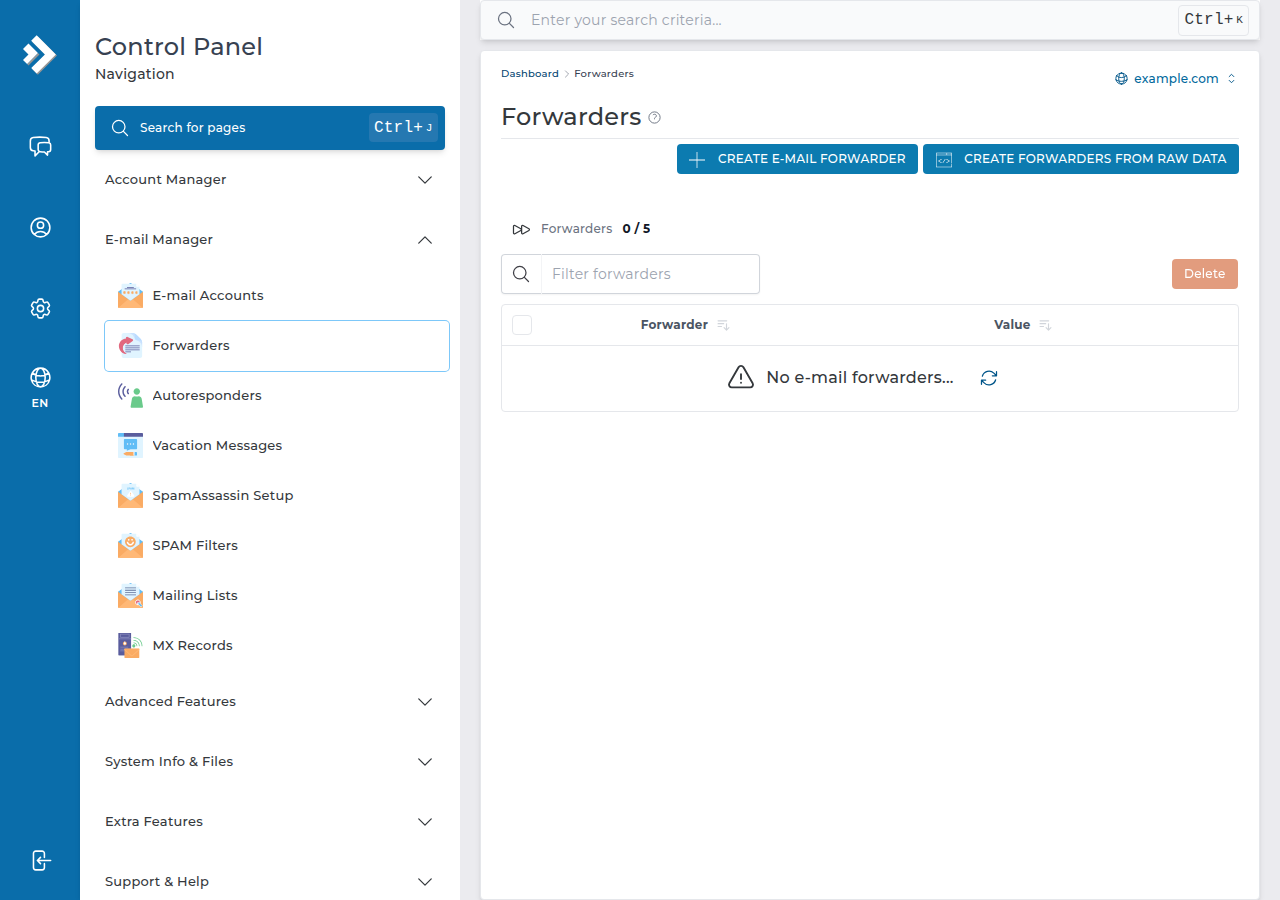
- DirectAdmin: open E-mail Manager › Forwarders, click CREATE E-MAIL FORWARDER, enter the name and one or more destination addresses, and save. Full steps: email forwarders in DirectAdmin.
- Windows (Plesk): see email forwarding in Plesk.
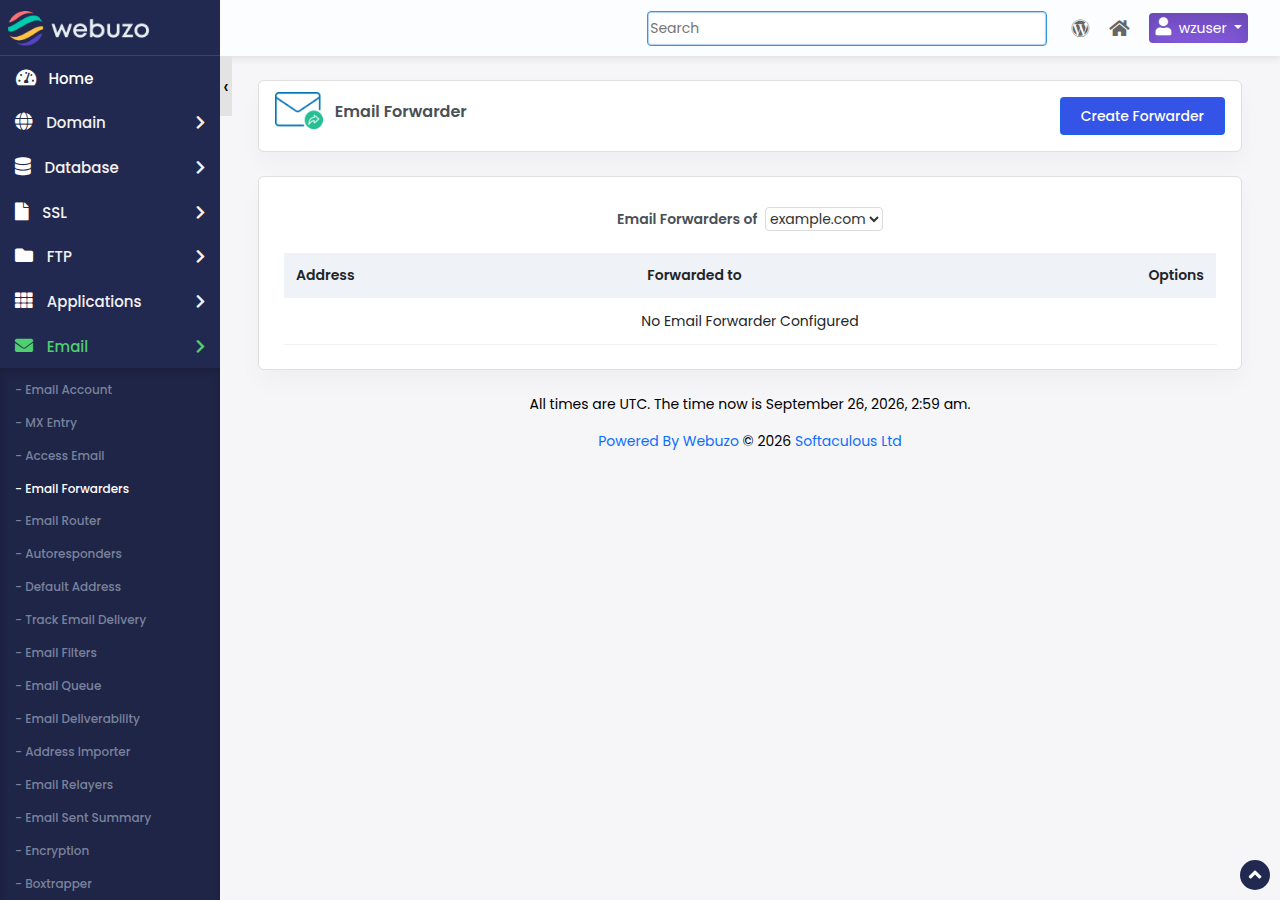
- Webuzo: open Email › Email Forwarders and click Create Forwarder.
On cPanel, Roundcube webmail has no filter settings, so use Forwarders, not webmail, to forward mail.
3. Is a copy kept?
| Set-up | What happens to each message |
|---|---|
| Address with a mailbox and a forwarder | Stored in the mailbox and a copy forwarded |
| Address with only a forwarder | Forwarded only; nothing stored on the server |
| Several destinations | Each destination gets its own copy |
A mailbox that nobody reads fills up, and once it is over quota new mail bounces and forwarding stops with it. For an address that only passes mail on, create the forwarder without a mailbox.
4. Forwarding to Gmail and other free mailboxes
Forwarded mail reaches Gmail from our server, not from the original sender, so it can fail the sender's SPF check.
- On our cPanel servers, SRS (Sender Rewriting Scheme) is off, so forwarded mail keeps the original sender and relies on the sender's DKIM signature to pass.
- On our DirectAdmin server, SRS is configured, so forwarded mail is checked against your domain.
A forwarder copies everything, including spam. If an address gets a lot of junk, don't forward it to Gmail. Add the mailbox to the Gmail app on your phone as an IMAP account instead: nothing is forwarded, and the mail stays on your server.
Two more rules: never set up a loop (A forwards to B and B back to A), and test from an outside address, because Gmail hides copies of messages you sent yourself.
5. Catch-all: forwarding every address
Forwarding mail for every address at your domain is a catch-all. In cPanel it is Email › Default Address; current Domain India DirectAdmin plans have none and refuse mail to unknown addresses (some older plans show E-mail Manager › Catch-All E-mail). It collects spam sent to invented addresses, so most businesses should reject unknown addresses with an error instead. On our cPanel servers, most domains deliver unknown-address mail to the account's main mailbox, so check your setting. See email aliases and catch-all addresses.
If you receive every message twice, look for two forwarders, or a forwarder plus a filter, on the same address.
Every Domain India shared hosting plan includes email accounts with forwarders and webmail in the same panel as your website; compare cPanel hosting and DirectAdmin hosting.
How do I set up email forwarding in cPanel?
Open Email, then Forwarders, click Add Forwarder, enter the address and domain, keep Forward to Email Address, type the destination and click Add Forwarder. It works straight away.
Does a forwarder keep a copy of the email?
Only if the same address also has a mailbox. Then the message is stored there and a copy is forwarded. An address with only a forwarder stores nothing on the server.
Can I forward one address to several people?
Yes. In cPanel, add a separate forwarder for each destination. In DirectAdmin, add several destinations to one forwarder. Each destination receives its own copy.
Why is forwarded mail not arriving in Gmail?
Forwarded mail can fail the original sender's SPF check, especially on cPanel where SRS is off, and forwarded spam makes Gmail stricter. Check the Gmail spam folder, or add the mailbox to the Gmail app over IMAP instead of forwarding.
Does this guide apply to Business Email?
No. It covers the email included with hosting plans. Business Email runs on a separate platform with its own webmail and settings.
Ready to set it up? Log in to your control panel from your hosting services, or read the full email forwarding setup guide. If forwarded mail keeps going missing, open a support ticket with the sender, the time and the destination address.
Mailboxes, forwarders and webmail are included with every Domain India shared hosting plan.
See hosting plans