A mailing list gives a group one shared address: send a message to [email protected] and every member gets a copy, and members can join or leave without you editing anyone's contacts. Domain India cPanel hosting includes a Mailing Lists tool for this, and DirectAdmin has its own. This guide shows how to set one up, when a simple forwarder is enough, and when you need a newsletter service instead.
In cPanel, open Email › Mailing Lists, enter a list name, choose the domain, set an administrator password and click Add. Then open Manage to add members and decide who may post. Mailing lists suit small groups such as a team, a committee or a members' club. Every post goes out through the same shared mail server as your mailboxes, which limits how much each account sends, so for newsletters and marketing to a large list, use a dedicated newsletter service.
1. Mailing list, forwarder or newsletter service?
Three tools send one message to many people. Choosing the right one first saves trouble later.
| You want to | Best tool | Why |
|---|---|---|
Send mail for sales@ to three colleagues | Forwarder | Nothing to manage; no list software |
| Let a group discuss by email, or send updates to a members' club | Mailing list | Members, moderation and archives in one place |
| Send a newsletter or offers to customers or subscribers | Newsletter service | Built for bulk mail: unsubscribe links, bounce handling, reputation |
A mailing list is a group tool, not a marketing tool. If your list is made of customers who signed up on your website, skip to section 7.
2. What is available on your hosting
We checked our servers on 23 September 2026:
- cPanel: the Mailing Lists tool (GNU Mailman) is installed, running and switched on for our cPanel plans, with no fixed limit on the number of lists.
- DirectAdmin: a mailing list feature is installed, and DirectAdmin plans allow up to 10 lists per account. It is under E-mail Manager › Mailing Lists.
- Webuzo: Webuzo has a Mailing List page under Email; ask support before you rely on it for a large list.
- Windows (Plesk): we have not confirmed a mailing list tool on this panel. Ask support before planning around one.
Domain India Business Email is a separate product and does not use these tools. For groups on Business Email, a shared alias is usually the answer: see Business Email sending limits.
3. Create a mailing list in cPanel
- Log in to cPanel.Use the login button on your hosting service in the client area, or see how to log in to cPanel.
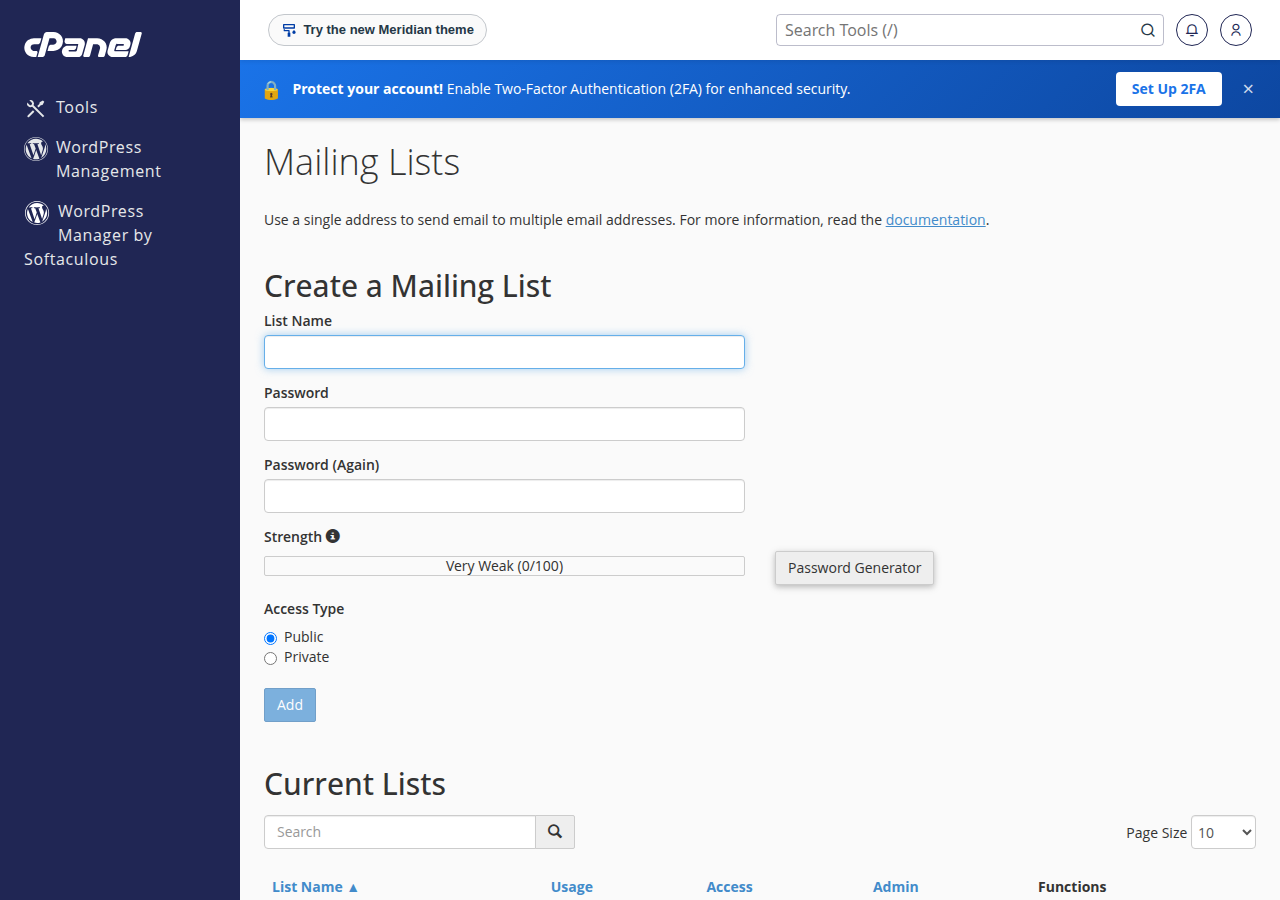
- Open Mailing Lists.It is in the Email section.
- Name the list.Enter a short name such as
teamormembers. The list's address becomes that name at your domain, for example[email protected], so choose a name that is not already used by a mailbox or forwarder. - Choose the domain.If your account has several domains, pick the one the list belongs to.
- Set an administrator password.Enter it in Password and Password (Again), or use the Password Generator. Use a password you do not use anywhere else, and store it safely: it controls the list's members and settings.
- Choose the Access Type.Private keeps the member list and archives away from the public, which is the right choice for most business lists. Public lets anyone see and join the list.
- Click Add.The new list appears in the table below the form.
Anyone with the administrator password can see, add and remove members and change who may post. A leaked password can turn your list into a spam relay in your name. Use a unique password, and change it when someone who knew it leaves.
4. Add members and set who may post
Click Manage next to the list in cPanel. This opens the list's own administration pages. The most useful settings are:
- Membership management. Add members one by one, or paste a list of addresses to subscribe several at once. Add only people who have agreed to be on the list.
- Who may post. For a discussion list, let members post. For an announcement list, where only you send and members just receive, set members to moderated and approve your own posts, or allow only named senders.
- Non-member posts. Hold or reject messages from people who are not members. Accepting them lets spam reach every member.
- Archives. Keep a private archive if members need to look back at earlier messages; turn it off if not.
- Digest mode. Members can receive one daily bundle instead of every message.
Settings take effect when you save each page. Send a short test to the list address and confirm that every member receives it.
Let a colleague manage the list
Click Delegation next to the list to let another user administer it, so a colleague can manage members without your cPanel login. The same row has Change Password and Delete.
5. A simpler option: a forwarder
If a handful of colleagues need copies of mail sent to one address, a forwarder does the job with nothing to maintain. In cPanel, open Email › Forwarders, click Add Forwarder, and forward the address to the first colleague. Repeat for each person who should receive a copy. DirectAdmin has forwarders under E-mail Manager › Forwarders, and Webuzo under Email › Email Forwarders.
Forwarders have no members to manage and no archive, and they use no disk space. Full steps are in how to create or delete an email forwarder and managing your email accounts.
6. Sending limits apply to lists too
Every post to a list goes out as one copy per member through the same shared mail server as your mailboxes. Plan as if every copy counts towards your hosting account's outgoing mail limit. We measured these limits on 22 September 2026:
| Hosting | Outgoing mail limit |
|---|---|
| cPanel (all plans) | 200 messages per hour per account |
| DirectAdmin | 1,000 messages per day per account (200 per mailbox by default) |
On a 200-per-hour plan, a single post to a list of a few hundred members can use up the hour's allowance, and your ordinary business mail then has to wait. Keep lists to the size of a team, a committee or a small club. See do you limit the amount of mail I can send per hour.
Newsletters and marketing campaigns to large lists should never be sent from a hosting account. Spam complaints from one account damage the reputation of the server that every customer on it relies on, and an account that sends bulk mail can have its outgoing mail blocked.
7. Newsletters and marketing: use a newsletter service
If you want to email customers, subscribers or leads, use a dedicated newsletter or email marketing service. Well-known options include Brevo, Mailchimp, MailerLite and Zoho Campaigns, and developers often use Amazon SES. Compare their current plans on their own websites.
- Sign-up forms with confirmation, and one-click unsubscribe in every email
- Automatic removal of addresses that bounce or complain
- Sending infrastructure built and monitored for bulk mail
- Reports on opens, clicks and complaints
- No one-click unsubscribe of the kind Gmail and Yahoo expect from bulk senders
- No reports on opens, clicks or spam complaints
- Shares a server, and its sending limit, with your normal business mail
When you connect a newsletter service to your domain, add its sending details to your domain's single SPF record and set up the DKIM records it gives you. A domain may have only one SPF record, so merge the new service into the existing one rather than adding a second. See SPF, DKIM and DMARC and email services compared.
8. Good practice for any list
- Get clear permission before adding anyone. India's Digital Personal Data Protection Act, 2023 requires consent to process personal data, and many other countries have similar laws.
- Make leaving easy. Tell members in every message how to unsubscribe.
- Remove addresses that bounce. Repeated bounces make receiving servers treat your mail as spam.
- Keep posts plain and relevant. Messages that look like marketing get filtered, even on a genuine members' list.
If list mail starts landing in spam, the causes and fixes are the same as for any mail from your domain: see email going to spam: how to fix.
9. Where Domain India products fit
Mailing lists come with cPanel hosting at no extra cost, alongside your mailboxes and website.
- 25 GB NVMe SSD Storage
- 50 GB Monthly Bandwidth
- 1 Website
- 10 Email Accounts
For small teams whose mail should run independently of the website, Business Email is priced per mailbox and starting with one. It is built for correspondence, not bulk mail.
- Priced per mailbox - start with one
- Email at your own domain ([email protected])
- Add and remove mailboxes yourself
- Webmail with calendar, contacts and tasks
Prices on the cards are Domain India list prices and exclude 18% GST.
Frequently asked questions
How do I create a mailing list in cPanel?
Log in to cPanel and open Email, then Mailing Lists. Enter a list name, choose the domain, set a strong administrator password, choose Private or Public as the access type and click Add. Then click Manage next to the list to add members and decide who may post.
Does Domain India hosting include mailing lists?
Yes on cPanel hosting, where the Mailing Lists tool is available on every plan. DirectAdmin hosting also has a mailing list feature, with up to 10 lists per account. Webuzo has a Mailing List page under Email; ask support before you rely on it for a large list. For Windows hosting, ask support before relying on one.
Can I send a newsletter to my customers from a hosting mailing list?
It is not a good idea. Shared hosting limits outgoing mail, for example to 200 messages per hour on most cPanel plans, and bulk mail from a shared server risks blocks and spam complaints. Use a dedicated newsletter service for customers and subscribers.
What is the difference between a mailing list and a forwarder?
A forwarder simply copies mail sent to one address to one or more other addresses, with nothing to manage. A mailing list has its own members, who can join and leave, plus moderation, archives and an administrator password. Use a forwarder for a few colleagues and a list for a larger group.
Who can send messages to my mailing list?
You decide in the list's settings. A discussion list lets members post; an announcement list lets only you or named senders post. Hold or reject messages from non-members so spam cannot reach every member.
Do mailing list messages count towards my sending limit?
Plan as if they do. Each post goes out as one copy per member through the same shared mail server as your mailboxes, which limits outgoing mail per account. Keep lists small, and use a newsletter service for large audiences.
Ready to set up your list? Log in to cPanel from your hosting services and open Email › Mailing Lists. For a large audience, pick a newsletter service and connect it with SPF, DKIM and DMARC. If you are not sure which tool fits, open a ticket in the client area or use the public ticket form.
Tell us who you want to reach and how often, and we will help you choose between a forwarder, a mailing list and a newsletter service.
Open a support ticket