An email alias gives you a second address, such as [email protected], that delivers into a mailbox you already have. A catch-all (called the default address in cPanel) decides what happens to mail sent to an address at your domain that does not exist. This guide shows how to set up both on Domain India cPanel and DirectAdmin hosting, and why most businesses should keep the catch-all switched off.
In cPanel, an alias is a forwarder: open Email › Forwarders, add the new address and forward it to your real mailbox. In DirectAdmin, use E-mail Manager › Forwarders. For unknown addresses, set cPanel's Default Address to discard with an error message, while current Domain India DirectAdmin plans already refuse mail to unknown addresses, with no catch-all to change. On our cPanel servers the default address of most domains delivers unknown-address mail to the account's main mailbox, so check it.
This guide covers the email included with cPanel and DirectAdmin hosting. Business Email runs on a separate platform with its own webmail at https://mail.yourdomain.com:8443/, so ask support about aliases there. Not sure which one you use? See Business Email vs the email included with your hosting.
1. Alias, forwarder or catch-all: which do you need?
| You want | Use | Uses a mailbox? |
|---|---|---|
sales@ and info@ to land in your own inbox | An alias (a forwarder to your own mailbox) | No, it uses the target mailbox |
| Mail to one address copied to a colleague or a Gmail account | A forwarder | No |
| Mail to addresses that do not exist to reach you | The catch-all (default address) | Yes, the one you choose |
| A separate inbox with its own password | A new email account | Yes |
An alias has no password, no storage and no inbox of its own, so it is not one of the email accounts your plan counts. You can also point one alias at several people by adding the same address more than once, each time with a different destination.
For the full forwarder guide, including forwarding to Gmail and retiring an old address, see How to create or delete an email forwarder (cPanel) and How to set up email forwarders in DirectAdmin.
2. Create an alias in cPanel
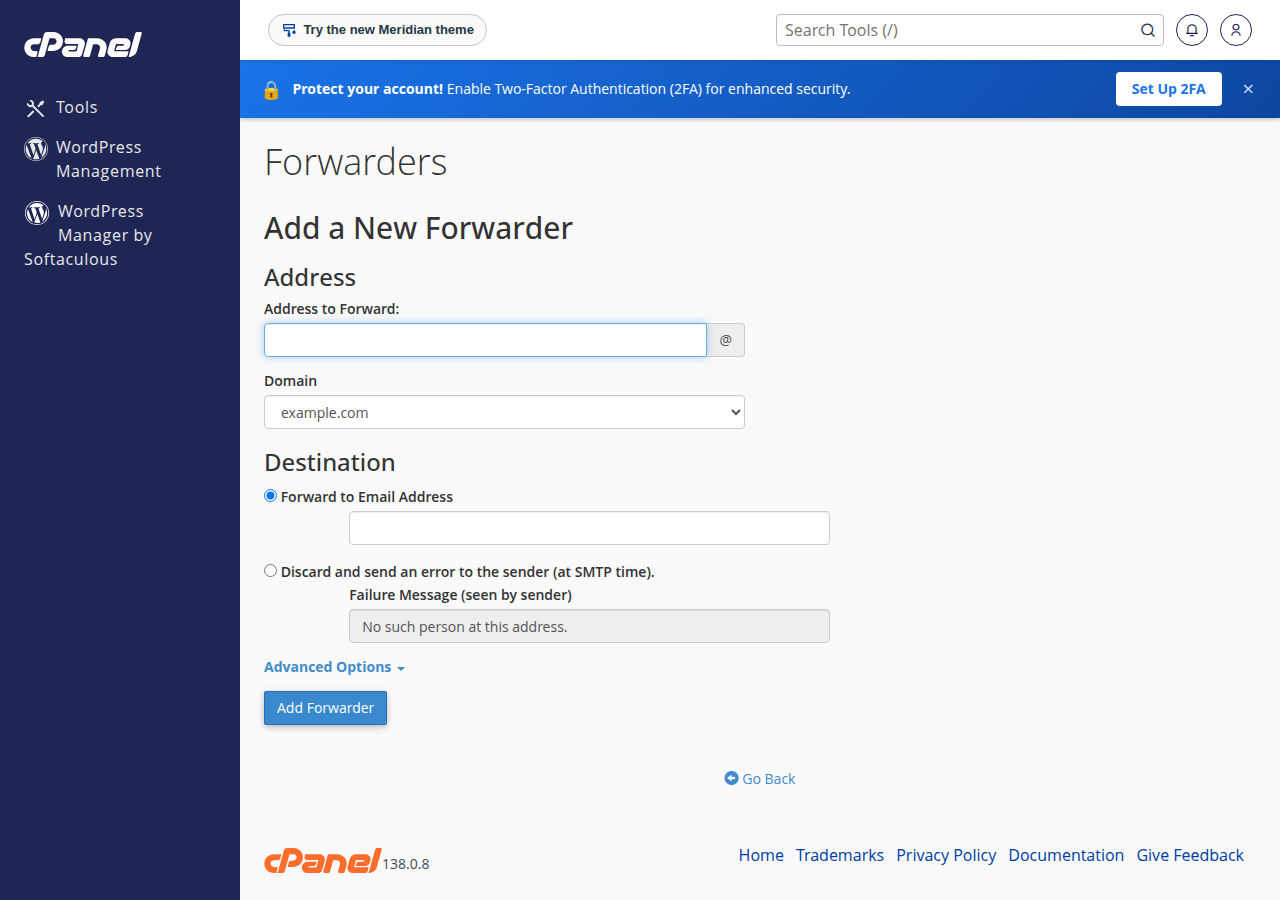
cPanel has no separate "alias" button. An alias is simply a forwarder whose destination is one of your own mailboxes.
- Log in to cPanel.Open your hosting service in the client area and use the control panel button, or see how to log in to cPanel.
- Open Email › Forwardersand click Add Forwarder.
- Enter the alias.Type the part before the @, for example
sales, and choose the domain. - Choose Forward to Email Addressand enter the mailbox that should receive the mail, for example
[email protected]. - Click Add Forwarder.Send a test message to the alias from another account to confirm it arrives.
3. Create an alias in DirectAdmin
- Log in to DirectAdminfrom your hosting service in the client area.
- Open E-mail Manager › Forwardersand create a new forwarder.
- Enter the alias name(for example
sales) and the destination mailbox (for example[email protected]). - Save,then send a test message to the alias.
On our DirectAdmin server, an address that has both a mailbox and a forwarder keeps a copy in the mailbox and forwards another. Forwarded mail to outside services such as Gmail uses the Sender Rewriting Scheme (SRS), which helps it pass SPF checks. On our cPanel servers SRS is off, so mail forwarded on to an outside mailbox is more likely to be filtered there. An alias that delivers to a mailbox on the same account is not affected.
On Webuzo hosting, forwarders are under Email › Email Forwarders. For Windows (Plesk) hosting, see Configuring email forwarding in Plesk.
4. Reply from the alias address
Mail sent to sales@ arrives in Priya's inbox, but her replies go out from priya@ unless she adds the alias as a sending identity.
- cPanel webmail (Roundcube): open Settings › Identities, create an identity with the alias address, and choose it in the From field when you write. See how to log in to webmail.
- Outlook, Apple Mail, Thunderbird: add the alias as an extra "From" address on the existing account. You still sign in with the real mailbox's address and password.
- Gmail "Send mail as": add the alias and use your hosting mail server's SMTP settings with the real mailbox's login. The settings are in Email server details and port numbers.
If a mail app or the server refuses to send with the alias as the From address, ask support to check the account rather than creating a full mailbox just to send.
5. What a catch-all does, and why it is usually a bad idea
A catch-all receives every message sent to an address at your domain that has no mailbox and no forwarder. A customer who types [email protected] still reaches you. So does every spammer who sends to invented addresses such as admin123@ or accounts2@, which happens to almost every domain.
- Short term, while you move email from another provider and are not sure which addresses are in use
- A very small domain where you want to catch customer typos and can check the mailbox daily
- Spam sent to random addresses fills the target mailbox and its quota
- Genuine mail gets lost among the junk
- Senders who mistype an address never learn their message went astray
The better setting for most businesses is to reject unknown addresses with an error. The sender's mail server then tells them at once that the address does not exist, and they can try again. If you need info@, sales@ or accounts@, create those as aliases instead.
6. Check and change the default address in cPanel
We measured the default address of the domains on our cPanel servers on 24 September 2026: for almost all of them it is set to deliver mail for unknown addresses to the cPanel account's own main mailbox. That is a catch-all into a mailbox many people never open. Look at your setting and change it if you did not choose it.
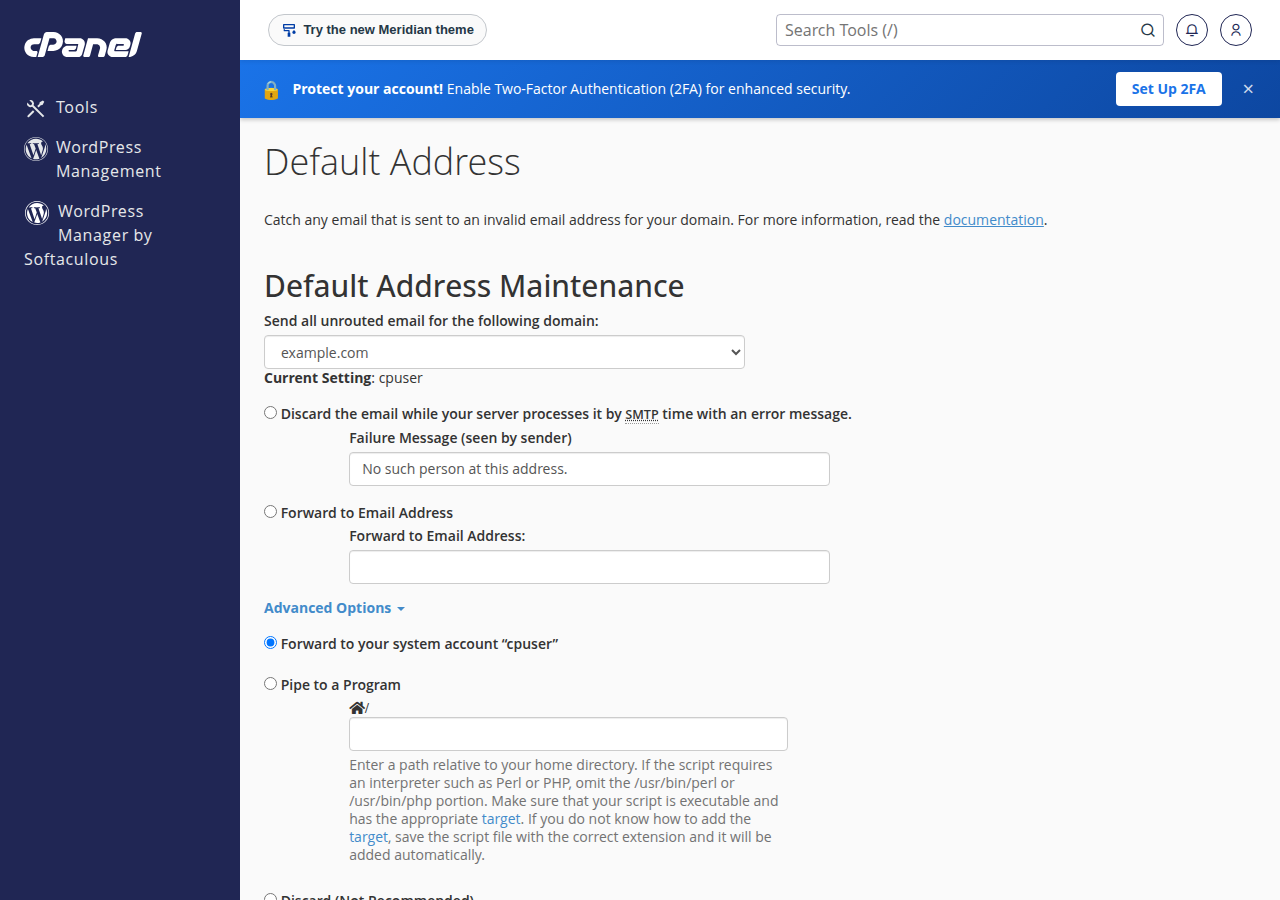
- Open Email › Default Addressin cPanel.
- Choose the domainunder "Send all unrouted email for the following domain". The Current Setting shows where unknown-address mail goes now.
- To switch the catch-all off,choose Discard the email while your server processes it by SMTP time with an error message, and write a short failure message, for example "No such person at this address. Please check the address on our website."
- To keep a catch-all,choose Forward to Email Address and enter a mailbox that someone reads.
- Click Change.
Under Advanced Options you will also see Forward to your system account, Pipe to a Program and Discard (Not Recommended). Silent discard gives the sender no warning, so use the error message option instead.
7. Set the catch-all in DirectAdmin
On current Domain India DirectAdmin plans (Starter, Growth and Professional) the catch-all is switched off: mail sent to an address that does not exist is refused, and the sender gets an error. That is the setting we recommend, so there is nothing to change, and the panel has no Catch-All page. To receive mail for an extra address, create a forwarder for it in E-mail Manager › Forwarders.
Some older DirectAdmin plans still show E-mail Manager › Catch-All E-mail, with three choices:
- Disable catch-all: the recommended setting. Mail to unknown addresses is refused and the sender is told. On our DirectAdmin server this is already the setting for most domains.
- Drop all mail sent to a non-existent mailbox: mail is accepted and silently thrown away. DirectAdmin itself warns that this invites spam and adds server load.
- Custom email address: unknown-address mail is delivered to the address you choose.
If your plan shows that page, keep Disable catch-all unless you have a clear reason, then send a test message to a made-up address to check the result.
8. Troubleshooting
Keep a short list of your aliases and who each one reaches, and remove aliases for people who have left.
| Problem | Likely cause | What to do |
|---|---|---|
| Mail to the alias never arrives | Typo in the forwarder, or the destination mailbox is full | Check the forwarder list and the mailbox quota; look in spam |
| Mail to a mistyped address still arrives | The default address or catch-all is delivering it | Change it to fail with an error (sections 6 and 7) |
| Replies go out from the wrong address | No sending identity for the alias | Add the alias as an identity (section 4) |
| Duplicate messages | Two forwarders or a filter sending the same mail twice | Remove the extra rule |
| Forwarded mail to Gmail goes missing | SPF checks at Gmail on forwarded mail | Deliver to a mailbox on your hosting instead, and read it in Gmail by IMAP |
Hosting email on Domain India cPanel and DirectAdmin plans includes forwarders, the default address and webmail. See the plans on cPanel hosting and DirectAdmin hosting, or Business Email if you want mailboxes that are separate from your website hosting.
- Priced per mailbox - start with one
- Email at your own domain ([email protected])
- Add and remove mailboxes yourself
- Webmail with calendar, contacts and tasks
Prices on the cards exclude 18% GST.
What is the difference between an email alias and a forwarder?
In cPanel and DirectAdmin they are the same tool. A forwarder sends mail from one address to another; when the destination is one of your own mailboxes, people call it an alias. Neither has its own password or storage.
Do email aliases count against my plan's mailbox limit?
No. An alias is a forwarder, not a mailbox. It stores nothing itself, so only the mailbox it delivers to uses disk space and counts as an email account.
How do I turn off the catch-all in cPanel?
Open Email, then Default Address, choose the domain, select the option to discard the email at SMTP time with an error message, enter a short failure message and click Change. Senders who mistype an address are then told it does not exist.
Is a catch-all address on by default at Domain India?
On our cPanel servers most domains deliver unknown-address mail to the account's main mailbox, which works like a catch-all, so check your Default Address setting. On our DirectAdmin server most domains refuse unknown addresses.
Can I send email from an alias address?
Yes. Add the alias as an identity or extra From address in webmail or your mail app, and sign in with the real mailbox's username and password. If sending is refused, ask support to check the account.
Should I use a catch-all to avoid missing customer email?
Usually not. A catch-all collects spam sent to invented addresses, which buries real mail. Create aliases for the addresses customers actually use and let unknown addresses bounce so senders can correct their mistake.
Ready to tidy up your addresses? Log in to your control panel from your hosting services, add your aliases and check the default address today. If anything behaves unexpectedly, open a support ticket or chat with us.
Tell us the domain and the addresses you want, and we will help you set up aliases and the right catch-all setting.
Open a support ticket